
Positive pressure airflow is the setup most builders aim for and few actually achieve: more air coming into your case than leaving it, so dust gets pushed out through the filtered intake vents instead of being sucked in through every unfiltered crack and crevice. The problem shows up most often in carpeted bedrooms and home offices, where a tower sits on the floor collecting lint, pet hair, and dust within weeks of a new build. If your intake fans move more air than your exhaust fans, that dust has nowhere to settle except on the filters you can actually clean.
Getting the math right comes down to choosing fans with enough airflow and static pressure to fill the intake side of the equation. Below, we’ve ranked seven case fans that make positive pressure easy to dial in, from a $7 slim 80mm unit to a 140mm high-static-pressure workhorse. Whether you’re building a quiet office PC or refreshing a gaming rig, there’s a pick here that fits your budget and your fan mounts.
As an Amazon Associate we earn from qualifying purchases at no extra cost to you.


Our Top Picks
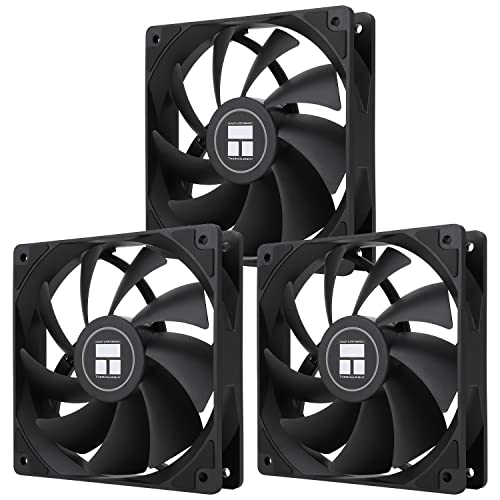


Top 3 picks at a glance
Thermalright TL-C12C X3 CPU Fan 120mm Case Cooler Fan, 4pin PWM Silent...Check priceAmRunJe 120mm x 38mm PWM 4Pin Computer Fan, 12v DC Brushless Dual...Check priceQuick Picks
| Product | Best for | Price |
|---|---|---|
| Thermalright TL-C12C X3 (3-Pack, 120mm) | Best overall value for intake-heavy builds | Check on Amazon |
| AmRunJe 120mm x 38mm PWM | High-static-pressure intake duty | Check on Amazon |
| Thermalright TL-9015W (92mm Slim, White) | White builds and slim mounts | Check on Amazon |
| Thermalright TL-9015 (92mm Slim) | Compact cases and HTPCs | Check on Amazon |
| GDSTIME 140mm High Static Pressure | Maximum intake airflow per mount | Check on Amazon |
| Thermalright TL-8015 (80mm) | Small form factor builds | Check on Amazon |
| Jiawu 120mm ARGB PWM | Showcase builds with lighting sync | Check on Amazon |
How We Compared
We focused on the factors that actually determine whether a fan helps or hurts your positive pressure setup. Airflow (measured in CFM) matters for volume, but static pressure (measured in mm H2O) matters just as much when air has to push through dust filters, radiator fins, or restrictive front panels. Bearing type affects lifespan and noise — S-FDB and dual ball bearings generally outlast sleeve bearings in fans that run all day. PWM control mattered too, because a 4-pin PWM header lets your motherboard scale fan speed with temperature, keeping noise down at idle. Finally, we weighed price per fan, because a positive pressure layout often means buying three or more fans at once. Every product here uses only published manufacturer specifications — we don’t invent lab numbers.
The 7 Best Picks
1. Thermalright TL-C12C X3 — Best Overall Value
Three 120mm PWM fans for around $11 is almost impossible to beat, and the TL-C12C makes it easy to populate an entire intake wall at once. The S-FDB (fluid dynamic) bearing is the standout spec — it’s the kind of bearing usually reserved for pricier fans, and it holds up well to continuous duty. With a top speed of 1550RPM, these run quietly enough for a bedroom office while still moving meaningful air through a dust filter. If you’re converting an exhaust-heavy build to positive pressure, this triple pack is the cheapest way to do it properly.
- Three fans with S-FDB bearings for just around $11 total
- 4-pin PWM control up to 1550RPM for quiet, adaptive cooling
- Modest peak speed means limited headroom for very restrictive filters
Skip it if you need a single premium fan with RGB — at this price you’re paying for function, not flair.
2. AmRunJe 120mm x 38mm PWM — Best for Restrictive Intakes
That 38mm thickness is the whole story here. A standard case fan is 25mm deep; this AmRunJe adds half again more blade depth, which translates directly into higher static pressure — exactly what you need when air has to force its way through a dense dust filter or a tightly grilled front panel. The dual ball bearing design is built for long, continuous run times, and the 12V DC brushless motor with 4-pin PWM gives your motherboard full speed control. At around $22, it’s the priciest 120mm fan on this list, but it’s doing a job the slim fans can’t.
- 38mm-thick frame delivers significantly higher static pressure than standard 25mm fans
- Dual ball bearing construction suits 24/7 operation
- Bulkier frame won’t fit every case’s front fan mount
Pass on this one if your case only has clearance for standard 25mm-deep fans — measure first.
3. Thermalright TL-9015W — Best for White Builds
White cases are everywhere now, and nothing ruins the look faster than gray fan frames visible through the front mesh. The TL-9015W solves that with a clean white shell, and its 15mm slimline profile fits the tight spots — bottom mounts, slim ITX cases, and shallow front bays — that standard 25mm fans can’t. At 2700RPM it spins faster than a full-size fan to compensate for its smaller 92mm size, yet stays at a reasonable 22.4dBA. For around $7, it’s an easy add to a positive pressure layout in a compact white build.
- 15mm slim profile fits shallow and bottom mounts
- White finish matches white-themed builds at just around $7
- 92mm size moves less total air than a 120mm fan
Skip it if your mounts accept full-size 120mm fans — you’ll get more airflow per slot elsewhere.
4. Thermalright TL-9015 — Best Slim Fan for Compact Cases
This is the black-framed sibling of the TL-9015W, with identical internals: a 92mm fan squeezed into a 15mm-thin frame, a 4-pin PWM header, and a 2700RPM top speed. It exists for the situations where a standard fan simply won’t physically fit — slim HTPC cases, small form factor builds with cramped bottom intakes, and older prebuilts with shallow fan bays. At around $9 it costs a couple dollars more than the white version, but black blends into most cases invisibly. Pair two or three of these as intakes and you can establish positive pressure even in the tightest chassis.
- 15mm ultra-thin design fits mounts standard fans can’t
- 2700RPM PWM control compensates for the small 92mm size
- Small blades mean lower overall airflow than 120mm options
Skip it if you have room for full-size fans; slim fans are a clearance solution, not a performance one.
5. GDSTIME 140mm High Static Pressure — Best Raw Intake Power
If you want one intake fan that does the work of two, this is it. The 140mm frame moves more total air per revolution than any 120mm can, and GDSTIME pairs it with a high-static-pressure blade design and dual ball bearings aimed at pushing through resistance — filters, radiators, dense mesh. It’s a 2-pin fan, so speed is fixed rather than PWM-controlled, which is the main trade-off for its around $34 price. Use it as your single dominant intake in a larger case, then let smaller exhaust fans run slower, and positive pressure takes care of itself.
- 140mm high-static-pressure design excels against filters and radiators
- Dual ball bearing construction for long service life
- 2-pin connection means no PWM speed control from the motherboard
Skip it if you need quiet, speed-controlled operation — fixed-speed 140mm fans can hum audibly at full tilt.
6. Thermalright TL-8015 — Best for Small Form Factor
Not every build has 120mm mounts to spare. For mini-ITX cases and older office towers that only accept 80mm fans, the TL-8015 is a bargain at around $7. It spins at 2200RPM — fast for its size, as small fans must be — while staying at a low 23.3dBA, and the 4-pin PWM header lets your motherboard rein it in when temps are easy. Thermalright’s budget fans have built a strong reputation for reliability, and this one fills the niche where positive pressure matters most: small cases with poor dust sealing.
- 80mm format fits compact and legacy mounts
- 2200RPM with just 23.3dBA of noise
- 80mm blades inherently move less air than larger fans
Skip it if your case supports 120mm or 140mm intakes — go bigger where you can.
7. Jiawu 120mm ARGB PWM — Best for Showcase Builds
Positive pressure and pretty lighting don’t have to be mutually exclusive. The Jiawu 120mm posts genuinely strong published specs: up to 58.36 CFM of airflow and 2.07mm H2O of static pressure, with an 800–2000RPM PWM range that spans near-silent idle to full cooling. The “infinite mirror” ARGB effect is the draw here, and motherboard sync means your lighting and fan curves stay coordinated from one software suite. At around $13 per fan, it costs more than a basic three-pack but far less than premium RGB brands.
- 58.36 CFM and 2.07mm H2O static pressure back up the looks
- ARGB with full motherboard sync via 4-pin PWM
- Per-fan pricing adds up fast if you need three or more
Skip it if you’re building a no-window office PC — put that budget toward more airflow instead.
Buying Guide
Get the Pressure Math Right
Positive pressure means total intake CFM exceeds total exhaust CFM. A simple rule of thumb: run one more intake fan than exhaust fans, or choose intakes with higher airflow ratings than your exhausts. You don’t need to obsess over exact CFM — a rough 60/40 intake-to-exhaust bias delivers the dust-repelling effect. If your case currently runs negative pressure and collects dust inside, flipping to positive pressure is the single cheapest fix available.
Match Static Pressure to Your Obstacles
CFM numbers are measured in open air; real cases put obstacles in the way. Dust filters, magnetic mesh, and radiator fins all resist airflow, and fans with poor static pressure lose most of their rated performance behind them. As a guide, look for at least 1.5mm H2O for filtered intakes, and favor thicker frames (like the 38mm AmRunJe) or dedicated high-static-pressure designs when pushing through radiators. Bearing type matters here too — fluid dynamic and dual ball bearings maintain consistent performance over years of daily running.
Noise, Control, and Connectors
Anything under 25dBA is effectively inaudible in a normal room; fans in the 30dBA range become noticeable at night. PWM (4-pin) fans are worth prioritizing over fixed-speed (2- or 3-pin) models because your motherboard can ramp them up under load and silence them at idle — a big deal for a bedroom or office machine. Check your motherboard’s fan headers before buying: most modern boards have four to six, and splitters are cheap if you run short. Watch for 2-pin fans like the GDSTIME, which trade control for simplicity and price.
Our Verdict
For most builders, the Thermalright TL-C12C X3 three-pack at around $11 is the obvious move — three PWM fans with quality S-FDB bearings for less than the price of one name-brand fan, enough to establish a clear intake advantage in a standard mid-tower. If your case fights back with restrictive filters, spend up on the AmRunJe 38mm for intake duty. Small form factor builders should grab the TL-9015 or TL-8015 depending on mount size, and anyone chasing looks and lighting should shortlist the Jiawu ARGB. Whichever route you take, set your fan curves so intakes run slightly faster than exhausts, clean your filters every couple of months, and your components will stay cooler and far cleaner through 2026 and beyond.
FAQ
How many intake fans do I need for positive pressure?
For a typical mid-tower, two or three 120mm intakes paired with one or two exhausts is the sweet spot. The goal is simply more intake than exhaust — a one-fan advantage is usually enough. Larger cases with 140mm mounts can achieve positive pressure with fewer fans overall.
Does positive pressure actually reduce dust?
Yes. When intake airflow exceeds exhaust, air escapes through every vent and gap in the case rather than entering through them. Since your intakes should have dust filters, dust gets caught where you can clean it instead of settling on your GPU and motherboard.
Can I use the same fan model for intake and exhaust?
Absolutely — most case fans are bidirectional, and some even include arrows on the frame showing airflow direction. Running the same model on both sides works fine; you create positive pressure simply by running more of them as intakes, or by setting intake fans to a slightly higher PWM curve.
Are slim fans like the TL-9015 good for positive pressure?
They work, with caveats. A 15mm-thin 92mm fan moves less air than a full-size 120mm, so you’ll want two or three of them to match one standard intake. They’re best treated as a clearance solution for compact cases rather than a first-choice airflow fan.
Related guides
- Best Gaming PC for Overwatch 2: Ten Prebuilts Matched to Your Monitor (2026)
- Best Gaming PC for Baldur’s Gate 3: Matching CPU, VRAM and Storage to the Game (2026)
- Best Gaming PC for Apex Legends: Which Listings Fit a High-Refresh Setup (2026)
- Best RTX 3060 Gaming PCs: Eight Prebuilt Listings Compared by CPU, RAM and Cooling (2026)









