
Designing a modern home office or gaming sanctuary requires balancing high-end hardware performance with clean interior aesthetics. Vertical GPU mounts have quickly become a cornerstone of minimalist desk layouts and custom gaming setups, allowing enthusiasts to showcase massive graphics cards directly through tempered glass panels. However, achieving a clean, showroom-worthy finish without performance degradation depends heavily on selecting the right riser cable—especially when connecting next-generation motherboards to power-hungry GPUs that draw anywhere from 300 to over 450 watts.
Whether you are planning a high-end workstation build for 2026 or simply trying to declutter a compact desk PC, finding the best pcie 5.0 riser cables for gaming comes down to signal stability, flexible routing, proper shielding, and physical clearance. Modern graphics cards are exceptionally heavy, and routing cables through tight mid-tower or Small Form Factor (SFF) chassis requires precision. Below, we review and rank eight top-performing PCIe 5.0 and PCIe 4.0 riser cables ranging from around $22 to around $99 to help you achieve a stable, sleek, and high-speed desk setup.
As an Amazon Associate we earn from qualifying purchases at no extra cost to you.




Our Top Picks
 Thermaltake PCIe 4.0 Dual 90°Degree Connectors Riser Cable;Compact0 x 0 x 0 inches0.6 PoundsCheck on Amazon



Top 3 picks at a glance
Quick Picks
| Product | Best For | Price |
|---|---|---|
| OwlTree PCIe 4.0 Riser Cable (200mm) | Budget 90-Degree Adapters | Check on Amazon |
| Corsair Premium PCIe 5.0 x16 Riser Cable (175mm) | Overall PCIe 5.0 Performance | Check on Amazon |
| Thermaltake PCIe 4.0 Dual 90° Riser Cable (400mm) | Large Custom & Open-Frame Desk PCs | Check on Amazon |
| PCIe 4.0 X16 Reverse Ultra Riser Cable | Tight-Space Reverse Mounting | Check on Amazon |
| LDPCSJ PCIe 4.0 Riser Cable (200mm) | Value Mid-Length Cable Management | Check on Amazon |
| ELECNEXUS PCIe 4.0 x16 Riser Cable (100mm) | SFF Ultra-Short Builds | Check on Amazon |
| LINKUP PCIe 5.0 Riser Cable (Straight, 5cm) | Ultra-Compact Gen 5 Pass-Through | Check on Amazon |
| GLOTRENDS 200mm PCIe 4.0 X16 Riser Cable | Standard Vertical GPU Displays | Check on Amazon |
How We Compared
To evaluate these GPU extension cables, we focused on physical design specifications, connector orientations, cable length options (ranging from ultra-short 5cm/50mm spans up to extended 400mm lengths), electromagnetic interference (EMI) shielding quality, and cross-generational compatibility. We analyzed how easily each ribbon cable bends around internal case hardware without putting excessive stress on motherboard PCIe slots or graphics card PCB connectors. Options spanning around $22 to around $99 were selected to cater to different budget tiers, case form factors, and generation needs (PCIe 5.0 vs. PCIe 4.0).
The 8 Best Picks
1. OwlTree PCIe 4.0 Riser Cable (200mm/7.8inch)
Designed for gaming setups requiring a clean 90-degree bend inside standard mid-tower cases, the OwlTree 200mm riser cable provides an accessible entry point for vertical GPU mounting. Its flexible ribbon layout simplifies cable routing behind power supply shrouds and desk-facing glass panels. It offers full compatibility across demanding graphics cards like the RTX 4090, 4080, 4070, and 3090, as well as legacy PCIe 3.0 motherboards. At around $26, it delivers excellent utility for neat, clutter-free desk builds.
- Pro: Flexible 90-degree adapter design eases tight cable bends.
- Pro: Highly affordable around $26 price point.
- Con: Capped at PCIe 4.0 speed specifications.
When to skip: Skip if your motherboard and GPU setup requires true native PCIe 5.0 bandwidth.
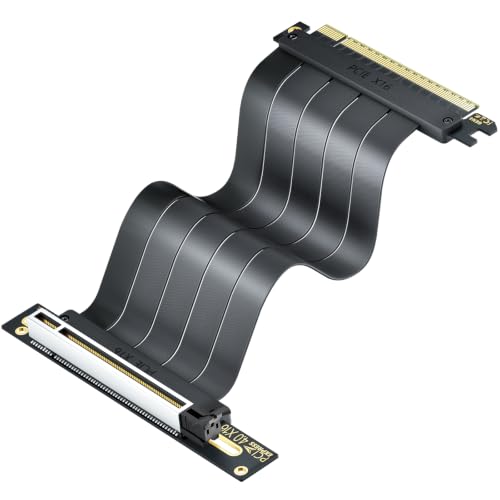
2. Corsair Premium PCIe 5.0 x16 175mm Riser Cable – Black
High-performance desk builds demand uncompromised hardware delivery, and the Corsair 175mm riser cable provides true native PCIe 5.0 x16 bandwidth. Built to handle extreme data throughput without signal degradation, this cable ensures your flagship graphics card performs at its peak potential. Heavy-duty internal shielding prevents electromagnetic interference from neighboring desk cables and power units, while the 175mm black sleeve offers an immaculate look inside modern ATX enclosures. At around $99, it is an investment in long-term system stability.
- Pro: Native PCIe 5.0 x16 speed support for maximum throughput.
- Pro: Robust EMI shielding prevents performance drops.
- Con: Higher cost at around $99.
When to skip: Skip if you are running a budget build with a PCIe 4.0 graphics card and want to save money.
3. Thermaltake PCIe 4.0 Dual 90° Connector Riser Cable (400mm)
For custom desk-integrated PCs or oversized full-tower cases, standard 200mm cables often lack the length needed for clean cable management. Thermaltake’s 400mm (AC-077-CO1OTN-C1) cable solves complex routing layouts with dual 90-degree connectors that keep lines straight and organized. Delivering 16Gbps high-speed transmission, strong EMI shielding, and backed by a 3-year warranty, this around $64 cable is tailored for massive cases where distance between motherboard slots and vertical mounts is substantial.
- Pro: Generous 400mm length ideal for large or custom desk setups.
- Pro: Backed by a reliable 3-year manufacturer warranty.
- Con: Excess length causes unwanted slack in standard mid-tower cases.
When to skip: Skip if you are building inside a compact or micro-ATX chassis.
4. PCIe 4.0 X16 Reverse Ultra Riser Cable
Unique desk case geometries often demand unorthodox cable mounting angles. This Reverse Ultra Riser Cable features a specialized reverse-mount connector layout that relieves mechanical stress on both the graphics card and motherboard slot. Priced at around $28, its heavy-duty shielding prevents interference from nearby electrical components, providing high-speed Gen4 transfer stability in cramped or inverted vertical mount setups where traditional 90-degree adapters cause strain.
- Pro: Reverse ultra-mount orientation fits tight, non-standard case angles.
- Pro: Solid signal shielding at a reasonable around $28 price point.
- Con: Reversed orientation may not align with standard vertical GPU brackets.
When to skip: Skip if your vertical mounting bracket expects a traditional straight or standard 90-degree interface.
5. LDPCSJ PCIe 4.0 Riser Cable (200mm/7.8inch)
The LDPCSJ 200mm riser cable brings a clean, understated black aesthetic to custom gaming desks. Designed with a flexible 90-degree adapter, it simplifies vertical mounting for bulky modern GPUs including the RTX 4090, 4080, 4070, and 3090. Retailing at around $23, it offers an economical way to eliminate lower slot clutter and display your GPU front-and-center through tempered glass window panels without sacrificing cable flexibility.
- Pro: Budget-friendly around $23 price tag.
- Pro: Soft, flexible ribbon material simplifies tight bends.
- Con: Limited to PCIe 4.0 transmission rates.
When to skip: Skip if you want to future-proof your rig for full PCIe 5.0 transfer speeds.
6. ELECNEXUS PCIe 4.0 x16 Riser Cable (100mm)
Small Form Factor (SFF) desk builds face tight thermal and physical boundaries. The ELECNEXUS 100mm (3.9-inch) riser cable is engineered specifically for mini-ITX cases where motherboard and GPU sit back-to-back. Delivering 64GB/s bandwidth, this around $22 shielded cable fully supports RTX 40/30 series and Radeon RX 7000/6000 graphics cards while avoiding excess cable bulk that could block crucial airflow inside small enclosures.
- Pro: Short 100mm length keeps compact cases free of excess cable loops.
- Pro: Excellent 64GB/s transmission performance at around $22.
- Con: Way too short for standard ATX vertical mounting brackets.
When to skip: Skip if your GPU mounting point sits more than 4 inches away from your PCIe slot.
7. LINKUP PCIe 5.0 Riser Cable (Straight, 5cm)
Built for specialized mini-builds and direct pass-through mounting brackets, the LINKUP 5cm straight riser cable brings true PCIe 5.0 performance to ultra-tight spaces. Priced at around $70, this 5cm (2-inch) extension cable features robust shielding designed to maintain high-frequency Gen 5 signal integrity across short spans. It is ideal for custom desk setups requiring an ultra-short, rigid link between hardware components.
- Pro: True PCIe 5.0 compliance in an ultra-compact 5cm form factor.
- Pro: Heavy-duty signal shielding for pristine data delivery.
- Con: 5cm straight length offers zero flexibility for offset routing.
When to skip: Skip if you need to route around fans, brackets, or frame panels.
8. GLOTRENDS 200mm PCIe 4.0 X16 Riser Cable
The GLOTRENDS 200mm riser cable provides a balanced solution for displaying GPUs inside standard desktop setups. Compatible with GeForce RTX 40/30 series and AMD Radeon RX 7000/6000 cards, it guarantees stable PCIe 4.0 performance for gaming and content creation. Available for around $26, its durable flat ribbon cable can be folded cleanly to help maintain tidy interior wiring and an attractive desk presentation.
- Pro: Easy-to-fold ribbon cable aids neat routing.
- Pro: Wide compatibility across current Nvidia and AMD graphics cards.
- Con: Does not support native PCIe 5.0 signal speeds.
When to skip: Skip if your priority is absolute maximum Gen 5 throughput for future hardware upgrades.
Buying Guide
1. PCIe Generation & Bandwidth Compatibility
When selecting a riser cable for a gaming rig, pay close attention to PCIe generation support. PCIe 4.0 offers a maximum theoretical bandwidth of 32GT/s (up to 64GB/s on x16 lanes), which remains sufficient for nearly all current graphics cards including the RTX 4090. However, PCIe 5.0 doubles that bandwidth to 64GT/s (up to 128GB/s). If you are building a top-tier setup meant to last for years without component changes, investing in a native PCIe 5.0 option like the Corsair (around $99) or LINKUP (around $70) ensures total forward compatibility.
2. Cable Length & Connector Orientation
Riser cables range in length from ultra-short 5cm (2 inches) to extended 400mm (15.7 inches). Choosing the wrong length can ruin your cable management or prevent installation entirely.
For compact SFF builds, 5cm to 100mm cables prevent air blockages. Standard mid-tower cases using vertical brackets typically require 175mm to 200mm cables. Large open-frame desk cases need 300mm to 400mm spans. Additionally, pay attention to angle types: straight connectors work well for direct pass-throughs, while 90-degree and reverse connectors suit bottom-bracket mounts.
3. EMI Shielding and Case Aesthetics
Because riser cables run parallel to power lines, storage drives, and RGB controllers, electromagnetic interference (EMI) can cause screen flickering, driver crashes, or reduced bus speeds. Quality riser cables feature individual lane shielding wrapped in protective plastic or rubberized sleeves. From an interior design standpoint, matching the color and flexibility of your cable (such as matte black ribbons) keeps your gaming desk setup looking clean, uncluttered, and professionally built.
Our Verdict
For most gamers seeking true next-gen performance and future-proofing, the Corsair Premium PCIe 5.0 x16 175mm Riser Cable (around $99) stands as the top recommendation thanks to its uncompromised bandwidth and heavy-duty EMI shielding. If you are operating on a budget and running current PCIe 4.0 hardware, the LDPCSJ 200mm Riser Cable (around $23) and OwlTree 200mm Riser Cable (around $26) offer fantastic value, solid flexibility, and clean 90-degree angles for standard vertical GPU mounting. For micro SFF builds or massive open desk displays, ultra-specific options like the ELECNEXUS 100mm (around $22) or Thermaltake 400mm (around $64) deliver the exact mechanical clearance required.
FAQ
Do PCIe 5.0 riser cables improve gaming frame rates compared to PCIe 4.0?
In most real-world gaming scenarios, PCIe 5.0 riser cables do not drastically increase frame rates compared to PCIe 4.0 because current graphics cards do not fully saturate Gen4 x16 bandwidth. However, PCIe 5.0 cables provide better signal integrity margins, prevent bus speed downgrades, and guarantee full performance for future flagship GPUs.
How do I measure what length riser cable I need for my desk PC case?
Use a flexible tape measure or piece of string to trace the exact route from your motherboard’s top PCIe x16 slot to the base of your vertical GPU bracket. Add approximately 15mm to 25mm of slack so the cable can bend naturally without putting tension on the PCB connectors.
Can I plug a PCIe 4.0 riser cable into a PCIe 5.0 motherboard slot?
Yes, PCIe standards are backward and forward compatible. However, if your motherboard slot and GPU are both PCIe 5.0, using a PCIe 4.0 cable may require you to manually set your PCIe slot speed to Gen4 in the BIOS to prevent boot errors or stability issues.
Does mounting a GPU vertically with a riser cable affect cooling?
Vertical GPU mounting can improve desk setup aesthetics, but thermal performance depends on clearance. Ensure your graphics card fans sit at least 1.5 to 2 inches away from the side glass panel so the cooler can draw in fresh air effectively.
Related guides
- Best Gaming PC for Overwatch 2: Ten Prebuilts Matched to Your Monitor (2026)
- Best Gaming PC for Baldur’s Gate 3: Matching CPU, VRAM and Storage to the Game (2026)
- Best Gaming PC for Apex Legends: Which Listings Fit a High-Refresh Setup (2026)
- Best RTX 3060 Gaming PCs: Eight Prebuilt Listings Compared by CPU, RAM and Cooling (2026)









