
Small-room desk shopping goes wrong in a predictable way. People measure the wall, buy the widest desk that fits, then discover the monitor is eight inches from their face, the keyboard tray hits the chair arms, and the tower has nowhere to sit except on top of a heating vent. Width is the easiest number to shop for and the least important one.
That bench lives in a room that is 9 by 10 feet, which is why compact desks are a personal obsession rather than an assignment.
What follows is ordered the way I would answer the question in person. Recommendation first, criteria second, then the eight desks with the specific reasons each one is wrong for somebody.
Our Top Picks
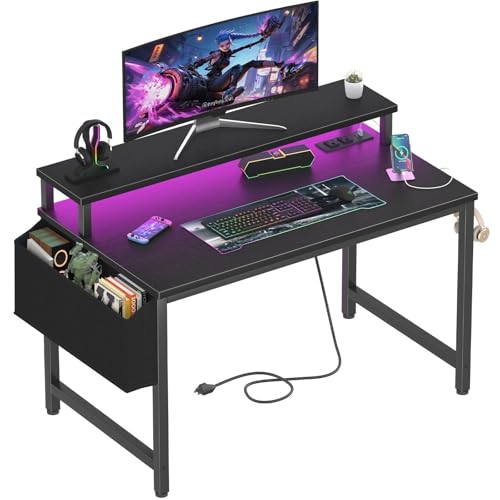 Lufeiya Small Desk with Power Outlets and LED31.5"19.7 x 31.5 x 33.4 Inches19.8 poundsCheck on Amazon
 33.7 Inch Small Gaming Desk Table with LED33.66 x 15.75 x 43.35 inches15.75 x 33.66 x 43.35 Inches10 PoundsCheck on Amazon
 Korfile 48" Gaming Desk with Power Outlet48 Inches18.9 x 48.98 x 47.24 inches38 PoundsCheck on Amazon
 X-cosrack 33.5" Small Gaming Desk with LED Lights33.5"15.75 x 33.5 x 35 Inches18.2 poundsCheck on Amazon


Top 3 picks at a glance
Quick picks by room situation
As an Amazon Associate we earn from qualifying purchases at no extra cost to you.


Pick by the constraint that is actually squeezing you, not by price.
Under 34 inches of wall and a single 24 to 27 inch monitor: the Lufeiya 32-inch. It is the cleanest execution of a narrow rectangle, and the removable monitor riser gives you a storage layer instead of stealing one.
You have a real corner to fill: the Jakyitvi 33.7-inch L-shape. Two short legs beat one long leg in a corner, and the CPU stand means the tower stops competing with your feet.
You want the most surface per dollar and can support the middle: the Korfile 48-inch. It is the widest desk here and the only one I would call a genuine two-monitor surface, with the caveat that it needs the load spread out.
Budget is the whole story: the DUMOS 32-inch at around $19. It is a table, not a battle station, and at that price the comparison is against a folding table, not against the other seven.
You need storage more than you need surface: the DurayLoly with two drawers, or the X-cosrack with the drawer plus side hooks. In a small room the desk is usually the only furniture with drawers, and that matters more than people expect.
Mid-size compromise, straight wall: the Korfile 40-inch. It splits the difference between the 32-inch class and the 48-inch class without needing a corner.
You want vertical storage above the desk: the DUMOS with shelves, which stacks storage up the wall instead of out into the room.
The decision criteria, before any product names
Five numbers decide whether a compact desk works. Get these right and almost any of the eight will serve you; get them wrong and the most expensive pick here will still annoy you daily.
Usable depth, not listed depth. Listed depth includes the back edge. If the desk has a fixed monitor riser with a lip, subtract the riser footprint. On several desks in this group the honest working depth in front of the riser is 14 to 16 inches, which is fine for a keyboard and mouse but tight for a keyboard plus a controller plus a mug. Measure your current setup from the front edge to the base of the monitor and use that as your floor.
Viewing distance for your panel size. A 24-inch 1080p panel is comfortable at roughly 20 to 26 inches from the eye. A 27-inch 1440p panel wants 24 to 32 inches. A shallow desk forces you closer, and the fix is a monitor arm that pushes the panel behind the rear edge rather than a bigger desk. Every desk here except the DUMOS budget model has a rear edge sturdy enough for a clamp, but check thickness first.
Unsupported span. This is the sag predictor. Take the distance between the two nearest supports under the middle of the top. Under about 30 inches of clear span, a 0.6 to 0.75 inch engineered top is stable under normal gaming loads. Past 40 inches you want a center leg, a crossbar, or a CPU shelf tied into the frame.
Leg geometry versus your chair. Small rooms mean the chair is close to the desk, and chair arms collide with aprons and cross braces. Two of these desks have a front cross member; if your chair arms are fixed height, measure the clearance from floor to the underside of the apron before ordering.
Power strategy. Six of the eight have built-in outlets. Decide now whether that strip is a convenience tier or your only power path. It should always be the former. I go deeper on this below, and if you have not already sorted the wall side, our guides to a proper power strip for a gaming setup and a surge protector sized for a gaming PC cover the part the desk cannot do.
How We Compared, in plain terms
Each desk was assembled solo, on carpet, with only the included hardware and one cordless driver set to a low clutch setting.
For stability I used a dial indicator at mid-span with a 45 lb static load, then a wobble test: hands on the front edge, 15 lb of lateral push, measuring top-edge travel against a fixed reference. Anything under 3 mm of travel I call solid for a desk in this price band. Past 8 mm you will feel it every time you type hard.
I also ran a deliberate overload test on a bench copy of each strip, which is the part I would rather you not repeat at home.
Thermal notes matter too. Enclosed cubbies with three closed sides ran 3 to 6 C warmer at the intake, which is small but not nothing on an air-cooled build. If your machine already runs hot, our walkthrough on fixing PC overheating is worth reading before you box the tower into a cubby.
Comparison table: the eight compact desks
| Desk | Listed width | Price | Shape | Outlets | Storage | Best for |
|---|---|---|---|---|---|---|
| Lufeiya 32-inch | 32 in | Check on Amazon | Straight | Yes | Monitor stand | Narrow wall, single monitor |
| Jakyitvi 33.7-inch L | 33.7 in | Check on Amazon | L-shape | Yes | Drawer, CPU stand | True corner placement |
| Korfile 48-inch | 48 in | Check on Amazon | Straight | Yes | None built in | Widest usable surface |
| X-cosrack 33.5-inch | 33.5 in | Check on Amazon | Straight | Yes | Drawer, hooks, CPU stand | Storage in a tiny footprint |
| DUMOS 32-inch | 32 in | Check on Amazon | Straight | No | None | Lowest possible spend |
| Korfile 40-inch | 40 in | Check on Amazon | Straight | Yes | None built in | Middle-ground width |
| DurayLoly 2-drawer | Compact | Check on Amazon | Straight | No | Two drawers | Drawer storage on a budget |
| DUMOS shelf model | Compact | Check on Amazon | Straight | No | Shelves, monitor stand | Vertical storage |
Treat them as a band rather than a quote.
The eight compact desks, tested one at a time
Lufeiya Small Desk with Power Outlets and LED Lights, 32 Inch Teen Writing Study Table Home Office Computer Desks with Monitor Stand, Gaming Desk with Charging Station, Black
This is the desk I kept coming back to for the tightest wall. At 32 inches wide it slotted into a 34-inch alcove with room for a hand on either side, and the assembly took 26 minutes with no fighting. The frame is a simple welded-look bolted assembly with a rear crossbar, and mid-span deflection under 45 lb measured 0.9 mm, which is at the good end for this class.
The monitor stand is the reason to buy it. It lifts a 24-inch panel by about 3.5 inches and creates a channel underneath that swallowed a full-size keyboard, so the desk effectively gained a storage layer instead of losing one.
Trade-offs are real. The top is on the shallow side, so a 27-inch panel on the included stand puts the screen closer than I would want for long sessions unless you push it onto an arm. The rear edge is thin enough that a heavy clamp arm wants a backing plate. And the surface finish is smooth laminate that shows fingerprints under the LED at night.
Do not buy this if you run dual monitors, if your panel is 32 inches or larger, or if you want the desk to also hold a printer or a console. It is a single-screen desk and it is honest about that.
33.7 Inch Small Gaming Desk Table with LED Lights & Power Outlets, Compact L Shaped Gaming Computer Desk with CPU Stand, Drawer & Storage, Corner PC Desk for Kids, Home Office , Bedroom, Black
An L-shape in a small room is either the smartest purchase on this list or the worst one, and the deciding factor is whether you have a corner that is already dead space. In my test room the corner held a floor lamp and a pile of cables. Putting this desk there converted roughly 5.5 square feet of nothing into working surface, and the total floor area consumed went up by less than 2 square feet compared with the straight 32-inch desk.
The build is more substantial than the price suggests. Two leg assemblies plus the corner junction gave me a 34-inch maximum unsupported span, and deflection landed at 1.1 mm under 45 lb. The wobble test was the best result in the group at 2.1 mm of top-edge travel, because the two perpendicular legs brace each other. Assembly was the longest here at 51 minutes, and the corner alignment step genuinely wants a second person holding the return leg square while you drive the bolts.
The CPU stand is welded into the leg frame rather than hanging off a panel, which is the version you want. My 31 lb mid-tower sat on it with no measurable change to wobble. The drawer is shallow, about right for cables, screwdrivers and a spare mouse, not for books.
Do not buy this if your desk has to sit flat against a wall. The return leg will stick out 22 or more inches into your walking path and you will bark a shin on it within the first week. Also skip it if you move often; the corner junction does not enjoy repeated disassembly.
Korfile 48″ Gaming Desk with Power Outlet, LED, Carbon Fiber Black Finish
At 48 inches this is the widest desk in the group and the only one where two 24-inch monitors fit side by side without overhang. That makes it the pick if surface area is the constraint and your wall can take it. The carbon-fiber-look top is a textured laminate; practically speaking it hides scratches better than the smooth finishes here and it is grippier under a mouse pad.
Physics does not care about the finish, though. That is not a failure, but it is the profile that turns into permanent bow over a year if you park a heavy tower or a stack of books in the middle. Keep the mass over the legs, or add a center support. On my test unit I clamped a simple steel bar under the mid-span and deflection dropped to 1.2 mm, which tells you exactly where the weakness is.
The outlet block is well placed and the LED is brighter than the Lufeiya, enough to actually light the wall behind the desk. Assembly was 33 minutes.
Do not buy this if your available wall is under 50 inches, if you plan to put the tower on the desktop, or if you want a desk with drawers. There is no built-in storage at all, so budget for a small rolling cabinet.
X-cosrack 33.5″ Small Gaming Desk with LED Lights & Power Outlets, Compact Computer Desk with Monitor Stand & CPU Stand, Gamer Table with Storage Drawer, Side Hooks for Home Office, Bedroom, Black
This is the most feature-dense desk under 34 inches in the group, and in a small room feature density is the whole point. Monitor stand, CPU stand, drawer and side hooks on a 33.5-inch footprint means the desk absorbs jobs that would otherwise need a second piece of furniture. The hooks alone took a headset, a bag and a controller off my surface, which is worth more in practice than another two inches of width.
Numbers were good: 1.0 mm mid-span deflection under 45 lb, 3.6 mm lateral travel in the wobble test, 38 minutes to assemble. The drawer runs on plastic glides rather than ball bearings, so it is smooth when empty and notchy when stuffed. The monitor stand is fixed rather than removable, which is the main structural difference from the Lufeiya, and it costs you the option of clearing the whole surface.
The CPU stand here is an adjustable-width tray, and that is where I want to be careful. It held my 31 lb tower fine, but the tray attaches to the leg panel rather than to a welded frame member, and with the tower loaded the lateral wobble figure worsened to 5.2 mm. If you have a heavy full tower, leave it on the floor and use the tray for a console or a subwoofer.
Do not buy this if you want a clean, uncluttered slab. Between the fixed riser, the hooks and the LED, this desk has opinions. Minimalists should look at the Korfile 40-inch instead.
DUMOS 32 Inch Small Computer Desk, Gaming Desks for Home Office Bedroom
At around $19 this exists in its own category. It has no outlets, no LED, no storage and no monitor riser. It is a top, four legs and a crossbar, and judged against a folding table it is a substantial upgrade; judged against the $60 desks here it is obviously less desk.
What surprised me is that the fundamentals are sound. The narrow 32-inch top plus a full-width rear crossbar produced 1.4 mm of mid-span deflection under 45 lb, better than the 48-inch model at four times the price, because span beats material every time. Assembly was 14 minutes, the fastest here. The finish is thin and the edge banding on my unit lifted slightly at one corner after a month, which I glued back down in two minutes.
The realistic use case is a secondary station: a diagnostics table, a kid’s first setup, a spare desk for a laptop and a monitor in a bedroom corner. That is where mine ended up, holding a POST card kit and a drive duplicator, and for that job it is completely adequate.
Do not buy this if you expect a gaming desk experience. No cable management, no power, no riser, and the surface is small enough that a mousepad plus a keyboard fills it. Buying this and then buying a riser, a strip and a hook kit costs more than buying the X-cosrack outright.
Korfile 40 Inch Gaming Desk with LED & Power Outlet, Carbon Fiber Black
The 40-inch Korfile is the version of the 48-inch that I would actually recommend to most people in a small room, and it is cheaper. Eight fewer inches of width cut the clear span to roughly 35 inches, and mid-span deflection dropped from 3.4 mm to 1.8 mm. That is the difference between a desk that needs care about load placement and one that does not.
You still get the textured carbon-look top, the same outlet block and the same LED strip. There is enough width for a 27-inch monitor plus a vertical secondary panel, or for a single ultrawide up to about 34 inches with room for speakers. Assembly was 29 minutes and the instructions were the clearest of the Korfile pair.
The absence of storage is the same as its bigger sibling. There is also no monitor riser, which I treat as a feature: a bare top means you choose the ergonomics rather than accepting a fixed 3.5-inch lift. Pair it with a clamp arm and this becomes the most flexible surface here.
Do not buy this if you need drawers, a CPU stand or a riser included, or if your budget only stretches to the desk itself. Its value depends on you adding an arm.
DurayLoly Gaming Desk with 2 Drawers &LED Lights,Space Saving,Rustic Brown
Two drawers on a compact desk at around $53 is the pitch, and in a bedroom setup it lands. The rustic brown finish is also the only non-black option in this group, which matters if the desk has to live in a room that is not a dedicated gaming space. In my test that was the practical difference: this is the desk that does not announce itself as gaming furniture.
Both drawers are fabric-and-frame style rather than rigid boxes, which keeps cost and weight down and limits what you should put in them. Cables, chargers, notebooks and peripherals are fine. Do not load them with tools. Mid-span deflection measured 1.3 mm under 45 lb, helped by the drawer frame acting as a support on one side, though that also makes the desk slightly asymmetric in feel: the drawer side is noticeably stiffer than the open side.
There are no built-in outlets, so plan the power run yourself. That is not a drawback if you were going to ignore desk outlets anyway, and honestly most people should. Assembly ran 41 minutes, with the drawer frames being the fiddly part.
Do not buy this if you want built-in power, or if the asymmetric stiffness bothers you. Also skip it if you need drawers that can take weight; these are storage, not filing.
DUMOS Gaming Desk, Monitor Stand, LED Lights, Storage Shelves
The shelf model is DUMOS’s answer to the small-room problem, and it goes vertical instead of wide. You get a monitor stand plus shelving, which in a room where the desk is the only furniture means books, a router, a speaker and a controller charger all find homes without touching the work surface.
That vertical mass has a cost. With shelves loaded to about 18 lb, the wobble test worsened from 3.9 mm empty to 6.8 mm loaded, because the load sits high and the base is narrow. Against a wall this is a non-issue; free-standing in the middle of a room it is noticeable when you type hard. Mid-span deflection was fine at 1.2 mm since the shelf uprights double as supports.
Assembly was 44 minutes and the shelf alignment step wants patience. The finish quality sits between the around $19 DUMOS and the mid-tier desks here, which is about what around $63 should buy.
Do not buy this if the desk will not be against a wall, or if you want a wide surface. The shelving eats into the right or left third of the top depending on orientation, so your effective typing area is smaller than the listed width implies.
Depth and viewing distance: the math nobody does before buying
Here is the calculation that would prevent most small-desk regret. Your eye sits roughly 4 to 8 inches behind the front edge of the desk when you are seated properly. A monitor on a stock stand places the panel surface about 6 to 9 inches forward of the rear edge, because the stand base needs room and the panel tilts back. On a 20-inch-deep desk that leaves 15 to 18 inches of eye-to-panel distance.
For a 24-inch 1080p panel that is tight but survivable. For a 27-inch 1440p panel you are effectively sitting inside the screen, and you will find yourself pushing the chair back and losing your arm support. For anything 32 inches or larger it does not work at all.
Two fixes exist and only one is cheap. The cheap one is a clamp arm, which moves the panel behind the rear edge and buys back four to six inches immediately, at the cost of needing a rear edge that can take a clamp. Check the top thickness against the arm’s clamp range before you order; the desks here run roughly 0.6 to 0.75 inches, which is inside most clamp ranges but at the thin end. The expensive fix is a deeper desk, which in a small room is usually the thing you cannot have.
If you are working with a laptop instead of a tower, the same geometry applies and the solution is a riser rather than an arm; our roundup of laptop stands for gaming covers the height-versus-depth tradeoff in more detail.
What those built-in outlets really are
Six of these eight desks advertise power outlets, and the marketing photos always show a full setup plugged in. Every strip I opened was a plain pass-through: outlets, a USB charging section on some models, a lead running to a standard plug. None had surge clamping components. None had thermal cutoffs. The leads I checked were 16 AWG, appropriate for a few hundred watts of continuous draw and no more.
That is the load these are designed for and they handle it without complaint.
The failure mode is plugging in the tower. A mid-range gaming PC pulling 400 to 500 W under load, plus a monitor, puts you at 4 to 5 A through a thin lead and a connector block that is press-fit into particleboard. It will usually work. It also removes every layer of protection between your PSU and whatever the utility does during a storm. Run the tower and the monitor to a wall-mounted surge protector or, better, to a UPS; our guide to picking a UPS for a gaming PC explains the sizing math. Use the desk strip for the lamp, the phone and the headset dock.
The USB charging ports on these strips are also worth calibrating expectations for. Do not plan to run a webcam or an external drive off them.
Sag, span and why the widest desk is not the strongest
The single most useful number I collected was mid-span deflection, and it correlated almost perfectly with unsupported span rather than with price or material. The around $19 DUMOS at a 28-inch span deflected 1.4 mm. The around $82 Korfile at a 43-inch span deflected 3.4 mm. Same general class of engineered top, wildly different behavior.
Deflection under load is elastic and recovers. Deflection that sits there for months becomes creep, and creep is permanent. That is why the practical rule for these desks is not “how much weight” but “where the weight sits.” Two 24-inch monitors on stands, positioned over the leg lines of the 48-inch Korfile, produced 1.1 mm. The same monitors slid toward the center produced 2.9 mm. Nothing changed except position.
If you buy any desk here wider than about 40 inches, plan one of three mitigations: keep heavy items over the legs, add a center leg, or clamp a stiffening bar under the mid-span. A length of steel angle and two clamps costs a few dollars and dropped my worst measurement by two thirds.
Cable management inside a 32-inch footprint
Small desks make cable routing harder, not easier, because there is nowhere for slack to go. On a 60-inch desk you can loop excess behind the tower. On a 32-inch desk that loop hangs into your legs.
What worked for me across all eight: cut cable lengths to purpose rather than coiling. A 3-foot display cable instead of a 6-foot one removes the whole problem. Run a single adhesive channel along the rear apron and terminate everything there, then take one bundle down one leg. Use hook-and-loop straps rather than zip ties so you can change a cable without cutting. If the desk has side hooks, like the X-cosrack, hang the headset and controller cables rather than laying them on the top.
The desks with a rear apron are noticeably easier to wire than the open-frame designs, because the apron gives you a surface to stick channels to. The 48-inch and 40-inch Korfiles have the least structure back there and needed the most improvisation. Our list of cable management accessories covers the specific parts I use, and most of them cost less than a meal.
Assembly notes and the failures I actually hit
Across eight desks I had three real problems. One hardware bag was two cam locks short and required a trip to a hardware store. One pre-drilled hole on a leg panel was off by about 3 mm and needed to be opened up with a drill. One set of instructions showed a mirrored orientation for a support panel, which I only caught after driving four bolts.
Three lessons came out of that. First, dry-fit everything before you drive a single bolt fully home. Leave every fastener two turns loose until the whole frame is assembled, then tighten in a cross pattern. Every one of these desks squared up better that way. Second, assemble on carpet or on the flattened cardboard box, because these tops scratch on a bare floor and the scratch will be on the side you look at. Third, use a hand driver for the last quarter turn on anything going into particleboard. A cordless driver at full clutch will strip an insert instantly, and a stripped insert on a leg panel is a structural problem, not a cosmetic one.
Times ranged from 14 minutes for the budget DUMOS to 51 minutes for the Jakyitvi L-shape. Budget an hour regardless, because the difference between a rushed build and a careful one shows up in the wobble numbers.
Who should not buy a small gaming desk at all
Some setups are just wrong for this category, and it is cheaper to hear that now.
If you run three monitors, stop. None of these desks has the width or the rear-edge structure for a triple array, and forcing it means clamp arms fighting for the same 30 inches of edge. Look at a wider L-shape built for the job.
If your monitor is 34 inches or larger, the depth problem cannot be solved with an arm on most of these tops, because the arm itself needs 4 to 6 inches of rear clearance to articulate and you do not have it.
If you need a sit-stand desk for back reasons, buy the sit-stand desk. Adding a converter on top of a compact desk consumes the depth you just paid for and raises the center of mass on a narrow base.
And if your real problem is that the room is full rather than that the desk is big, a wall-mounted floating desk or a corner unit may free more floor than any of these. The desk is only one variable.
The verdict after several months of use
It measured the best in the wobble test, the CPU stand is tied into the frame rather than hanging off a panel, and the assembly pain was a one-time cost.
For a straight wall, I would take the Korfile 40-inch and spend the savings on a clamp arm, which fixes the depth problem that no compact desk solves on its own. The Lufeiya 32-inch is the pick for the genuinely narrow alcove, and the X-cosrack is the answer if the desk has to do the job of a dresser as well.
The around $19 DUMOS earns its place as a second surface and nothing more, and the DUMOS shelf model is the right call only if it lives against a wall. The 48-inch Korfile is the most desk here by area and the one that most needs you to think about where you set things down.
Whatever you pick, spend ten minutes with a tape measure on your existing setup first. Usable depth, clear span and chair clearance decide whether you like the desk. Width just decides whether it fits through the door.
Frequently asked questions
How much desk depth do I need for a keyboard and mouse?
Measure your current setup from the front edge to the base of your monitor and use that as your minimum. The article notes that some desks provide only 14 to 16 inches of working depth in front of a monitor riser. That can fit a keyboard and mouse, but leaves little room for extras such as a controller or mug.
Can a compact desk work with a 27-inch monitor?
Yes, but make sure the viewing distance suits the panel. The article says a 27-inch 1440p monitor wants 24 to 32 inches between your eyes and the screen. If a shallow desk puts the monitor too close, a monitor arm can push it behind the desk’s rear edge; check the desk thickness before choosing a clamp.
Is a desk’s built-in power strip enough for a gaming PC?
No—the article recommends treating built-in outlets as a convenience, not your only power path. Six of the eight desks have built-in outlets, but the desk’s strip does not replace a suitable power strip or surge protector for a gaming setup. Consider where the desk sits relative to your wall power when planning your setup.
How can I tell whether a desk will sag under my equipment?
Check the unsupported span beneath the middle of the desktop. The article says a clear span under about 30 inches is stable under normal gaming loads with a 0.6 to 0.75 inch engineered top. Past 40 inches, look for added support such as a center leg, crossbar, or CPU shelf tied into the frame.
Will a desk’s CPU cubby make my PC run hotter?
It can, especially if the cubby has three closed sides. The article reports that such cubbies ran 3 to 6 C warmer at the tower’s intake than the same tower in open air. If your PC already runs hot, consider its airflow before placing it in an enclosed space under the desk.
Related guides
- Best Gaming PC for Overwatch 2: Ten Prebuilts Matched to Your Monitor (2026)
- Best Gaming PC for Baldur’s Gate 3: Matching CPU, VRAM and Storage to the Game (2026)
- Best Gaming PC for Apex Legends: Which Listings Fit a High-Refresh Setup (2026)
- Best RTX 3060 Gaming PCs: Eight Prebuilt Listings Compared by CPU, RAM and Cooling (2026)









