
You’ve picked out a monitor, a graphics card, and a desk. Then you plug in a cable, and the monitor refuses to run at 144Hz. That’s the moment most buyers discover that the displayport vs hdmi for high refresh rate gaming question is not a formality. The cable and port you choose determine whether your expensive hardware actually delivers the smooth motion you paid for, or quietly caps you at 60Hz with no obvious warning.
The real decision a buyer faces is simpler than forum threads make it sound: match the port to your monitor’s resolution, refresh rate, and features (like variable refresh rate and HDR), then buy a certified cable that can handle the bandwidth. Get that pairing wrong and no amount of settings-tweaking fixes it. Get it right and both standards are genuinely excellent. Here’s how to choose.
As an Amazon Associate we earn from qualifying purchases at no extra cost to you.


Our Top Picks
 Acer 27in FHD 1920x1080 IPS 120Hz Gaming Monitor27-inch8.27 x 24.07 x 17.44 inches11 poundsCheck on Amazon
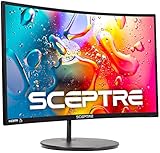
 Sceptre Curved 24-inch Gaming Monitor 1080p R1500 98%24-Inches16.04 x 21.61 x 9.06 inches6 PoundsCheck on Amazon

Top 3 picks at a glance
Quick Verdict
For a dedicated desktop gaming setup, DisplayPort is usually the better choice. A DisplayPort 1.4 cable ($7 to $12) carries 1440p at 165Hz or 4K at 144Hz with room to spare, and DisplayPort 2.1 pushes up to 54Gbps for 4K at 240Hz and beyond. DisplayPort also has a locking connector that resists being yanked out of the port — a small thing that matters on a desk.
HDMI wins when one cable needs to serve multiple purposes. Every TV, console, projector, and most laptops speak HDMI fluently, and HDMI 2.1 handles 4K at 120Hz comfortably. If your gaming happens on a couch, a console, or a screen that doubles as a movie display, HDMI is the practical answer.
Side by Side
| Factor | DisplayPort | HDMI |
|---|---|---|
| Max bandwidth (current mainstream) | 32.4Gbps (DP 1.4); 54Gbps (DP 2.1) | 42Gbps (HDMI 2.0); 48Gbps (HDMI 2.1) |
| High refresh ceiling | 1440p at 240Hz+ on DP 1.4; 4K at 240Hz on DP 2.1 | 4K at 120Hz on HDMI 2.1; 1440p at 240Hz with DSC |
| Comfort of setup | Locking connector stays put; slight thumb-release learning curve | Familiar plug, but no latch — can work loose behind desks |
| Cable durability | Certified DP cables rated for thousands of insertion cycles; buy VESA-certified only | Certified “Ultra High Speed” HDMI cables reliably carry 48Gbps; generic ones often don’t |
| Price range (good cable) | $7 to $15 for 6.6ft certified | $8 to $20 for certified 2.1, longer runs cost more |
| Maintenance | Essentially none; reseat if the lock releases | Essentially none; check seating if signal drops |
| Space needed | Compact 20-pin connector; lock adds a few millimeters | Slightly wider 19-pin connector; fine for wall-mounted TVs |
| Look behind the desk | Tidy; latch prevents sagging cables | Clean too, but gravity plus stiff cables can stress ports |
| Resale/reuse value | PCs and gaming monitors only | Works with nearly every TV, console, and receiver you’ll ever own |
| Best for | Desktop PC gamers chasing 144Hz and above | Console gamers, couch setups, mixed TV-and-monitor homes |
Where Displayport Wins
Raw refresh rate headroom is the headline. A DisplayPort 1.4 connection carries 32.4Gbps, which covers 2560×1440 at 165Hz with HDR, or 4K at 120–144Hz with display stream compression. If you’ve bought a 240Hz or 360Hz esports monitor, DisplayPort 2.1 raises bandwidth to 54Gbps and removes most compression caveats. HDMI 2.1 can reach similar numbers on paper, but many mid-range PC monitors either lack full HDMI 2.1 features or restrict the high refresh modes to the DisplayPort input.
Adaptive sync support is the second advantage. NVIDIA’s G-Sync on dedicated modules and most FreeSync implementations work over DisplayPort without fuss, and some older G-Sync panels only support variable refresh rate on DisplayPort. If stutter-free gaming at 141Hz on a 144Hz panel is the goal, DisplayPort is the path of least resistance.
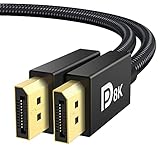
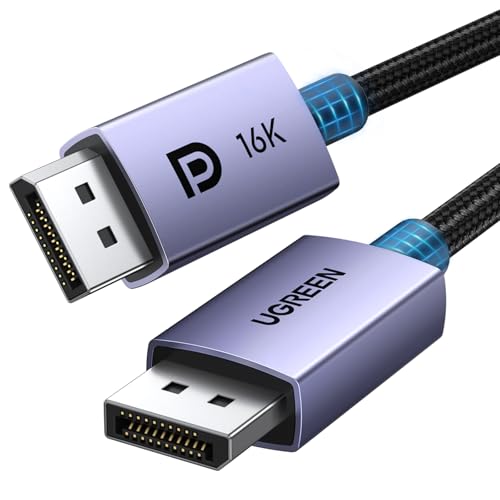
Third is the mechanical connection. DisplayPort connectors include a latch that clicks into place. Anyone who has reached behind a monitor to find an HDMI cable half-out — and a signal that flickers as a result — will appreciate that. Cable quality matters in both camps, but certified options are cheap: an IVANKY VESA Certified 8K DisplayPort 1.4 cable in a 6.6ft length runs about $6, and a VESA Certified DisplayPort 2.1 cable from UGREEN with full 54Gbps bandwidth in the same 6.6ft length costs around $9. There’s little reason to gamble on uncertified cables when certified ones cost coffee money.
Where Hdmi for High Refresh Rate Gaming Wins
Universal compatibility comes first. Every PlayStation 5 and Xbox Series X output HDMI, and they do it well: 4K at 120Hz with variable refresh rate on HDMI 2.1. If you game on consoles even part of the time, HDMI isn’t optional — it’s the native language of your hardware.
Second, HDMI 2.1 closed the gap that used to justify the “DisplayPort for gaming” rule automatically. Modern HDMI 2.1 delivers 48Gbps, supporting 4K at 120Hz with HDR, VRR, and auto low-latency mode. For a living-room TV setup or a monitor that doubles as a console display, HDMI gets you genuine high refresh rate gaming with features DisplayPort lacks on the TV side, like eARC for routing audio through a soundbar.
Third is budget reality. Plenty of excellent entry-level monitors ship with HDMI as the primary high-refresh input. The Sceptre 24-inch curved 1080p gaming monitor (around $79) includes two HDMI ports alongside VGA and built-in speakers, covering 1080p high refresh gaming without needing DisplayPort at all. Similarly, HDMI works fine for the huge population of 1080p and 1440p players where bandwidth ceilings simply don’t come into play.
Cost Over 5 Years
Cables are a one-time purchase, so five-year cost is mostly about buying right the first time. A quality DisplayPort cable runs $7 to $15; a certified HDMI 2.1 cable runs $8 to $20 depending on length. Expect to own one or two per display over five years — budget roughly $15 to $35 total either way.
The cost trap is the monitor itself. If you buy a $300 high refresh monitor and drive it with a cable or port that caps it at 60Hz, you’ve wasted most of the purchase. That’s not a cable expense, it’s a compatibility expense. Spend five minutes confirming your GPU and monitor share a port generation — for example, a DisplayPort 2.1-capable GPU paired with a DP 2.1 cable and monitor — and the five-year cost stays under $35. Swapping standards later because you bought the wrong hardware is where real money disappears: new cable, possibly a new monitor, and an afternoon of troubleshooting.
For perspective, the entry hardware is cheap too. An Acer 27-inch 1080p IPS 120Hz monitor lists around $99, and a $7 certified DisplayPort 1.4 cable drives it at full refresh without breaking a sweat. Budget setups don’t need exotic cables; they need correctly rated ones.
Which One for Your Home
Small Apartment
Space-constrained setups often make one display do everything: work by day, gaming and streaming by night. HDMI is the pragmatic pick because it connects to whatever screen you own, including a TV pulled into double duty. Use HDMI 2.1 for console gaming at 4K/120Hz, and keep a $7 DisplayPort cable on hand if your monitor’s high refresh mode is DP-only. Short 6.6ft cables keep the cable clutter behind a small desk manageable.
Family with Kids or Pets
Here the latching DisplayPort connector genuinely earns its keep. Cables near floor level or behind accessible furniture get kicked and tugged; a locked connector pops back instead of working loose. That said, kids mean consoles, and consoles mean HDMI, so the honest answer is both: HDMI 2.1 to the TV for couch gaming, DisplayPort for the family PC. Consider cable channels or raceways (about $10 to $20) to keep anything out of reach, since no connector survives a determined toddler or a chew-happy puppy.
Rental
Renters rarely want to wall-mount or run in-wall cables, so portability and reversibility dominate. Both standards are fine here, but lean HDMI for anything connecting to provided or shared TVs, and DisplayPort for a personal desktop. Keep cable runs above 6 feet to a minimum — a 6.6ft certified cable handles most rental bedroom desks without coiling excess. When you move, everything unplugs cleanly; DisplayPort’s latch releases with a button press, and nothing is permanent.
Long-Term Home
If you’re building a setup meant to last five to ten years, invest in the port with the longest runway: DisplayPort 2.1 on the PC side, certified cables, and a monitor whose high refresh modes work over both inputs. A VESA Certified DisplayPort 2.1 cable at around $9 today protects you when your next GPU and monitor arrive. Add a certified HDMI 2.1 run to the living room for consoles and guests, and you’re covered for every device the household will acquire. Mixed homes shouldn’t pick a side — they should standardize on certified cables for both.
FAQ
Do I need a new cable for 144Hz, or will the old one in my drawer work?
Maybe. Older DisplayPort cables often handle 1440p at 144Hz fine, but bandwidth failures show up as flickering or black screens rather than a clean “no.” Since VESA-certified cables cost $7 to $10, replacing an unknown cable is the cheapest troubleshooting step in PC gaming. The same logic applies to HDMI: only certified “Ultra High Speed” cables are guaranteed at 48Gbps.
Can HDMI 2.1 really match DisplayPort for gaming?
For 4K at 120Hz with HDR and variable refresh rate, yes — HDMI 2.1 is fully capable and is the standard on PS5 and Xbox Series X. DisplayPort still leads at the extreme end (4K at 240Hz and higher refresh ceilings on PC monitors), and some monitors only unlock their top refresh rate on the DisplayPort input. Check your specific monitor’s spec sheet.
Does cable length affect high refresh rate performance?
It can. Passive high bandwidth cables become less reliable past roughly 10 to 15 feet, which matters for projector and in-wall runs. For typical desk setups, a 6.6ft certified cable has enormous margin. For 25-foot-plus runs over HDMI, look at active optical cables.
Is it worth upgrading my cable ahead of new hardware in 2026?
If you’re buying a new GPU or high refresh monitor soon, a $10 certified DisplayPort 2.1 cable is cheap insurance that your next hardware’s full bandwidth is available on day one. If your current setup runs correctly at its rated refresh rate, there’s no urgency — certified DisplayPort 1.4 and HDMI 2.1 cables remain the right tools for the vast majority of gaming displays.
Related guides
- Best Gaming PC for Overwatch 2: Ten Prebuilts Matched to Your Monitor (2026)
- Best Gaming PC for Baldur’s Gate 3: Matching CPU, VRAM and Storage to the Game (2026)
- Best Gaming PC for Apex Legends: Which Listings Fit a High-Refresh Setup (2026)
- Best RTX 3060 Gaming PCs: Eight Prebuilt Listings Compared by CPU, RAM and Cooling (2026)









