
Our Top Picks

The Short Answer
For most people who game and stream at the same time, yes — 32GB of RAM is worth it. The one condition: it only matters if your GPU and CPU can keep up. RAM won’t fix a weak processor or a budget graphics card, so don’t buy 32GB expecting it to rescue a struggling system. If you stream casually once or twice a week at 1080p, 16GB is still perfectly fine. If you stream several times a week, run a dual-PC setup, or keep Chrome, Discord, and game launchers open while you play, 32GB removes the stutter and gives you headroom for the next few years.
What You Actually Get
Stepping up from 16GB to 32GB buys you three concrete things when you’re gaming and streaming simultaneously:
As an Amazon Associate we earn from qualifying purchases at no extra cost to you.
Headroom for encoding. When you use software encoding (x264 on your CPU) to push a 1080p60 stream at around 6,000 Kbps, OBS typically wants 4–8GB of that memory on top of what your game is using. Modern AAA titles like Cyberpunk 2077 or Starfield can pull 12–16GB on their own. Add Windows (2–4GB), Discord, a browser with a few tabs, and Spotify, and a 16GB system is running at the ceiling — which is exactly when frame drops and hitching start.
Faster multi-tasking without slowdown. With 32GB, you can alt-tab out of a full-screen game, answer a DM, check stream alerts, and jump back in without the system paging to your SSD. That swap-file activity is what causes those half-second freezes mid-match.
Longevity. Game memory requirements have crept up steadily. A 32GB kit bought today should still feel comfortable in 2026 and beyond, while 16GB systems are already hitting their limit in the newest releases.
What you don’t get: higher FPS in most games. Above 16GB, additional RAM rarely improves raw frame rates. It prevents dips and stutters when the system is under load — that’s a different thing, and it’s the thing streamers actually notice.
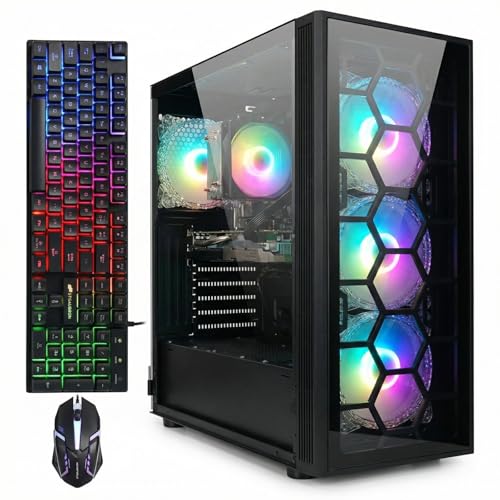
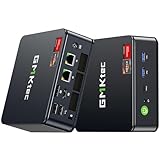
To see how this plays out in real systems, consider the STGAubron gaming desktop built around a Core i7, an RTX 3070 with 8GB of VRAM, 32GB of RAM, and a 1TB SSD, typically listed around $770. That configuration is a good example of the sweet spot: a capable GPU doing the heavy lifting, with 32GB of memory covering the streaming overhead. On the compact end, the GMKtec M5 Ultra mini PC pairs a Ryzen 7 7730U with 32GB of RAM and a 512GB SSD for roughly $560 — a small-form-factor box (most units in this class measure under 6 inches per side and weigh under 2 pounds) that handles streaming and lighter gaming well, though its integrated-class graphics can’t match a discrete RTX card.
Pros
- Eliminates most stutter and frame drops caused by memory pressure when OBS runs alongside a modern game
- Lets you run browser tabs, Discord, alerts, and music simultaneously without system-wide slowdowns
- Future-proofs your build — game and streaming software requirements keep climbing
- 32GB DDR4 kits are inexpensive now; the upgrade often costs only $45–70 if your motherboard has free slots
- Improves workflow for creators who edit clips or recordings on the same machine
Cons
- Won’t raise FPS in the vast majority of games — if your GPU is the bottleneck, more RAM does nothing
- Diminishing returns for casual streamers who play older or lighter titles (Valorant, Rocket League, Minecraft)
- On prebuilt mini PCs, the RAM is often soldered or hard to upgrade later, so you pay up front whether you need it or not
- Spending on RAM can eat budget that would deliver more visible improvement if put toward a better GPU or a capture card
- Some budget motherboards only support two DIMM slots, meaning a 32GB upgrade means replacing your existing sticks entirely
Who Should Buy It
You’re a good candidate for 32GB if you stream three or more times a week, play memory-hungry AAA releases, use CPU-based x264 encoding, or run a cluttered desktop (20+ browser tabs is normal for you). It’s also the right call if you do double duty as a content creator — recording gameplay, then editing it in Premiere or DaVinci Resolve on the same machine. Video editing software is aggressively memory-hungry, and 32GB is the practical minimum for comfortable 1080p timelines. Finally, if you’re buying a new PC outright in 2026, 32GB is simply the sensible default; the price premium over 16GB configs has shrunk to the point where skipping it saves little.
Who Should Skip It
Skip 32GB if you stream occasionally for friends, play esports titles that rarely use more than 8GB, or you’re on a strict budget where $60 better spent goes toward a GPU upgrade. Also skip it if your current system still runs smoothly with OBS open — check Task Manager while streaming; if memory usage stays under about 85% during a typical session, you don’t need more yet. And if you stream console games via a capture card on a secondary device, your gaming PC’s RAM barely matters at all.
Cheaper Alternatives
| Option | Cost | Trade-off |
|---|---|---|
| Add 16GB to an existing 16GB build (2x8GB DDR4-3200 kit) | $45–70 | Requires free DIMM slots; mixing sticks can drop speeds slightly, but the capacity gain is identical |
| Use NVENC hardware encoding (Nvidia GPU) instead of x264 | $0 | Cuts CPU/RAM load dramatically; quality is slightly below top-tier x264 presets but imperceptible to most viewers |
| Close background apps and stream at 1080p30 / 4,500 Kbps | $0 | Lower stream smoothness; fine for talking-heavy or slower-paced content |
| Budget mini PC like the GMKtec M5 Ultra (32GB RAM, 512GB SSD) as a dedicated stream/encoder box | Check on Amazon | Keeps encoding off your gaming rig entirely, but it won’t play demanding games itself and has limited storage out of the box |
| 16GB prebuilt desktop (Core i5 / RTX 3060 class) | $600–700 | Stronger GPU for the money, but you’ll likely hit the memory ceiling within two years of heavy streaming |
FAQ
Is 16GB enough to stream at 1080p60?
It can be, if you use NVENC or AMD hardware encoding and keep background apps closed. Esports titles run fine. Modern open-world games plus OBS on 16GB is where stutters start, especially with a browser open.
Does 32GB RAM increase FPS?
Not meaningfully in most games. Going from 8GB to 16GB can help; going from 16GB to 32GB rarely changes average FPS. What it changes is consistency — fewer drops and hitches when your system is multitasking.
Should I get 2x16GB or 4x8GB for 32GB?
Two 16GB sticks are the better choice. They leave slots free for future upgrades, are easier on the memory controller, and usually cost the same or less than four sticks.
Is 32GB worth it in a prebuilt or mini PC?
Yes, if streaming is your main use case — especially in mini PCs where RAM may be soldered or hard to upgrade later. Paying the premium up front on a compact machine like the GMKtec M5 Ultra is cheaper than replacing the whole unit when 16GB runs out of room.
Related guides
- Best Gaming PC for Overwatch 2: Ten Prebuilts Matched to Your Monitor (2026)
- Best Gaming PC for Baldur’s Gate 3: Matching CPU, VRAM and Storage to the Game (2026)
- Best Gaming PC for Apex Legends: Which Listings Fit a High-Refresh Setup (2026)
- Best RTX 3060 Gaming PCs: Eight Prebuilt Listings Compared by CPU, RAM and Cooling (2026)









