
Our Top Picks
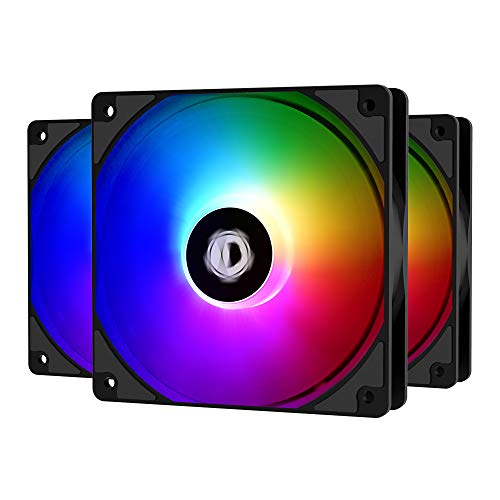 ID-COOLING XF-12025-ARGB-TRIO 120mm Case FanAddressable RGB4.7 x 4.7 x 1 inches1 PoundsCheck on Amazon

The Short Answer
Yes, in almost every case you still need case fans even if you have an AIO liquid cooler. The one condition where you can safely skip them is a low-power build — something like a 65-watt CPU paired with an entry-level GPU drawing under 150 watts — where the AIO’s fans and passive airflow through open mesh panels can handle the heat on their own. Everyone else should keep at least two or three case fans, because your AIO only cools the CPU. It does absolutely nothing for your graphics card, VRMs, RAM, M.2 drives, or power supply.
What You Actually Get
Let’s be clear about what an AIO actually is: a sealed loop with a pump, a radiator, and fans bolted to that radiator. A 240mm or 360mm radiator pulls heat out of your CPU and dumps it into the air inside your case. That’s the critical detail. The heat leaves the radiator and enters your chassis — something then has to push that warm air out and pull cooler air in.
As an Amazon Associate we earn from qualifying purchases at no extra cost to you.

Case fans are that something. A typical 120mm case fan moves anywhere from 30 to 70 CFM (cubic feet per minute) at modest noise levels, and costs very little. Modern case fans usually run on 3-pin or 4-pin PWM connectors, draw roughly 1 to 4 watts each, and fit standard 120mm or 140mm mounts. Intake fans feed cool air to your GPU and motherboard; exhaust fans evacuate the hot air your AIO just deposited. Without them, your GPU recirculates its own exhaust, your VRMs bake, and over time even your AIO performs worse because it’s pulling in pre-heated case air instead of room-temperature air.
The products worth considering fall in a friendly price range: a single solid 120mm fan like the Vetroo SA-120 (white, fluid dynamic bearing) runs about $11, while a three-pack of ARGB fans like the ID-COOLING XF-12025-ARGB-TRIO costs around $22 — roughly $7 per fan. That’s a tiny investment compared to the $100–$300 you likely spent on the AIO itself.
Pros
- Protects your GPU: Modern graphics cards draw 200–450 watts and dump all of that heat inside your case. Intake fans are the only thing delivering fresh air to them.
- Improves AIO performance: An exhaust fan removes hot radiator exhaust from the case, so your AIO’s intake air stays cooler and CPU temps drop as a result.
- Cools everything else: VRMs, RAM, M.2 SSDs, and your power supply all rely on case airflow. M.2 drives in particular throttle when starved of moving air.
- Very cheap: $10–$25 buys enough fans for a full airflow loop — less than 10% of the cost of a typical AIO.
- Quieter overall system: With better airflow, your GPU and AIO fans can spin at lower RPM to hit the same temperatures, reducing total noise.
- Positive pressure option: More intake than exhaust keeps dust out of crevices when paired with filtered front panels.
Cons
- Extra noise sources: Every fan adds a potential whine or hum, especially cheap sleeve-bearing fans under load.
- More cables and headers: Each fan needs a motherboard header or a splitter/pwm hub. Budget boards may only have two or three system fan headers.
- Dust management: Intake fans pull in dust; you’ll need filters and occasional cleaning to keep airflow strong.
- Aesthetic planning: Mixing fan brands looks inconsistent if you care about a coordinated build, particularly with RGB.
Who Should Buy It
Add case fans if your GPU draws more than about 150 watts (which is nearly every dedicated GPU sold today), if your case came with fewer than two pre-installed fans, if you game or render for long sessions, or if your GPU sits above 80°C under load. Anyone running a 360mm AIO on a hot CPU like a Ryzen 9 or Core i9 should absolutely plan for at least three 120mm case fans — two front intake, one rear exhaust — to evacuate radiator exhaust and feed the GPU.
Who Should Skip It
You can genuinely skip extra case fans in a few narrow situations: an office or HTPC build with a 65-watt CPU and integrated graphics; a mesh-heavy case with open top and bottom panels relying on chimney effect; or an ITX build where the AIO radiator mounts directly against mesh side panels and pulls fresh air from outside the case. Even then, a single $12 exhaust fan is cheap insurance, so “skipping” is more of a theoretical win than a practical one.
Cheaper Alternatives
| Option | Cost | Trade-off |
|---|---|---|
| Leave stock fans and reposition them (front intake, rear exhaust) | $0 | Stock fans are often tuned for noise over airflow; gains are limited but real |
| Add one high-value 120mm fan (e.g., Vetroo SA-120, around $11) | $10–$15 | Solves the exhaust problem but leaves GPU intake thin |
| Buy a 3-pack ARGB kit (e.g., ID-COOLING XF-12025-ARGB-TRIO, around $22) | $20–$30 | Best coverage per dollar, but adds RGB cables and hub clutter |
| Undervolt your GPU and CPU | $0 | Cuts heat output 10–20% but requires tuning time and doesn’t fix airflow |
FAQ
Can I mount my AIO as exhaust and skip case fans entirely?
You can mount a 240mm or 360mm AIO as a rear or top exhaust, but that only removes CPU heat. Your GPU — usually the hottest component at 200–450 watts — still needs intake fans feeding it fresh air. Skipping case fans in a gaming build almost always raises GPU temperatures by a noticeable margin.
How many case fans do I actually need with an AIO?
For most mid-tower builds, three is the sweet spot: two 120mm or 140mm front intakes and one rear exhaust. That creates a clean front-to-back airflow path that feeds your GPU and clears radiator exhaust. High-airflow cases with mesh fronts benefit most; restrictive cases with solid front panels may need a top exhaust fan too.
Should case fans be intake or exhaust if my AIO is at the top?
With a top-mounted AIO, run front and bottom fans as intake and keep the rear as exhaust. The AIO’s own fans act as exhaust. This gives your GPU the cool air it needs while keeping the radiator’s intake air reasonably fresh — the standard setup recommended by most case and cooler makers.
What’s a reasonable budget for case fans in 2026?
Plan on $20–$40 for a typical three-fan setup. Budget fans with fluid dynamic bearings run $10–$15 each, while three-packs with RGB and controllers sit around $20–$35. Spending more than roughly $15 per fan buys quieter operation and better lighting, but not dramatically better cooling — a $12 fan moving 50 CFM cools about as well as a $30 fan moving 55 CFM.
Related guides
- Best Gaming PC for Overwatch 2: Ten Prebuilts Matched to Your Monitor (2026)
- Best Gaming PC for Baldur’s Gate 3: Matching CPU, VRAM and Storage to the Game (2026)
- Best Gaming PC for Apex Legends: Which Listings Fit a High-Refresh Setup (2026)
- Best RTX 3060 Gaming PCs: Eight Prebuilt Listings Compared by CPU, RAM and Cooling (2026)









