
Our Top Picks
 DARKROCK EC2 ATX Mid Tower Gaming Computer PCATX/Micro-ATX/Mini-ITX17.6 x 8.6 x 15.2 inchesCheck on Amazon

Top 3 picks at a glance


The Short Answer
A mesh PC case needs enough open area to feed every intake fan without forcing air through a restrictive panel. For most desktop builds, choose a case with a full mesh front panel, at least two 120 mm or 140 mm front intake fan mounts, and one rear exhaust mount. That setup is suitable for typical 65–125 W processors and graphics cards using roughly 150–300 W during gaming.
For higher-heat systems—such as a 200 W-plus graphics card, a 240 mm or 360 mm radiator, or a workstation that runs for long stretches—look for a larger mesh-front mid tower or full tower with three front intake positions and top exhaust support. The important measurement is not simply the outside size of the case: it is the usable opening behind the mesh, fan mounting pattern, radiator clearance, and space between the front fans and internal components.
As an Amazon Associate we earn from qualifying purchases at no extra cost to you.
As a practical rule, use 120 mm fans when working with a compact case or narrow mounting rail. Use 140 mm fans when the case supports them and quiet operation matters, since a larger fan can move useful air at lower speeds. A removable dust filter is worthwhile, but very fine mesh can reduce airflow if it is not cleaned regularly.
Standard Sizes
PC case mesh, fan openings, and dust filters are usually sized around fan dimensions rather than a universal “case airflow” measurement. Measure the opening that needs coverage, then allow extra material for mounting. The table below covers common sizes shoppers will encounter.
| Component or Opening | Dimensions in Inches | Dimensions in Centimeters | Best Use |
|---|---|---|---|
| 80 mm fan mount | 3.15 x 3.15 in. | 8 x 8 cm | Older compact cases, small rear exhaust positions |
| 92 mm fan mount | 3.62 x 3.62 in. | 9.2 x 9.2 cm | Compact towers and some CPU cooler applications |
| 120 mm fan mount | 4.72 x 4.72 in. | 12 x 12 cm | Most common front, top, rear, and radiator size |
| 140 mm fan mount | 5.51 x 5.51 in. | 14 x 14 cm | Quiet mid-tower and full-tower intake or exhaust |
| 200 mm fan mount | 7.87 x 7.87 in. | 20 x 20 cm | Large front-panel intake on select cases |
| Two 120 mm front fan area | 4.72 x 9.45 in. | 12 x 24 cm | Entry and mainstream mesh-front towers |
| Three 120 mm front fan area | 4.72 x 14.17 in. | 12 x 36 cm | High-airflow mid towers and radiator-ready builds |
| Two 140 mm front fan area | 5.51 x 11.02 in. | 14 x 28 cm | Quiet, high-capacity front intake |
| DIY mesh sheet | 11.81 x 39.37 in. | 30 x 100 cm | Custom front, side, top, or bottom dust-filter cuts |
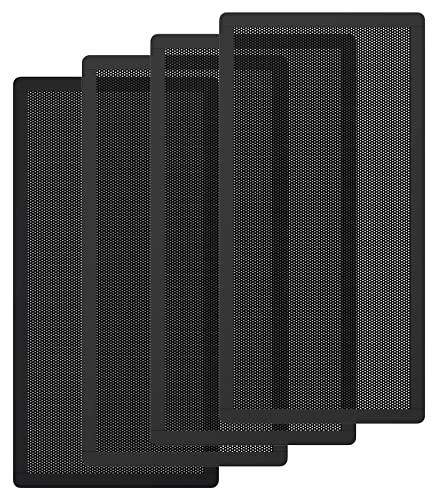
A 1000 x 300 mm DIY mesh sheet measures 39.37 x 11.81 inches, making it large enough to cut several fan filters or cover a wide front intake. Single sheets commonly sell around $13, while two-sheet packs are often about $19. Smaller four-pack fan-filter sets sized 140 x 280 mm, or 5.51 x 11.02 inches per filter, are commonly around $10 and fit many two-fan openings.
How to Measure Your Space
- Remove the front, top, or side panel. Measure the actual vent opening from edge to edge, not the decorative outer frame. A case may be 8 inches wide at the front but have only a 5-inch-wide ventilated section.
- Measure width and height separately. Use a tape measure or ruler and record both inches and centimeters. For a filter, measure the full area you want covered, including a mounting border of at least 0.5 inch (1.3 cm) on each side.
- Check the fan mount pattern. Count the mounting positions and identify whether they are designed for 120 mm, 140 mm, or another fan size. A front panel that accepts three 120 mm fans is not automatically compatible with three 140 mm fans.
- Measure depth behind the mesh. Standard case fans are usually 25 mm thick, or about 0.98 inch. Leave room for fan frames, cables, a radiator, and any front-mounted drive cage.
- Check radiator clearance if applicable. A 240 mm radiator usually uses two 120 mm fan positions, while a 360 mm radiator uses three. Radiator-and-fan assemblies often require 52–55 mm, or about 2.05–2.17 inches, of total depth before considering hoses and motherboard clearance.
- Inspect obstruction points. Solid front trim, thick foam, tightly woven fabric, drive cages, and a close wall can all reduce usable airflow. Keep the front of the case at least 3 inches from a wall or desk side panel; 6 inches is better for a deeply recessed desk compartment.
- Plan cable and component room. Long graphics cards can extend into the front-fan area. Confirm the case’s listed GPU clearance with front fans or a front radiator installed before buying.
By Room or Use Case
Open Desk Gaming Setup
For a desktop sitting in open air on or beside a desk, a standard ATX mesh-front mid tower is usually the best balance of capacity, noise control, and footprint. Aim for two 140 mm front intakes or three 120 mm front intakes, plus one 120 mm rear exhaust. This configuration suits most gaming systems without requiring an oversized full tower.
Many affordable ATX mesh cases fall in the $55–$100 range before extra fans. A budget model around $55 may include basic fan mounts but fewer installed fans, so check the listing carefully. If it ships with only one rear fan, budget another $20–$50 for two quality 120 mm or 140 mm intake fans.
Desk Cabinet or Enclosed Furniture Bay
A mesh case alone cannot solve a poorly ventilated desk cabinet. If the computer sits in an enclosed furniture compartment, the cabinet itself needs an air path: one lower intake opening and one higher exhaust opening are ideal. Provide at least 3 inches of clearance at the front and rear of the case, and avoid placing the rear exhaust directly against a solid back panel.
For this use, choose a case with a mesh front and a conventional rear exhaust, rather than a glass-front design with narrow side vents. A 120 mm rear exhaust fan is the minimum; two front intake fans are preferable. Consider removing the cabinet’s rear panel section or adding a furniture vent grille if warm air pools around the system.
Small Bedroom, Dorm, or Apartment Office
Noise matters more in a small room, so prioritize larger, slower-spinning fans over packing every available mount with small fans. A case supporting two 140 mm front fans and one 120 mm rear fan is a strong starting point. Cleanable mesh is especially helpful in carpeted rooms, where lint and fibers collect quickly.
Place the case on a hard riser if it must sit near carpet. Leave at least 1 inch of clearance beneath bottom vents and 3 inches around the front and rear. Avoid covering the front mesh with fabric, storage bins, or a desk drawer.
High-Performance Gaming or Creative Workstation
For a powerful graphics card, a high-wattage CPU, or regular rendering and video work, look for a wide mesh-front ATX mid tower with three 120 mm front mounts or two 140 mm mounts. Add a rear exhaust and, if supported, one or two top exhaust fans. This creates a straightforward front-to-back and bottom-to-top path for heat.
A 360 mm front radiator requires roughly 14.2 inches (36 cm) of vertical fan space, while a 280 mm radiator requires roughly 11 inches (28 cm). Verify that front radiator installation will not reduce graphics-card clearance below the length of your card.
Common Sizing Mistakes
- Buying mesh based only on the case’s exterior dimensions. Always measure the vented opening, because trim and mounting lips reduce the usable area.
- Cutting the filter exactly to the opening size. Add at least 0.5 inch on each edge for magnetic tape, clips, or overlap.
- Assuming all fan sizes use the same screw spacing. A 140 mm fan does not fit every 120 mm mount, even when the panel looks large enough.
- Using ultra-fine mesh everywhere. Fine filters catch more dust but can need more frequent cleaning. Inspect filters monthly and clean them whenever visible buildup appears.
- Adding exhaust fans without sufficient intake. A rear and top exhaust setup still needs unrestricted front or bottom intake air.
- Ignoring furniture clearance. A high-airflow case can still run warmer if pressed into a cubby or placed against a wall.
FAQ
Is one mesh panel enough for a PC case?
Yes, if it is a large front intake panel with room for at least two 120 mm fans and the case also has a rear exhaust. Additional top mesh can help higher-power systems, but a well-designed mesh front is the priority.
How much larger should a DIY dust mesh filter be than the opening?
Add at least 0.5 inch (1.3 cm) on every side. For example, cover a 5.51 x 11.02 inch opening with a filter cut close to 6.5 x 12 inches. This provides enough edge area for magnetic strips, hook-and-loop tape, or a frame.
Should I choose 120 mm or 140 mm fans for a mesh case?
Choose 140 mm when your case supports them and you want lower noise at a given cooling demand. Choose 120 mm when you need broad compatibility, radiator support, or three-fan front mounting. Two 140 mm front fans and three 120 mm front fans are both practical high-airflow arrangements.
Do I need a dust filter behind a mesh front panel?
In most homes, yes. The outer mesh helps protect the fans and gives the case its open look, while a removable inner filter catches finer dust. Use a filter that covers the full intake area without sagging into the fan blades, and clean it regularly to maintain airflow in 2026 and beyond.









