
Our Top Picks
 CORSAIR Vengeance LPX DDR4 RAM 32GB2 count (pack of 1)5.32 x 0.28 x 1.32 Inches0 PoundsCheck on Amazon

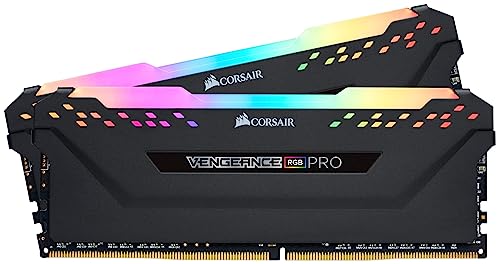

Top 3 picks at a glance
The Short Answer
Most gamers should buy 16GB of RAM as a bare minimum and 32GB as the sweet spot for 2026 and beyond. If you play competitive esports titles, stream, or run modern AAA games alongside Discord, Chrome, and voice chat, 32GB is the practical answer. Just as important as capacity is physical fit: desktop DIMMs are standardized at roughly 5.25 inches (13.3 cm) long, but cooler clearance and slot spacing determine whether low-profile sticks like the Corsair Vengeance LPX (about 1.4 inches / 3.5 cm tall) or taller RGB modules (up to 2.2 inches / 5.6 cm) will actually fit your build.
Standard Sizes
Desktop RAM comes in a few standardized physical formats. Knowing the dimensions before you buy prevents the most common frustration in PC building: a module that clears your CPU cooler by a millimeter — or doesn’t.
As an Amazon Associate we earn from qualifying purchases at no extra cost to you.



| Module Type | Length | Height | Thickness | Typical Weight (per stick) |
|---|---|---|---|---|
| Low-profile DDR4 (e.g., Corsair Vengeance LPX) | 5.25 in / 13.3 cm | 1.4 in / 3.5 cm | 0.28 in / 0.7 cm | 0.3–0.4 oz / 8–12 g |
| Standard-height DDR4 with heat spreader (e.g., GIGASTONE Game PRO) | 5.25 in / 13.3 cm | 1.6 in / 4.0 cm | 0.3 in / 0.75 cm | 0.4–0.5 oz / 11–14 g |
| Tall RGB DDR4 (e.g., Corsair Vengeance RGB PRO) | 5.25 in / 13.3 cm | 2.1–2.2 in / 5.4–5.6 cm | 0.3 in / 0.75 cm | 0.5–0.7 oz / 14–20 g |
| DDR5 with light bar (e.g., Corsair Vengeance RGB RS) | 5.25 in / 13.3 cm | 1.8–2.2 in / 4.5–5.6 cm | 0.3 in / 0.75 cm | 0.5–0.7 oz / 14–20 g |
| SO-DIMM (laptops/mini PCs) | 2.66 in / 6.76 cm | 1.18 in / 3.0 cm | 0.15 in / 0.38 cm | 0.15–0.25 oz / 4–7 g |
Capacity-wise, consumer kits come in 8GB (2x4GB), 16GB (2x8GB), 32GB (2x16GB), and 64GB (2x32GB) configurations. Two-stick kits are the norm because dual-channel operation gives you meaningfully better gaming performance than a single stick of the same total capacity.
How to Measure Your Space
RAM is the one component where “measuring your space” matters as much as the spec sheet. Follow these steps before ordering:
- Check your motherboard’s slot count and spacing. Most ATX boards have four DIMM slots; micro-ATX boards often have two to four. Note whether slots 2 and 4 (the usual dual-channel pair) sit close to the CPU socket.
- Measure cooler clearance. Find your CPU cooler’s spec sheet for maximum RAM height under an overhanging fan or shroud. Tower air coolers commonly allow 1.6–1.8 inches (4.0–4.5 cm); large dual-tower models can drop that to 1.5 inches (3.8 cm) or less. Low-profile sticks at 1.4 inches (3.5 cm) clear nearly everything.
- Allow clearance for RGB lighting. Taller RGB modules at 2.1–2.2 inches (5.4–5.6 cm) require a cooler with no overhang, or a front-mounted fan orientation.
- Confirm the generation. DDR4 modules are physically keyed differently from DDR5 — a notch position offset of about 0.08 inches (2 mm) makes them impossible to cross-install. Check your motherboard manual before buying.
- Verify case clearance for tall sticks. If your cooler mounts fans over the RAM area, measure from the motherboard surface to the nearest fan edge and compare against module height.
- Plan your wattage headroom. RAM draws little power — roughly 3–6W per stick at 1.35V — but DDR5 kits at 6000MHz can run warmer, so confirm your case has airflow over the DIMM area.
By Room or Use Case
Casual and Esports Gaming (16GB)
If you play Valorant, CS2, League of Legends, Rocket League, or Minecraft at 1080p, 16GB in a 2x8GB kit handles every title smoothly. A budget DDR5 kit like the Corsair Vengeance RGB RS 16GB (2x8GB) at 6000MHz runs around $290, while comparable DDR4 16GB kits sell in the $50–$90 range. Note that 16GB is the point where you’ll feel limits first — a game, Discord, and a browser with 15 tabs can push past 14GB of usage.
Mainstream AAA Gaming (32GB)
This is the sweet spot. Modern open-world and AAA releases routinely recommend 32GB, and a 2x16GB kit at 3200MHz DDR4 keeps everything comfortable. The Corsair Vengeance LPX 32GB (2x16GB) 3200MHz CL16 kit sits at around $250, the GIGASTONE Game PRO 32GB kit runs about $210, and the RGB-equipped Corsair Vengeance RGB PRO 32GB lands near around $260. Physically, all three use the standard 5.25-inch (13.3 cm) length; the LPX’s 1.4-inch (3.5 cm) profile is the safest bet under bulky air coolers.
Streaming and Content Creation (32–64GB)
If you stream at 1080p60 or 1440p while gaming, run OBS, edit footage, or keep heavy browser workloads open, 32GB is the floor and 64GB removes all doubt. A 2x32GB DDR4 kit typically costs $380–$550, while DDR5 64GB kits run $400–$600 depending on speed. DDR5’s on-module power management adds roughly 1–2W per stick versus DDR4 — negligible for your PSU math but worth knowing.
Small Form Factor and Console-Style Builds (16–32GB SO-DIMM)
Mini-ITX builds using ITX boards with SO-DIMM slots, or gaming laptops, use the smaller 2.66-inch (6.76 cm) form factor. These are often soldered or capped at 32–64GB, so check the maximum supported capacity in your device’s manual before purchasing.
Common Sizing Mistakes
- Buying one big stick instead of two. A single 32GB module runs in single-channel mode and costs you real frame rates. Always buy a matched 2x16GB or 2x8GB kit.
- Ignoring cooler height. A 2.2-inch (5.6 cm) RGB stick under a low-slung tower cooler doesn’t fit. Measure first.
- Mixing kits. Adding an old 16GB pair to a new 32GB pair can cause instability or force slower speeds. Buy one kit sized for your needs.
- Buying speed your CPU can’t use. A DDR4-3200 CL16 kit is the practical ceiling on many older platforms; paying for DDR4-4000 on a board that downclocks it wastes money.
- Overbuying capacity. Going from 32GB to 64GB purely for gaming yields almost no benefit — that $150–$200 is better spent on a GPU or SSD upgrade.
- Forgetting the DDR4/DDR5 mismatch. They are not interchangeable. Confirm your platform before checkout.
FAQ
Is 32GB of RAM overkill for gaming?
Not anymore. Competitive and esports players can live with 16GB, but 32GB has become the recommended specification for many new AAA releases, and it leaves headroom for Discord, streaming, and background apps. Kits like the Corsair Vengeance LPX 32GB at around $250 make the upgrade affordable.
Does RAM height really matter?
Yes. Standard-length DIMMs are all 5.25 inches (13.3 cm), but heights range from 1.4 inches (3.5 cm) for low-profile modules to 2.2 inches (5.6 cm) for tall RGB sticks. If your CPU cooler has a fan overhanging the RAM slots, measure the maximum allowed height first.
Is 3200MHz DDR4 fast enough, or do I need 6000MHz DDR5?
DDR4-3200 CL16 remains fully adequate for most gaming, and DDR4 kits like the GIGASTONE Game PRO 32GB at around $210 offer excellent value. DDR5-6000 delivers a modest frame rate gain on newer platforms, but expect to pay a premium — the Corsair Vengeance RGB RS DDR5-6000 16GB kit runs around $290 for half the capacity of a comparable DDR4 kit.
Can I add more RAM later instead of buying it all at once?
You can, but it’s risky. Mixing modules from different kits can cause instability or force all sticks to run at the speed of the slowest pair. If you plan to expand, buy a 2x16GB kit now and verify your motherboard supports the exact second kit later — or simply buy 32GB up front to avoid the compatibility gamble.









