
Our Top Picks
 ARCTIC Liquid Freezer III Pro 360 A-RGBLiquid Freezer III Pro 360 A-RGB15.7 x 4.7 x 2.9 Inches4.5 PoundsCheck on Amazon


Top 3 picks at a glance

The Short Answer
A 360mm All-In-One (AIO) liquid cooler is worth buying under one main condition: you are using a high-end processor that regularly draws over 200 watts of power under load, or you require an ultra-quiet workstation environment where low noise levels are a priority. If your CPU operates below 120 watts—which includes most mid-tier gaming processors—a 360mm AIO is largely an aesthetic upgrade rather than a performance necessity. For high-heat chips, however, the extra radiator surface area offers acoustic and thermal headroom that smaller air or liquid coolers simply cannot match.
What You Actually Get
When you purchase a 360mm AIO, you are adding a substantial piece of thermal hardware to your desktop workspace. Despite the name referencing three 120mm fans, the actual physical footprint of the radiator itself is larger. A typical 360mm radiator measures approximately 394mm to 400mm (15.5 to 15.7 inches) in length, 120mm (4.7 inches) in width, and 27mm to 38mm (1.0 to 1.5 inches) in depth. When you mount the three included 120mm fans—which add another 25mm of thickness—the complete assembly drops down roughly 52mm to 63mm from your case ceiling or front panel.
As an Amazon Associate we earn from qualifying purchases at no extra cost to you.
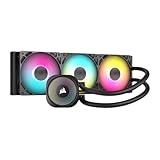


The total weight of a filled loop, radiator, CPU block, and fan array generally sits between 3.5 and 5.0 pounds. This hardware is engineered to manage thermal loads between 250 watts and 350 watts, dissipating heat across a large aluminum surface area before it ever warms the interior ambient air of your room.
From a home office and interior design standpoint, a 360mm radiator changes the visual character of a PC setup. It creates a full-length, symmetrical line across the top or front of a modern glass-paneled chassis. Because three fans spread the thermal load across more surface area, they can spin at lower rotational speeds (often between 800 and 1,200 RPM under general workloads). This keeps operational noise down to a whisper-quiet 20 to 26 dBA, preventing your desk area from sounding like a server room during intensive creative rendering or gaming sessions. Modern desktop processors push power limits higher each generation, and as we look ahead in 2026, high thermal density remains standard for top-tier silicon.
Pros
- Superior Thermal Headroom: Efficiently dissipates heat loads exceeding 250W to 300W, preventing CPU thermal throttling during prolonged workstation tasks like 3D rendering or video encoding.
- Exceptionally Quiet Operation: Spreading heat across three fans allows the system to run at significantly lower RPMs, keeping ambient desk noise beneath 28 dBA during mid-level workloads.
- Unobstructed RAM Clearance: Unlike massive dual-tower air coolers that overhang memory slots, an AIO CPU block has a small footprint (roughly 70 x 70mm), keeping high-profile RGB memory sticks fully visible and accessible.
- Balanced Desk Aesthetics: Spanning nearly 16 inches, a 360mm unit spans the full length of standard mid-tower and full-tower case roofs, creating a clean, filled-out look inside glass-panel chassis.
- Reduced Strain on the Motherboard: The primary weight (radiator and fans) mounts directly to the steel chassis frame rather than hanging 3 pounds of metal directly off the CPU socket.
Cons
- Case Compatibility Constraints: Requires a PC case with at least 400mm of internal radiator clearance, ruling out many compact mid-towers, Micro-ATX, and Small Form Factor (SFF) enclosures.
- Higher Initial Investment: Quality 360mm AIO units generally range from $110 to $250, compared to top-performing air coolers that cost between $35 and $65.
- Increased Cable Management: Requires routing three fan power cables, three ARGB lighting leads, pump power connectors, and sometimes a dedicated USB header for pump cap displays.
- Finite Lifespan and Failure Points: Liquid loops contain mechanical pumps and permeable rubber tubing (~400mm in length). Pumps can wear out or suffer from microscopic liquid evaporation over a 4- to 7-year period.
Who Should Buy It
A 360mm AIO is ideal for power users running top-tier processors—such as Intel Core i7/i9 unlocked chips or AMD Ryzen 9 series—that consistently generate high heat during heavy productivity workloads. It is also a smart purchase for home office professionals who work in small or quiet rooms where high-pitched fan noise is a major distraction. Finally, desk aesthetic enthusiasts who prefer a clean, open interior view of their motherboard and RAM without a bulky metal heat sink blocking the center of the build will appreciate what a 360mm liquid cooler provides.
Who Should Skip It
You should skip a 360mm AIO if you are building with mid-range, energy-efficient processors like the Intel Core i5 or AMD Ryzen 5 and Ryzen 7 non-X chips. These processors typically draw between 65W and 105W, meaning a 360mm liquid cooler offers zero extra performance over a modest air cooler. Builders working with tight desk spaces, compact Micro-ATX cases, or strict budgets under $1,000 should also skip this category. Redirecting that $100–$150 price difference toward a faster GPU or more storage yields a far bigger improvement in day-to-day computing.
Cheaper Alternatives
If a 360mm AIO feels like overkill for your desk setup or budget, several cooling configurations offer excellent thermal management at lower price points.
| Option | Cost Range | Trade-off Compared to 360mm AIO |
|---|---|---|
| Dual-Tower Air Cooler | $35 – $65 | Covers RAM slots visually; slightly higher fan pitch under 200W+ loads; zero liquid leak risk. |
| 240mm AIO Liquid Cooler | $70 – $120 | ~33% less surface area; fans run 200–400 RPM faster under load; fits in smaller cases. |
| Single-Tower Air Cooler | $20 – $40 | Limited to ~150W thermal loads; visible metal heatsink core; ultra-simple installation. |
FAQ
Does a 360mm AIO fit in standard PC cases?
Not always. While most modern ATX mid-towers and full-towers support 360mm radiators on either the top or front panel, smaller Micro-ATX and Mini-ITX cases rarely have the required ~400mm of internal clearance. Always check your specific PC case specifications for explicit “360mm radiator support” and verify motherboard component clearance along the top panel before purchasing.
How long does a 360mm AIO liquid cooler typically last?
A high-quality 360mm AIO usually lasts between 5 and 7 years of daily operation. The primary point of wear over time is the mechanical pump motor or gradual permeation, where trace amounts of liquid slowly evaporate through the rubber tubing over several years. Most reputable brands support their units with 5- to 6-year manufacturer warranties.
Is a 360mm AIO quieter than a dual-tower air cooler?
Under heavy CPU power draws (above 180W), yes. Because a 360mm radiator spreads heat across three fans and a large volume of liquid, the fans do not need to ramp up to maximum RPM to keep temperatures stable. Under lighter loads (under 100W), both options are functionally silent, though an AIO still produces a low, faint pump hum that air coolers do not have.
Should I mount a 360mm radiator on the top or front of my case?
Top mounting as an exhaust is generally recommended for overall system balance. It allows rising warm air to exit out the roof of the case while delivering fresh room air to your graphics card. Front mounting as an intake delivers slightly cooler air directly to your CPU, but it blows slightly warmed air across your graphics card and inside motherboard components.
Related guides
- Best Gaming PC for Overwatch 2: Ten Prebuilts Matched to Your Monitor (2026)
- Best Gaming PC for Baldur’s Gate 3: Matching CPU, VRAM and Storage to the Game (2026)
- Best Gaming PC for Apex Legends: Which Listings Fit a High-Refresh Setup (2026)
- Best RTX 3060 Gaming PCs: Eight Prebuilt Listings Compared by CPU, RAM and Cooling (2026)









