
For decades, building a high-end gaming PC meant budgeting for a dedicated sound card. During the golden era of PC gaming in the late 1990s and early 2000s, motherboards lacked the processing power to handle complex audio, leaving sound cards to do the heavy lifting of positional 3D audio and environmental effects.
Today, the landscape of home gaming setups has changed dramatically. Motherboards are more sophisticated, USB headsets process their own audio, and desks are designed for clean, minimalist aesthetics. This begs a crucial question for anyone planning a desk upgrade or a new PC build: is a dedicated sound card worth it for gaming, or is it an obsolete relic of the past?
As an Amazon Associate we earn from qualifying purchases at no extra cost to you.

Our Top Picks
 Creative Sound Blaster Audigy Fx Pro Hi-Res PCIe4.13 inches6.93 x 5.59 x 1.57 inches0.1 poundsCheck on Amazon
The Short Answer
No, a dedicated sound card is not worth it for 95% of modern gamers. Modern motherboard audio is highly capable, and you only need a dedicated audio solution if you are using high-impedance audiophile headphones (typically over 80 ohms) that require a powerful amplifier, or if your current PC setup suffers from severe electromagnetic interference (audible buzzing or static) caused by your graphics card or power supply.
What You Actually Get
To understand whether a dedicated sound card makes sense for your setup, it helps to understand what these devices actually do. A sound card contains three primary components: a Digital-to-Analog Converter (DAC), an Analog-to-Digital Converter (ADC) for microphone input, and an amplifier.
Every digital audio file or game sound design starts as binary code (1s and 0s). The DAC converts this digital code into an electrical analog signal that your speakers or headphones can translate into physical sound waves. The amplifier then boosts that signal so it is loud enough for you to hear.
Dedicated sound cards generally fall into two categories:
- Internal PCIe Sound Cards: These cards plug directly into your motherboard’s PCIe slots inside your PC case. An option like the Creative Sound Blaster Audigy Fx Pro Hi-Res PCIe Sound Card (priced around $75) is a prime example. Measuring roughly 4.6 x 4.8 inches, it fits into a spare PCIe slot and offers 5.1-channel surround sound outputs, a high-fidelity 120dB Signal-to-Noise Ratio (SNR) DAC, and a dedicated 600-ohm headphone amplifier to drive studio-grade gear.
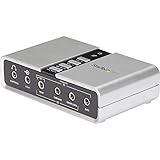
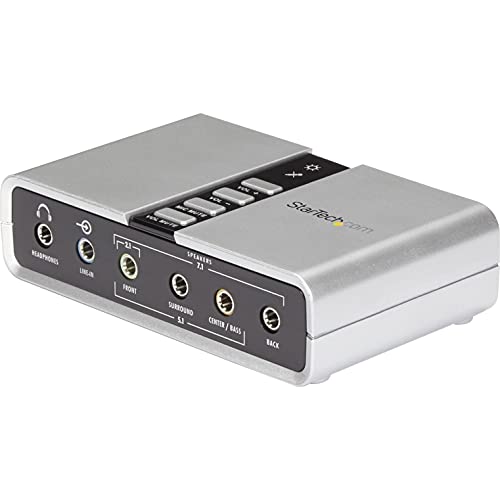
- External USB Sound Cards / DACs: These sit on your desk, connecting to your PC via a USB cable. The StarTech 7.1 USB Audio Adapter (ICUSBAUDIO7D), retailing for approximately $38, is a compact, external option. Measuring 3.9 x 2.4 x 1 inches and weighing a mere 3.2 ounces, it draws minimal power (under 2.5 watts) from a USB port while providing optical S/PDIF ports and multiple 3.5mm jacks for legacy 7.1 surround-sound speaker systems.
While onboard motherboard audio uses these same components, they are often crowded onto a shared circuit board right next to high-draw components like your CPU and graphics card. Dedicated cards isolate these components, utilizing higher-grade capacitors, superior shielding, and more powerful operational amplifiers (op-amps) to deliver a cleaner, louder sound stage.
Pros
- Superior Amplification for Studio Headphones: Standard motherboard audio chips struggle to adequately power high-impedance headphones (such as 250-ohm or 600-ohm studio models). A dedicated card provides the voltage needed to make these headphones sound rich, dynamic, and sufficiently loud.
- Isolation from System Noise: Because internal PCIe cards feature specialized shielding, and external USB cards sit completely outside the computer chassis, they are protected from the electromagnetic interference (EMI) generated by modern graphics cards drawing 300 to 450 watts of power.
- Legacy Speaker Support: If you own an older, high-end 5.1 or 7.1 analog speaker setup that relies on multiple color-coded 3.5mm jacks, a dedicated card provides the physical ports that many modern, minimalist motherboards have phased out.
- Advanced Software Features: Dedicated audio suites offer highly customizable equalizer (EQ) profiles, mic-monitoring controls, and proprietary virtual surround-sound algorithms that can help you pinpoint enemy footsteps in competitive shooters.
Cons
- High Cost-to-Benefit Ratio: Spending $40 to $150 on an audio card will yield almost zero audible difference if you are plugging in a standard $80 gaming headset. That money is better spent upgrading your headset, GPU, or monitor.
- Cluttered PC Interiors and Restricted Airflow: An internal PCIe card sits directly beneath your graphics card. In compact Micro-ATX or Mini-ITX cases, this extra board can block intake fans, raising your GPU temperatures by several degrees.
- Driver and Software Conflicts: Third-party audio software can occasionally conflict with Windows updates or game-specific audio engines, leading to crashes, popping noises, or sudden loss of audio mid-game.
- USB Headsets Bypass Them Entirely: If your gaming headset connects via USB or a wireless USB dongle, it has its own built-in DAC and amplifier. Plugging a USB headset into a computer with a $200 sound card completely bypasses the sound card, rendering it useless.
Who Should Buy It
You should consider buying a dedicated sound card if you fall into one of a few specific niches. First, if you are an audiophile who uses open-back, high-impedance headphones for both music production and gaming, a dedicated internal card or external USB DAC is essential to unlock their full frequency range.
Second, you should buy one if your current audio output suffers from a noticeable hiss, hum, or buzzing sound whenever you launch a game. This “coil whine” interference is a physical limitation of your motherboard’s shielding, and a dedicated device is often the only way to escape it. Finally, content creators who need clean microphone inputs with real-time hardware EQ processing will benefit from the upgraded ADCs found on dedicated cards.
Who Should Skip It
As we look ahead toward the gaming setups of 2026, motherboard manufacturers continue to narrow the gap by integrating high-end audio capacitors and isolated audio PCB traces directly into mid-range boards. If you bought your motherboard within the last few years and it cost over $150, its onboard audio (often powered by Realtek ALC1220 or ALC4080 chips) is already excellent.
You should absolutely skip a dedicated sound card if you use a wireless gaming headset, a USB-connected headset, or budget desktop speakers. In these scenarios, a dedicated sound card will sit completely idle, providing zero performance improvements for your investment.
Cheaper Alternatives
If you want to improve your gaming audio without spending a fortune on a dedicated PCIe card, there are several highly effective, budget-friendly workarounds.
| Option | Approximate Cost | Trade-off |
|---|---|---|
| USB-C to 3.5mm Dongle | $9 – $15 | Lacks advanced software features and multi-channel speaker ports, but provides an incredibly clean, hiss-free stereo DAC signal for low-impedance headphones. |
| External USB Sound Card (e.g., StarTech 7.1) | $30 – $40 | Offers physical 7.1 analog ports and optical outputs, but the amplifier power is limited compared to internal PCIe cards. |
| Free Spatial Audio Software (e.g., Windows Sonic) | $0 | Provides simulated 3D surround sound using your existing motherboard hardware, though it lacks physical hardware noise isolation. |
| USB Gaming Headset Upgrade | $60 – $100 | Bypasses poor motherboard audio completely by utilizing its own built-in USB sound card, though you are locked into using that specific headset. |
FAQ
Does a dedicated sound card increase gaming FPS?
No. In the early days of PC gaming, sound cards processed audio to free up precious CPU cycles, which did improve frame rates. Modern multi-core processors handle audio processing with less than 1% CPU utilization, meaning a dedicated sound card will have zero measurable impact on your game’s frames per second.
Will a sound card make my cheap gaming headset sound better?
Generally, no. The audio quality of a headset is primarily limited by its physical drivers (the miniature speakers inside the earcups). If your headset costs under $50, plugging it into an expensive sound card will not magically make it sound high-end; you would get a much bigger audio upgrade by spending that same budget on a better pair of headphones.
Is an external USB DAC better than an internal PCIe sound card?
For most modern setups, yes. External USB DACs sit completely outside the computer case, isolating them entirely from the electromagnetic noise created by your graphics card and power supply. Additionally, they do not block GPU airflow and put physical volume knobs within arm’s reach on your desk.
Can I use a dedicated sound card with a wireless headset?
No. Wireless gaming headsets use their own proprietary USB transmitters to send digital audio signals directly to the headset, where an internal, battery-powered DAC and amplifier process the sound. Because this process entirely bypasses your computer’s internal audio routing, a dedicated sound card cannot process or improve wireless audio.
Related guides
- Best Gaming PC for Overwatch 2: Ten Prebuilts Matched to Your Monitor (2026)
- Best Gaming PC for Baldur’s Gate 3: Matching CPU, VRAM and Storage to the Game (2026)
- Best Gaming PC for Apex Legends: Which Listings Fit a High-Refresh Setup (2026)
- Best RTX 3060 Gaming PCs: Eight Prebuilt Listings Compared by CPU, RAM and Cooling (2026)









