
Our Top Picks
 LIAN LI 4 Slots Vertical GPU Kit6.61 x 5.81 x 9.25 inches6.61 x 5.81 x 9.25 inches2.36 poundsCheck on Amazon
 Cooler Master Gen5 Vertical Graphics Card HolderMedium12.01 x 7.01 x 5.58 inches1.79 PoundsCheck on Amazon
The Short Answer
Yes, a GPU vertical mount is worth it if your primary goal is showing off your graphics card — the RGB lighting, the fans, the shroud design you paid extra for. That is the one condition: you are buying aesthetics, not performance. If you are expecting lower temperatures or higher frame rates, you will likely be disappointed, because most vertical mounts actually restrict airflow slightly compared to a standard horizontal installation. If your card is a plain, mostly hidden workhorse and your budget is tight, skip it. If you have a windowed case and a card you genuinely want to display, a $60–$80 riser kit is one of the cheapest visual upgrades you can make to a build.
What You Actually Get
A vertical GPU mount is a bracket plus a riser cable. The bracket screws into your case’s PCIe slot covers (or dedicated mounting points on newer cases) and holds your graphics card upright, parallel to the glass side panel. The riser cable — a PCIe extension, now commonly PCIe 5.0 on current kits — connects your motherboard’s slot to the card, letting it sit several inches away from the board.
As an Amazon Associate we earn from qualifying purchases at no extra cost to you.
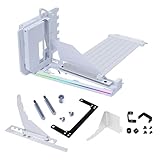

The practical result is that the card’s face, with its fans and lighting, points directly at your side panel instead of down at your floor. You see the whole card, not its backplate edge.
A typical kit like the LIAN LI 4 Slots Vertical GPU Kit (VG4v4) at around $74 includes a PCIe 5.0 riser rated for four-slot cards, while the Cooler Master Gen5 Vertical Graphics Card Holder at around $64 covers similar ground in a white finish. Both support modern full-size cards, which commonly run 300–340mm long, weigh 2–3kg, and draw 300–450 watts.
Three things to verify before buying any kit:
- Case compatibility. Your case needs clearance between the motherboard and side panel — typically 70–80mm minimum — plus mounting holes at the PCIe slot covers. Many mid-towers simply do not have the room.
- Slot count. A three-slot card needs a four-slot bracket with the card installed; a chunky 3.5–4 slot card like an RTX 4090-class cooler needs five or more slots of clearance.
- Riser generation. A PCIe 4.0 riser will run a PCIe 5.0 card, usually at a slight bandwidth reduction, but if you are paying for a kit anyway, matched-generation risers ($60–$90) avoid the question entirely.
Pros
- Showcase value. This is the real reason to buy. High-end cards with lighting and premium shrouds are designed to be seen, and vertical mounting is the only way to see them properly.
- Better view of the card’s fans. You can confirm fans are spinning and spot dust buildup without opening the case.
- PCIe 5.0 risers are future-proof. Modern kits handle current and next-generation cards without a bandwidth compromise.
- Can help in some airflow layouts. In cases where a thick card sits nearly flush against the PSU shroud, lifting it vertically can open a bit of breathing room underneath — though this is layout-dependent, not guaranteed.
- Cheap relative to the build. On a $2,000+ system, a $65–$75 kit is a small line item for a major visual change.
- Potentially reduces GPU sag stress. The bracket supports the card at both ends rather than cantilevering it off one slot.
Cons
- It usually costs you thermals. Pulling the card closer to the glass panel restricts intake to the fans. Expect temperatures to tick up a few degrees in many cases — the exact figure varies with your chassis and fan setup, so treat manufacturer claims of “no thermal penalty” with skepticism unless they publish case-specific testing.
- Case compatibility is a real hurdle. Clearance, mounting holes, and slot count rule out a large share of budget and compact cases.
- Riser cables can be a fault point. A seated riser occasionally causes instability or detection issues, and troubleshooting one more cable is one more headache.
- Added install complexity. You are unmounting a $1,000+ card, routing a flat ribbon cable, and torqueing brackets in tight quarters.
- Zero performance gain. Frame rates do not improve. If anyone tells you otherwise, they are selling something.
- White kits and specific finishes sell out. Matching an all-white build can mean waiting on restocks or paying above MSRP.
Who Should Buy It
- Showcase builders. You chose a card partly for its looks, your case has a tempered glass panel, and you want it on display.
- Owners of three-plus-slot monster cards. A heavy 3+ kg card that dominates a horizontal build often looks better and is better supported vertically.
- Builders with compatible cases. If your chassis has native vertical mount points and 80mm+ of panel clearance, installation is straightforward and the risks are minimal.
- Anyone finishing an aesthetic-themed build. For a white, open-frame, or showpiece system entering 2026, vertical mounting is close to standard practice.
Who Should Skip It
- Budget builds. $65–$75 buys a genuinely good case fan, which will do more for temperatures than a mount will hurt them.
- Tight cases. If your case lacks clearance or mounting points, forcing the issue means poor airflow or no fit at all.
- Thermally marginal systems. If your GPU already runs hot in a warm room or a low-airflow chassis, do not add a restriction.
- Anyone chasing performance. There is no FPS here. That is not the product.
Cheaper Alternatives
| Option | Cost | Trade-off |
|---|---|---|
| Anti-sag GPU support bracket | $8–$15 | Fixes sag only; the card stays horizontal and its face stays hidden |
| Adjustable GPU holder arm | $10–$20 | Same as above with height adjustability; no visual payoff |
| Better case airflow (one quality 140mm fan) | $15–$30 | Improves temperatures instead of aesthetics; solves the opposite problem |
| Windowed case with better card visibility angle | $0 (repositioning) to $80+ | Only helps marginally; a horizontal card always shows its edge to the glass |
FAQ
Does a vertical GPU mount hurt performance?
Frame rates are essentially unaffected, especially with a PCIe 5.0 riser. Thermals can take a small hit — commonly a few degrees — because the card’s fans sit closer to the glass panel with less intake room. How much depends on your specific case and fan layout, not on the mount itself.
Will a PCIe 4.0 riser work with a PCIe 5.0 graphics card?
In most cases, yes — the card will run at reduced bandwidth, which for gaming typically costs little to nothing in real-world frame rates. But since current PCIe 5.0 kits like the LIAN LI VG4v4 (around $74) and Cooler Master Gen5 (around $64) cost roughly the same as older 4.0 kits, buying matched-generation hardware removes the variable entirely.
Will my case and graphics card fit a vertical mount?
Check three numbers: at least 70–80mm between the motherboard and side panel for clearance, the bracket’s slot count versus your card’s slot width (a four-slot kit handles most three-slot cards; thick 3.5–4 slot coolers need more), and whether your case has mounting holes at the PCIe slot covers. If your case has dedicated vertical mount points, you are set.
Is a vertical GPU mount worth it for a mid-range card?
Usually not. Mid-range cards tend to have simpler shrouds with less to show off, and the $60–$80 kit price is a bigger share of the build. Spend that money on airflow or put it toward the GPU itself. Vertical mounting makes the most sense when the card itself is a visual centerpiece.
Related guides
- Best Gaming PC for Overwatch 2: Ten Prebuilts Matched to Your Monitor (2026)
- Best Gaming PC for Baldur’s Gate 3: Matching CPU, VRAM and Storage to the Game (2026)
- Best Gaming PC for Apex Legends: Which Listings Fit a High-Refresh Setup (2026)
- Best RTX 3060 Gaming PCs: Eight Prebuilt Listings Compared by CPU, RAM and Cooling (2026)









