
Our Top Picks

The Short Answer
Whether an external DAC is worth gaming comes down to one decisive condition: you use wired, mid-to-high-impedance headphones and your current setup suffers from motherboard audio noise or low volume levels. If you already rely on a wireless USB headset or standard Bluetooth headphones, an external Digital-to-Analog Converter (DAC) will deliver zero performance improvement because those devices bypass your computer’s internal audio circuitry entirely. However, if you are driving a set of wired studio headphones (ranging from 32 to 300 ohms) and want crisp, hiss-free positional audio alongside physical volume control on your desk, adding a dedicated DAC/amp unit is one of the most practical desktop upgrades you can make.
What You Actually Get
Every digital gaming device—whether a custom-built PC, a PlayStation 5, or a laptop—contains an internal DAC. Its job is to take the binary code (1s and 0s) generated by your game engine and translate it into an analog electrical signal that your headphone drivers convert into physical sound waves. The problem with built-in motherboard audio is environment. Motherboards are crowded real estate, packed with power delivery phases, high-draw graphics cards, and active cooling fans. This proximity creates electromagnetic interference (EMI), which often manifests as subtle background buzzing, electrical static, or hiss during quiet gaming moments.
As an Amazon Associate we earn from qualifying purchases at no extra cost to you.

An external DAC moves this entire delicate conversion process outside of your PC case or console chassis. Connected via a clean USB-C or optical cable, it isolates the audio signal from internal electronic noise. Most consumer units for gaming setups combine the DAC stage with a dedicated headphone amplifier stage, providing both clean signal conversion and physical power delivery.
From a desk design and spatial workflow perspective, an external DAC/amp acts as an ergonomic control station. Rather than alt-tabbing out of a match to adjust Windows volume sliders or fumbling with small inline inline cable pods, you get a dedicated, weighted volume knob directly within arm’s reach. Modern units range in size from compact footprint designs to full feature-laden desktop hubs:
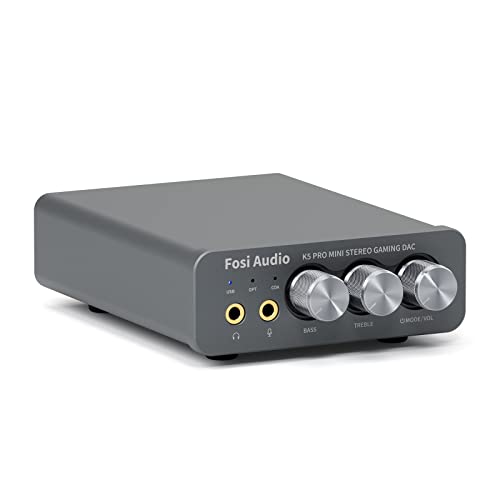
- Compact Entry-Level Units: Devices like the Fosi Audio K5 Pro ($70–$90 price range) measure roughly 4.3 x 3.8 x 1.3 inches and weigh approximately 0.55 pounds. They take up minimal desk real estate while providing micro-adjustments via physical bass, treble, and volume dials, delivering up to 1000mW at 16 ohms or 250mW into 32-ohm loads.
- Feature-Rich Dual-DSP Units: Advanced options like the Sound Blaster G8 ($150–$180 price range) offer a larger physical presence at roughly 7.2 x 4.5 x 1.8 inches and 0.88 pounds. These incorporate dual USB-C inputs for dual-PC or console/PC mixing, high-resolution 32-bit/384kHz playback, custom equalizer profiles, and balanced 4.4mm headphone outputs.
Pros
- Elimination of Background Noise: By shifting signal processing away from the motherboard, you eliminate the electrical hum, coil whine, and static buzz caused by high-draw GPUs and power supplies.
- Tactile Desktop Controls: Physical aluminum dials offer instant, precise volume and tone adjustments without disrupting your gameplay or overlaying software menus over your screen.
- Expanded Power Headroom: Dedicated amplifiers provide significantly more power output (ranging from 100mW to well over 1000mW) than standard 3.5mm motherboard jacks, allowing higher-impedance studio headphones to reproduce deep bass and wide dynamic range without distortion.
- Cross-Platform Compatibility: Most external gaming DACs feature driverless USB-C, optical, or coaxial inputs, allowing smooth toggling between a gaming PC, PS5, Nintendo Switch, or Mac workstation.
- Cleaner Desk Cable Routing: Consolidating your headphone, microphone, and powered speaker connections into a single rear-routed hub helps keep workstation wiring neat and hidden behind monitors or desk risers.
Cons
- Added Desktop Footprint: Adding a physical box requires extra space on your mousepad area or desk mat, along with running additional USB and power cables across your workspace.
- Zero Benefit for Wireless Gear: If your primary audio device is a wireless gaming headset using a 2.4GHz dongle, an external DAC cannot process or improve its signal.
- Diminishing Returns on Cheap Hardware: Pairing a $150 external DAC with a basic $20 set of budget earbuds will yield almost no perceptible audio improvement; your money is better spent upgrading the headphones first.
- Potential Driver or Software Overhead: Advanced DAC units that feature virtual 7.1 surround sound or game-chat balance knobs often require proprietary background software to unlock full functionality.
- Upfront Cost Investment: Quality gaming DACs cost anywhere from $70 to $200, representing a budget commitment that could otherwise go toward ergonomic seating, monitor arms, or GPU upgrades.
Who Should Buy It
You should invest in an external DAC if you currently use open-back studio headphones (such as 80-ohm or 250-ohm models) that sound quiet or flat when plugged directly into your computer case. It is also an ideal addition for players who suffer from audible GPU coil whine through their wired headsets, or streamers who switch between multiple sources (like a gaming PC and a capture console) and need a centralized hardware volume controller on their desk.
Who Should Skip It
You should skip an external DAC if you rely exclusively on wireless gaming headsets, direct USB-A/USB-C headsets, or Bluetooth audio. Additionally, if your computer motherboard was manufactured recently and features isolated audio traces with built-in shielding, and you use easy-to-drive 16-ohm to 32-ohm gaming headsets, your onboard sound card is likely already delivering clean, adequately loud performance.
Cheaper Alternatives
If you want to solve basic audio issues like static hiss or insufficient volume without dedicating budget and desk space to a full desktop DAC unit, consider these practical alternatives:
| Option | Cost Range | Trade-off |
|---|---|---|
FAQ
Does an external DAC reduce in-game audio lag?
No, an external DAC does not meaningfully alter or reduce audio latency compared to a functional onboard sound card. Modern wired audio transmission via USB or 3.5mm analog connections operates with near-zero latency (under 5 milliseconds), which is completely imperceptible during fast-paced gaming. Latency issues are almost exclusively confined to wireless Bluetooth connections, which an external wired DAC does not address.
Can an external DAC make enemy footsteps louder in FPS games?
An external DAC itself does not selectively boost specific sound effects like footsteps; it simply translates the game’s audio output with higher clarity, lower noise, and greater dynamic headroom. However, because a dedicated DAC/amp provides a cleaner signal and higher volume output without distortion, subtle directional audio cues—like footsteps, reload sounds, or distant gunfire—become much easier to isolate and pinpoint in the soundstage.
Is an external DAC worth gaming in 2026 if I already have a high-end motherboard?
In 2026, premium motherboard manufacturers routinely incorporate dedicated audio shielding, quality Japanese capacitors, and built-in headphone amplifiers capable of driving up to 600-ohm loads. If your motherboard cost over $200 and you experience no background noise, an external DAC will yield subtle improvements at best. The primary reasons to buy one with a modern motherboard are physical desk controls, multi-source mixing, and superior front-of-desk cable ergonomics.
Do I need separate software to run an external DAC on PC or console?
Most entry-level external DACs operate using standard USB Audio Class drivers, meaning they are completely plug-and-play on Windows, macOS, PS5, and Nintendo Switch without installing extra software. Higher-end gaming DACs offer optional companion software suites for customized EQ curves, virtual surround sound processing, and mic noise-suppression, but the core audio conversion and amplification functions work instantly out of the box.
Related guides
- Best Gaming PC for Overwatch 2: Ten Prebuilts Matched to Your Monitor (2026)
- Best Gaming PC for Baldur’s Gate 3: Matching CPU, VRAM and Storage to the Game (2026)
- Best Gaming PC for Apex Legends: Which Listings Fit a High-Refresh Setup (2026)
- Best RTX 3060 Gaming PCs: Eight Prebuilt Listings Compared by CPU, RAM and Cooling (2026)









