
Our Top Picks


The Short Answer
Whether is ddr5 ram worth it for budget gaming depends on one specific condition: whether you are building a completely new system from scratch or upgrading an existing one.
If you are assembling a brand-new gaming PC, yes, DDR5 is worth it because it secures an upgrade path on modern CPU sockets (like AMD AM5 or Intel LGA1700/1851). However, if you are trying to squeeze more life out of an older system, or if your total system budget is strictly under $600, DDR5 is not worth it. The minor performance gains do not justify the mandatory cost of a new motherboard and processor.
As an Amazon Associate we earn from qualifying purchases at no extra cost to you.

What You Actually Get
To understand if DDR5 fits into a budget gaming setup, we have to look at the physical and architectural upgrades it brings to your desk. From a hardware perspective, DDR5 is not just a speed bump; it is a complete redesign of how your system handles memory.
First, DDR5 operates at a lower base voltage of 1.1 volts compared to DDR4’s standard 1.2 volts (and up to 1.35 volts or higher for overclocked XMP profiles). For a home gaming setup, this lower voltage means less heat dissipation inside your PC case. If you are building a compact, small-form-factor PC for a minimalist living room or a tight desk space, keeping thermals low is crucial for maintaining a quiet environment. Additionally, DDR5 moves the Power Management Integrated Circuit (PMIC) directly onto the RAM stick itself, whereas DDR4 relied on the motherboard to manage power. This change allows for highly precise power distribution, though it does make the RAM modules run slightly warmer to the touch, requiring decent integrated heatspreaders.
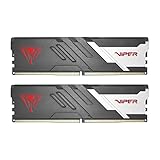
In terms of speed, DDR5 starts where DDR4 maxes out. Standard DDR4 typically runs between 2666MHz and 3600MHz. Entry-level DDR5 starts at 4800MHz and quickly climbs to sweet spots like 6000MHz. High-performance kits, such as the Patriot Viper Venom DDR5 32GB (2x16GB) 6000MHz CL30 desktop memory, offer exceptionally low latency (CL30) and massive bandwidth. While enthusiast-tier kits like this can sometimes carry premium price tags up to around $480 depending on market availability and regional import fees, they showcase the absolute performance ceiling of the technology.
For budget-conscious gamers, however, you do not need to spend hundreds of dollars on memory alone to see the benefits. Many pre-built budget systems and laptops now come with DDR5 integrated right out of the box. For example, the NIMO 15.6-inch IPS FHD Light Gaming Laptop offers an AMD Ryzen 5 6600H processor, an AMD Radeon 660M GPU, and 16GB of DDR5 RAM, all packaged in a portable chassis powered by a 100W Type-C adapter for around $480. In this case, DDR5 is built into the value proposition, providing the fast memory bandwidth required by the integrated Radeon 660M graphics without requiring a custom desktop build.
When it comes to actual in-game performance on a budget desktop, the impact of DDR5 depends heavily on your graphics card. If you are pairing your system with an entry-level GPU like an AMD Radeon RX 6600 (which draws about 130 watts of power), you will likely be GPU-bound in most modern titles. This means your graphics card is working at 100% capacity, and upgrading from DDR4 to DDR5 will only yield a modest 3% to 8% increase in average frame rates. However, where DDR5 truly shines is in your 1% low frame rates. It reduces sudden stuttering in open-world games, making your overall gaming experience feel significantly smoother, even if the maximum frame rate counter does not skyrocket.
Pros
- Future-Proof Socket Compatibility: Opting for DDR5 means you are using modern platforms like AMD’s AM5, which guarantees support for future CPU upgrades without needing a new motherboard.
- Improved Minimum Framerates: Higher memory bandwidth helps eliminate micro-stutters in asset-heavy, open-world games, leading to a smoother visual experience.
- On-Board Power Management: The shift to an on-module PMIC (Power Management Integrated Circuit) at 1.1V improves power efficiency and reduces motherboard complexity.
- Dual Subchannels per Module: DDR5 splits a single physical stick into two independent 32-bit channels, which improves data retrieval efficiency compared to DDR4’s single 64-bit channel.
Cons
- Higher Platform Entry Cost: While DDR5 RAM itself has dropped in price, compatible motherboards generally start around $110 to $150, and compatible CPUs add another $120 to $200 minimum to your build cost.
- Higher CAS Latency: DDR5 has higher latency numbers (typically CL30 to CL40) compared to DDR4 (typically CL16 to CL18), though this is largely offset by the massive increase in clock speed.
- Negligible Gains for GPU-Bound Systems: If you are gaming at 1440p or using a budget graphics card, the GPU will remain the bottleneck, rendering the extra speed of DDR5 mostly unnoticeable.
Who Should Buy It
You should opt for DDR5 RAM if you are building a new PC from scratch with a budget of $800 or more. If you want a clean, modern home office setup that will easily transition into the future without needing a complete overhaul, starting on a DDR5 platform is the smartest move. It is also highly recommended for gamers who play CPU-intensive, simulation, or multiplayer titles like Cities: Skylines, Counter-Strike 2, or Valorant, where memory bandwidth directly impacts system latency and overall frame pacing.
Who Should Skip It
You should skip DDR5 if your total gaming PC budget is strictly capped under $600. At this price tier, every dollar must be funneled directly into the graphics card and processor. Choosing a DDR4-based motherboard and a cheaper CPU (such as an Intel Core i3-12100F or AMD Ryzen 5 5600) allows you to save roughly $80 to $120. That saved money can be redirected to upgrade your GPU from an entry-level model to a mid-range card, which will provide a much larger real-world performance jump than DDR5 ever could.
Cheaper Alternatives
If DDR5 stretches your budget too thin, there are several viable ways to build a highly capable gaming system without overspending on memory hardware.
| Option | Estimated Cost | Trade-off |
|---|---|---|
| 16GB DDR4 (2x8GB) 3200MHz CL16 | $35 – $45 | No future CPU upgrade path on the same motherboard; slightly lower 1% low framerates in CPU-heavy games. |
| 32GB DDR4 (2x16GB) 3200MHz CL16 | $55 – $70 | Provides excellent capacity for multitasking at a low price, but is still locked to older, end-of-life platforms. |
| Budget DDR5 (2x8GB) 5200MHz CL40 | $50 – $60 | Gets you onto a modern motherboard platform, but the lower speed and high latency offer almost no performance benefit over fast DDR4. |
FAQ
Can I use DDR5 RAM in a DDR4 motherboard socket?
No. DDR4 and DDR5 RAM modules are physically incompatible. Even though they have a similar physical length, the key notch on the bottom connector of a DDR5 module is placed in a different position to prevent users from accidentally inserting it into a DDR4 slot. You must choose a motherboard that explicitly supports DDR5.
Is 16GB of DDR5 enough for budget gaming, or do I need 32GB?
For a budget gaming setup, 16GB of DDR5 RAM (configured as two 8GB sticks to run in dual-channel mode) is perfectly adequate for the vast majority of modern games. However, if you plan to keep multiple browser tabs open, stream your gameplay, or run background productivity apps in your home office, upgrading to 32GB provides comfortable headroom for the future.
Does DDR5 RAM require a special power supply?
No. While DDR5 features onboard power management (PMIC) and runs at a lower voltage (1.1V), it draws its power directly from the motherboard’s 24-pin connection. Any standard ATX power supply that is compatible with your motherboard and CPU will work perfectly fine with DDR5 RAM.
Will DDR4 RAM be completely obsolete by 2026?
While DDR4 will no longer be featured on new mainstream motherboard releases by 2026, it will not be completely obsolete. Millions of active gaming systems will still run on DDR4, and budget components will remain widely available on the used market. However, building a new system on DDR4 at that point will severely limit your ability to make simple component upgrades down the road.
Related guides
- Best Gaming PC for Overwatch 2: Ten Prebuilts Matched to Your Monitor (2026)
- Best Gaming PC for Baldur’s Gate 3: Matching CPU, VRAM and Storage to the Game (2026)
- Best Gaming PC for Apex Legends: Which Listings Fit a High-Refresh Setup (2026)
- Best RTX 3060 Gaming PCs: Eight Prebuilt Listings Compared by CPU, RAM and Cooling (2026)









