
Our Top Picks
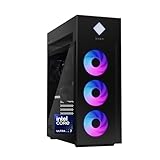
 HP OMEN 45L Gaming Desktop3,847.65 cubic inches8.03 x 18.5 x 21.85 inches49.82 poundsCheck on Amazon

The Short Answer
Yes, DDR5 is worth it for gaming right now — with one condition: you’re buying (or building) a new system anyway. If you already own a working DDR4 rig, the memory alone won’t transform your gaming experience, and it’s not worth an overhaul just to switch. For anyone building fresh or buying a prebuilt desktop today, DDR5 is simply the sensible default because the motherboards and CPUs that matter most for gaming now use it.
What You Actually Get
DDR5 brought several real changes over DDR4: higher base speeds (5,200 MT/s is the entry floor, with 6,000–6,400 MT/s as the gaming sweet spot), double the density per stick (24GB and 48GB modules are now common alongside 16GB), and lower voltage at comparable speeds (1.1V at baseline versus DDR4’s 1.2V). On-die power regulation and two independent 32-bit channels per module round out the spec.
As an Amazon Associate we earn from qualifying purchases at no extra cost to you.

In practice, what does that mean for your frame rates? Modest but real gains. Depending on the game and resolution, moving from a well-tuned DDR4 kit to a decent DDR5 kit typically buys somewhere between roughly 5% and 15% more average FPS in CPU-limited scenarios — think esports titles at 1080p or simulation games with lots of active entities. At 1440p and 4K, where the graphics card becomes the bottleneck, the difference often shrinks into the low single digits. Stutter behavior in CPU-heavy open-world games can improve too, which some players notice more than raw FPS.
The bigger story is platform, not performance. AMD’s AM5 socket and Intel’s current Core Ultra desktop chips are DDR5-only. If you want a modern CPU with a realistic upgrade path, DDR5 isn’t an optional luxury — it’s the ticket price.
Pros
- Real FPS gains in CPU-bound games. Expect roughly 5–15% in titles like competitive shooters and sims when you’re playing at 1080p with a fast GPU.
- Higher capacity per stick. A 2x24GB kit gives you 48GB in two slots, leaving room to expand to 96GB later without replacing anything.
- Lower power draw. Baseline DDR5 runs at 1.1V versus 1.2V for DDR4, a small but genuine efficiency win.
- Future-proof platform. AM5 boards continue to support new CPU generations, so a DDR5 build today can survive a GPU-and-CPU refresh or two.
- Prices have fallen hard. A 32GB DDR5-6000 kit now routinely costs $85–$130, closing most of the gap with DDR4.
- Better memory bandwidth headroom. Useful beyond gaming for streaming, video editing, and other memory-hungry side tasks.
Cons
- No upgrade path from DDR4. DDR4 and DDR5 are physically keyed differently — they will not fit the same motherboard. Switching means a new board, and usually a new CPU.
- Marginal at high resolutions. If you game at 4K, the GPU does the heavy lifting and the memory type barely registers.
- Speed matters more than the label. A slow DDR5 kit (5,200 MT/s with loose timings) can perform worse than a fast DDR4 kit. Buy 6,000 MT/s with CL30–CL36 timings or don’t bother optimizing.
- Slightly higher platform cost. AM5 and Intel DDR5 boards still carry a modest premium over the cheapest DDR4 alternatives.
- Early kits needed BIOS updates. Some boards required memory-training fixes in their first firmware releases; buy from vendors with current stock and updated BIOS.
Who Should Buy It
You’re building a new PC or buying a prebuilt from scratch. In that case the decision is already made — modern gaming platforms are DDR5, and the price difference versus a DDR4 setup has collapsed to under $100 in most builds. It’s also worth it if you play CPU-limited games competitively, stream while gaming, or keep a system for four-plus years and want the upgrade path.
A quick note for prebuilt shoppers: the two reference systems here both make sense. The Skytech Gaming PC with a Ryzen 7 9850X3D and RX 9070 XT at around $2,900 targets maximum frame rates and includes 32GB of DDR5 plus a 2TB SSD. The HP OMEN 45L at around $2,500 pairs an Intel Core Ultra 7 265K with an RTX 5070 Ti, 32GB of RAM, and a 1TB SSD in a tempered-glass case; the 45L chassis measures roughly 8.1 x 18.6 x 21.4 inches and weighs around 30 pounds, so check your desk clearance. Both will feel identical in DDR5-specific terms — the RAM is no longer the differentiator.
Who Should Skip It
If you already own a DDR4 system with a Ryzen 5000 or Intel 12th/13th-gen CPU, skip the switch unless you’re replacing the whole platform anyway. A GPU upgrade will do far more for your frame rates than a memory migration ever will. Also skip it if you game exclusively at 4K with no interest in competitive CPU-bound titles — you’d pay the platform premium for gains you can’t see. And if your current rig has 16GB of RAM and games are stuttering, adding 16GB of whatever standard you already have beats jumping platforms.
Cheaper Alternatives
| Option | Cost | Trade-off |
|---|---|---|
| Add 16GB DDR4 to your existing rig | $35–$55 | Solves stutter from low capacity; no FPS boost from bandwidth, but no platform change either. |
| Overclock your existing DDR4 to 3,600–3,800 MT/s with tuned timings | $0 | Free gains of a few percent in CPU-bound games; requires patience in BIOS. |
| Put the money toward a GPU upgrade instead | $250–$600 for a meaningful class jump | Far larger FPS gains at 1440p/4K than any memory switch; may need a PSU of 650–850W. |
| Buy a DDR5-6000 CL30 kit now, save the platform jump for later | $85–$130 | Only works if you’re already on AM5 or a DDR5 Intel board — cheapest way to get the “full” DDR5 experience. |
FAQ
How much FPS will I actually gain from DDR5?
In CPU-limited games at 1080p, typical gains over a good DDR4 setup run around 5–15%. At 1440p and above, expect low single digits or nothing, because your graphics card becomes the limiting factor long before memory bandwidth does.
Is 32GB of DDR5 necessary, or is 16GB fine?
16GB is still workable for pure gaming, but 32GB is the smart buy in a new build. Modern titles plus a browser, Discord, and background apps can eat past 16GB, and 32GB kits cost so little now — often just $30–$40 more — that the capacity is essentially free insurance.
What speed DDR5 should I buy?
Aim for 6,000 MT/s with CL30 timings on AMD AM5, or 6,400–7,200 MT/s on Intel, where the memory controller tolerates higher speeds more easily. Below 5,600 MT/s you’re leaving easy performance on the table; above 7,200 MT/s the price climbs faster than the returns.
Will DDR4 become obsolete for gaming soon?
Not soon enough to hurt. Games still ship supporting hardware many years old, and a DDR4 system will remain fully playable through the rest of the decade. But by the time you’re shopping for a new CPU around 2026 or later, DDR5-only platforms will be the entire market — so new builds today should plan around DDR5 from the start.
Related guides
- Best Gaming PC for Overwatch 2: Ten Prebuilts Matched to Your Monitor (2026)
- Best Gaming PC for Baldur’s Gate 3: Matching CPU, VRAM and Storage to the Game (2026)
- Best Gaming PC for Apex Legends: Which Listings Fit a High-Refresh Setup (2026)
- Best RTX 3060 Gaming PCs: Eight Prebuilt Listings Compared by CPU, RAM and Cooling (2026)









