
Our Top Picks
 SANSUI 32 Inch Curved 240Hz Gaming Monitor High32 inch24.19 x 8.06 x 17.75 inches9.7 poundsCheck on Amazon
The Short Answer
Yes, a high refresh monitor is worth it for competitive gaming — if your PC or console can consistently push frame rates that match the monitor’s refresh rate. If your system can deliver 180 to 240 frames per second in the games you actually play competitively, you will see and feel a real advantage in motion clarity, input responsiveness, and target tracking. If it cannot, you are paying for headroom you will not use, and your money is better spent on a GPU, CPU, or faster storage first.
For most competitive players focused on shooters, battle royales, and fighting games, 144Hz is the sweet spot for value, while 240Hz is the current sweet spot for serious advantage without the extreme cost of 360Hz+ panels. As of 2026, 240Hz 1080p monitors have fallen into the $170 to $230 range, making the upgrade far more accessible than it was just a few years ago.
As an Amazon Associate we earn from qualifying purchases at no extra cost to you.

What You Actually Get
A monitor’s refresh rate, measured in hertz (Hz), is how many times it can draw a new image per second. A standard 60Hz display shows 60 frames per second. A 144Hz display shows 144, and a 240Hz display shows 240. When your game is running at high frame rates to match, everything in motion looks dramatically smoother.
What you notice first is not just smoothness, but clarity in motion. On a 60Hz panel, a fast-moving enemy is a blur with a faint trailing edge. On a 144Hz or 240Hz panel, that same enemy retains sharper edges while strafing, which makes it easier to track and land shots. The improvement from 60Hz to 144Hz is obvious to almost everyone within minutes. The jump from 144Hz to 240Hz is subtler but still valuable for competitive play, especially in close-range tracking and flick shots.
You also get lower system latency. Refresh rate is tied to how often the display can show a new frame from your GPU. At 60Hz, a new frame is delivered every 16.6 milliseconds. At 240Hz, it is every 4.16 milliseconds. Combined with modern adaptive sync technologies like FreeSync and G-SYNC Compatible, this cuts the time between your mouse movement and seeing the result on screen. In competitive titles where reactions are measured in milliseconds, that reduction matters.
In practical terms, here is what a modern high refresh gaming monitor looks like physically. A typical 27-inch flat IPS model measures roughly 24.2 x 18.0 x 8.0 inches with the stand and weighs 11 to 13 pounds. A 32-inch curved VA model is larger at about 27.9 x 20.5 x 10.2 inches and weighs 15 to 18 pounds with its stand. Power draw is modest, usually 30 to 65 watts during gaming and under 0.5 watts in standby, so operating cost is negligible compared to your PC itself.
At this price point, you are generally getting a 1920×1080 (FHD) panel rather than 1440p. That is intentional for competitive gaming. 1080p is far easier to drive to 200+ fps with a mid-range GPU, and it keeps the focus on speed and response time rather than pixel density. Most 240Hz models in the around $180 to $189 range advertise 1ms MPRT or 1ms GtG response times and support both HDMI 2.0 and DisplayPort 1.4 inputs to hit full refresh at 1080p.
Pros
- Clear competitive advantage in motion: Higher refresh dramatically reduces motion blur and ghosting, so fast-moving targets stay sharper and easier to track in games like Valorant, Counter-Strike 2, Overwatch 2, Apex Legends, and Call of Duty.
- Lower input lag and more responsive feel: Dropping frame time from 16.6ms at 60Hz to 6.94ms at 144Hz and 4.16ms at 240Hz makes aiming, peeking, and building feel directly connected to your hand. Most players report their aim feels more consistent within a few days of adjusting.
- Adaptive sync has matured: FreeSync and G-SYNC Compatible modes on current 240Hz monitors eliminate most screen tearing and stuttering without adding noticeable lag, as long as you keep your frame rate within the monitor’s variable refresh range.
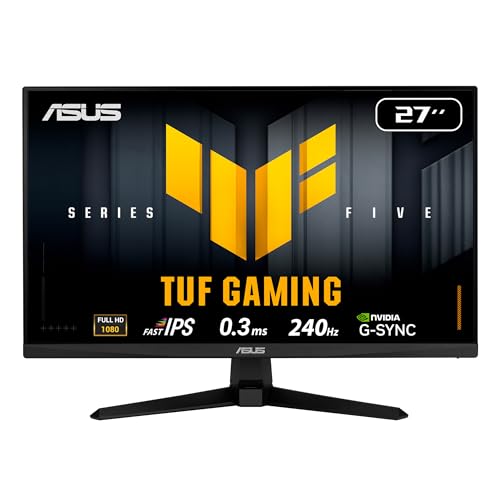
- Excellent value in 2026: 1080p 240Hz panels like the 27-inch flat IPS class represented by the ASUS TUF VG279QM5A at $189 and the 32-inch curved class represented by the SANSUI 32 Inch Curved 240Hz at around $180 have brought esports-grade speed to a mainstream budget. You no longer need to pay $300+ for 240Hz.
- Better for eyes during long sessions: Smoother motion reduces the micro-stutter that causes eye fatigue on 60Hz displays during long practice or tournament sessions, particularly when scrolling or quickly panning the camera.
- Future-proofing for GPU upgrades: If you buy a 240Hz display now, you will not need to replace it when you upgrade your graphics card next. The monitor will simply show more of the performance you paid for.
Cons
- Useless without the frame rate: A 240Hz monitor locked to 90 fps by a weak GPU looks no better than a good 144Hz or even 100Hz display. You need a system that can consistently hit 200+ fps in your competitive titles to justify 240Hz.
- 1080p at large sizes is a trade-off: On a 32-inch 1080p curved panel, pixel density is about 69 PPI versus about 82 PPI on a 27-inch 1080p. You gain immersion but lose sharpness for text, browsing, and productivity compared to 27-inch 1440p monitors.
- Color and viewing angle compromises on budget VA: Curved VA panels offer great contrast (often 3000:1) but can have narrower viewing angles and slower dark transitions than IPS. Fast IPS models have excellent angles and color (typically covering 99%+ sRGB) but lower contrast around 1000:1.
- Desk space and ergonomics: High refresh monitors often use large, V-shaped feet that are 20 to 24 inches wide. Curved 32-inch models need about 28 to 30 inches of desk width and 10 to 12 inches of depth to sit comfortably. Check stand adjustability before you buy — some budget models offer only tilt, not height, swivel, or pivot.
- Diminishing returns above 240Hz: For most players, the jump from 240Hz to 360Hz is much harder to feel than 60Hz to 144Hz and requires an even more powerful and expensive PC. 360Hz and 480Hz 1080p monitors still cost $350 to $600+.
Who Should Buy It
You should buy a high refresh monitor if you primarily play competitive multiplayer games and you already have the hardware to drive them. This includes anyone with a mid-range or better GPU from the last two generations (for example, an RTX 3060 / RTX 4060 / RX 6600 XT class card or better) playing at 1080p, where 144 to 240 fps is realistic with competitive settings.
It is also a smart purchase if you are serious about ranked improvement. If you practice aim trainers, play scrims, or enter local tournaments, the combination of sharper motion and lower latency makes your practice more effective. The investment pays off in consistency rather than a sudden jump in rank.
Size preference matters. Choose a 27-inch 1080p 240Hz Fast IPS monitor, such as the ASUS TUF VG279QM5A type, if you want the best all-around balance of speed, color accuracy, and desk fit for competitive FPS games where clarity and response time come first. Choose a 32-inch curved 240Hz monitor, such as the SANSUI 32 Inch type, if you want a more immersive field of view for both competitive and casual play and you sit 28 to 36 inches from the screen.
Who Should Skip It
Skip a high refresh monitor for now if your PC cannot push beyond 100 to 120 fps in your main games without major visual compromises, or if you mostly play single-player, cinematic, or strategy games at 60 fps where resolution, contrast, and color matter more than raw speed. In that case a 60Hz or 75Hz 1440p or 4K display will look better for the same money.
Also skip it if you are tight on desk space or use your monitor heavily for color-critical work, photo editing, or reading. A 32-inch 1080p curved screen is not ideal for text sharpness or accurate editing. Console players should check carefully as well — PlayStation 5 and Xbox Series X only support up to 120Hz in select titles, so a 240Hz panel will run at 120Hz maximum on console and your extra refresh goes unused.
Cheaper Alternatives
| Option | Cost | Trade-off |
|---|---|---|
| 1080p 144Hz IPS Monitor (27-inch) | $120 to $160 | Still a huge upgrade over 60Hz, but you give up the extra motion clarity and lowest lag of 240Hz for about $30 to $50 in savings. |
| 1080p 165Hz to 180Hz VA Curved Monitor (27-32 inch) | $110 to $150 | Cheaper and immersive, but higher response times and more smearing in dark scenes than 240Hz Fast IPS; less future headroom. |
| 1440p 144Hz to 165Hz Monitor (27-inch) | $170 to $220 | Sharper image for work and single-player games, but requires a much stronger GPU to hit 144 fps at 1440p in competitive titles. |
| Keep current 60Hz/75Hz + GPU upgrade | $200 to $350 for GPU | If your system is the bottleneck, a GPU upgrade first will raise fps on your existing display more than a monitor that cannot be fed. |
FAQ
Can I see the difference between 144Hz and 240Hz?
Most competitive players can, but it is less dramatic than 60Hz to 144Hz. At 240Hz, fast panning and close-range strafing look cleaner with less blur, and mouse input feels slightly more immediate. If you mainly play at 120 to 150 fps, you will not see much difference. If you consistently play at 200+ fps, you will feel the improvement within a few hours, especially in shooters.
Do I need a powerful PC for a 240Hz 1080p monitor?
Yes, to get the full benefit. You need a system that can deliver 200 to 240 fps in your competitive games at 1080p. At competitive/low settings this is achievable with a mid-range GPU paired with a modern 6-core CPU and 16GB RAM. For AAA or graphically heavy games, you will need to lower settings significantly or accept that you will play those titles at 120 to 144 fps, which is still smooth.
Is 1080p still good enough for competitive gaming?
Yes. 1080p remains the standard for competitive gaming because it is the easiest resolution to drive to very high frame rates, which matters more than extra pixels for winning fights. At 24 to 27 inches, 1080p looks sharp for gaming at normal viewing distance. At 32 inches it looks softer for desktop work but still excellent in motion, which is why 32-inch 1080p models are positioned as budget immersive options rather than productivity displays.
Should I choose a 27-inch flat IPS or a 32-inch curved VA for competition?
For pure competitive performance, most players prefer a 27-inch flat IPS. It offers slightly faster pixel response, more accurate colors, and a smaller image where the entire battlefield stays in your central vision. A 32-inch curved VA is better if you want immersion and a larger, more wrap-around view for mixed use, and if your desk can accommodate a stand that is about 28 inches wide and 10 inches deep. Both at 240Hz are far ahead of any 60Hz or 75Hz panel for competitive play.
Related guides
- Best Gaming PC for Overwatch 2: Ten Prebuilts Matched to Your Monitor (2026)
- Best Gaming PC for Baldur’s Gate 3: Matching CPU, VRAM and Storage to the Game (2026)
- Best Gaming PC for Apex Legends: Which Listings Fit a High-Refresh Setup (2026)
- Best RTX 3060 Gaming PCs: Eight Prebuilt Listings Compared by CPU, RAM and Cooling (2026)









