
Our Top Picks

The Short Answer
For most gamers, liquid cooling is only worth it under one condition: you’re running a high-wattage CPU (roughly 150W and above, like an Ryzen 7 9700X under full load or any current-gen i7/i9) in a case with mediocre airflow, or you want the quietest possible build. If you’re gaming on a mid-range chip, a good $50–$90 air cooler will keep temperatures within a few degrees of a 240mm all-in-one liquid cooler — for less money and fewer points of failure.
So: worth it for enthusiasts, overclockers, and small-form-factor builders. Skip it if your budget is tight and every dollar should go toward the GPU instead.
As an Amazon Associate we earn from qualifying purchases at no extra cost to you.

What You Actually Get
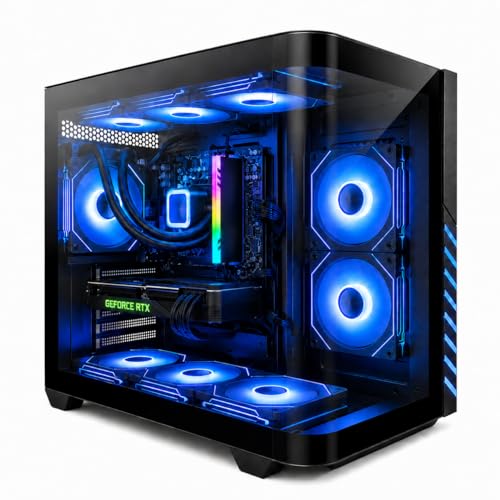
An all-in-one (AIO) liquid cooler is a sealed loop: a pump sitting on your CPU circulates coolant through a tube to a radiator, where fans exhaust the heat. It is not a custom loop — you never refill it, and it’s no more efficient at moving heat than air in theory. What it does better is move heat elsewhere. Instead of dumping 200W+ of heat right next to your RAM and VRMs like a tower air cooler, an AIO exhausts it through a radiator mounted at the top or front of your case.
Here’s what that translates to in real specs. A 240mm AIO is typically around 277 x 120 x 27mm for the radiator and adds roughly 1.3–1.6kg of weight hanging in your case. A 360mm unit pushes that to about 397 x 120 x 27mm and needs a case with at least 360mm of radiator clearance — something you must check before buying, because it’s the most common compatibility mistake. Air coolers, by contrast, top out around 155–168mm tall, which rules out many compact cases.
Pump noise is the trade-off most reviews gloss over. Modern AIO pumps run at 2,500–3,000 RPM and produce a faint but constant hum. Fans on a 240mm radiator usually spin slower than air-cooler fans for the same cooling, so the overall noise profile can be quieter under load — but the pump never turns off.
Pros
- Better sustained temperatures on hot CPUs. A 360mm AIO can dissipate 300W+ continuously, which matters for flagship chips that boost hard during long gaming sessions.
- Clearance and sightlines. Nothing towers over your motherboard, so RAM with tall heat spreaders and VRM heatsinks stay fully visible and accessible.
- Quieter under load (often). Larger radiator surface area means fans can run at 800–1,200 RPM instead of 1,800+, and the noise is spread across three fans rather than concentrated in one.
- Better fit for small cases. A 120mm or 240mm AIO fits where a 158mm tower cooler physically cannot.
- Aesthetics. If you value a clean build with a display-capable pump cap, that’s a legitimate reason — you’ll look at this machine every day.
Cons
- Cost. A quality 240mm AIO runs $90–$130; a 360mm runs $130–$200. A top-tier air cooler like a dual-tower model costs $40–$90 and cools nearly as well for chips under 200W.
- More failure points. A pump failure kills your system instantly; a fan failure on an air cooler gives you thermal throttling and time to react. AIO pumps typically carry 5–6 year warranties, but when they die, the whole unit goes in the trash.
- Limited lifespan. Coolant permeates the tubing over time. Expect 5–7 years of effective life regardless of warranty.
- Installation complexity. You’re mounting a radiator, routing tubes, and often the pump needs to sit at the loop’s lowest point to avoid air gurgling. Air coolers are four screws and done.
- Negligible FPS gain. On a mid-range CPU, liquid cooling will not raise your frame rate. If your chip isn’t throttling, extra cooling headroom buys you nothing in-game.
Who Should Buy It
Buy liquid cooling if you’re pairing an RTX 4070 Ti-class GPU or better with a 150W+ CPU and gaming for multi-hour sessions in a warm room. Buy it if you’re building in a small-form-factor case under 25 liters where a tower cooler won’t fit. Buy it if noise matters — a well-tuned 360mm loop is genuinely quieter under full load. And buy it if you simply want the look; enthusiasm is a valid budget line.
It’s also the standard configuration on many strong prebuilts. A liquid-cooled Ryzen 7 8700F with an RTX 4060 Ti and 16GB of DDR5 around $1,150, or a Ryzen 7 9700X prebuilt with an RTX 5060 Ti near $1,500, both use closed loops to keep noise down in compact chassis — and at those prices the cooler is essentially bundled rather than something you pay extra for.
Who Should Skip It
Skip it if you’re running a 65W–88W CPU like a Ryzen 5 7600 or Intel’s non-K mid-range chips — a $35–$60 tower cooler handles those without breaking a sweat. Skip it if your total budget is under $1,000 and every $100 moved from cooling to the GPU buys roughly one tier of graphics performance. Skip it if you hate maintenance anxiety: leaks are rare with modern units, but “rare” isn’t “never,” and a slow pump death is more annoying than a slow fan death. And skip it if you upgrade CPUs often — AIO mounting brackets occasionally lag behind new socket launches.
Cheaper Alternatives
| Option | Cost | Trade-off |
|---|---|---|
| Dual-tower air cooler (e.g., 120mm-class twin towers, ~155mm tall) | $40–$90 | Handles up to ~250W; taller and heavier, may block tall RAM; slightly louder at max load |
| Single-tower or downdraft cooler | $20–$45 | Fine for 65W–100W CPUs; also cools RAM and VRM; not enough for flagship chips |
| Stock cooler (included with many AMD chips) | $0 | Adequate at stock speeds but loud under load; no headroom for hot spells or overclocking |
| Improved case airflow (2–3 extra 120mm fans) | $20–$40 | Drops CPU and GPU temps several degrees; no compatibility concerns; adds fan headers and slight noise |
For the money saved dropping from a 360mm AIO to a $60 air cooler — roughly $100–$140 — you could step up a GPU tier, and that will show up in your frame rates.
FAQ
Do liquid coolers leak?
Rarely. Modern AIOs from major brands use reinforced tubing and have leak rates well under one percent, and most include leak-damage warranties that cover other components. Still, avoid cheap no-name units, and don’t buy an AIO that’s been sitting on a shelf for years — the coolant degrades over time.
How long does an all-in-one liquid cooler last?
Plan on 5–7 years. The pump is usually the first component to fail, and coolant slowly permeates through the tubing. Most manufacturers back their units with 5–6 year warranties, which is a good proxy for expected lifespan. Air coolers, having only one moving part, can last decades.
Is liquid cooling better for gaming performance?
Only indirectly. If your CPU is throttling under load — sustained temperatures pinned at 95°C+, with clock speeds dropping — then better cooling restores lost performance. If your current cooler keeps the chip in the 70s–80s°C, an AIO changes nothing about your frame rate. It changes acoustics and aesthetics more than performance.
Should I get a 240mm or 360mm AIO?
A 240mm is sufficient for CPUs up to about 200W and fits far more cases. A 360mm makes sense only for flagship, high-wattage chips or if you want maximum acoustic headroom — and you’ll need a case with at least ~400mm of top or front radiator clearance. Measure before you buy; radiator clearance is the single most common return reason for AIOs.
Related guides
- Best Gaming PC for Overwatch 2: Ten Prebuilts Matched to Your Monitor (2026)
- Best Gaming PC for Baldur’s Gate 3: Matching CPU, VRAM and Storage to the Game (2026)
- Best Gaming PC for Apex Legends: Which Listings Fit a High-Refresh Setup (2026)
- Best RTX 3060 Gaming PCs: Eight Prebuilt Listings Compared by CPU, RAM and Cooling (2026)









