
Our Top Picks

The Short Answer
Whether liquid metal thermal paste is worth the risk depends on one condition: your tolerance for hardware-ending mistakes balanced against your need for extreme thermal performance. For 95% of PC builders, home office users, and casual gamers, the answer is a resounding no. The minor temperature drop does not justify the catastrophic risk of short-circuiting expensive components. However, if you are an extreme overclocker, a custom water-cooling enthusiast pushing CPUs past 250 watts, or a technician restoring a PlayStation 5 console, the dramatic boost in thermal conductivity makes it a risk worth taking.
What You Actually Get
Standard thermal paste is typically made of silicone grease filled with metal oxides or ceramic particles. It is thick, forgiving, and electrically non-conductive. Liquid metal, on the other hand, is a eutectic alloy of gallium, indium, and tin (often referred to by the brand name Galinstan). It remains liquid at room temperature and behaves physically like mercury.
As an Amazon Associate we earn from qualifying purchases at no extra cost to you.


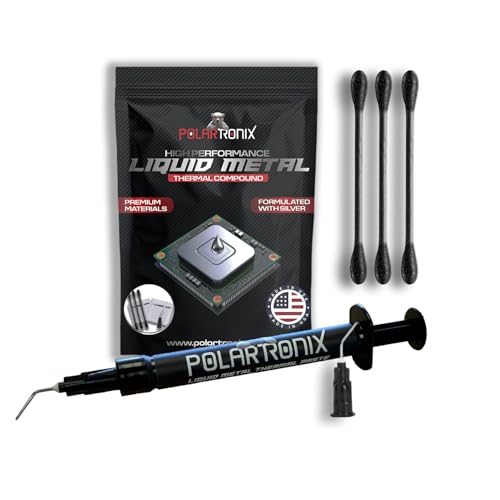
When you purchase a premium liquid metal compound, such as Thermal Grizzly Liquid Metal Thermal Paste Conductonaut (1 Gram for around $14) or the USA-made PolarTronix Liquid Metal Thermal Paste (1 Gram for around $12), you receive a tiny syringe containing a highly dense, reflective silver liquid. Because of its liquid state, a 1-gram syringe is incredibly small—often just a few centimeters long—but contains enough material for 5 to 10 applications. This is because you only need a microscopic layer (roughly 0.1 grams or less) to cover a standard CPU or GPU die.
The magic of these alloys lies in their raw thermal conductivity. Standard high-end thermal pastes offer a thermal conductivity rating between 5 W/mK (Watts per meter-kelvin) and 15 W/mK. In contrast, liquid metal compounds boast ratings of 73 W/mK to over 80 W/mK. By replacing a thick, resistive layer of silicone paste with a microscopic, highly conductive film of liquid metal, you minimize the thermal resistance between your processor and the heatsink. This allows heat to transfer almost instantly, preventing thermal throttling during intense workloads.
Pros
- Unmatched Heat Transfer: With thermal conductivity ratings up to eight times higher than traditional carbon- or silicone-based pastes, liquid metal offers the fastest thermal transfer possible outside of direct soldering.
- Significant Temperature Drops: Replacing stock thermal compound with liquid metal on a hot-running processor can lower load temperatures by 10°C to 20°C. This directly translates to lower fan speeds, a quieter home office, and higher sustained boost clocks.
- No Drying or Pumping Out: Standard thermal pastes suffer from “pump-out” (where heating and cooling cycles push the paste out of the sides of the die) and dry out over a few years. Liquid metal remains stable and liquid, meaning it can theoretically last the lifetime of the system without needing reapplication.
- Essential for Console Repair: Modern game consoles, like the PS5, pull up to 180 watts of power and rely on factory-applied liquid metal to stay cool. If you are repairing or deep-cleaning one of these consoles, using a product like PolarTronix Liquid Metal is necessary to maintain factory-spec cooling.
Cons
- High Electrical Conductivity: Gallium-based alloys conduct electricity exceptionally well. If even a microscopic bead of liquid metal spills onto your motherboard’s capacitors, resistors, or PCB traces, it will cause an immediate, permanent short-circuit the moment you power on the system.
- Severe Aluminum Corrosion: Gallium reacts violently with aluminum through a process called liquid metal embrittlement. If you apply liquid metal to an aluminum heatsink, it will physically compromise the metal’s crystal structure, turning a solid aluminum cooler into flaky, brittle dust within hours. It must only be used on pure copper or nickel-plated copper heatsinks.
- Difficult and Stressful Application: Because of its high surface tension, liquid metal does not spread easily. It tends to bead up like water on a freshly waxed car. Applying it requires meticulous scrubbing with specialized black cotton swabs to “wet” the metal surfaces, which can easily lead to accidental splattering if you press too hard on the syringe.
- Staining and Alloying with Copper: While safe on raw copper, liquid metal will slowly diffuse into the copper over time, leaving a dull, silver stain. While this does not ruin the heatsink’s performance, it can make the surface uneven and require light sanding if you ever decide to switch back to standard paste.
Who Should Buy It
You should buy liquid metal thermal paste if you are an experienced PC enthusiast, a professional system builder, or a console repair technician. If you are delidding a high-end CPU (physically removing the metal integrated heat spreader to apply paste directly to the silicon die) or setting up a custom open-loop liquid cooling system to run demanding tasks, liquid metal is the gold standard. It is also the correct purchase for anyone servicing a PlayStation 5 or Xbox Series X/S console that has experienced factory dry spots or thermal shutdown errors.
Who Should Skip It
You should skip liquid metal if you are building a standard home office computer, assembling a mid-range gaming PC, or upgrading a laptop with an aluminum heatsink. If your CPU pulls under 100 watts under load, the difference between standard paste and liquid metal is negligible—often only 2°C to 4°C—which is not worth risking a $300 motherboard or a $400 processor. If you prefer a “set-and-forget” installation process that takes less than five minutes without the need for protective nail polish, foam barriers, or electrical tape protection around the CPU socket, stick to traditional pastes.
Cheaper Alternatives
If you want excellent thermal performance without the risk of destroying your motherboard or melting your heatsink, there are highly effective, non-conductive alternatives available on the market.
| Option | Cost Range | Trade-off |
|---|---|---|
| Premium Ceramic/Carbon Paste (e.g., Arctic MX-6, Noctua NT-H2) | around $6 – around $12 | Temperatures will run 5°C to 12°C warmer than liquid metal, and the paste will require reapplication every 3 to 5 years as it slowly dries out. |
| Phase Change Material Pads (e.g., Honeywell PTM7950) | around $8 – around $15 | Solid at room temperature but melts into a thin, highly conductive layer under load. Safe, non-conductive, and incredibly durable, though raw thermal conductivity is still lower than liquid metal. |
| Standard Carbon Thermal Pads (e.g., Innovation Cooling Graphite Pad) | around $10 – around $13 | Completely dry, reusable, and impossible to spill. However, thermal performance is noticeably worse than both premium paste and liquid metal. |
FAQ
Does liquid metal dry out over time?
Liquid metal does not dry out in the traditional sense because it contains no volatile solvents or silicone carriers. However, when applied to bare copper, the gallium in the alloy will slowly diffuse into the copper surface, a process known as alloying. This can make the liquid metal appear to have dried up or disappeared after a year or two, requiring a light reapplication. Applying liquid metal to a nickel-plated copper surface completely prevents this chemical reaction.
Can I use liquid metal on my laptop?
It is generally not recommended for laptops unless the manufacturer applied it at the factory (like some high-end gaming laptops). Laptops are subject to constant movement, vibrations, and physical shocks in backpacks. Because liquid metal remains in a fluid state, these movements can cause the liquid to migrate or squeeze out of the sides of the CPU die, risking a short-circuit on the closely packed motherboard components nearby.
How do I clean up a liquid metal spill?
If you spill a droplet of liquid metal on your motherboard or desk, do not try to wipe it away with a dry paper towel, as this will smear the metal and make the spill worse. Instead, use a high-purity (91% or higher) isopropyl alcohol wipe or a cotton swab dipped in alcohol to carefully corral and lift the bead. Because gallium has high surface tension, it will easily cling to the cotton swab if handled gently.
Will using liquid metal void my warranty?
As we look forward to the highly advanced, high-wattage computing components of 2026, manufacturers continue to tighten their policies. In almost all cases, applying liquid metal to a retail desktop CPU or graphics card voids the manufacturer’s warranty. If you delid a processor or remove a GPU cooler to apply liquid metal, you assume all financial liability for any damage that occurs during the process or down the line.
Related guides
- Best Gaming PC for Overwatch 2: Ten Prebuilts Matched to Your Monitor (2026)
- Best Gaming PC for Baldur’s Gate 3: Matching CPU, VRAM and Storage to the Game (2026)
- Best Gaming PC for Apex Legends: Which Listings Fit a High-Refresh Setup (2026)
- Best RTX 3060 Gaming PCs: Eight Prebuilt Listings Compared by CPU, RAM and Cooling (2026)









