
Every gaming PC buyer eventually hits the same wall: the specs page says your processor boosts to a certain clock speed, but a forum post says you can squeeze out more by “overclocking” it yourself. So which path actually makes sense — letting the CPU boost itself automatically, or locking in a manual overclock through the BIOS? It sounds like a technical question, but it’s really a lifestyle decision about how much time, patience, and risk tolerance you want to invest in your gaming rig. This guide breaks down both approaches in plain terms, with real costs and real scenarios, so you can pick the one that fits your home and your habits.
Our Top Picks


Top 3 picks at a glance


Quick Verdict
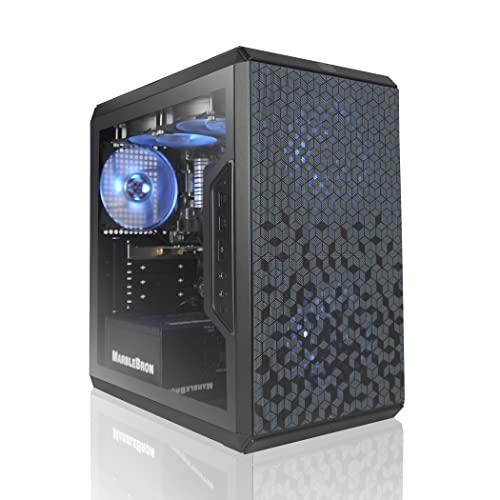
For most gamers, auto boost is the right call. Modern CPUs — like the AMD Ryzen 7 9800X3D found in the Skytech Gaming PC (around $2,900) or the Ryzen 5 5500 in the AVGPC Q-Box (around $789) — are engineered to boost themselves aggressively and safely out of the box. Manual overclocking delivers diminishing returns on newer chips, often adding only 3–8% in frame rates while raising heat, power draw, and system instability. Choose manual overclocking only if you enjoy tinkering as a hobby, have solid cooling, and don’t mind troubleshooting. Choose auto boost if you want to game, not babysit your BIOS.
As an Amazon Associate we earn from qualifying purchases at no extra cost to you.
Side by Side
| Factor | Manual Overclock | Auto Boost |
|---|---|---|
| Comfort of setup | Requires BIOS knowledge, stress testing, and hours of trial and error | Works out of the box — plug in, update drivers, play |
| Long-term durability | Higher sustained voltages can shorten CPU lifespan; warranties often voided | Factory-validated limits protect chip longevity; full warranty intact |
| Price range to get started | $0 for the overclock itself, but expect $50–$150 extra for a beefier cooler like a 240mm or 280mm liquid AIO | Stock or included cooling is usually enough; prebuilt systems like the AVGPC Q-Box ship with a liquid cooler already |
| Maintenance | Ongoing: retest after driver updates, re-tune if temps creep up, monitor stability monthly | Minimal: dust the case and repaste thermal compound every 2–3 years |
| Space and airflow needs | Overclocked chips can push 150–250W, demanding a case with 3+ intake/exhaust fans and clearance for a large air tower (155mm+ height) or radiator | Boosting chips spike briefly but settle at lower sustained power; a standard mid-tower case (roughly 18 x 8 x 17 inches) handles it fine |
| Look and aesthetics | Enthusiast builds often showcase custom loops, RGB, and open test benches | Clean, quiet, factory-quiet operation; fits any desk or living room setup |
| Noise levels | Coolers ramp hard under load — expect 38–45 dB during gaming sessions | Typically 30–36 dB under the same load with stock or included cooling |
| Resale value | Overclocked chips can raise buyer concerns; some resale listings disclose it, others hide it | Stock-condition CPUs sell faster and inspire more buyer confidence |
| Performance gain | Typically 3–8% in games; larger gains in rendering or simulation workloads | Already delivers near-max single-core speeds automatically; modern algorithms beat most manual tunes on hybrid CPUs |
| Best for | Hobbyists, benchmark chasers, and gamers who treat their PC as a project | Everyone else — especially first-time buyers and busy households |
Where Manual Overclock Wins
Manual overclocking still has a place, and it’s worth being honest about when it shines. First, older or lower-tier CPUs benefit most. A chip like the Ryzen 5 5500 has headroom that a careful 30–60 minute BIOS session can unlock — all six cores held at a steady all-core clock often beats the stock behavior in sustained workloads. Second, manual control eliminates the ups and downs of boost algorithms. In consistent, CPU-bound scenarios, a flat, predictable clock can feel smoother than a chip constantly shifting frequency. Third, it’s genuinely educational. If you’ve picked up something like the Raspberry Pi 4 Manual Completo (around $14) to tinker with hobby computing, you already have the mindset — overclocking a desktop CPU is the same spirit of hands-on learning, just with higher stakes and higher wattage. Finally, competitive players chasing every last frame in esports titles at 1080p sometimes find a few extra frames, which matters when a match is decided by milliseconds.
Where Auto Boost for Gaming Cpu Wins
Auto boost wins on nearly every practical measure for the average buyer. Modern boost algorithms sample the chip’s temperature, power draw, and workload thousands of times per second, adjusting clocks far faster than any manual profile could. Chips like the Ryzen 7 9800X3D are specifically tuned to exploit this — the 3D V-Cache design relies on the boost system to stay within tight thermal envelopes, and manually forcing clocks can actually hurt its gaming performance. Auto boost also protects your investment: warranty coverage stays intact, and the chip never operates outside factory-validated safe zones. There’s the stability factor, too. A manually overclocked system that crashes mid-raid or corrupts a save file costs you far more than the 5% performance it gained. And for households where the gaming PC doubles as the family computer, auto boost means the system stays quiet and reliable for homework, streaming, and browsing — no surprises. In 2026, the performance gap between a well-engineered auto boost profile and a hand-tuned overclock on a modern gaming CPU has narrowed to the point where most players will never notice it in-game.
Cost Over 5 Years
Here’s where the comparison gets concrete. With auto boost, your five-year cost is essentially the price of the system plus routine care: a can of compressed air twice a year (about $10 annually), fresh thermal paste once around year three ($8–$12), and possibly a case fan replacement ($15–$25). Call it $40–$70 in upkeep on a $789 AVGPC Q-Box, or the same upkeep on a around $2,900 Skytech flagship. Total cost of ownership stays close to the sticker price.
Manual overclocking adds several layers. A stronger cooler is almost mandatory: budget $60–$150 for a quality 240mm or 280mm liquid AIO or a premium dual-tower air cooler. Higher sustained power draw means a bigger PSU — stepping up from 550W to 750W or 850W adds $30–$80 if your existing unit is marginal. Add $20–$40 in electricity over five years if your overclock pushes sustained draw 30–50W higher during long sessions. Factor in the hidden cost of your time — realistically 5–15 hours of initial tuning and stress testing — and occasional stability troubleshooting. The hardware premium alone runs $100–$250, and that’s before counting a failed component outside warranty coverage, which could mean a $150–$500 CPU replacement. For most buyers, that premium buys a single-digit percentage gain that auto boost nearly matches for free.
Which One for Your Home
Small Apartment or Starter Space
If your gaming setup lives in a compact apartment, heat and noise matter. An overclocked CPU pumping 200W+ into a small room with one window gets uncomfortable in summer, and loud cooler fans bleed into calls and recordings. Go with auto boost and a stock-configured prebuilt — something like the AVGPC Q-Box with its included liquid cooler keeps sustained noise in the low 30s dB and fits a standard desk footprint.
Family with Kids or Pets
Reliability is everything when the PC serves homework, video calls, and weekend gaming. A manual overclock introduces crash risk at the worst possible moments, and its extra heat and fan noise attract curious hands and paws to a hotter case. Auto boost keeps the system predictable and cool-running. Choose a system with a locked-down, factory configuration and enable a BIOS-level password so nobody wanders into settings.
Rental or Frequently Moved Setup
If you relocate often or your rig lives in a rental, portability and hassle-free operation favor auto boost. Overclocked systems can require re-tuning after a move (temperature changes, different ambient conditions), and a stability issue is the last thing you want to debug in a new place with your tools still in boxes. A prebuilt running stock boost profiles travels well and just works when you plug it in.
Long-Term Home Build
If you’re settling in for five-plus years in one place and gaming is a serious hobby, this is the one scenario where manual experimentation makes sense — as a second-phase project, not a day-one necessity. Run the system on auto boost for six months first, learn its behavior, then decide whether a modest, well-cooled overclock is worth the effort. Pair a flagship like the Ryzen 7 9800X3D with a 280mm or 360mm liquid cooler and a quality 850W PSU so you have headroom either way. Even then, many long-term enthusiasts end up reverting to auto boost after realizing the gains weren’t worth the upkeep.
FAQ
Does manual overclocking void my warranty?
It depends on the manufacturer. AMD and Intel generally allow overclocking on unlocked chips without voiding the CPU warranty itself, but damage caused by overclocking typically isn’t covered. More importantly, many prebuilt PC makers void the whole-system warranty if you modify BIOS settings outside their validated profiles. Check your system builder’s policy before touching anything.
How much FPS will I actually gain from overclocking?
In modern games, expect roughly 3–8% at 1080p on CPU-bound titles, and often 0–3% at 1440p or 4K where the GPU becomes the bottleneck. Competitive esports titles at low resolutions see the largest gains. There are no guaranteed numbers — results vary chip to chip even on the same model, which is part of why manual tuning takes time.
Is auto boost the same as “auto overclocking” features in BIOS?
Not quite. Auto boost is the processor’s built-in factory behavior, validated by the chip maker. Many motherboards also offer one-click “auto overclock” or PBO-style features, which push beyond stock limits automatically. Those sit in the middle ground: less effort than manual tuning, more risk than pure auto boost. For most buyers, plain factory auto boost is the sweet spot.
Do I need a liquid cooler if I stick with auto boost?
Usually not, but it helps. High-boost CPUs can briefly spike well past 150W, and a good liquid cooler or strong air tower keeps those spikes from throttling performance. Many prebuilts include one already — the AVGPC Q-Box ships with a liquid cooler at its $789 price point — so you may not need to buy anything extra. For lower-wattage chips, a quality $30–$50 air cooler is plenty.
Related guides
- Best Gaming PC for Overwatch 2: Ten Prebuilts Matched to Your Monitor (2026)
- Best Gaming PC for Baldur’s Gate 3: Matching CPU, VRAM and Storage to the Game (2026)
- Best Gaming PC for Apex Legends: Which Listings Fit a High-Refresh Setup (2026)
- Best RTX 3060 Gaming PCs: Eight Prebuilt Listings Compared by CPU, RAM and Cooling (2026)









