
As an Amazon Associate we earn from qualifying purchases at no extra cost to you.


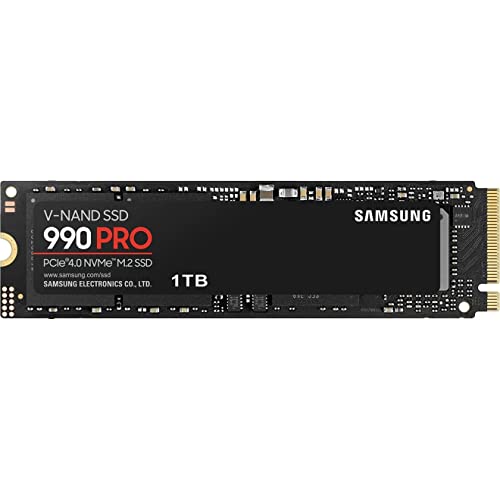
If you’re building or upgrading a gaming PC this year, the biggest storage decision isn’t capacity or brand loyalty anymore — it’s whether to buy a PCIe 4.0 SSD or step up to PCIe 5.0. On paper, the numbers look dramatic: a fast Gen 4 drive like the Samsung 990 PRO tops out around 7,450 MB/s, while Gen 5 drives such as the fanxiang 1TB or the WD_Black SN8100 push 14,000 to 14,900 MB/s. That sounds like double the speed for double the experience. In practice, the answer is more nuanced — and understanding where that bandwidth actually matters is what determines whether you’ll be happy with your purchase three years from now.
The real decision most buyers face is this: spend $150–$250 on a proven, cool-running, power-sipping PCIe 4.0 drive that games genuinely cannot saturate, or spend $200–$700 on a PCIe 5.0 drive that delivers headline speeds, better future-proofing, and workload performance beyond gaming — at the cost of more heat and a higher price per gigabyte. Neither choice is wrong. The right one depends on your budget, your motherboard, and what else your computer does besides gaming.
Our Top Picks



Top 3 picks at a glance
Quick Verdict
For pure gaming, PCIe 4.0 remains the sweet spot. Games today rarely push even 3,000 MB/s of sustained read bandwidth, so the real-world difference between a 7,450 MB/s Gen 4 drive and a 14,900 MB/s Gen 5 drive in load times is usually a second or less. Buy a quality PCIe 4.0 drive like the Samsung 990 PRO and you’ll lose almost nothing in gameplay.
Choose PCIe 5.0 if you’re building a top-tier system and you also work with large files — 8K video, AI projects, massive photo libraries — or if you simply want headroom for games shipping in 2026 and beyond that increasingly use DirectStorage-style streaming. If that describes you, the WD_Black SN8100 4TB is the no-compromise pick, and budget Gen 5 options like the fanxiang 1TB make stepping up far cheaper than it used to be.
Side by Side
| Category | PCIe 4.0 SSD | PCIe 5.0 SSD |
|---|---|---|
| Typical sequential read | 7,000–7,450 MB/s | 12,000–14,900 MB/s |
| Game load times | Fast; within ~1 second of Gen 5 in most titles | Fastest available, best with DirectStorage games |
| Heat and cooling | Runs cool; thin heatsink or bare drive is fine (typically 5–8W under load) | Runs hot; needs a substantial heatsink, often bundled (typically 10–12W under load) |
| Price range | $60–$100 for 1TB; $90–$150 for 2TB | $200 for budget 1TB; $400–$700 for premium 4TB |
| Capacity options at retail | Widely available from 500GB to 4TB+ | Commonly 1TB to 4TB; 8TB still rare and costly |
| Price per gigabyte | Roughly $0–around $0/GB | Roughly $0–around $0/GB |
| Motherboard compatibility | Works in virtually any AM4, AM5, LGA 1700, or newer board | Requires a Gen 5 M.2 slot (AM5, Intel Z690-class and newer on select boards) |
| Space needed | Standard M.2 2280: 80mm x 22mm, about 0.25–0.4 inch thick with heatsink | Same M.2 2280 footprint, but taller heatsinks (0.5+ inch) can conflict with GPU clearance |
| Resale / future value | Excellent; mature standard, easy to move between builds | Good long-term; strong differentiator when selling a high-end PC |
| Best for | Pure gamers, mid-range builds, secondary drives | Enthusiast builds, content creators, buyers who keep PCs 5+ years |
Where Pcie 4.0 Wins
The first place PCIe 4.0 wins is your wallet. A 2TB Samsung 990 PRO at $389 or the 1TB version at around $240 delivers sequential reads up to 7,450 MB/s — more bandwidth than any game currently on the market demands. If your priority is shortening load screens, a Gen 4 drive already gets you 95% of the way there. Loading an open-world title on a Gen 4 NVMe drive typically takes a few seconds; doubling the interface speed might shave a fraction of that.
The second win is thermals and power. Gen 4 controllers typically draw 5–8 watts under heavy load and idle in the low milliwatts, so they run comfortably under a slim heatsink — or even bare on many motherboards. That matters in small cases, in living-room console-style builds, and on laptops, where a hot Gen 5 drive can throttle and drag down neighboring components.
The third win is compatibility and flexibility. A PCIe 4.0 M.2 2280 drive drops into nearly any PC built in the last six or seven years, and it becomes a perfectly good spare or upgrade drive when you rebuild later. That makes it a better value to resell or hand down.
Where Pcie 5.0 Ssd for Gaming Wins
PCIe 5.0’s clearest win is raw bandwidth: up to 14,900 MB/s read and 11,000 MB/s write on the WD_Black SN8100, and up to 14,000 MB/s on the fanxiang 1TB. Games today don’t need that, but games are changing. Titles using DirectStorage and similar asset-streaming techniques move enormous textures and geometry straight from storage to the GPU, and as those pipelines mature, the gap between Gen 4 and Gen 5 will widen. Buying Gen 5 now means your storage won’t be the bottleneck in 2026 and the years after.
The second win is everything else your PC does. If you edit 8K video, train AI models, move multi-hundred-gigabyte project folders, or copy large game libraries between drives, Gen 5’s doubled sustained throughput is genuinely transformative. A 4TB SN8100 filling at 11,000 MB/s writes a 200GB project folder in under 20 seconds; the same transfer on a Gen 4 drive takes roughly twice as long.
The third win is capacity at the high end. Enthusiast Gen 5 drives are leading the way into 4TB territory, which matters as modern games routinely hit 100–150GB installs. One 4TB drive holds a full library without juggling uninstalls.
Cost Over 5 Years
Think of this as a five-year ownership decision, not a day-one purchase.
A PCIe 4.0 path is straightforward: about $240 for a dependable 1TB 990 PRO or $389 for the 2TB. Over five years, a Gen 4 drive needs no extra cooling, adds negligible heat to your case, and costs nothing to maintain. If you need more capacity later, adding a second Gen 4 drive is cheap — roughly $90–$150 per terabyte.
A PCIe 5.0 path costs more up front: around $200 for a budget 1TB Gen 5 drive, or around $700 for a premium 4TB model. Factor in potential extras — a beefier heatsink if yours doesn’t ship with one ($10–$30), and possibly better case airflow ($20–$80 for an extra fan) to keep the drive under its typical operating ceiling. Over five years, though, the per-year math narrows: a $700 4TB Gen 5 drive costs about $140 a year and likely serves through two builds, while a $389 2TB Gen 4 drive may feel cramped in three years, prompting a $150–$250 add-on. If you’re the kind of buyer who’d otherwise upgrade mid-cycle, the big Gen 5 drive can actually come out ahead.
If you game casually, the Gen 4 route wins on cost, full stop. If you game heavily and work with big files, Gen 5’s premium buys real time back.
Which One for Your Home
Small Apartment or Dorm Setup
Space and heat are at a premium, and compact cases often sit near monitors or beds where fan noise is noticeable. A PCIe 4.0 drive’s low power draw (5–8W under load) and slim profile make it the smarter fit. The 1TB Samsung 990 PRO at around $240 keeps a single-drive build simple with no clearance headaches. If your budget stretches further, the fanxiang 1TB Gen 5 at around $200 is actually the cheaper option here — just confirm your case has airflow over the M.2 slot.
Family Home with Kids and Pets
Durability and simplicity matter more than benchmark bragging rights, and a family PC or shared gaming rig benefits from a drive with no moving parts (both are SSDs, so both qualify) and a long warranty — the 990 PRO carries a 5-year/1,200 TBW rating, and premium Gen 5 drives offer similar or better endurance ratings. But capacity is the real issue: kids’ game libraries grow fast. The 2TB 990 PRO at $389 is the practical choice, or step to the 4TB SN8100 at around $700 if one machine serves both homework and serious gaming for years.
Rental or Frequently Moved Setup
If you rebuild, relocate, or resell your PC often, prioritize portability and universal compatibility. PCIe 4.0 drives work in essentially any modern motherboard, so the same $389 2TB drive can move between three builds over five years without worry. Gen 5 drives are forward-compatible too, but backward — a Gen 5 drive in a Gen 4 slot runs fine at Gen 4 speeds, so the fanxiang 1TB at around $200 is a reasonable hedge if you might upgrade your platform soon.
Long-Term Home Build (5+ Years)
This is where PCIe 5.0 justifies itself. A system you keep for five or more years will see games, Windows updates, and applications grow in ways that reward storage headroom. Pair a 4TB WD_Black SN8100 (around $700) with a good motherboard now and you avoid both a capacity upgrade and an interface upgrade later. Pair it with a high-end GPU and CPU, and you’ve built a machine that stays fast for its whole life in your home.
FAQ
Do games actually load faster on a PCIe 5.0 SSD?
Marginally. Most current games load within about a second of Gen 4 speeds because they aren’t written to use more bandwidth. Future titles using DirectStorage-style streaming will benefit more, but today the difference is small.
Will a PCIe 5.0 SSD work in my older motherboard?
Yes, physically and electrically — NVMe is backward compatible. It will simply run at the older slot’s speeds, so a 14,900 MB/s drive in a Gen 3 slot reads around 3,500 MB/s and a Gen 4 slot around 7,400 MB/s.
Do PCIe 5.0 SSDs run hot enough to cause problems?
They can. Gen 5 drives commonly draw 10–12W under sustained load versus 5–8W for Gen 4, and without adequate cooling they can throttle. Use the bundled motherboard heatsink or the drive’s own heatsink and ensure some case airflow over the M.2 area.
Is 1TB enough for gaming in 2026?
It’s workable but tight. Modern games often need 100–150GB each, so a 1TB drive holds roughly six or seven large titles plus Windows. For a primary gaming machine, 2TB is the comfortable minimum, and 4TB eliminates uninstall juggling entirely.
Related guides
- Best Gaming PC for Overwatch 2: Ten Prebuilts Matched to Your Monitor (2026)
- Best Gaming PC for Baldur’s Gate 3: Matching CPU, VRAM and Storage to the Game (2026)
- Best Gaming PC for Apex Legends: Which Listings Fit a High-Refresh Setup (2026)
- Best RTX 3060 Gaming PCs: Eight Prebuilt Listings Compared by CPU, RAM and Cooling (2026)









