
As an Amazon Associate we earn from qualifying purchases at no extra cost to you.


Our Top Picks


Top 3 picks at a glance
The Short Answer
For most clean gaming PC builds, a 6-foot (1.8 m) Ethernet cable is the sweet spot if your router or wall jack is on the same desk or within a few feet of the tower. If your modem and router live in another room, step up to 25–50 ft (7.6–15.2 m). For power supply extension cables, the standard length is 30 cm (11.8 inches) per extension — that is the industry norm and what most aftermarket kits ship with, and it is long enough for mid-tower and full-tower cases without leaving excess slack.
In short: buy 6 ft of Ethernet for a desk-adjacent router, 30 cm PSU extensions for sleeved cable management, and never exceed 100 ft (30.5 m) of Ethernet in a single run, since signal quality degrades past that point on longer passive runs.
Standard Sizes
| Cable Type | Common Lengths | Imperial | Metric | Typical Price |
|---|---|---|---|---|
| Ethernet (Cat 8), desk build | 6 ft | 6 ft | 1.8 m | $6–$10 |
| Ethernet (Cat 8), across room | 25 ft | 25 ft | 7.6 m | $8–$12 |
| Ethernet (Cat 8), other room / whole house | 50 ft | 50 ft | 15.2 m | $9–$15 |
| PSU extension, 24-pin ATX | Single length per kit | 11.8 in | 30 cm | $20–$30 per kit |
| PSU extension, 8-pin EPS | Single length per kit | 11.8 in | 30 cm | Included in kit |
| PSU extension, 8-pin (6+2) PCI-E | Single length per kit | 11.8 in | 30 cm | Included in kit |
Note on pricing: a budget Cat 8 cable in the 6 ft range typically costs around $6, while a 50 ft Cat 8 run lands around $9. Full sleeved PSU extension kits — usually a 24-pin ATX, an 8-pin EPS, and dual 8-pin PCI-E extensions in 18AWG braided sleeving with cable combs — generally run $22–$25.
How to Measure Your Space
- Map the actual path, not the straight line. Use a tape measure and follow the route the cable will really take: down behind the desk, along the floor, up the leg, and to the router or wall jack. Straight-line distance always understates what you need.
- Add 15–20% slack. A 6 ft path needs roughly 7 ft of cable. Slack prevents tension on connectors and lets you reroute later without buying a new cable.
- Check your case’s cable routing channel. Measure from your motherboard’s rear I/O or PSU shroud grommets to the graphics card’s PCI-E power ports. For most mid-tower cases this is 8–12 inches; the standard 30 cm (11.8 in) extension covers it with room for the 24-pin’s awkward bend radius.
- Account for connector bulk. Braided and sleeved connectors add up to 1 inch (2.5 cm) at each end. Measure the clear space behind your desk or wall plate so plugs are not crushed.
- Verify PSU cable reach. Confirm your stock PSU modular cables reach the components first — extensions must not be stretched taut, or they will pull out of the PSU shroud under the side panel.
By Room or Use Case
Desk Builds (Router Within Arm’s Reach)
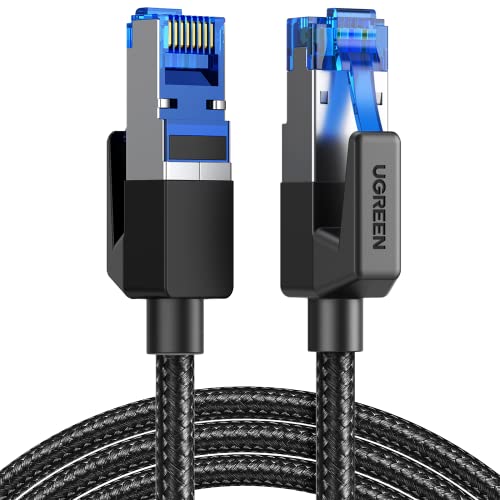
A 6 ft (1.8 m) Cat 8 cable is ideal. The extra 2 feet beyond a typical 4 ft straight-line run absorbs the drop behind the desk. Braided 6 ft cables weigh under half a pound and stay tidy with a single velcro tie. Expect to pay around $6 for a shielded, braided Cat 8 rated at 40 Gbps / 2000 MHz.
Router Across the Room
For runs of 15–20 ft along baseboards, choose 25 ft (7.6 m). This length is still light enough (roughly 1–1.5 lb) to route cleanly under carpet edge or along a cable raceway without noticeable sag.
Separate Room or Modem on Another Floor
A 50 ft (15.2 m) Cat 8 cable handles most single-story apartment and bedroom-to-office runs, typically costing around $9 or less. At this length, route the excess in loose coils rather than tight wraps, and avoid running it parallel to power cords for more than a few feet to minimize interference. Stay under 100 ft (30.5 m) total for the run.
Cable Management-Focused Showcase Builds
For tempered-glass builds where the interior is on display, a full PSU extension kit is what makes the difference. Kits like 18AWG sleeved sets — covering the 24-pin ATX, 8-pin EPS, and dual 8-pin (6+2) PCI-E connections — include cable combs and run about $22 in colorway options like silver-grey/sky blue or black/red. Each extension is 30 cm (11.8 in), which fits mid-tower cases from roughly 16 to 20 inches tall and full-towers up to about 22 inches. If your case is a compact micro-ATX chassis under 15 inches tall, check that the extensions can be folded back into the shroud; otherwise the extra length bulges the side panel.
HDMI-Adjacent Setups (PC Plus Console)
If the same cable path serves a PS5 or Xbox, budget a 25 ft Ethernet run so one cable can be swapped between devices, or run two 6 ft cables through a switch near the desk.
Common Sizing Mistakes
- Buying exactly the measured length. A cable with zero slack cannot be routed around corners; you need that 15–20% buffer.
- Assuming longer Ethernet means slower speeds. Length itself is not the issue below 100 ft — but cheap, thin (30AWG) long cables can be. For runs over 25 ft, prefer 26AWG or heavier cable with proper shielding.
- Using extensions instead of native PSU cables for long runs. Extensions are cosmetic additions over the stock cables. If the stock cable does not physically reach, an extension on top may still fall short or create a strained connection at the 24-pin socket.
- Ignoring bend radius on sleeved extensions. Braided sleeving is stiffer than stock rubber cables. Forcing a 30 cm extension around a tight 90-degree turn kinks the sleeving and looks worse than a slightly longer, gently curved run.
- Forgetting connector height. Braided plugs can be 1 inch tall, which matters if your desk sits flush against a wall — the plug will not fit in the gap.
- Skipping the combs. Extension kits that include two-color combs (they hold individual wires parallel) are what create that crisp “showcase” look. A kit without combs costs similar but delivers a noticeably messier result.
FAQ
Does a longer Ethernet cable reduce gaming performance?
Not within normal home distances. Cat 8 cable is rated for full performance at up to 100 meters (328 ft) in lab conditions; in a house, runs of 6 ft to 50 ft are all effectively identical for latency. The practical limit for a passive home run is about 100 ft (30.5 m), where budget unshielded cable starts to risk errors.
What length PSU extensions do I need for a mid-tower case?
The standard 30 cm (11.8 in) extensions included in nearly all aftermarket kits fit the vast majority of mid-tower and full-tower cases. Measure from your PSU shroud grommet to the furthest component connector — typically the graphics card’s 8-pin ports — and if that distance is under about 9 inches, standard extensions will reach with slack to spare.
Can I cut an Ethernet cable shorter myself?
You can, but it requires RJ45 crimping tools and connectors, and a poor crimp is the most common cause of intermittent dropouts. For short runs at around $6–around $9 price points, buying the correct pre-made length is cheaper and more reliable than DIY.
Are braided Ethernet cables worth the extra cost over PVC?
For a visible desk setup, yes — a braided 6 ft Cat 8 cable is only a dollar or two more than a basic PVC equivalent and resists kinking behind the desk. For a 50 ft run hidden along a baseboard, the braiding buys nothing, so a standard PVC jacket at the same or lower price is the smarter pick.
Related guides
- Best Gaming PC for Overwatch 2: Ten Prebuilts Matched to Your Monitor (2026)
- Best Gaming PC for Baldur’s Gate 3: Matching CPU, VRAM and Storage to the Game (2026)
- Best Gaming PC for Apex Legends: Which Listings Fit a High-Refresh Setup (2026)
- Best RTX 3060 Gaming PCs: Eight Prebuilt Listings Compared by CPU, RAM and Cooling (2026)









