
Our Top Picks
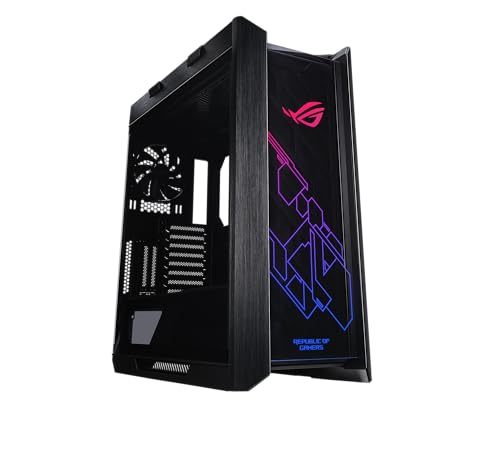 ASUS ROG Strix Helios RGB EATX Mid-Tower GamingGX601|Black22.24 x 9.8 x 23.26 inches39.7 PoundsCheck on Amazon

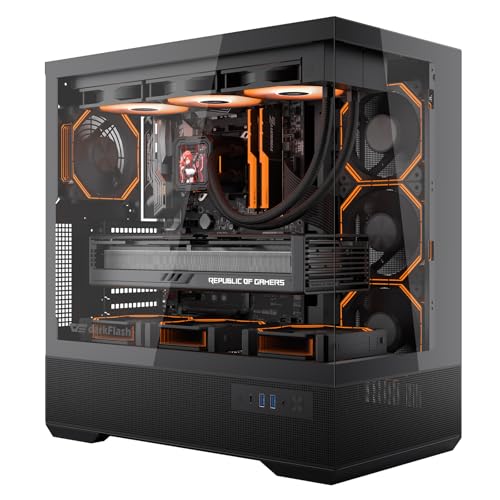

Top 3 picks at a glance
The Short Answer
For a full length gaming graphics card, you need a mid-tower ATX case or larger. Most full length cards from the last two generations measure 12 to 13.5 inches long (305 to 343 mm), and many flagship models now exceed 13 inches. A standard mid-tower ATX case that lists 400mm to 420mm of GPU clearance will fit virtually any full length card with room left for front fans or a radiator, while a full-tower or large EATX mid-tower is required if you want extra clearance for thick radiators, vertical mounting, or future upgrades.
If you want a single rule to shop by: Do not buy a case that offers less than 330mm of GPU clearance for a full length card, and aim for 360mm or more if you are buying an RTX 4080, RTX 4090, RX 7900 XTX, or any RTX 5090 class card. That extra 30 to 40mm prevents the front of the card from pressing against case fans, cables, or a front-mounted AIO.
As an Amazon Associate we earn from qualifying purchases at no extra cost to you.


Standard Sizes
Graphics card length and case GPU clearance are not standardized across brands, but the form factors below cover what you will actually see on retail listings in 2026. Use the table to match your card length to the correct case class.
| Case Form Factor | Typical Case Dimensions (H x W x D) | Max GPU Length Supported | Best For |
|---|---|---|---|
| Mini-ITX (Compact) | 11-14 x 6-8 x 12-15 in / 28-36 x 15-20 x 30-38 cm | Up to 12.0 in / 305 mm | Short to mid-length GPUs like RTX 4060, RTX 3050 6GB |
| MicroATX (mATX Tower) | 14-16 x 7-8 x 14-17 in / 36-41 x 18-20 x 36-43 cm | 12.6-13.4 in / 320-340 mm | Most dual-fan and some triple-fan cards |
| Mid-Tower ATX (Standard) | 17-19 x 8-9 x 17-19 in / 43-48 x 20-23 x 43-48 cm | 13.8-16.5 in / 350-420 mm | Full length triple-fan cards, RTX 4070 Ti and up |
| Mid-Tower EATX / Large ATX | 19-22 x 9-10 x 19-21 in / 48-56 x 23-25 x 48-53 cm | 16.5-17.7 in / 420-450 mm | Flagship cards with vertical mount, RTX 4090 / RTX 5090 |
| Full-Tower | 22-26 x 9-11 x 22-24 in / 56-66 x 23-28 x 56-61 cm | 17.7 in+ / 450 mm+ | Workstation builds, dual 360mm radiators, custom loops |
| Protective Carrying Case (for GPU only) | 14-15 x 9-10 x 4-5 in / 36-38 x 23-25 x 10-13 cm | Holds one GPU up to 14.2 in / 360 mm | Storage and travel for RTX 4060 through RTX 4090 |
For reference, real card lengths you will encounter:
ASUS Dual GeForce RTX 3050 6GB OC Edition: 7.9 inches / 201 mm long, 1.5-slot thick, ideal for compact cases. Power draw around 70 watts, no extra power connector required on most variants, weight about 1.1 lb / 500 g. Price range typically $170 to $260.
RTX 4060 / RTX 4070 dual-fan models: 8.9 to 9.5 inches / 226 to 241 mm. RTX 4070 Ti / RTX 4070 Super triple-fan: 12.0 to 13.1 inches / 305 to 333 mm.
RTX 4080 Super / RTX 4090 Founders and partner triple-fan cards: 12.0 to 13.6 inches / 304 to 346 mm long, 3.5 to 3.75-slot thick, weight 4.2 to 5.5 lb / 1.9 to 2.5 kg, power draw 320 to 450 watts. Partner RTX 5090 cards are pushing 13.3 to 14.2 inches / 338 to 360 mm and listings commonly advertise cases with up to 420mm clearance to accommodate them.
Protective hard cases for GPUs, such as molded carrying bags with handle and foam insert sized for RTX 4060 through RTX 4090 cards, typically measure about 14.5 x 9.5 x 4.3 inches / 37 x 24 x 11 cm externally and weigh 2.2 to 3.0 lb empty. Retail price range is usually $22 to $35.
How to Measure Your Space
Do not rely on case form factor name alone. Two mid-towers labeled ATX can differ by 50mm of GPU clearance. Measure both the card and the case interior before you buy.
- Find your card’s true length and thickness. Check the manufacturer’s spec sheet for length, width, and slot thickness. Include the cooler shroud and any protruding backplate. If you already own the card, measure from the rear bracket to the farthest point of the shroud with a tape measure.
- Check the case GPU clearance spec. Look for “Maximum GPU Length” or “VGA Length” in the case specs. If the listing says 420mm, that is the distance from the rear expansion slots to the front panel or front fans. If you plan to mount a front AIO radiator, subtract 27mm for a slim radiator or 50 to 60mm for a radiator plus fans.
- Measure slot thickness and width clearance. Modern flagship cards are 3.5 to 4 slots thick. Look for “GPU Thickness” or “CPU Cooler / GPU Width” in the case manual. You need at least 65mm to 75mm of width from the motherboard to the side panel for a thick card, and more if you want a vertical mount with a riser cable.
- Measure your desk or floor footprint. Measure the height, width, and depth of the space where the tower will sit. Leave 2 to 3 inches / 5 to 8 cm of clearance behind the case for cables and 2 inches on top for exhaust. A standard mid-tower at 18 x 9 x 18 inches needs a footprint of at least 20 x 12 inches to breathe.
- Verify power and airflow needs. Full length cards in the 300 to 450 watt range need a PSU of 750 to 1000 watts depending on CPU, and at least two to three intake fans. Ensure the case supports a PSU length of 160 to 180mm and has vented front or bottom panels if you have a high-wattage GPU.
- Add 20 to 30mm of safety margin. If your card is 342mm long, do not buy a case rated for exactly 345mm. Cables, front fans, and manufacturing tolerances will make installation difficult. Choose a case rated for at least 360mm.
By Room or Use Case
Compact Desk or Small Bedroom – Space Saving Without Sacrificing Fit
Recommended: MicroATX or compact mid-tower with 330 to 360mm GPU clearance, dimensions around 15 x 8 x 17 inches / 38 x 20 x 43 cm. These fit under a standard 29-inch high desk and still accept most RTX 4070 class cards. Avoid slim Mini-ITX cases under 320mm clearance unless you are using a dual-fan card under 10 inches like the RTX 3050 or RTX 4060. For dorms and apartments, look for a case under 25 lb empty and with a solid front panel filter to control dust in tight spaces.
Standard Gaming Setup in Living Room or Home Office
Recommended: Mid-tower ATX with 380 to 420mm clearance, such as models that advertise support for RTX 5090 up to 420mm. Typical size is 18 x 9 x 18.5 inches / 46 x 23 x 47 cm, weight 18 to 26 lb empty. This is the sweet spot for most gamers. You get room for a 240mm or 360mm AIO on top or front, three front fans, and a full length triple-fan GPU without removing drive cages. Budget for this category is usually $80 to $170, with premium airflow models reaching $180 to $270.
Enthusiast, Creator, or Dual-Radiator Build – Dedicated Gaming Room or Studio
Recommended: EATX mid-tower or full-tower with 420 to 450mm+ clearance, support for vertical GPU mounting, and dual 360mm radiator mounts. Expect dimensions of 20 x 10 x 20 inches / 51 x 25 x 51 cm and up, weight 28 to 40 lb. Cases in this class like the ROG Strix Helios and similar EATX towers provide extra width for thick 3.75-slot cards, reinforced PCIe brackets to prevent sag, and Type-C front panel connectivity. These are ideal if you run a 4080 Super, 4090, or 5090 class card and want to show it off vertically with tempered glass. Prices typically run $200 to $400.
Portable Storage, Travel, or LAN Events
Recommended: Hard protective carrying case for the GPU itself, not the entire PC. A molded case with foam insert, handle, and zip closure sized at roughly 14.5 x 9.5 x 4.3 inches holds one full length card safely during moves or when transporting a card to a different build. This does not replace a PC case but protects a $300 to $1,600 card from bending, static, and impact. Pair it with a mid-tower at your destination that meets the clearance numbers above.
Common Sizing Mistakes
- Assuming all ATX cases fit all ATX cards. Form factor only describes motherboard support. A budget ATX case may only offer 300 to 315mm of GPU space, which will block a 13-inch triple-fan card.
- Forgetting front radiator thickness. A case rated for 360mm of GPU clearance with flat front fans may drop to 305mm once you install a 27mm radiator plus 25mm fans. Always subtract radiator and fan depth from the advertised GPU length.
- Ignoring thickness and sag. Length is not the only limit. A 3.5-slot card that is 61mm thick needs wide case clearance and a support bracket. Without it, the card can sag, stress the PCIe slot, and press against the side panel.
- Not accounting for power connectors. Many new cards use a recessed 12VHPWR or 12V-2×6 connector that needs 35mm of extra space in front of the card to bend safely. Cases with only 10 to 15mm between the card’s power plug and the glass will put strain on the cable.
- Measuring the case exterior instead of interior. Exterior depth includes front panel and cable shroud. The usable GPU length is always less than the outer dimension. Use the manufacturer’s interior clearance number.
- Choosing a small case for a heavy card. A 5 lb / 2.3 kg RTX 4090 class card in a light, narrow case can tip or flex. Look for a case with a reinforced GPU bracket, at least 0.8mm steel or aluminum frame, and feet that provide stable balance.
FAQ
What case size do I need for a 13-inch full length graphics card?
You need a mid-tower ATX case with at least 360mm of GPU clearance. A card that is 13 inches / 330mm long requires 30mm of extra space for cables and front fans. Cases rated for 380 to 420mm give you the most comfortable install and allow for future cards that are slightly longer. A MicroATX case rated for 340mm can work if it is truly 340mm to the fan surface, but verify with the manual.
Can a full length RTX 4090 or RTX 5090 fit in a mid-tower?
Yes, if the mid-tower is a modern full-view or large ATX model with 400 to 420mm clearance. Standard mid-towers built before high-end 40-series cards were common often topped out at 330 to 350mm and will not fit. Check for explicit RTX 4090 or RTX 5090 support in the spec sheet, support for vertical mounting if you want that option, and at least 75mm of width clearance for the 3.5 to 3.75-slot cooler.
How do I know if my case supports vertical GPU mounting?
Look for vertical PCIe slots with a riser cable included or sold as an accessory, and a stated vertical GPU clearance. Vertical mounting requires an extra 20 to 30mm of width from the side panel and a vented side or bottom intake so the fans are not choked against glass. It also requires that the case width be at least 9 inches / 23 cm. If the spec sheet does not list vertical GPU length separately, assume it is 10 to 15mm less than horizontal clearance.
Do I need a full-tower for gaming or is mid-tower enough?
Mid-tower is enough for 95 percent of gaming builds, including full length triple-fan cards, a 360mm AIO, and multiple storage drives. Choose a full-tower only if you need dual 360mm or 420mm radiators, an EATX motherboard, more than six storage drives, or custom water cooling with a large reservoir. Full-towers are 4 to 6 inches taller and deeper than mid-towers and weigh significantly more, so they demand more floor space and are harder to move.
Related guides
- Best Gaming PC for Overwatch 2: Ten Prebuilts Matched to Your Monitor (2026)
- Best Gaming PC for Baldur’s Gate 3: Matching CPU, VRAM and Storage to the Game (2026)
- Best Gaming PC for Apex Legends: Which Listings Fit a High-Refresh Setup (2026)
- Best RTX 3060 Gaming PCs: Eight Prebuilt Listings Compared by CPU, RAM and Cooling (2026)









