
Our Top Picks
 Furologee 66'' L Shaped Desk with Power Outlet66 Inch18.11 x 65.35 x 29.52 Inches54.34 PoundsCheck on Amazon


Top 3 picks at a glance
The Short Answer
For a comfortable dual-monitor setup, the absolute minimum desk width you should consider is 47 inches (120 cm), but the ideal size for most users is 55 to 60 inches (140 to 152 cm) wide and 24 to 30 inches (61 to 76 cm) deep.
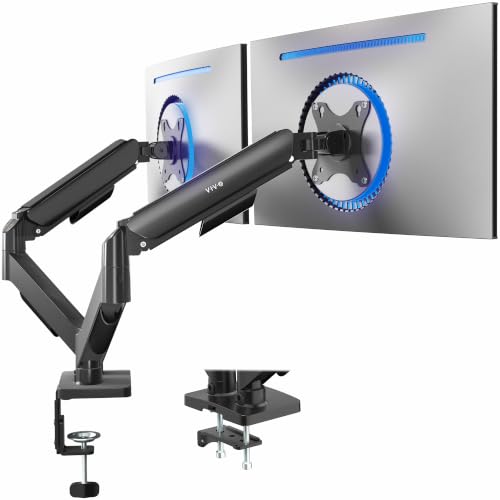
If you are running two standard 24-inch monitors, a 47-inch desk will fit them, but the screens will line up exactly edge-to-edge with virtually no leftover room for desktop speakers, a console, or a cup of coffee. If you upgrade to dual 27-inch or 32-inch monitors, you will need at least a 55-inch or 60-inch desk to prevent the screens from hanging over the outer edges of your workspace. To maximize your desk surface, pairing your desk with a heavy-duty mechanical arm, such as the VIVO Dual Monitor Stand (typically priced between $45 and $55) or the HUANUO FlowLift™ Dual Monitor Stand (ranging from $55 to $65), allows you to float the screens above your desk and reclaim valuable square footage.
As an Amazon Associate we earn from qualifying purchases at no extra cost to you.

Standard Sizes
Desk dimensions vary significantly by style, shape, and intended use. The table below outlines standard desk sizes, their physical dimensions in both imperial and metric systems, and how well they accommodate dual-monitor configurations.
| Desk Category | Width (Inches) | Width (cm) | Depth (Inches) | Depth (cm) | Dual Monitor Compatibility |
|---|---|---|---|---|---|
| Compact / Small | 40″ to 47″ | 101 to 120 cm | 20″ to 24″ | 51 to 61 cm | Tight fit. Requires mounting arms or heavy angling of dual 22″–24″ screens. |
| Medium / Standard | 48″ to 55″ | 122 to 140 cm | 24″ to 30″ | 61 to 76 cm | Excellent fit for dual 24″ screens; snug but functional for dual 27″ screens. |
| Large / Executive | 60″ to 72″ | 152 to 183 cm | 30″ to 36″ | 76 to 91 cm | Perfect for dual 27″ to 32″ screens. Ample room for PC towers, speakers, and paperwork. |
| L-Shaped Corner | 59″ to 66″+ (per side) | 150 to 168 cm+ | 20″ to 30″ | 51 to 76 cm | Ideal for corner placements. Fits dual or triple monitors easily while preserving writing space. |
How to Measure Your Space
Before purchasing a new desk, you must calculate the physical footprint of your hardware and reconcile it with the layout of your room. Follow these steps to ensure a perfect fit:
- Measure the True Physical Width of Your Monitors: Do not rely on the advertised screen size (e.g., 27 inches), as this is a diagonal measurement of the glass. Instead, use a tape measure to find the actual horizontal width from the outer left bezel to the outer right bezel of a single monitor, then multiply by two. For example, a standard 27-inch monitor is usually around 24 inches wide horizontally. Two of them side-by-side require 48 inches of linear space.
- Account for Screen Angle: Most dual-monitor users do not place their screens completely flat. If you angle them slightly inward (a “V” shape) to match your natural peripheral vision, you will decrease the overall horizontal width footprint by 2 to 4 inches, but you will increase the depth requirement.
- Determine Your Preferred Viewing Distance: For proper ergonomics, your eyes should be 20 to 30 inches away from your screens. If you choose a desk with a depth of only 20 inches, your monitors will feel uncomfortably close to your face, causing eye strain. Aim for a desk depth of at least 24 inches, preferably 30 inches.
- Measure Your Available Floor Space: Use painter’s tape to map out the proposed desk dimensions on your floor. Ensure you have at least 30 to 36 inches of clearance behind the desk for your office chair to roll back comfortably without hitting walls or other furniture.
By Room or Use Case
The ideal answer to “what size desk do i need for dual monitors” depends heavily on how you intend to use your computer setup and the room it will occupy. As we design workspaces for 2026 and beyond, ergonomics and versatility are more critical than ever.
The Professional Home Office
If you work from home full-time, you need a desk that accommodates dual screens, a keyboard, a mouse, and physical documents or a notepad. A 55-inch to 60-inch rectangular desk is the sweet spot. However, if your home office serves multiple purposes, an L-shaped desk is highly efficient.
Models like the Korfile 59-inch L-Shaped Computer Desk (priced around $80 to $100) or the spacious Furologee 66-inch L-Shaped Desk (ranging from $120 to $140) allow you to dedicate one wing of the “L” entirely to your dual monitors and keyboard, leaving the other wing completely open for paperwork, books, or a tablet. L-shaped desks naturally utilize corner spaces that would otherwise go to waste.
The Dedicated Gaming Setup
PC gaming setups require extra space. Gamers often use wider mechanical keyboards, oversized mousepads for low-DPI sweeping movements, streaming microphones, and external audio mixers. Furthermore, many gamers prefer to showcase their custom PC tower on top of the desk rather than on the floor.
For this use case, a desk width of 60 to 72 inches with a depth of 30 inches is highly recommended. To prevent your desk from looking cluttered, use an articulating desk mount like the VIVO Dual Monitor Stand. These stands support screens from 17 to 32 inches and up to 19.8 lbs per arm, allowing you to suspend your screens and routing cables cleanly down the pole.
Small Spaces & Compact Apartments
When space is limited, you have to get creative. You can squeeze dual monitors onto a 40-inch to 47-inch desk, but only if you lift them off the desktop. Using a C-clamp or grommet mount, like the HUANUO FlowLift™ (which supports 13- to 32-inch screens), frees up the entire surface beneath the monitors. This setup allows your keyboard to slide under the screens when not in use, making a small apartment desk feel twice as large.
Common Sizing Mistakes
Avoid these frequent pitfalls when shopping for a dual-monitor desk:
- Ignoring the Desk’s Weight Capacity: Dual monitors plus a heavy steel mounting bracket can weigh anywhere from 25 to 45 lbs. Cheap particleboard or thin glass desks can bow, crack, or completely shatter under the concentrated pressure of a heavy dual-arm C-clamp. Ensure your desk is constructed from solid wood, thick MDF, or has a reinforced steel frame underneath.
- Underestimating Depth: Buyers often focus entirely on width and forget about depth. A 20-inch deep desk leaves almost no room for your wrists or a keyboard in front of the monitor stands. Always aim for at least 24 inches of depth.
- Forgetting About Bezel Width: Older monitors have thick outer plastic frames (bezels). If you are using older screens, they will take up more physical width than modern, bezel-less displays of the same screen size.
- Neglecting Cable Management Space: Multiple monitors mean a web of power cables, HDMI/DisplayPort cords, and USB cables. Desks with built-in power strips or cable management trays help prevent your legroom from becoming a tangled mess of wires.
FAQ
Can I fit dual 27-inch monitors on a 48-inch desk?
Yes, you can fit dual 27-inch monitors on a 48-inch wide desk, but it will be a very tight fit. Because a standard 27-inch monitor is roughly 24 inches wide, two of them side-by-side will span exactly 48 inches. They will line up perfectly flush with the left and right edges of your desk, leaving no safety margin. To make this work comfortably, you must angle the monitors inward or use a dual-monitor desk mount to keep them secure.
What is the ideal desk depth for dual monitors?
The ideal desk depth for dual monitors is 30 inches (76 cm). This depth provides a safe ergonomic viewing distance of 20 to 30 inches from your eyes to the screens, reducing eye fatigue. It also leaves ample room in front of your monitors for a full-size keyboard, a wrist rest, and your forearms to rest comfortably on the desk surface.
Do I need a special desk to use a dual monitor mount?
You do not need a special desk, but you do need a sturdy one. Dual monitor mounts use either a C-clamp that grips the edge of the desk or a grommet mount that bolts through a hole in the desktop. Your desk must be made of a solid material like solid wood, thick MDF, or metal. Avoid desks with hollow-core designs (such as cardboard paper-fill interiors) or thin glass tops, as the clamping force can crush or crack them.
Is an L-shaped desk better for dual monitors than a straight desk?
An L-shaped desk is highly beneficial if you want to separate your computer work from other tasks. By placing your dual monitors in the corner curve or along one side of the “L”, you leave the entire adjacent side completely clear for writing, drawing, or reading. L-shaped desks also fit naturally into room corners, making them excellent space-savers for smaller rooms.
Related guides
- Best Gaming PC for Overwatch 2: Ten Prebuilts Matched to Your Monitor (2026)
- Best Gaming PC for Baldur’s Gate 3: Matching CPU, VRAM and Storage to the Game (2026)
- Best Gaming PC for Apex Legends: Which Listings Fit a High-Refresh Setup (2026)
- Best RTX 3060 Gaming PCs: Eight Prebuilt Listings Compared by CPU, RAM and Cooling (2026)









