
When you are setting up a gaming station, it is easy to spend weeks researching the perfect ergonomic chair, the fastest monitor refresh rates, or the exact mechanical keyboard switch that matches your typing style. Yet, when it comes to audio, many buyers fall into a classic trap: they buy a gaming headset based on flash rather than function. They get swayed by aggressive marketing terms like “virtual 7.1 surround sound,” flashy RGB lighting arrays, or celebrity endorsements, only to find that the headset pinches their ears after forty-five minutes of play, snaps at the plastic hinge within three months, or suffers from muddy, unbalanced audio.
A gaming headset is not just a piece of tech; it is a wearable piece of hardware that interacts directly with your body for hours at a time. A poorly designed headset can cause genuine physical discomfort, including tension headaches from excessive clamping force, neck fatigue from unbalanced weight, and sweat buildup from non-breathable materials. To find a headset that delivers both immersion and long-term durability, you need to look past the marketing hype and focus on the fundamental engineering of the device.
As an Amazon Associate we earn from qualifying purchases at no extra cost to you.


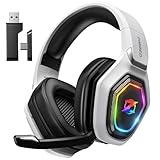
Our Top Picks
 Razer BlackShark V2 X Wired PlayStation Gaming Headset3.5 mm7.5 x 4.5 x 9.5 inches1.15 PoundsCheck on Amazon


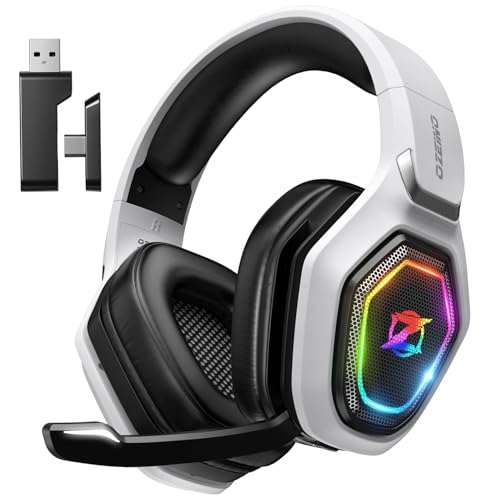
Top 3 picks at a glance
Decide These 3 Things First
Before diving into driver specifications or ear cushion materials, you must narrow down your search by making three fundamental decisions about your gaming environment and habits.
1. Wired vs. Wireless: This choice dictates your budget, movement freedom, and maintenance habits. Wired headsets (like the Razer BlackShark V2 X at around $31) offer plug-and-play simplicity, zero latency, lighter weights, and infinite battery life at a lower price point. Wireless headsets (such as the AOC 2.4GHz Wireless at around $49 or the Ozeino Wireless at around $29) eliminate desk clutter and allow you to walk away from your screen without removing the gear. If you go wireless, ensure the headset utilizes a 2.4GHz USB dongle rather than standard Bluetooth, as Bluetooth introduces noticeable audio latency that can put you at a disadvantage in fast-paced games.
2. Platform Compatibility: Do not assume a headset works seamlessly across every console and PC. While a standard 3.5mm analog jack provides universal compatibility across PlayStation, Xbox, Nintendo Switch, and PC controllers, digital USB connections are more restrictive. PlayStation 5 and PC generally share compatible USB audio drivers, but Xbox consoles require specific proprietary security chips for USB audio. Always check the packaging to verify that the wireless dongle or USB transmitter natively supports your specific console platform.
3. Open-Back vs. Closed-Back Ear Cups: This structural choice determines how you hear your game and your physical surroundings. The vast majority of gaming headsets are closed-back, meaning the outer shell of the ear cup is solid plastic or metal. This seals in the sound, blocks ambient household noise, and delivers punchier bass. Open-back headsets feature perforated outer grilles that allow air and sound to pass freely. This design creates a wider, more natural “soundstage” (making it easier to pinpoint directional cues) and keeps your ears cooler, but it leaks sound to anyone sitting nearby and lets in room noise.
Size and Weight: Finding the Golden Mean
The physical footprint of a headset determines its long-term comfort. A headset that is too heavy or lacks proper weight distribution will inevitably cause neck strain during extended sessions.
- Weight: Look for a headset that weighs between 240 and 320 grams. Anything under 250 grams (such as the Razer BlackShark V2 X at roughly 240g) is considered ultra-lightweight and will feel almost weightless on your head. Wireless headsets, which must house internal batteries and transceivers, typically weigh between 300 and 380 grams. If a wireless headset exceeds 350 grams, it must feature an exceptional headband design to distribute that weight evenly across your skull.
- Clamping Force: This is the lateral pressure the ear cups exert against the sides of your head to create an acoustic seal. Clamping force is measured in Newtons. The ideal sweet spot is between 4N and 5.5N. Anything lower than 4N will cause the headset to slide off your head when you tilt your face down; anything higher than 6N will press too hard against your temporal bones and jawline, causing discomfort or headaches, especially if you wear glasses.
- Adjustability Range: The headband should offer at least 1.5 to 2.0 inches of vertical travel on each side to accommodate different head sizes (typically matching hat sizes from 6.5 to 8). Look for clear, notched adjustment sliders so you can easily balance the sides symmetrically.
Ear Cup Materials: Heat Dissipation vs. Acoustic Seal
The material covering the ear cup padding directly affects both the acoustic performance of the headset and the microclimate around your ears.
Protein Leather (PU Leather): This synthetic material is the industry standard for budget and mid-range headsets. It provides an excellent acoustic seal, which traps bass frequencies inside the cup and isolates you from external room noise. However, protein leather is non-porous. It traps heat and moisture, leading to sweaty ears after an hour of use. If you game in a warm room, this material can quickly become uncomfortable.
Fabric and Athletic Mesh: Often found on sport-oriented headsets, these breathable textiles allow air to circulate freely around your ears, significantly reducing heat buildup. The trade-off is acoustic isolation; fabric cups allow ambient room noise to enter and let low-end bass frequencies escape, resulting in a slightly thinner sound profile.
Velour and Hybrid Cushions: Velour offers a plush, premium feel that is highly comfortable for glasses wearers because it compresses easily without squeaking against frames. However, it acts like a dust magnet and can be difficult to clean. Hybrid cushions—which feature protein leather on the exterior ring to maintain bass response and breathable fabric on the surface that touches your skin—offer the best of both worlds.
Regardless of the material, ensure the padding thickness is at least 0.75 inches (20mm) deep. If the padding is too thin, the outer edges of your ears will press directly against the hard plastic speaker grille inside the cup, causing acute pain within minutes.
Frame Construction and Durability
A gaming headset is subjected to constant physical stress: it is stretched open to fit your head, tossed onto desks, and occasionally dropped. The materials used in the frame dictate whether your purchase will last for years or snap within a few months.
Avoid headsets constructed entirely of cheap ABS plastic, especially at critical stress points like the headband core and the hinges where the ear cups pivot. Look for a spring-steel or reinforced aluminum headband band concealed inside the padding. The yokes (the forks that hold the ear cups) should ideally be made of metal or high-impact, thick-walled polycarbonate.
Pay close attention to the cable entry points and hinges. If the cable is wired, it should feature a thick, flexible rubber strain-relief boot at least 0.5 inches long where it enters the ear cup to prevent internal wire fraying. For wireless models, check the charging port; a reinforced USB-C port is vastly superior to the fragile, outdated Micro-USB ports found on older budget models.
Comfort and Ergonomic Performance
Ergonomic headset design is about pressure distribution. The human head is not a perfect sphere, and pressure must be spread out to avoid focal pain points.
The headband design plays a massive role here. There are two primary styles: traditional padded bands and suspension (or “ski-band”) designs. Traditional bands rely on a single strip of foam along the underside of the arch. If the foam is too hard or thin, it creates a hot spot on the crown of your skull. Suspension headbands use an elasticized fabric band stretched beneath a rigid outer metal frame. The elastic band conforms perfectly to the unique curvature of your head, distributing the weight evenly across a wider surface area and eliminating pressure points entirely.
Furthermore, look for ear cups that offer multi-axis articulation. The cups should not be fixed rigidly to the headband; they need to tilt vertically (at least 15 degrees) and swivel horizontally (up to 90 degrees) to match the natural angle of your jaw and the space behind your ears. This articulation ensures that the clamping pressure is distributed evenly around the entire ear cup cushion rather than concentrating on the area behind your earlobe.
Understanding the Price Tiers
Knowing what you can realistically expect at different price points prevents you from overpaying or buying underperforming gear. As we look toward the design standards of 2026, the boundaries of what budget hardware can achieve have expanded significantly.
- Budget Tier ($15 to $40): In this price range, you will find highly capable wired options like the Razer BlackShark V2 X (around $31) and entry-level wireless models like the Ozeino Wireless (around $29). Expect basic plastic construction with metal structural reinforcements, stereo sound, and standard protein leather padding. While these headsets lack advanced software suites or active noise cancellation, they offer excellent core performance and reliability for everyday gaming.
- Mid-Range Tier ($40 to $100): This tier introduces robust wireless connectivity (like the AOC 2.4GHz Wireless at around $49), larger 50mm neodymium drivers, improved microphone capsules with physical mute indicators, and hybrid ear cushion materials. Durability increases here, with aluminum frames becoming the standard rather than the exception. Battery life in this tier typically ranges from 30 to 50 hours of continuous playback.
- Premium Tier ($100 to $300+): Premium headsets offer advanced features such as dual-wireless connectivity (allowing you to connect to a console via 2.4GHz and a phone via Bluetooth simultaneously), active noise cancellation (ANC), high-resolution planar magnetic drivers, swappable battery systems, and sophisticated spatial audio software.
Warranty and Post-Purchase Support
Because headsets are highly mobile devices with moving parts and internal electronics, they are prone to wear and tear. When shopping, check the warranty period provided by the manufacturer. Major established brands typically offer a 2-year limited warranty on their audio gear, while entry-tier or generic brands may only offer a 90-day or 1-year warranty.
Additionally, check if the manufacturer sells replacement parts. The two components most likely to degrade over time are the ear cushions (which can flay or absorb oils) and the internal battery (for wireless models). A brand that offers easily swappable, snap-on replacement ear cushions extends the lifespan of your headset by years, saving you from having to replace the entire unit when the foam inevitably wears down.
Spec Checklist
Use this convenient checklist to compare technical specifications across different budget tiers before making your final purchase decision.
| Specification Feature | Budget ($15 – $40) | Mid-Range ($40 – $100) | Premium ($100 – $300+) |
|---|---|---|---|
| Connection Type | Wired 3.5mm Analog / USB-A | 2.4GHz Wireless + Wired backup | Simultaneous 2.4GHz + Bluetooth |
| Driver Size | 40mm Neodymium | 50mm Neodymium | 50mm Custom / Planar Magnetic |
| Weight Target | 240g – 280g (Wired) | 280g – 320g (Wireless) | 300g – 350g (Feature-rich) |
| Battery Life (Wireless) | 15 to 30 Hours | 40 to 60 Hours | 80+ Hours / Swappable System |
| Ear Cushion Fill | Standard Polyurethane Foam | High-Density Memory Foam | Gel-Infused Memory Foam |
| Microphone Style | Fixed or Bendable Boom | Detachable or Retractable Boom | Broadcast-Grade / Dual-Mic Array |
Red Flags to Avoid
When browsing product listings, keep an eye out for these warning signs that indicate a headset might not live up to its marketing claims:
- No Driver Size Listed: If the product specifications omit the speaker driver size, it is highly likely the manufacturer is using cheap, undersized 30mm drivers that will produce thin, tinny audio with poor directional imaging. Look for a minimum of 40mm drivers, with 50mm being the ideal standard for rich bass and clear mids.
- Proprietary, Non-Detachable Cables: If a wired headset has a permanently attached cable that is thin and lacks nylon braiding, avoid it. If that cable gets snagged on an armrest or chewed by a pet, the entire headset is ruined. A detachable 3.5mm or USB cable can be replaced for less than five dollars.
- “7.1 Virtual Surround” on Analog Connections: True multi-channel audio processing requires a digital connection (USB or optical). If a headset connects via a standard 3.5mm analog jack and claims “7.1 Surround Sound” on the box without including an external USB sound card dongle, it is a misleading marketing claim.
- Aggressive Plastic Hinges with Visible Screws into Plastic: Examine the pivot points where the ear cups connect to the headband. If you see metal screws threaded directly into thin plastic housings without any metal reinforcement collars, the plastic will eventually crack under tension.
Frequently Asked Questions
Is wireless always better than wired for gaming?
No, wireless is not inherently better; it is simply more convenient. Wired headsets offer lossless, uncompressed audio with zero latency, require no battery charging, and are generally lighter and more affordable. Wireless headsets are excellent for clean desk setups and freedom of movement, but they introduce battery degradation over time and can occasionally suffer from signal interference if you have multiple wireless devices nearby.
What driver size should I look for in a gaming headset?
You should look for drivers that are 40mm or 50mm in diameter. Larger drivers are capable of moving more air, which allows them to produce deeper, more resonant bass frequencies and a wider dynamic range without distorting the sound at higher volumes. However, driver tuning and material quality matter just as much as raw size; a well-tuned 40mm driver will easily outperform a poorly engineered 50mm driver.
How do I prevent my ears from sweating during long gaming sessions?
To prevent heat and sweat buildup, choose a headset that features breathable fabric, athletic mesh, or velour ear cushions rather than solid protein (PU) leather. Additionally, look for open-back headset designs, which allow air to flow naturally through the ear cups, or headsets that utilize gel-infused memory foam cushions designed to actively absorb and disperse heat away from your skin.
Will a PlayStation headset work on an Xbox console?
If the headset connects using a standard 3.5mm analog audio cable plugged directly into the controller, it will work perfectly on both PlayStation and Xbox consoles. However, if the headset is wireless and relies on a USB dongle, it will only work on both platforms if the manufacturer has specifically designed the dongle with a physical switch to toggle between the proprietary Xbox security protocol and standard PlayStation/PC USB audio protocols.
Related guides
- Best Gaming PC for Overwatch 2: Ten Prebuilts Matched to Your Monitor (2026)
- Best Gaming PC for Baldur’s Gate 3: Matching CPU, VRAM and Storage to the Game (2026)
- Best Gaming PC for Apex Legends: Which Listings Fit a High-Refresh Setup (2026)
- Best RTX 3060 Gaming PCs: Eight Prebuilt Listings Compared by CPU, RAM and Cooling (2026)









