
As an Amazon Associate we earn from qualifying purchases at no extra cost to you.


Buying a budget prebuilt gaming PC should be simple. Instead, most shoppers get overwhelmed by spec sheets, RGB lighting, and brand names, then either overspend on power they’ll never use or save $100 on a machine that throttles, crashes, or dies within a year. The most common mistakes: fixating on CPU cores while ignoring the GPU (which does 80% of the gaming work), buying 8GB of RAM when 16GB is the practical floor, accepting a no-name power supply that risks the whole build, and forgetting to budget for a monitor, keyboard, and mouse if you don’t already own them. Others chase the cheapest listing on a marketplace site, only to receive a machine cobbled together from used enterprise parts.
This guide walks through what actually matters when you’re shopping for a budget prebuilt gaming PC, with real numbers so you can judge any listing in under five minutes.
Our Top Picks
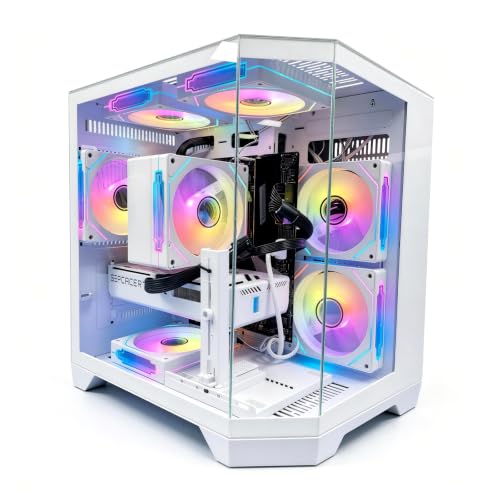

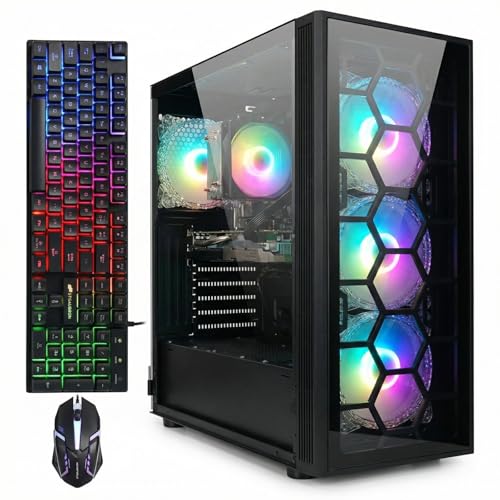

Top 3 picks at a glance
Decide These 3 Things First
Before comparing a single spec, answer these three questions. They narrow the field faster than any spec sheet.
1. What resolution will you play at? This single decision dictates your GPU budget. 1080p at 144Hz — the sweet spot for budget builds — needs a GPU in the RTX 3050 to RTX 4060/5060 class. If you’re aiming for 1440p, you’ll need to stretch toward $1,100–$1,500. Buying a 1440p-class machine to play at 1080p means wasted money; buying a 1080p-class machine for a 1440p monitor means instant disappointment.
2. What’s your true total budget? Not just the tower. If you need a monitor ($120–$200 for a decent 1080p/144Hz panel), peripherals ($50–$80), and possibly Windows (most prebuilts include it, but check), add $200–$300 to whatever you’ve set aside for the PC itself. A $900 tower with $250 in extras is a $1,150 purchase.
3. How long do you want it to last? A machine you’ll replace in two years can be built cheap. One you expect to hold for four to five years needs a better GPU, 32GB-capable motherboards, and a case with real airflow — worth an extra $150–$250 upfront.
GPU: The Component That Deserves Most of Your Money
The graphics card determines your framerate more than any other part. Allocate roughly 40–50% of the total system cost to it.
For pure budget gaming at 1080p, a card like the RTX 3050 6GB — found in machines like the STGAubron (Ryzen 7 5700X, RTX 3050 6G, 16GB DDR4, 1TB SSD, around $830) — handles esports titles (Valorant, CS2, Rocket League) at well over 100 fps and modern AAA games at medium settings around 60 fps. It’s a legitimate entry point, not a scam, as long as the price stays under $900.
The current value king for budget builds is the RTX 5060 class. The Thermaltake LCGS Quartz i1460 (i5-14400F, RTX 5060, 16GB DDR4-3600, 1TB NVMe, around $1,000) and the LXZ (Ryzen 7 8700F, RTX 5060, 16GB DDR5, 1TB SSD, around $1,300) both land here. The Thermaltake is the better raw value — same GPU tier for $300 less — while the LXZ’s DDR5 and newer CPU platform give it more headroom for future upgrades.
A quick heuristic: whatever the GPU is, search its model number plus “fps” and check a couple of reviews for games you actually play. If a seller lists the GPU vaguely (“gaming graphics card”) or omits the exact model, walk away.
CPU: Good Enough Beats Best
Budget prebuilts routinely over-invest here because CPU model numbers sell. Reality: for gaming at 1080p with a mid-range GPU, a 6-core modern chip is sufficient. An Intel Core i5-14400F (10 cores, 65W base TDP, boosts to 4.4GHz) or a Ryzen 5 7600 will not bottleneck an RTX 5060 in any meaningful way.
The “F” suffix on Intel chips means no integrated graphics — fine in a gaming PC with a discrete GPU, and it saves $20–$40. On AMD’s side, the Ryzen 7 5700X (8 cores, 65W) remains a capable budget pick, though note it’s an AM4 platform: excellent value now, but a dead end for future CPU upgrades. AM5 (Ryzen 7000/9000 series) costs slightly more and gives you an upgrade path into the 2030s.
Avoid paying a premium for 8-core-plus CPUs in sub-$1,100 builds unless you also stream or edit video. Every dollar spent there is a dollar not spent on the GPU.
RAM and Storage: The Two Cheapest Upgrades to Get Right at Purchase
RAM: 16GB is the minimum; don’t buy less in 2026. Dual-channel matters too — two 8GB sticks outperform one 16GB stick by 10–15% in many games. DDR5 is slightly faster than DDR4 but not worth a $150+ premium on its own. Check that the motherboard has open slots (ideally 4 DIMM slots or 2 free of 2) so you can add another 16GB later for $40–$60.
Storage: Insist on NVMe SSD, not SATA SSD, and absolutely never a hard drive as the primary drive. A 1TB NVMe drive is standard on well-configured budget builds and costs sellers so little that its absence is a red flag. Windows alone plus a few modern games (many are 80–150GB) will fill a 500GB drive fast. Check whether the motherboard has a second M.2 slot for cheap future expansion.
Power Supply and Cooling: Where Cheap Prebuilts Cut Corners
This is the part listings hide, and it’s where budget machines fail.
Power supply: An RTX 3050 system needs at minimum a 450–500W unit; an RTX 5060 system wants 550–650W. More important than wattage is the brand and rating. Look for 80 Plus Bronze certification at minimum, from a real manufacturer (EVGA, Corsair, Cooler Master, Thermaltake, Seasonic). If a listing doesn’t name the PSU brand, assume it’s a no-name unit — the single component most likely to take the rest of the PC down with it when it fails.
Cooling and airflow: A prebuilt with one rear exhaust fan and a shrouded front panel will thermally throttle a GPU under long sessions. Look for at least two or three case fans, mesh front panels, and — ideally — a tower-style air cooler on the CPU rather than a tiny downdraft cooler. GPU temperatures under sustained load should sit in the 70–80°C range; sustained 85°C+ suggests inadequate airflow. You can’t measure this before buying, but you can read owner reviews specifically mentioning noise and heat.
Noise: Cheap case fans and stock coolers are loud. If quiet operation matters, check reviews for noise complaints, and budget $20–$30 for a case fan swap later.
Case, Size, and Build Quality
Measure your desk space before buying. Budget prebuilts typically fall into two sizes:
- Mid-tower: roughly 17–20 inches tall, 8–9 inches wide, 16–18 inches deep, weighing 20–30 lbs. Best airflow and upgrade room. Most budget prebuilts are this size.
- Small form factor: under 15 liters of volume. Convenient, but often uses proprietary parts, runs hotter, and limits GPU length to under 8 inches — which restricts future upgrades.
Check whether the case uses standard ATX/micro-ATX parts or proprietary ones. Proprietary motherboards and PSUs (common in some SFF and big-box retailer machines) make future upgrades nearly impossible. A tempered-glass side panel is cosmetic; mesh front panels are functional. Prefer the mesh.
Price Tiers: What Your Money Buys
- $700–$900 — Entry: GTX 1650/RTX 3050-class GPU, Ryzen 5/7 5000-series or i5 CPU, 16GB DDR4, 500GB–1TB SSD. Expect 60+ fps at 1080p medium in AAA games, 100+ fps in esports. The STGAubron at around $830 fits here.
- $900–$1,400 — Value sweet spot: RTX 5060-class GPU, i5-14400F or Ryzen 7 7600/8700F, 16GB RAM, 1TB NVMe. This is where most buyers should land. Both the Thermaltake (around $1,000) and LXZ (around $1,300) sit in this band.
- $1,400–$2,200 — Upper budget: RTX 5070/RX 9070-class GPUs, 32GB RAM, 2TB storage. True 1440p-high-refresh territory.
- $2,200+ — Premium: machines like the Skytech (Ryzen 7 9850X3D, RX 9070 XT, 32GB, 2TB, around $2,900) target high-refresh 1440p and entry 4K. Excellent hardware, but this is no longer “budget” — buyers in this range should be comparing against carefully self-selected component lists.
For most first-time buyers, the $900–$1,400 tier delivers the best cost-per-frame by a wide margin.
Warranty, Seller Reputation, and Assembly
Prebuilt means someone else assembled it — which is the point — but quality control varies enormously.
Warranty: Look for at least 1 year of parts-and-labor coverage; 2–3 years is better and standard among established builders (Skytech and Thermaltake both offer multi-year coverage on many models). Confirm whether the warranty covers the individual components or just the whole unit — component-level coverage matters, since a failed GPU under a “system” warranty can mean weeks of shipping turnaround.
Seller reputation: Buy from established builders (Skytech, Thermaltake, iBUYPOWER, CyberPowerPC) or the manufacturer’s official store. Marketplace listings from sellers with fewer than a few hundred reviews are a gamble regardless of how good the spec sheet looks.
Assembly quality: Even in $1,000 prebuilts, check owner reviews and unboxing videos for cable management nightmares, loose GPU sag, or missing fans. A GPU sag bracket costs pennies; a builder that skips it signals broader carelessness.
Delivery: Large retailers ship towers in double-boxed packaging with foam supports. If reviews mention units arriving with detached GPUs (a common shipping casualty), confirm the builder includes instructions for reseating the card — most reputable ones do.
Spec Checklist
| Spec | Budget ($700–$900) | Mid ($900–$1,400) | Premium ($1,400+) |
|---|---|---|---|
| GPU | RTX 3050 6GB / RX 6600 | RTX 5060 / RX 9060 XT | RTX 5070 / RX 9070 XT |
| CPU | Ryzen 5 5600 / i5-12400F | i5-14400F / Ryzen 7 8700F | Ryzen 7 9800X3D / i7-class |
| RAM | 16GB DDR4 (2x8GB) | 16–32GB DDR4/DDR5 | 32GB DDR5 |
| Storage | 500GB–1TB NVMe | 1TB NVMe | 2TB NVMe |
| PSU | 500W 80 Plus Bronze | 600–650W Bronze+ | 750W+ Gold |
| OS | Windows 11 | Windows 11 | Windows 11 |
| Warranty | 1 year | 1–2 years | 2–3 years |
Red Flags
- No PSU brand or wattage listed anywhere in the spec sheet
- Hard drive or SATA-only storage as the primary drive
- 8GB of RAM in any machine over $600
- Vague GPU descriptions (“gaming-grade graphics”) or mobile/laptop GPU variants in a desktop
- Proprietary case/motherboard/PSU that blocks upgrades
- Prices dramatically below the going rate for the listed GPU — it’s usually a scam listing, a used card, or a fake spec sheet
- Fewer than two case fans or a fully sealed front panel
- Seller with minimal review history or stock photos borrowed from other brands
- Refurbished or “open box” sold as new
FAQ
Is it cheaper to build a PC yourself?
Usually yes, by roughly 10–15% at the budget end — but a builder’s bulk component pricing can close that gap during sales, and prebuilts include assembly, OS licensing, and a single warranty covering everything. If your time is worth anything, or you don’t want to troubleshoot a no-post build at 11 p.m., a well-specced prebuilt at a fair price is a rational choice.
Are prebuilt gaming PCs upgradeable?
Standard mid-tower prebuilts from reputable builders use standard parts, so RAM, storage, GPU, and even PSU upgrades are straightforward. The exceptions are small form factor machines and some big-box retail brands that use proprietary boards and power supplies. Check for standard ATX sizing and named-brand components before buying if upgradeability matters to you.
How long will a budget prebuilt gaming PC last?
A $800–$1,100 machine with a current-generation GPU should comfortably play new releases at 1080p for three to four years, and remain usable for esports and older titles well beyond that. The GPU becomes the limiting factor first; a same-form-factor GPU swap at the two- or three-year mark ($250–$400) can extend the machine’s life another two years.
Is RTX 5060 good for budget gaming?
Yes — it’s the current benchmark for the $900–$1,300 tier, delivering high-refresh 1080p performance and solid 1440p at medium settings, plus DLSS support that meaningfully extends its lifespan. If a prebuilt with an RTX 5060-class card is priced within about $50–$100 of an equally specced competitor, prioritize the one with the better PSU, case airflow, and warranty rather than chasing a marginally faster CPU.
Related guides
- Best Gaming PC for Overwatch 2: Ten Prebuilts Matched to Your Monitor (2026)
- Best Gaming PC for Baldur’s Gate 3: Matching CPU, VRAM and Storage to the Game (2026)
- Best Gaming PC for Apex Legends: Which Listings Fit a High-Refresh Setup (2026)
- Best RTX 3060 Gaming PCs: Eight Prebuilt Listings Compared by CPU, RAM and Cooling (2026)









