
Our Top Picks
 LIAN LI 4 Slots Vertical GPU Kit6.61 x 5.81 x 9.25 inches6.61 x 5.81 x 9.25 inches2.36 poundsCheck on Amazon
 Cooler Master Gen5 Vertical Graphics Card HolderMedium12.01 x 7.01 x 5.58 inches1.79 PoundsCheck on Amazon
The Short Answer
Whether a vertical GPU mount is bad for thermals depends entirely on one critical condition: the physical distance between your graphics card’s fans and the side panel of your PC case.
If you use a case with built-in vertical slots that position a thick, 3-slot graphics card directly against a solid tempered glass side panel (leaving less than 20mm or 0.8 inches of clearance), the answer is a resounding yes—it is terrible for thermals. Your GPU will be choked for fresh air, easily causing temperatures to spike by 10°C to 15°C, which leads to thermal throttling and loud fan noise.
As an Amazon Associate we earn from qualifying purchases at no extra cost to you.
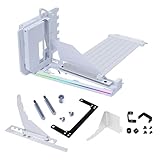

However, if you use an adjustable aftermarket bracket that mounts to your standard horizontal PCIe slots, you can push the graphics card deeper into the interior of the chassis. When you maintain a clearance of at least 50mm (about 2 inches) between the GPU fans and the side panel, or if you use a breathable mesh side panel, the thermal impact is negligible—often within a margin of 1°C to 3°C compared to a traditional horizontal mount.
What You Actually Get
In the world of custom home offices and gaming setups, aesthetics play a massive role. Modern graphics cards have become the visual centerpiece of the system. They feature elaborate RGB lighting, stylized fans, and premium metal shrouds. A traditional horizontal mount hides all of this design work, showing only the plain backplate of the card. A vertical GPU mount rotates the card 90 degrees, facing the fans and shroud directly toward your side panel window.
To achieve this look, you need a physical steel bracket and a flexible PCIe riser cable to route the data signal from your motherboard’s top PCIe slot to the relocated graphics card. High-quality kits, such as the LIAN LI 4 Slots Vertical GPU Kit (VG4v4) priced at around $74 or the Cooler Master Gen5 Vertical Graphics Card Holder priced at around $64, come bundled with PCIe 5.0 riser cables to ensure maximum bandwidth and zero signal degradation.
Beyond the visual upgrade, a vertical mount changes the structural dynamics of your build. Modern high-end graphics cards are massive. A typical flagship card can weigh over 4.5 pounds (2 kg), measure up to 340mm (13.4 inches) in length, and draw upwards of 350 to 450 watts of power under load. When mounted horizontally, this immense weight puts severe mechanical stress on the motherboard’s PCIe slot, causing the card to droop—a phenomenon known as “GPU sag.” A vertical mount transfers this weight to the sturdy steel floor of the chassis or the rear expansion slot frame, protecting your motherboard from long-term physical damage.
However, you must account for internal space. These mounting kits occupy a significant footprint. They require a case with open expansion slots (without metal bars between the slots) or a chassis wide enough to accommodate the bracket without pressing the card against the glass. As we look ahead toward the demanding hardware releases of 2026, managing system temperatures while keeping a clean, dust-free interior is more critical than ever, making your choice of mounting hardware a vital performance decision.
Pros
- Eliminates GPU Sag: By supporting the graphics card from the bottom or rear brackets, a vertical mount completely removes the physical strain on your motherboard’s delicate PCIe slot.
- Showcases Premium Card Designs: It allows you to display custom cooling shrouds, colorful fan designs, and intricate liquid-cooling water blocks that would otherwise face downward.
- Improves Cable Routing: Heavy, stiff power cables (like the 12VHPWR connector) can be routed cleanly downward or backward, preventing them from pressing directly against your side glass panel.
- Clearance for Bottom Radiators: In some dual-chamber or panoramic cases, mounting the GPU vertically lifts the card high enough to clear thick liquid-cooling radiators and fans installed at the bottom of the chassis.
Cons
- Potential Thermal Choking: If your case restricts the GPU to a position right up against a glass side panel, the fans cannot pull in enough air, causing heat to build up rapidly.
- Loss of PCIe Expansion Slots: Because a vertical bracket covers the entire rear expansion area of your case, you will lose access to other motherboard slots used for sound cards, capture cards, or extra M.2 expansion cards.
- Riser Cable Complications: Cheap or damaged riser cables can introduce system instability, black screens, or PCIe link speed drops. If you use a PCIe 4.0 or 5.0 system, you must ensure your riser cable matches that specification.
- Added System Cost: Quality vertical mounting kits are a premium accessory, generally adding $60 to $90 to your overall PC build budget.
Who Should Buy It
You should purchase a vertical GPU mount if you own a wide, spacious PC case (such as a dual-chamber panoramic chassis or a full-tower) and want to show off the visual design of your high-end graphics card. It is also an excellent option for builders using custom open-loop liquid cooling, where a water block looks spectacular when mounted vertically. If you are using an adjustable bracket like the Cooler Master Gen5 (around $64) or the Lian Li VG4v4 (around $74), you can safely purchase one knowing you have the mechanical adjustments needed to keep your thermals perfectly healthy.
Who Should Skip It
You should skip a vertical mount if you own a compact mid-tower or mini-ITX case where the graphics card will inevitably sit flush against a glass panel. Budget-conscious builders should also skip this modification, as the $60 to $80 cost of a quality PCIe 5.0 riser kit is better spent on higher-performing core components like a faster CPU, more storage, or an upgraded power supply. Finally, if your work requires dedicated internal expansion cards—such as a dedicated capture card for streaming or a high-speed 10Gb network card—a vertical mount is not practical.
Cheaper Alternatives
If you want to protect your motherboard from heavy graphics cards without spending a fortune on a vertical mount, or if you are worried about the thermal trade-offs, several budget-friendly alternatives exist:
| Option | Cost | Trade-off |
|---|---|---|
| Adjustable Support Pillar (Anti-Sag Stand) | $5 – $15 | Keeps the card in a traditional horizontal position; does not showcase the shroud or fans. |
| Under-GPU Bracket (Screw-in Support) | $10 – $20 | Blocks the expansion slots directly beneath the GPU; visible metal bar under the card. |
| Horizontal PCIe Brace (L-Bracket) | $12 – $25 | Requires careful alignment with case screws; does not offer the premium aesthetic of a vertical showcase. |
FAQ
Will a vertical GPU mount lower my game performance?
No, a vertical GPU mount will not directly lower your gaming performance or frame rates, provided the card has adequate breathing room. However, if the card is pushed against the glass and reaches its thermal limit (typically around 83°C to 84°C for modern silicon), the GPU will automatically lower its clock speeds to protect itself, resulting in a drop in performance.
Do I need a PCIe 5.0 riser cable, or is PCIe 4.0 fine?
For almost all current graphics cards, a PCIe 4.0 riser cable is perfectly fine and will not bottleneck your performance. However, if you are building a future-proof system with a motherboard and GPU that both support PCIe 5.0, choosing a Gen5-ready kit ensures you will not have to manually change BIOS settings or face signal dropouts under heavy workloads.
Is it harder to install a vertical GPU bracket?
Yes, installation requires more effort than standard mounting. You must remove the existing horizontal expansion slot brackets from your case, install the vertical bracket, mount the riser cable to the motherboard, and then secure the GPU into the bracket. It requires patience and a magnetic screwdriver to handle the small screws inside tight spaces.
Are vertical GPU mounts safe for heavy graphics cards?
Yes, high-quality aftermarket vertical mounts are incredibly safe. Because they sit on the floor of the case or lock securely into the rear PCIe frame, they provide a much stiffer, more stable platform than a standard horizontal motherboard slot, preventing physical damage during transit or long-term use.
Related guides
- Best Gaming PC for Overwatch 2: Ten Prebuilts Matched to Your Monitor (2026)
- Best Gaming PC for Baldur’s Gate 3: Matching CPU, VRAM and Storage to the Game (2026)
- Best Gaming PC for Apex Legends: Which Listings Fit a High-Refresh Setup (2026)
- Best RTX 3060 Gaming PCs: Eight Prebuilt Listings Compared by CPU, RAM and Cooling (2026)









