
Picture a student who needs a PC for assignments and video calls and has a hard ceiling on spending. The best budget desktop computers for that person are not the cheapest ones, they are the ones that avoid a slow hard drive, too little memory and a surprise monitor bill. From this list of eight, the new Dell Pro with a 14th Gen i5-14500, 16GB DDR5 and a 512GB SSD is the strongest all-round office machine by specification, while the renewed Dell OptiPlex 5060 gives the most storage for a modest outlay.
Our Top Picks
All eight desktops at a glance

Dell Windows 11 Desktop Computer OptiPlex 5060 | Intel Core i5-8500 Six Core (4.3GHz Turbo) | 16GB DDR4 RAM | 500GB SSD Solid State + 1TB HDD | WiFi + Bluetooth | Home or Office PC (Renewed)


As an Amazon Associate we earn from qualifying purchases. Product prices and availability are accurate as of the date/time indicated.
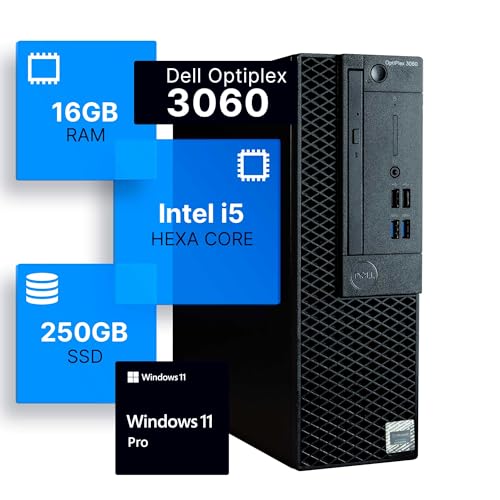
Dell Optiplex 3060 Desktop Computer | Intel i5-8500 (3.2) | 16GB DDR4 RAM | 250GB SSD Solid State | Windows 11 Professional | Home or Office PC (Renewed)


As an Amazon Associate we earn from qualifying purchases. Product prices and availability are accurate as of the date/time indicated.

Dell Pro Business Desktop Computer, New OptiPlex Version - Intel 14th Gen i5-14500(Beats i7-13700, 14Core,20 Threads), 16GB DDR5 RAM, 512GB PCIe SSD, Ultra-Quiet Design, KB & Mouse, Windows11 Pro


As an Amazon Associate we earn from qualifying purchases. Product prices and availability are accurate as of the date/time indicated.

HP 23.8 inch All-in-One Desktop PC, FHD Display, Intel Core i5-1334U, 16 GB RAM, 512 GB SSD, Intel UHD Graphics, Windows 11 Home, Shell White, 24-cr0112 (2025)


As an Amazon Associate we earn from qualifying purchases. Product prices and availability are accurate as of the date/time indicated.

Dell OptiPlex 3080 Micro PC | Intel Core i5-10500T | 16GB RAM | 512GB SSD | Windows 11 Pro | Wi-Fi+ BT | Mini Desktop Computer (Renewed) (16GB RAM + 512GB SSD)




As an Amazon Associate we earn from qualifying purchases. Product prices and availability are accurate as of the date/time indicated.

Bmax 2026 Mini PC Micro Desktop Computer, Intel Core i5-8257U (Beats N100/N97/N150/4300U/10110U) 16GB DDR4 RAM 512GB SATA SSD, Support 64GB/4TB Expansion, WiFi 6, Dual 4K HDMI/DP, Win 11 Pro,B6 Turbo


As an Amazon Associate we earn from qualifying purchases. Product prices and availability are accurate as of the date/time indicated.

CyberPowerPC Gaming PC, Intel Core i5-14400F, GeForce RTX 5060 8GB | Gamer Xtreme, 16GB DDR5, 1TB PCIe 4.0 SSD, WiFi Ready & Windows 11 Home (GXiVR8060A47)


As an Amazon Associate we earn from qualifying purchases. Product prices and availability are accurate as of the date/time indicated.

Lenovo IdeaCentre Secure & Productive Business Tower Desktop|16GB DDR5 RAM | 13TH Intel 4-core (Beat i5-12400T) | 756GB Storage(256GB SSD & 500GB HDD) | HDMI, Wi-Fi 6E, RJ-45, USB-C|Windows 11 Pro


As an Amazon Associate we earn from qualifying purchases. Product prices and availability are accurate as of the date/time indicated.
| Model | Key point from title | Price tier | Best for |
|---|---|---|---|
| Dell OptiPlex 5060 (Renewed) | i5-8500, 16GB DDR4, 500GB SSD plus 1TB HDD | Budget | Home office with extra storage |
| Dell OptiPlex 3060 (Renewed) | i5-8500, 16GB DDR4, 250GB SSD | Budget | Basic everyday use |
| Dell Pro Business Desktop | New, i5-14500, 16GB DDR5, 512GB SSD, keyboard and mouse | Mid-range | Quiet, newer office PC |
| HP 24-inch All-in-One | 23.8-inch FHD, i5-1334U, 16GB, 512GB SSD | Mid-range | Screen included, tidy desk |
| Dell OptiPlex 3080 Micro (Renewed) | i5-10500T, 16GB, 512GB SSD, mini size | Budget | Small spaces |
| Bmax B6 Turbo Mini PC | i5-8257U, 16GB DDR4, 512GB SATA SSD, expandable | Budget | Compact, dual displays |
| CyberPowerPC Gamer Xtreme | i5-14400F, RTX 5060 8GB, 16GB DDR5, 1TB SSD | Premium | Stepping up to gaming |
| Lenovo IdeaCentre Tower | 13th Gen 4-core, 16GB DDR5, 256GB SSD plus 500GB HDD | Mid-range | Office with Wi-Fi 6E |
Price tiers are relative to this set only. Check the listing for the current price.
Eight budget desktops in detail
Dell OptiPlex 5060 (Renewed, i5-8500)
This renewed tower lists a six-core Intel Core i5-8500, 16GB of DDR4, a 500GB SSD plus a 1TB hard drive, WiFi and Bluetooth, and Windows 11. It is the only renewed Dell here that pairs an SSD with a second drive, which suits someone keeping photos or documents alongside the operating system. Check the listing for the refurbisher’s warranty and return window.
- Pros: SSD plus 1TB of bulk storage; 16GB of RAM; Windows 11 listed
- Cons: eighth-generation processor; renewed, so condition varies
Who it’s for: home-office users who want lots of room at a low outlay.
Dell OptiPlex 3060 (Renewed, i5-8500)
The 3060 uses the same i5-8500 and 16GB of DDR4, but offers a single 250GB SSD and Windows 11 Professional. Storage is the limit: after Windows and updates, space is tight for photo libraries or large downloads. It is a straightforward machine for email, web and documents.
- Pros: SSD boot drive; Windows 11 Pro listed; 16GB of RAM
- Cons: only 250GB; renewed condition varies
Who it’s for: a second computer for basic tasks.
Dell Pro Business Desktop (Core i5-14500)
The only new, non-renewed Dell on this list. The title names a 14th Gen i5-14500, 16GB of DDR5, a 512GB PCIe SSD, an “ultra-quiet design,” a keyboard and mouse, and Windows 11 Pro. The title also claims it beats an i7-13700 and describes 14 cores and 20 threads; treat those as the seller’s marketing statements and compare with Intel’s published specifications. Graphics are not listed, so check whether it relies on integrated graphics.
- Pros: new hardware; DDR5 memory; peripherals included
- Cons: comparison claims in the title are unproven; 512GB storage
Who it’s for: buyers who want a newer, quiet office PC without a renewed machine’s uncertainty.
HP 24-inch All-in-One (24-cr0112)
This all-in-one has a 23.8-inch full HD display, an Intel Core i5-1334U, 16GB of RAM, a 512GB SSD, Intel UHD Graphics and Windows 11 Home. Because the screen is included, a separate monitor is not required. The “U” in the processor name indicates a low-power mobile chip, so it is aimed at office tasks rather than heavy workloads.
- Pros: display included; small desk footprint; 512GB SSD
- Cons: hard to upgrade most parts; low-power processor class
Who it’s for: small desks and shared family computers.
Dell OptiPlex 3080 Micro (Renewed, i5-10500T)
This renewed micro PC lists an Intel Core i5-10500T, 16GB of RAM, a 512GB SSD, Wi-Fi and Bluetooth, and Windows 11 Pro. The “T” suffix denotes a low-power processor. It is small enough to mount behind a monitor, though the title does not mention a mount. Check the listing for ports and power adapter details.
- Pros: small footprint; tenth-generation i5; 512GB SSD
- Cons: little internal upgrade room; renewed
Who it’s for: compact workspaces and tidy desks.
Bmax B6 Turbo Mini PC (Core i5-8257U)
This mini PC lists an Intel Core i5-8257U, 16GB of DDR4, a 512GB SATA SSD, WiFi 6, dual 4K output through HDMI and DisplayPort, and Windows 11 Pro. The title says it supports expansion up to 64GB of memory and 4TB of storage, which you should confirm on the listing. It compares itself with other chips by name; treat those claims as marketing.
- Pros: WiFi 6; dual display outputs; stated expansion
- Cons: older processor; SATA rather than NVMe storage
Who it’s for: someone who needs a tiny dual-monitor desk machine.
CyberPowerPC Gamer Xtreme (i5-14400F, RTX 5060)
This one does not really belong with the office machines. It is a gaming PC with an i5-14400F, an RTX 5060 8GB, 16GB of DDR5, a 1TB PCIe 4.0 SSD and Windows 11 Home. The “F” processor has no built-in graphics, so the graphics card is essential. We include it as the “step-up” option in this guide for buyers who might spend more.
- Pros: dedicated GPU; 1TB fast SSD; DDR5
- Cons: highest tier in the set; 8GB of graphics memory; no peripherals listed
Who it’s for: a buyer who wants budget gaming and school work on one machine.
Lenovo IdeaCentre Business Tower (13th Gen, 4-core)
The title lists a 13th Gen Intel 4-core processor, 16GB of DDR5, a 256GB SSD plus a 500GB hard drive (756GB total), Wi-Fi 6E, Ethernet, USB-C, HDMI and Windows 11 Pro. The title does not name the exact processor model, and it claims to beat an i5-12400T. Ask for the model on the listing page before comparing.
- Pros: DDR5; Wi-Fi 6E; USB-C; SSD plus bulk drive
- Cons: exact CPU not named; only 4 cores; small SSD
Who it’s for: general office tasks with extra file space.
How we picked these
We compared the eight listings on what their titles say: processor generation, memory, storage type and size, and operating system. We also split new from renewed, because that choice changes your risk more than a faster clock does. Nobody on the team used or measured these units. Anything beyond the title is marked “check the listing,” and numbers we add are estimates with stated assumptions. Our basis is published specifications, manufacturer documentation and buyer reviews.
What to look for in a budget desktop
SSD first, then size
A solid-state drive matters more than a few hundred megahertz. A 250GB SSD shows as about 232GB in Windows because of how capacity is counted. If Windows 11 and updates take roughly 40GB (an estimate), about 190GB is left, which is plenty for office files and tight for a large photo library. A 512GB SSD is the comfortable size.
Memory
All eight list 16GB. That is a sound base for browsing with many tabs, video calls and spreadsheets. Check the listing for whether memory is one module or two, and what upgrade path exists.
Processor generation
Newer processors generally bring better efficiency and longer software support. The i5-8500 and i5-8257U are eighth-generation chips, the i5-10500T is tenth, and the others are 13th or 14th. For tasks like documents and video calls, older chips still work, but they offer a shorter runway before you replace them.
New versus renewed
Renewed machines are previously used. Look for a clear return window and a named warranty provider. If the listing is vague, the savings are not worth the gamble. A simple routine for the first week with any renewed unit: confirm the processor and memory in Windows system settings match the listing, check the SSD’s capacity, run Windows Update fully, listen for fan or drive noise, and try every port and the Wi-Fi connection. Do this inside the return window, not after it.
Worked example: the hidden costs
Assume (these are estimates) a basic 24-inch monitor costs $100 to $140 and a keyboard and mouse costs $20 to $30. A tower without peripherals then needs roughly $120 to $170 on top of its price. The Dell Pro includes a keyboard and mouse; the HP all-in-one includes its screen. If a tower and an all-in-one are close in price, the all-in-one may be cheaper in total. Add a Windows license if a machine lacks one, which can be well over $100, so confirm that each listing includes an activated copy.
Who should step up
If you game, edit video or run heavy software, a business desktop with integrated graphics will frustrate you. Look at the CyberPowerPC, or save for a machine with a dedicated graphics card and a larger power supply.
Mistakes buyers make
- Ignoring the monitor. Many towers ship without a screen, a keyboard or a mouse.
- Buying a hard drive as the boot drive. A mechanical drive makes even a good CPU feel slow.
- Trusting “beats i7” in titles. Compare model numbers on Intel’s pages.
- Skipping the return window. On renewed units, this is your main protection.
- Overpaying for gaming parts you will not use. The CyberPowerPC is a different class from the rest.
Verdict
For most people, the new Dell Pro is the safest pick, because it is new, has DDR5 and includes peripherals. For storage on a tight outlay, the renewed OptiPlex 5060 stands out. For a clean desk, choose the HP all-in-one. If gaming matters, the CyberPowerPC is the only machine here built for it. Verify the warranty and Windows license on every listing.
Related guides
- Windows Macos Linux Gaming Performance Comparison Strengths Weaknesses
- Desktop Operating Systems Gaming Performance Strengths Weaknesses
- 5G Home Internet Wifi Modem Settings Low Latency Gaming
Frequently asked questions
Is a renewed desktop a safe way to save money?
It can be, if you treat it as a used product with a seller’s warranty rather than a new one. Renewed means a third party inspected and refurbished the machine, so condition and guarantee terms vary by seller. Check the return window, who offers the warranty, and whether Windows is licensed, before you buy. If any of those details are missing from the listing, move on to a different one.
How much RAM and storage does a budget desktop need?
For browsing, email, documents and video calls, 16GB of RAM is a comfortable floor, and every listing in this set offers it. For storage, an SSD of 250GB is workable but tight, 512GB is easier to live with, and a larger hard drive is useful for photos or backups. An SSD makes the machine feel faster than a spinning drive, so put the SSD first.
Do older Intel Core i5 chips still run Windows 11?
Eighth-generation Intel Core chips and newer meet Microsoft’s processor requirement, which covers the i5-8500, i5-8257U and i5-10500T named here. Microsoft sets other requirements too, such as TPM 2.0, so check that the listing states Windows 11 is installed and activated, as these titles do. Check the listing for license type on renewed machines.
Can a budget desktop play games?
Light games, older titles and indie releases usually run on integrated graphics at low settings, but modern 3D games need a dedicated graphics card. Among these eight, only the CyberPowerPC lists one, an RTX 5060 8GB. The others use the processor’s built-in graphics, so treat them as work, school and streaming machines unless you plan to add a card and confirm the power supply can feed it.
Should I pick an all-in-one or a tower?
An all-in-one such as the HP 24-cr0112 includes the screen, which saves the cost and desk space of a separate monitor, but you cannot easily swap the display or upgrade most parts. A tower costs more in separate peripherals but gives you room to add storage, memory or a graphics card later. Choose based on whether you value a tidy desk or upgrade room.
Related guides
- Best Gaming PC for Overwatch 2: Ten Prebuilts Matched to Your Monitor (2026)
- Best Gaming PC for Baldur’s Gate 3: Matching CPU, VRAM and Storage to the Game (2026)
- Best Gaming PC for Apex Legends: Which Listings Fit a High-Refresh Setup (2026)
- Best RTX 3060 Gaming PCs: Eight Prebuilt Listings Compared by CPU, RAM and Cooling (2026)









