For most buyers, the Gamer Master with the Ryzen 5 8400F and RTX 5060 is the sensible middle of this list, while the Ryzen 7 9800X3D and RTX 5070 Ti Gamer Supreme is the top configuration and the Ryzen 5 5500 and RX 6500 XT model is the entry point with clear limits. The ten listings all share the CyberPowerPC name, Windows 11 Home and, in nine of ten cases, 16GB or more of DDR5 memory, but the processor and graphics pairings differ a lot. This guide uses listing titles and published specifications only.
Top 3 picks at a glance
Quick picks
As an Amazon Associate we earn from qualifying purchases at no extra cost to you.

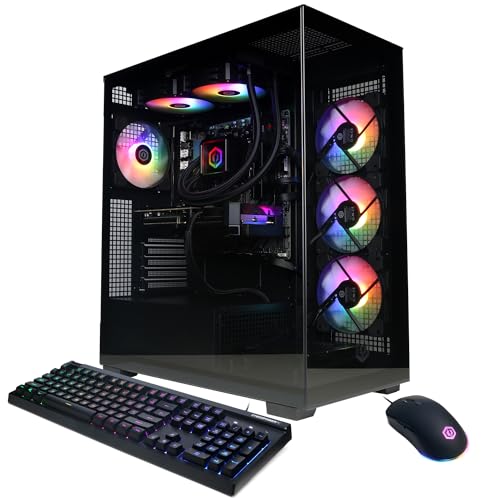
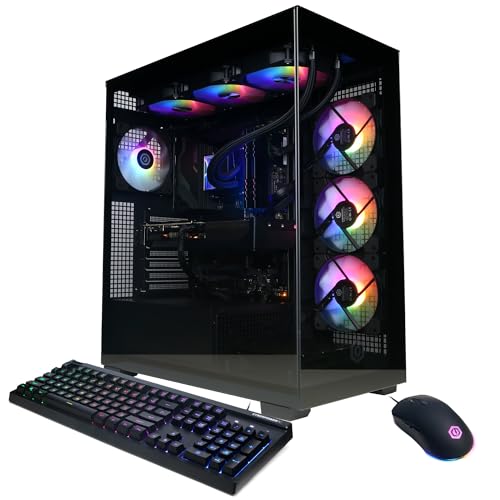


- Highest configuration: Gamer Supreme with Ryzen 7 9800X3D, RTX 5070 Ti 16GB, 2TB
- Middle of the road: Ryzen 5 8400F and RTX 5060
- Most storage: Core Ultra 7 265F and RTX 5050, 2TB
- Entry level: Ryzen 5 5500, RX 6500 XT 4GB, 8GB DDR4 and 500GB
Side-by-side comparison
| Model | Key point from title | Best for |
|---|---|---|
| Gamer Supreme SLC8480A9 | Ryzen 7 9800X3D, RTX 5070 Ti, 32GB, 2TB | Top performance |
| Gamer Xtreme VR GXiVR8080A39 | Core i9-14900KF, RTX 5070 12GB, 32GB, 2TB | Multitasking |
| Gamer Xtreme GXiVR8080A41 | Ryzen 9 9900X, RTX 5070 12GB, 32GB, 1TB | Creator work |
| Gamer Xtreme GXiVR8040A19 | Core i7-14700F, RTX 5060 Ti 8GB, 16GB, 1TB | Upper-mid |
| Gamer Master GMA2900A3 | Ryzen 7 8700F, RTX 5060 Ti 8GB, 16GB, 1TB | Balanced AMD pick |
| Gamer Xtreme GXiVR8060A47 | Core i5-14400F, RTX 5060 8GB, 16GB, 1TB | Mid-range Intel |
| Gamer Xtreme VR GXiVR8060A40 | Core i5-13400F, RTX 5060 8GB, 16GB, 1TB | Older Intel chip |
| Gamer Master (no model code) | Ryzen 5 8400F, RTX 5060 8GB, 16GB, 1TB | Mid-range AMD |
| Gamer Xtreme GXiVR8800A6 | Core Ultra 7 265F, RTX 5050 8GB, 2TB | Storage first |
| Gamer Master GMA3100A3 | Ryzen 5 5500, RX 6500 XT 4GB, 8GB DDR4 | Entry build |
The ten PCs, one by one
Gamer Supreme SLC8480A9 (Ryzen 7 9800X3D, RTX 5070 Ti)
The title lists the AMD Ryzen 7 9800X3D, a GeForce RTX 5070 Ti with 16GB, 32GB of DDR5, a 2TB PCIe 4.0 SSD, WiFi and Windows 11 Home. It carries the largest graphics memory and the top processor in this group, and the Supreme name suggests CyberPowerPC treats it as its premium tier. The title does not name the cooling, power supply or motherboard, so ask the seller before assuming upgrade room. It is also the highest-priced listing here.
Pros
- 16GB graphics memory and 2TB storage
- Top processor and graphics pairing in the list
Cons
- Highest listed price
- Power supply and cooling are not named
Who it’s for: Players who want the strongest build here and can pay for it.
Gamer Xtreme VR GXiVR8080A39 (Core i9-14900KF, RTX 5070)
Listed with an Intel Core i9-14900KF, an RTX 5070 with 12GB, 32GB of DDR5, a 2TB PCIe 4.0 SSD and Windows 11 Home. The processor sits at the top of Intel’s range in this list, while the graphics card is a step down from the 5070 Ti. The pairing leans toward multitasking and production work as much as pure gaming. The VR in the name appears to be a line label, not a claim; check the listing before buying it for virtual reality. The 32GB of memory and the 2TB drive are generous, which suits players who edit video or run several programs while gaming.
Pros
- 32GB of memory and 2TB of storage
- Powerful processor for heavy multitasking
Cons
- Processor strength may outrun the graphics tier
- VR label is not explained in the title
Who it’s for: Players who game and also run heavy apps alongside.
Gamer Xtreme GXiVR8080A41 (Ryzen 9 9900X, RTX 5070)
The title shows an AMD Ryzen 9 9900X with an RTX 5070 12GB, 32GB of DDR5 and a 1TB PCIe 4.0 SSD. It matches the graphics tier of the i9 listing but halves the storage. The 32GB of memory and Ryzen 9 chip make it a candidate for streaming or content work with gaming on the side. The 1TB drive will fill quickly with modern games, so plan for a second drive. Against the i9 listing it has the same graphics tier but half the storage.
Pros
- 32GB DDR5 and a Ryzen 9 processor
- RTX 5070 with 12GB
Cons
- Only 1TB of storage
- Processor tier is high for this graphics card
Who it’s for: Streamers and creators who also play games.
Gamer Xtreme GXiVR8040A19 (Core i7-14700F, RTX 5060 Ti)
Listed with an Intel Core i7-14700F, an RTX 5060 Ti 8GB, 16GB of DDR5 and a 1TB PCIe 4.0 SSD. It is close to the AMD Gamer Master with the same graphics card, so the choice is mainly Intel versus AMD and price. At 8GB of graphics memory, it is better suited to 1080p and 1440p play than to the heaviest settings at higher resolutions.
Pros
- RTX 5060 Ti and a strong Core i7 pairing
- 1TB of PCIe 4.0 storage
Cons
- Graphics memory is 8GB
- Case and power supply are unnamed
Who it’s for: Intel-leaning buyers who want an upper-mid build.
Gamer Master GMA2900A3 (Ryzen 7 8700F, RTX 5060 Ti)
The title lists a Ryzen 7 8700F, an RTX 5060 Ti 8GB, 16GB of DDR5 and a 1TB PCIe 4.0 SSD. It is the AMD counterpart to the Core i7 listing and carries the same graphics card, so compare the two on price and brand preference. The F suffix on the processor usually means no built-in graphics, which is fine here because a separate card is installed. Check the listing for the cooler and power supply.
Pros
- Balanced processor and graphics pairing
- Same graphics card as the Intel i7 listing
Cons
- 8GB graphics memory
- Processor has no integrated graphics for troubleshooting
Who it’s for: AMD-leaning buyers who want a balanced build.
Gamer Xtreme GXiVR8060A47 (Core i5-14400F, RTX 5060)
Listed with a Core i5-14400F, an RTX 5060 8GB, 16GB of DDR5 and a 1TB PCIe 4.0 SSD. It is one of two near-identical Intel listings with the RTX 5060, so the processor generation and model code are the main differences. As with the other F-suffix chips, there is no integrated graphics, so a working graphics card is needed from the start. It is a sensible mid-range configuration. Compare it against the Ryzen 5 8400F listing, which offers the same graphics card, memory and storage on the AMD side.
Pros
- Mid-range pairing without obvious mismatch
- 1TB PCIe 4.0 storage and 16GB DDR5
Cons
- Near-duplicate of the i5-13400F listing
- 8GB graphics memory limits settings at higher resolutions
Who it’s for: Buyers who want a mid-range Intel build.
Gamer Xtreme VR GXiVR8060A40 (Core i5-13400F, RTX 5060)
The title shows an Intel Core i5-13400F at 2.5GHz, an RTX 5060 8GB, 16GB of DDR5 and a 1TB PCIe 4.0 SSD. The processor is one generation behind the 14400F listing, and the title gives no other differences. If the two are priced similarly, the newer chip is the simpler choice. If this one is cheaper, the gap is probably small in day-to-day play, but the listings do not state it. Check the model code, because the two Xtreme listings share a similar name and are easy to confuse.
Pros
- Same graphics card and memory as the 14400F listing
- Clock speed is named in the title
Cons
- Older processor generation
- Near-duplicate, so little to separate it
Who it’s for: Buyers who find this listing cheaper than the 14400F one.
Gamer Master Ryzen 5 8400F, RTX 5060 (no model code)
This title lists a Ryzen 5 8400F at 4.2GHz, an RTX 5060 8GB, 16GB of DDR5, a 1TB PCIe 4.0 SSD, WiFi and Windows 11 Home. It lacks a model code in brackets, so double-check the exact configuration on the product page. It matches the mid-range Intel listings on graphics and memory and offers an AMD route. It is the best candidate for a balanced budget-conscious pick. Confirm the exact case, cooler and power supply with the seller, because the title leaves those out and the missing model code gives less to check against.
Pros
- Clock speed is named in the title
- Mid-range pairing with 1TB PCIe 4.0 storage
Cons
- No model code in the title
- 8GB graphics memory
Who it’s for: AMD fans who want a mid-range build.
Gamer Xtreme GXiVR8800A6 (Core Ultra 7 265F, RTX 5050)
Listed with an Intel Core Ultra 7 265F, an RTX 5050 8GB, 16GB of DDR5 and a 2TB PCIe 4.0 SSD. The processor tier is high for the RTX 5050, so this is an unbalanced configuration for gaming. The 2TB drive adds value, but the weak graphics tier means money is spent on the wrong parts. Compare it against the RTX 5060 listings before ordering.
Pros
- 2TB of PCIe 4.0 storage
- Strong processor tier
Cons
- Graphics card is the weakest of the RTX listings
- Unbalanced pairing for gaming
Who it’s for: Buyers who need big storage first and gaming second.
Gamer Master GMA3100A3 (Ryzen 5 5500, RX 6500 XT)
This entry model lists a Ryzen 5 5500, a Radeon RX 6500 XT with 4GB, 8GB of DDR4 and a 500GB PCIe 4.0 SSD. It is the only listing here with DDR4 memory and the only one below 16GB. The 4GB of graphics memory, 8GB of system memory and 500GB of storage are all small by current standards, so treat it as a first-PC option and plan upgrades soon. Adding memory is usually the cheapest first upgrade, but check the product page for free slots and the power supply before you buy any parts.
Pros
- Lowest listed price in the group
- Still a complete Windows 11 PC
Cons
- Only 8GB of DDR4 memory
- 500GB drive fills quickly
Who it’s for: First-time buyers on a strict budget.
How we picked these
We worked from the ten listing titles supplied for this keyword and compared processor, graphics card, memory, storage and the product-line label in each. We ranked them by how balanced the parts look, not by name, and flagged the near-duplicates so they can be compared quickly. Nobody on the team used or measured these units, and the guide takes no performance numbers from memory. Where a title leaves out the case, power supply or cooling, we say to check the listing.
What to look for in a CyberPowerPC gaming PC
Decode the title
Take the Gamer Master Ryzen 7 8700F listing. Its title names the processor, graphics card, memory, storage and Windows edition, followed by a code in brackets. Read the parts, ignore the line name, and use the code to confirm the exact configuration with the seller before you order.
Balance the processor and graphics card
Spending most of the budget on the processor and leaving a weak card, as in the Core Ultra 7 and RTX 5050 listing, tends to waste money in games. A better balance is a mid-range processor with a mid-range card, as in the Ryzen 5 8400F and RTX 5060 listing.
Memory and storage
16GB of DDR5 is a workable base. 32GB suits streaming and creative work. A 1TB drive fills quickly with several large games, so look for open M.2 slots on the product page.
Match the monitor
A card only earns its price if the screen can use it. A 1080p 144Hz monitor rarely needs more than a mid-range card, while a 1440p screen at a high refresh rate asks for more memory and a stronger GPU tier.
Parts the titles do not name
None of the ten titles names the power supply, motherboard, case or cooler. These affect noise, safety and upgrade room, so read the full listing or ask the seller before buying.
A worked example
Suppose you have a 1440p monitor and play several new games. Eight gigabytes of graphics memory is the first limit to watch, so look at the RTX 5070 listings with 12GB or the RTX 5070 Ti with 16GB before paying for a bigger processor. If your screen is 1080p, a mid-range pairing is enough.
Warranty and support
Check who stands behind the PC and for how long. A prebuilt has many parts, so the listing should state the warranty period and the return window.
Quick checklist
- Is the exact model code in the listing?
- Does the graphics card suit your monitor resolution?
- Are there free memory and M.2 slots?
- Is a warranty period stated?
Mistakes buyers make
The biggest mistake is paying for the processor and ignoring the graphics card. A second is reading the line name as a quality ranking. A third is skipping the model code, which is what separates two near-identical listings such as the two mid-range Intel RTX 5060 ones. Finally, buyers often forget that 8GB of graphics memory can limit settings at higher resolutions, whatever the card name says. A further one is assuming a listed VR label means the PC is certified for virtual reality, which the titles do not state.
Verdict
The Ryzen 5 8400F and RTX 5060 Gamer Master is the sensible pick for most buyers, the Ryzen 7 9800X3D and RTX 5070 Ti Gamer Supreme is the top choice, and the Ryzen 5 5500 model is a first-PC option with clear limits. Confirm the model code and warranty before ordering any of them. For other brands and price tiers, see our guide to the best gaming PCs.
Related guides
- Windows Macos Linux Gaming Performance Comparison Strengths Weaknesses
- Desktop Operating Systems Gaming Performance Strengths Weaknesses
- 5G Home Internet Wifi Modem Settings Low Latency Gaming
Frequently asked questions
What do Gamer Master, Gamer Xtreme and Gamer Supreme mean?
They are product-line names that appear in the listing titles. They hint at a tier, but the real differences are the parts: processor, graphics card, memory and storage. The code in brackets identifies one exact configuration. Compare listings by their parts, and do not assume that one line name always outranks another.
Is 16GB of memory enough in a gaming PC?
For most current games, 16GB of DDR5 is a workable starting point, and six of the ten listings carry it. The 32GB listings suit players who stream, edit video or keep many apps open. The Ryzen 5 5500 model has only 8GB of DDR4, which is the weakest memory spec here.
Why do some listings say 8GB on a newer graphics card?
Newer cards come in different memory sizes. The RTX 5060 Ti, RTX 5060 and RTX 5050 listings here are all 8GB models, while the RTX 5070 listings have 12GB and the RTX 5070 Ti has 16GB. If you play at higher resolutions or with large texture packs, more video memory gives more headroom.
Can these PCs be upgraded later?
Often yes, but the titles do not say which motherboard, power supply or case is used, so upgrade room is unknown. Ask the seller or read the full product page for open memory slots, spare M.2 slots and power supply wattage before you count on adding parts.
Is an Intel or AMD processor better for gaming here?
Neither brand wins on name alone. This list mixes Ryzen and Intel chips across several tiers, and what matters more is how the processor pairs with the graphics card. Match a mid-range card with a mid-range processor and avoid paying extra for a top processor beside a weak card.
Related guides
- Best Gaming PC for Overwatch 2: Ten Prebuilts Matched to Your Monitor (2026)
- Best Gaming PC for Baldur’s Gate 3: Matching CPU, VRAM and Storage to the Game (2026)
- Best Gaming PC for Apex Legends: Which Listings Fit a High-Refresh Setup (2026)
- Best RTX 3060 Gaming PCs: Eight Prebuilt Listings Compared by CPU, RAM and Cooling (2026)