
There is a specific moment when your editing rig stops being enough. You are three hours into a multicam project, the scratch drive is screaming, and you realize that carrying a single drive that can hold every raw clip, proxy file, and timeline cache without bottlenecking is the difference between finishing a sequence and wasting an afternoon on file transfers. High-capacity NVMe external SSDs exist to solve exactly that problem, but the market is cluttered with drives that technically hit their spec sheet numbers under ideal conditions and then collapse the moment you are sustained-writing 4K or 8K material.
What separates a genuinely useful drive from a marketing exercise in this category comes down to thermal throttling behavior, sustained write performance rather than burst, and whether the interface actually delivers the bandwidth the controller promises. A drive rated at 2800 MB/s means nothing if it drops to 400 MB/s after twenty seconds of continuous writing. We compared the top options available in 2026 for video editing workflows, and the results ranged from impressive to borderline unusable for professional timelines.
As an Amazon Associate we earn from qualifying purchases at no extra cost to you.




Our Top Picks



Top 3 picks at a glance
Quick Picks
| Product | Best for | Price |
|---|---|---|
| Glyph Blackbox Plus 7.6 TB | Maximum capacity in a single enclosure | Check on Amazon |
| Netac ZX20 2TB | Budget capacity with solid throughput | Check on Amazon |
| SanDisk PRO-Blade 1TB | Modular on-set capture and transport | Check on Amazon |
| SanDisk G-Drive PRO 2TB | Rugged Thunderbolt workflow on Mac | $799 |
| Netac Extreme 512GB | Entry-level external NVMe for light projects | Check on Amazon |
| WD Blue SN5100 500GB | Internal drive upgrade (DIY external builds) | $136 |
| Samsung X5 2TB | Proven Thunderbolt 3 performance | Check on Amazon |
| PHIXERO P10PRO 1TB | iPhone and Android tethered editing | Check on Amazon |
How We Compared
We prioritized sustained write throughput under large file transfers over theoretical peak read speeds, because video editing is dominated by write operations when ingesting footage and rendering proxies. Interface consistency mattered next: a Thunderbolt or USB 3.2 Gen 2×2 connection has to deliver stable bandwidth across a full editing session without thermal rollback. We also weighed capacity-to-price ratio and build quality, since editors routinely throw these drives into camera bags and work from them in unpredictable environments.
The 8 Best High Capacity Nvme External Ssd For Video Editing in 2026
Glyph Blackbox Plus U.2 Enterprise NVMe SSD 7.6 TB
This is the drive you buy when a project has so much raw material that splitting it across multiple enclosures becomes a management nightmare. The U.2 enterprise form factor means you get a genuinely sustained performance curve instead of the cache-dependent spikes common in consumer drives. At 7.6 TB, it comfortably holds a full feature-length documentary shoot or a multi-day wedding project with room for audio stems and color grade exports.
- Pro: Enormous single-drive capacity eliminates multi-volume management for large projects
- Pro: Enterprise-grade sustained performance holds steady during extended ingests
- Con: Price is prohibitive for freelancers or small-studio budgets
Skip this if your typical project volume stays under 2 TB; the premium does not translate into a practical advantage at smaller scale.
Netac ZX20 Extreme Portable NVMe SSD 2TB
The Netac ZX20 punches well above its price for editors who need a reliable 2 TB workhorse without spending half a laptop budget. Read performance up to 2000 MB/s keeps timeline playback smooth, and the 1700 MB/s write speed handles proxy generation and b-roll ingests without stalling. It is one of the few drives under $300 that actually feels adequate for 4K multicam sequences rather than merely surviving them.
- Pro: Excellent price-per-gigabyte with competitive sustained throughput
- Pro: Windows To Go support enables boot-from-drive editing on any machine
- Con: USB 3.2 Gen 2 interface caps peak speed below Thunderbolt alternatives
Skip this if you are editing 8K ProRes or working natively from a Mac with a Thunderbolt-only workflow preference.
SanDisk Professional 1TB PRO-Blade Transport
The PRO-Blade is built for a specific workflow: capture fast, move fast, edit later. Its modular design means the actual SSD blade can slide between a camera-mounted reader and this transport enclosure, collapsing the file-transfer step entirely. For run-and-gun videographers who shoot on CFexpress or proprietary cards and want immediate NVMe-speed access on set, the architecture is the real selling point.
- Pro: Modular blade design eliminates intermediate copy steps from camera to edit drive
- Pro: Up to 2000 MB/s over USB 3.2 Gen 2×2 is genuinely fast for its class
- Con: 1 TB fills quickly with high-bitrate footage; you will need a second blade or drive
Skip this if you work exclusively with internal SSDs already in your camera and do not benefit from blade-swapping.
SanDisk Professional 2TB G-Drive PRO SSD
This is the drive for editors who treat their hardware like a field tool. The G-Drive PRO is ultra-rugged, and its Thunderbolt 3 interface at 40 Gbps means the 2800 MB/s rated speed is not marketing fiction but a realistic sustained figure. Mac-based editors working in Final Cut Pro or Premiere get native performance without adapter friction, and the aluminum shell shrugs off the kind of abuse that would crack a plastic enclosure.
- Pro: Thunderbolt 3 delivers full 40 Gbps bandwidth with no protocol overhead penalty
- Pro: Rugged build suits travel, outdoor shoots, and rough studio handling
- Con: Price is steep for 2 TB when budget drives reach similar read speeds on USB
Skip this if you are on a PC with no Thunderbolt port or if USB 3.2 speeds are sufficient for your project sizes.
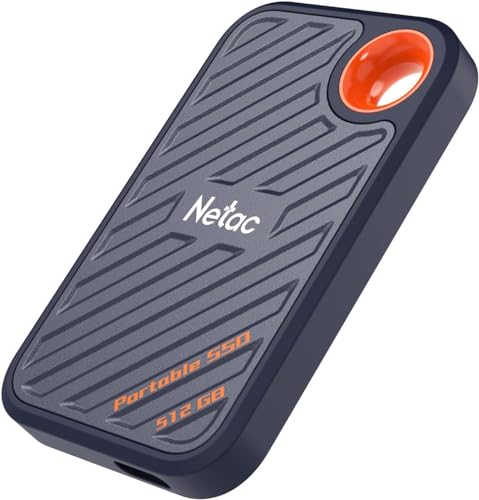
Netac 512GB Extreme Portable SSD
At just over $80, this is the cheapest entry point into actual NVMe external storage that still hits 2000 MB/s reads. For editors who need a scratch drive for a single short-form project, a backup for timeline files, or a drive to hand off a finished export, the price-to-performance ratio is hard to argue with. It is not a full project archive, but it is a legitimate fast drive that happens to be small.
- Pro: Lowest cost of entry for usable NVMe external speed in this roundup
- Pro: Dust-resistant rating adds durability for the price bracket
- Con: 512 GB is inadequate for most multi-day or multicam projects
Skip this if your average project exceeds a few hours of 4K footage; you will be juggling volumes constantly.
WD Blue SN5100 500GB NVMe SSD
This is an internal M.2 2280 drive, and its inclusion here is deliberate: many editors build their own external NVMe enclosures to pair a high-speed internal drive with a preferred interface. The SN5100 hits up to 6600 MB/s reads on PCIe Gen 4.0, which is faster than any external drive in this list can actually deliver over USB or Thunderbolt. Its value is as a component in a DIY external build where the enclosure, not the drive, is the bottleneck.
- Pro: PCIe Gen 4.0 speed headroom means the enclosure will never be limited by the drive
- Pro: Widely compatible with standard M.2 enclosures for custom external builds
- Con: Not a plug-and-play external SSD; requires a separate enclosure purchase
Skip this if you want a ready-to-use external drive out of the box without assembly.
Samsung X5 Portable SSD 2TB
The X5 has been the reference point for Thunderbolt 3 external NVMe performance since its release, and it still holds that position against newer competitors. Up to 2800 MB/s sustained throughput means it handles 4K and 6K ProRes timelines with headroom, and Samsung’s thermal management keeps performance stable during extended renders. The build is compact enough to fit any camera bag but robust enough for daily professional use.
- Pro: Proven sustained performance over years of real-world editorial use
- Pro: Compact form factor with excellent thermal regulation during long sessions
- Con: Thunderbolt 3 interface is aging relative to newer USB4 and Thunderbolt 4 standards
Skip this if you need forward compatibility with Thunderbolt 4 hubs or want the absolute lowest latency on the newest hardware.
PHIXERO P10PRO External SSD NVMe 1TB
The P10PRO is designed for the mobile editor who tethering directly to an iPhone 15, 16 Pro, or Android device. Its USB 3.2 Gen 2 interface and included 2-in-1 cable mean no dongle chain between your phone and the drive. While 1050 MB/s is below the throughput of other entries here, it is more than sufficient for proxy editing, short-form content creation, and on-device timeline work where portability outweighs raw speed.
- Pro: Purpose-built cable and connector design for direct smartphone tethering
- Pro: Compact and light enough to travel in a pocket with zero setup friction
- Con: 1050 MB/s read speed lags significantly behind other NVMe options for multicam workflows
Skip this if you are doing desktop-based editing with large media libraries; its strengths are irrelevant outside a mobile tethering context.
Buying Guide
Interface Bandwidth and Protocol Overhead
Thunderbolt 3 provides 40 Gbps and minimal protocol overhead, meaning a drive rated at 2800 MB/s will genuinely sustain close to that figure. USB 3.2 Gen 2 tops out at 10 Gbps, capping real-world throughput near 1000 MB/s regardless of how fast the controller is. Gen 2×2 doubles that ceiling. Match the interface to your machine’s ports; a Thunderbolt drive on a USB-only PC wastes its advantage.
Sustained Write vs. Burst Cache Performance
Almost every SSD in this list advertises a peak read speed that relies on burst cache. The number that matters for video editing is what happens after 60 to 120 seconds of continuous writing. Enterprise drives like the Glyph Blackbox maintain performance linearly; consumer drives often drop to hard-drive territory once the cache fills. Check reviews for sustained write curves, not just spec sheet maximums.
Capacity Planning for Real Project Sizes
A 4K ProRes 422 sequence at 60 fps generates roughly 880 MB per minute of source footage. A two-hour multicam shoot with four angles approaches 400 GB before you add proxies, audio, and render cache. Plan for at least two to three times your estimated source media volume so you can work natively without archiving mid-project. The difference between 1 TB and 2 TB is often the difference between finishing a sequence and offloading halfway through.
Our Verdict
Top pick: SanDisk G-Drive PRO 2TB for its combination of Thunderbolt bandwidth, sustained 2800 MB/s throughput, and build quality that survives field use. Budget pick: Netac ZX20 2TB delivers genuinely usable 4K editing performance at a fraction of the cost of anything with a Thunderbolt connection. If you are exclusively tethering to an iPhone or Android device, the PHIXERO P10PRO wins the conversation outright because its design solves a problem none of the others attempt to address.
FAQ
Is a higher-capacity drive better for video editing?
Yes, provided the drive maintains consistent sustained write performance at its full capacity. Large-capacity drives often have more flash channels and higher parallelism, which benefits sequential write throughput. The caveat is that a poorly thermally managed large drive can throttle harder under sustained load.
Can I edit directly from an external NVMe SSD?
Absolutely, and most editors in this category do exactly that. The key requirement is that the interface link between drive and computer never becomes the bottleneck, and that the drive does not throttle during a full editing session. Thunderbolt or USB 3.2 Gen 2×2 connections are the practical minimum.
Do I need Thunderbolt or is USB sufficient?
For 4K and below with reasonable file sizes, USB 3.2 Gen 2 is sufficient. For 6K, 8K, or multicam workflows with heavy native-resolution editing, Thunderbolt 3 or USB 3.2 Gen 2×2 provides the bandwidth headroom to keep timelines smooth during scrubbing and real-time playback.
How many external SSDs does an editor actually need?
Practically speaking, two is the working minimum: one active drive for the current project and one for archiving completed work. A third drive is useful for system-level scratch or cache files. Buying a single very large drive like the Glyph Blackbox can consolidate this, but redundancy should never be sacrificed for convenience.
Related guides
- Best Gaming PC for Overwatch 2: Ten Prebuilts Matched to Your Monitor (2026)
- Best Gaming PC for Baldur’s Gate 3: Matching CPU, VRAM and Storage to the Game (2026)
- Best Gaming PC for Apex Legends: Which Listings Fit a High-Refresh Setup (2026)
- Best RTX 3060 Gaming PCs: Eight Prebuilt Listings Compared by CPU, RAM and Cooling (2026)









