
Our Top Picks
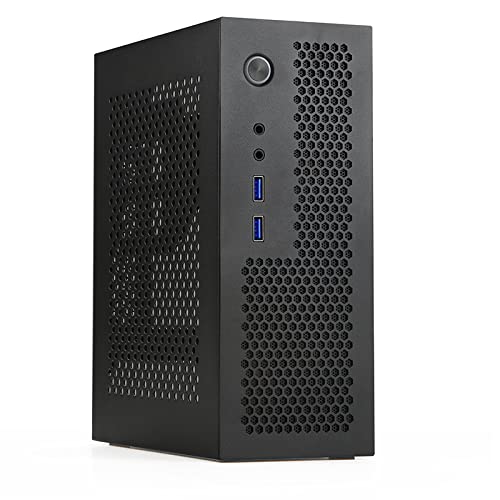 Goodisory A09 Black MINI-ITX 0.8mm SPCC Desktop Computer7.4 x 3.5 x 9 inches2.6 PoundsCheck on Amazon

Top 3 picks at a glance
The Short Answer
To determine what psu size fits itx case setups, you must look at your specific chassis specifications, as “Mini-ITX” is an umbrella term for cases ranging from ultra-compact 4-liter console styles to larger 20-liter hybrid towers. The short answer is that SFX (Small Form Factor) is the standard power supply unit (PSU) size for the vast majority of Mini-ITX cases. However, ultra-compact cases require Flex ATX power supplies, while larger, budget-friendly ITX/Micro-ATX hybrid cases can accommodate standard ATX power supplies.
When planning your desktop layout, matching the PSU to the case volume is essential. An mismatched power supply will either physically fail to fit into the mounting bracket or leave zero room for cable management, choking your system’s airflow and ruining your clean desk aesthetic.
As an Amazon Associate we earn from qualifying purchases at no extra cost to you.


Standard Sizes
Power supplies come in distinct form factors, each standardized by physical dimensions. When building a small form factor (SFF) PC, millimeters matter. Below is a breakdown of the standard PSU sizes you will encounter when shopping for a Mini-ITX chassis, complete with measurements in both inches and centimeters.
| PSU Form Factor | Width | Height | Depth (Standard) | Typical Volume Fit |
|---|---|---|---|---|
| ATX (Standard PS2) | 5.9 in / 15.0 cm | 3.4 in / 8.6 cm | 5.5 to 7.1 in / 14.0 to 18.0 cm | 15L to 25L (Hybrid ITX/M-ATX) |
| SFX | 4.9 in / 12.5 cm | 2.5 in / 6.35 cm | 3.9 in / 10.0 cm | 7L to 15L (Standard SFF) |
| SFX-L | 4.9 in / 12.5 cm | 2.5 in / 6.35 cm | 5.1 in / 13.0 cm | 10L to 18L (Performance ITX) |
| Flex ATX (1U) | 3.2 in / 8.15 cm | 1.6 in / 4.05 cm | 5.9 in / 15.0 cm | Under 5L (Ultra-Compact) |
As we look ahead to 2026, the density of high-performance internal components means that managing heat and physical clearance is more critical than ever. Choosing the right form factor ensures your system runs quietly while fitting seamlessly onto your workspace.
How to Measure Your Space
Before purchasing a power supply, you should physically inspect your Mini-ITX case or carefully review its manual. Do not rely solely on the “ITX” label. Follow this step-by-step process to measure your internal space and ensure a perfect fit:
- Step 1: Locate the PSU Mounting Bracket: Open your ITX case and identify where the power supply sits. Some cases mount the PSU at the top-front, while others position it at the bottom-rear. Note if the case includes an adapter plate (such as an SFX-to-ATX bracket).
- Step 2: Measure the Maximum Depth Clearance: Use a tape measure to find the distance from the mounting bracket to the nearest obstruction (usually the graphics card or a hard drive cage). While a standard SFX PSU is 100mm deep, modular cables will add another 15mm to 20mm (0.6 to 0.8 inches) of required clearance for the cable bend radius.
- Step 3: Check GPU Length Interference: In many sandwich-style ITX layouts, a longer power supply will physically block the installation of a full-sized graphics card. Measure your GPU’s planned position to ensure the PSU cables will not press hard against the backplate of your video card.
- Step 4: Assess Cable Routing Paths: Measure the clearance between the top of the PSU and the top panel of the case. In ultra-compact setups, you need at least 10mm of breathing room to route the thick 24-pin motherboard cable without pinching it against the chassis frame.
By Room or Use Case
Where you place your computer dictates the type of case you need, which in turn dictates your PSU choice. Below are the three most common home environments and the specific hardware configurations that fit them best.
Ultra-Compact Writing Desks & Minimalist Workspaces
If you work at a shallow secretary desk or a floating wall desk, desk real estate is at a premium. You want a computer footprint that is virtually invisible. For these micro-setups, ultra-compact ITX cases under 5 liters in volume—such as the Goodisory A09 Black MINI-ITX (typically priced between $40 and $50)—are ideal.
These tiny enclosures fit a Flex ATX PSU. Because a Flex PSU is extremely narrow (only 1.6 inches high), it leaves enough room on your desktop for notebooks, a table lamp, and coffee. Keep in mind that Flex PSUs often use smaller 40mm cooling fans, which can run louder under heavy workloads, so they are best suited for quiet office tasks, writing, and casual web browsing.
Living Room Media Centers & Home Theater Cabinets
When integrating a PC into a living room media console or TV stand, aesthetics and noise levels are paramount. You want a system that blends in with your audio-visual receivers. A portable, mid-sized small form factor chassis like the SGPC K49BL 8.3L Mini ITX Case (priced around $85 to $100) sits comfortably on an open shelf or inside a ventilated media cabinet.
An 8-to-10-liter case like this is designed specifically for an SFX PSU. SFX power supplies utilize larger 80mm or 92mm fans, allowing them to run much quieter than Flex ATX units. This is the sweet spot for home theater PCs (HTPCs) and living room gaming setups, providing up to 750W to 850W of clean, silent power for immersive 4K entertainment without distracting fan whine.
High-Performance Home Offices & Creative Studios
For dedicated home offices where you tackle video editing, 3D modeling, or high-end gaming, power demands are much higher. You need a robust system but may still want the portability of a compact footprint. Hybrid cases, such as a Micro-ATX/ITX Portable PC Case with a Handle (typically retailing for $40 to $60), are designed for this exact scenario.
These slightly larger cases (usually 15 to 22 liters) are engineered to fit standard, full-sized ATX power supplies. This allows you to use high-wattage PSUs (1000W+) that are highly reliable and budget-friendly. Because these cases are larger, they fit easily under a standard 30-inch-high office desk or can be carried between rooms using an integrated utility handle.
Common Sizing Mistakes
Even experienced system builders run into clearance issues when working within the tight constraints of Mini-ITX cases. Avoid these common pitfalls to save yourself the hassle of return shipping:
- Ignoring Cable Stiffness and Connector Depth: The physical dimensions listed by PSU manufacturers only cover the metal housing. Modular cable connectors stick out an additional 0.6 to 0.8 inches from the back of the unit. Standard, non-modular cables are permanently attached and require immediate, tight bending, which can strain internal solder joints.
- Confusing SFX with SFX-L: Many buyers assume “SFX-L” is just a marketing term. It is actually 30mm (1.2 inches) deeper than standard SFX. In many tight ITX cases, that extra 30mm will completely block your graphics card slot or prevent you from mounting an intake fan or liquid cooling radiator.
- Overlooking the SFX-to-ATX Adapter Plate: Some ITX cases are designed for ATX power supplies but include a bracket to mount an SFX unit. If you buy an SFX power supply, check if the case includes this adapter. Mounting an SFX PSU directly to an ATX cutout without a bracket leaves a massive physical gap and no way to secure the unit.
- Failing to Account for Fan Intake Clearance: Power supplies draw cool air in through their main fan and exhaust it out the back. If your ITX case forces the PSU fan to press directly against a solid acrylic or steel side panel without ventilation holes, the PSU will quickly overheat and trigger a thermal shutdown.
FAQ
Can I put a standard ATX PSU in a Mini-ITX case?
Only if the specific Mini-ITX case is designed to support it. Larger ITX cases (usually over 15 liters in volume) often feature mounting brackets for standard ATX power supplies. However, in true small form factor cases (under 12 liters), a standard ATX PSU is physically too large to fit alongside your motherboard and graphics card.
What is the difference between SFX and SFX-L power supplies?
The primary difference is physical depth. While both share the same width (125mm) and height (63.5mm), a standard SFX PSU is 100mm deep, whereas an SFX-L PSU is 130mm deep. The extra length of the SFX-L allows manufacturers to install a larger, quieter 120mm fan, but it reduces the space available for cable routing inside your chassis.
Do Mini-ITX cases come with a power supply included?
Most premium Mini-ITX cases do not include a power supply, allowing you to choose the exact wattage and efficiency level you need. However, some ultra-compact or budget cases may come bundled with a proprietary or pre-installed Flex ATX power supply to guarantee compatibility out of the box.
How much wattage do I need for a Small Form Factor (SFF) build?
For a basic home office or media center PC, a 450W to 550W power supply is more than sufficient. If you are building a high-end gaming or workstation PC with a dedicated graphics card, look for an SFX or SFX-L power supply rated between 650W and 850W to ensure stable power delivery under heavy loads.
Related guides
- Best Gaming PC for Overwatch 2: Ten Prebuilts Matched to Your Monitor (2026)
- Best Gaming PC for Baldur’s Gate 3: Matching CPU, VRAM and Storage to the Game (2026)
- Best Gaming PC for Apex Legends: Which Listings Fit a High-Refresh Setup (2026)
- Best RTX 3060 Gaming PCs: Eight Prebuilt Listings Compared by CPU, RAM and Cooling (2026)









