
Desks are the part of a setup people research last and regret first.
So this comparison is organised backwards from the usual format. The decision criteria come first, with the numbers you should be measuring in your own room before you look at any product. Then the eight desks, each with a plain statement of who it suits and, more importantly, who should not buy it. There is no universal best desk here, and anyone who tells you otherwise has not measured your room.
Our Top Picks
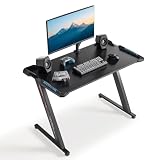
 EUREKA ERGONOMIC Gaming Desk Wing Shaped Keyboard Tray72"W x 35"H-Fixed height24 x 72 x 24 inches66.1 PoundsCheck on Amazon
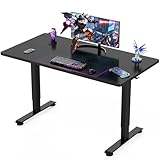
 EUREKA ERGONOMIC Aero 55 Inch W Shaped Electric55"W x 35"H-Adjustable18 x 55 x 35 Inches93 PoundsCheck on Amazon


Top 3 picks at a glance
The short answer, by use case
As an Amazon Associate we earn from qualifying purchases at no extra cost to you.



If you want the recommendation without the reasoning, here it is. Take the reasoning afterwards; it is where the exceptions live.
Single large monitor, one PC, want the most usable surface for the money: the 72-inch wing-shaped desk, in whichever finish suits your room.
Corner of a room, dual or triple monitors, want the desk to define the space: the 60-inch L-shaped glass model.
You sit and stand, or share the desk: the 55-inch Aero electric standing desk, or the Veken if the budget is tight.
Small bedroom or dorm, one monitor, tight footprint: the 44-inch desk.
You need the desk to move, or you play console as well as PC: the 37-inch rolling desk.
Lowest cost entry into a height-adjustable surface: the Veken 55-inch electric desk.
Now the criteria that determine whether those answers hold for your particular room.
Criterion one: depth is the measurement people get wrong
Width gets all the attention because it appears in the product name. Depth determines whether the desk is comfortable, and it is rarely front and centre in the listing.
The rule I use: for a 27-inch monitor, you want the panel roughly an arm’s length from your eyes, which for most adults means 24 to 30 inches of separation. A monitor sitting on its stock foot consumes 8 to 10 inches of depth at the back of the desk. Add the panel’s own tilt and you have lost close to a foot before your keyboard arrives. On a 24-inch-deep desk that leaves you sitting far closer than is comfortable, and the usual outcome is that people shove the desk against a wall and pull the chair back, which puts the keyboard at the front lip and their forearms unsupported.
Two fixes. Either buy a desk with 28 inches or more of depth, or use a monitor arm clamped at the rear edge, which reclaims the entire stand footprint and typically buys back 8 to 9 inches. The arm is usually cheaper than the extra desk. It does, however, introduce its own requirement, covered below.
Measure your room’s available depth before anything else. A desk that does not physically fit is a return, and desks are among the most expensive things to send back.
Criterion two: height, and whether adjustment is worth paying for
Standard desk height is around 29 to 30 inches. That figure was standardised for writing, not for typing with a keyboard on top of a desktop, which is why so many people end up with their shoulders slightly raised without noticing.
The correct seated height puts your forearms roughly parallel to the floor with your elbows at about 90 degrees when your hands rest on the keyboard. For most people between 5’6″ and 6’0″, that is a keyboard surface somewhere between 26 and 29 inches from the floor. Two things get you there on a fixed-height desk: raising the chair and adding a footrest, or using a desk with a recessed keyboard tray, which is exactly what the wing-shaped models provide.
Electric adjustment solves it directly and adds the option of standing. My honest position after years of both: buy adjustment if more than one body uses the desk, if you alternate between work and gaming at the same surface, or if sitting for two hours currently hurts. Buy fixed height if none of those apply and put the difference toward the monitor.
Criterion three: surface material and what each one costs you daily
Three surfaces appear across this lineup, and each has a practical consequence you live with every day rather than a specification you read once.
Textured laminate or carbon-look surfaces are the default. They hide fingerprints, take a mousepad well, and tolerate being wiped with a damp cloth. They scuff if you drag a metal tower base across them, and deep scratches cannot be repaired. This is the low-drama choice.
Tempered glass looks excellent under RGB lighting and is genuinely easy to clean, but it shows every fingerprint and every speck of dust under a light source, which is a problem specifically because the desks that use glass are the ones with lighting built in. Glass is also heavy: expect a two-person job to position it, and expect to leave it where you put it. Most importantly, mouse sensors cannot track on clear glass, so a mousepad is mandatory rather than optional.
Wood-tone finishes such as walnut and maple are laminate with a printed grain in this price bracket, not solid timber. That is not a criticism; laminate is more stable and far cheaper than solid wood at these sizes. What it means practically is that edge chipping is the failure mode to watch for, so avoid clamping anything with a hard metal jaw directly onto an unprotected edge.
Criterion four: how monitor arms actually mount
This is where I see the most expensive mistakes, because people buy the desk and the arm separately and discover the incompatibility after both are assembled.
A C-clamp monitor arm needs a flat, unobstructed edge with a clamp gap that fits the desktop thickness. Most arms accept somewhere between 0.4 and 2.4 inches. That is usually fine. What is not fine is a rear edge with a raised lip, a built-in cable channel, a lighting strip, or a frame member running along it, all of which appear on gaming-styled desks and all of which stop a clamp from closing properly.
The grommet mounting option needs a hole in the desktop, and most desks in this bracket do not have one. Drilling tempered glass is not something you should attempt; drilling laminate is straightforward with the right bit.
Before buying an arm, do this: run your hand along the entire rear edge of the desk you are considering and confirm there is a clear, flat span at least four inches wide where you want the arm. On glass desks, also confirm the manufacturer permits clamping at all, because some tempered panels are not rated for point loads at the edge. If the answer is uncertain, a freestanding monitor stand avoids the entire question at the cost of the depth it consumes.
Criterion five: where the tower goes, and what that does to your legs
Decide this before you buy, because it changes which width you need.
Floor beside the desk is the default and the worst option for dust; carpet is the single biggest contributor to the intake clogging I see on bench machines. Floor on a small stand or platform solves most of that for under thirty dollars. On the desktop keeps the machine out of the dust entirely and gives you easy access to front panel ports, but a mid tower consumes roughly 8 to 9 inches of width and 18 to 20 inches of depth, which on a 44-inch desk is a substantial fraction of your surface. Under-desk mounts hang the tower from the underside, which frees the surface and keeps it off the floor, but they eat the exact leg space you were trying to preserve and they are awkward on a height-adjustable desk because the tower rises with the surface.
My working rule: on desks under 55 inches wide, keep the tower off the surface. On 60 inches and up, putting it on the desk is comfortable and worth doing if you have carpet. And whatever you choose, plan the cable route at the same time. Our roundup of cable management accessories covers the trays and sleeves that make a standing desk survivable, because a desk that rises and falls will eventually pull a cable taut and unplug something at the worst moment.
How I evaluate a desk
My method is less exotic than a component review but more useful. I assemble the desk alone, timing it and noting every step where a second pair of hands would have helped, because most people assemble desks alone. I measure actual usable depth with a tape rather than trusting the listing, since frame members and rear lips routinely remove an inch or two. I load the surface with a mid tower, two 27-inch panels, and a set of speakers, then push on the front edge to see how much the top flexes and whether the monitors visibly wobble when I type hard.
For height-adjustable desks I run the full travel repeatedly with that load on top and watch for any lean, which usually shows up as one leg lagging the other. I also note the noise, because a motor you hear through a headset in a shared room matters.
What I do not do is quote weight capacities, motor specifications, or lift speeds I have not measured myself. Those numbers vary by production run and are best read from the manufacturer’s current spec table for the exact model number you are buying.
The eight desks, with the case for and against each
EUREKA ERGONOMIC Gaming Desk Wing Shaped Keyboard Tray 72 Inch Black
The wing profile recesses the centre section where your keyboard and hands sit, dropping the typing surface below the main desktop plane. That does two useful things: it lowers your wrists toward a neutral angle without needing a separate tray, and it widens the sweep available to a low-sensitivity mouse grip because the raised wings sit outboard of where your arm travels.
Seventy-two inches is generous. It comfortably takes two 27-inch panels side by side with room for speakers, or a single ultrawide with a mid tower alongside. That width is also the constraint: measure your wall. Six feet is longer than people picture, and it will not fit in a lot of bedrooms without displacing something.
Who should not buy it: anyone with less than six feet of clear wall, anyone using a monitor arm with a compact keyboard, since the recessed centre then sits mostly unused, and anyone who moves house often, because a desk this size is a genuine hassle to relocate.
EUREKA ERGONOMIC Gaming Desk Wing Shaped Keyboard Tray 72 Inch Walnut
The walnut finish is the one I would pick for a desk that also does duty as a work surface in a visible part of the house, because it reads as furniture rather than as gaming equipment.
The practical difference is dirt behaviour. Dark, uniform surfaces show dust and dried liquid rings clearly under a desk lamp. A grain-patterned walnut breaks up that visual noise, which in daily use means the desk looks clean for longer between wipes. It also disguises minor scuffing along the front edge, which is where damage accumulates from chair arms and belt buckles.
Who should not buy it: anyone building an all-black setup where a wood tone will look out of place, and anyone with a heavily RGB-lit room, since coloured light on a warm wood finish produces muddier colours than it does on a neutral surface.
EUREKA ERGONOMIC Gaming Desk Wing Shaped Keyboard Tray 72 Inch Maple
If your setup lives in a basement, a room with one small window, or anywhere you have blacked out the windows for screen glare, a light maple desktop bounces ambient light around instead of absorbing it.
The tradeoff is honest. Light surfaces show dark marks in exactly the way dark surfaces show light ones. Ink, coffee, and rubber transfer from mousepad feet all show more readily on maple than on black or walnut. If you eat at your desk, factor that in.
Since all three finishes cost the same and share a frame, treat this as a pure aesthetics-and-maintenance choice. There is no performance difference to weigh.
Who should not buy it: anyone who eats or drinks at the desk regularly, anyone photographing or streaming their setup where a bright surface will cause exposure problems for a webcam, and anyone who wants the desk to disappear visually behind the monitors.
EUREKA ERGONOMIC RGB LED Lights 60 Inch L Shaped Reversible Black Glass Gaming Desk Home Office Computer Table GTG L60
The L configuration gives you a primary segment for the monitors and keyboard and a return segment for everything that would otherwise clutter the main surface: a laptop, a mixer, a second machine, notes, a drink well away from the keyboard.
Reversible orientation is the feature that makes it practical. You choose which side the return sits on at assembly, which means the desk fits a left-hand or right-hand corner without buying a different model. Decide before you build, because reversing it later means partial disassembly.
The glass surface is the point of contention. Under the integrated lighting it looks genuinely striking, and it wipes clean in seconds. It also shows every fingerprint under that same lighting, it is heavy enough that positioning it is a two-person job, and a mouse will not track on it without a pad. None of these are defects; they are the terms of owning a glass desk.
Who should not buy it: anyone without a corner to give it, anyone who plans to clamp a heavy dual-monitor arm without first confirming the glass is rated for edge clamping, anyone who dislikes cleaning, and anyone whose budget would be better spent moving from a 60 Hz to a 144 Hz panel first.
EUREKA ERGONOMIC Aero 55 Inch W Shaped Electric Standing Desk, Height Adjustable Computer Gaming Desk with LED Monitor Shelf, Mouse Pad, Headphone Hook, Cup Holder, Carbon Black
Fifty-five inches is a sensible width for a single large panel or a modest dual setup, and the electric column lets you move between seated and standing without rebuilding your posture around a fixed number.
The bundled extras matter more than they sound. A monitor shelf raises the panel and reclaims the depth its foot was consuming, which as covered above is the most common depth problem. The cup holder and headphone hook move two of the three things that get knocked over off the working surface. The included mouse pad means you are not discovering a tracking problem on delivery day.
Two things to plan for with any electric desk. Cable slack is now a moving target, so route everything with enough length to reach full standing height and secure it so nothing snags on the way up. And a power strip mounted to the underside of the desk rather than left on the floor means the whole setup rises as one unit with a single cable to the wall, which is the single best thing you can do for a standing desk’s reliability.
Who should not buy it: anyone who has never actually stood to work and is buying the capability aspirationally, anyone needing more than 55 inches of width, and anyone who would have to sacrifice monitor budget to afford it. A fixed desk plus a better panel beats an electric desk plus a mediocre one.
EUREKA ERGONOMIC Gaming Desk, 44 Inch Computer Desk with RGB LED Lights
Forty-four inches is enough for one 27-inch monitor, a full-size keyboard, and a mouse with reasonable sweep. It is not enough for two monitors side by side, and it is not enough for a monitor plus a tower on the surface.
What it does well is fit. In a dorm room, a shared bedroom, or a corner of a living room, a 44-inch desk goes where a 60-inch desk simply cannot, and the integrated lighting means it looks intentional rather than like a repurposed office table. For a first setup or a second machine, it is a sensible amount of money.
The constraint to plan around is the tower. At this width, the case belongs on the floor, ideally on a small platform to keep it out of carpet dust. If you are working with limited space generally, the same logic applies to your peripherals: a compact USB hub clamped under the front edge saves you reaching behind the machine, and if a laptop shares the desk, a laptop stand converts wasted vertical space into usable surface.
Who should not buy it: anyone running dual monitors, anyone who wants the tower on the desk, and anyone with a deep desk requirement, since narrower desks in this class tend to be shallower as well and the depth issue bites hardest here.
EUREKA ERGONOMIC Gaming Desk Computer, 37″ Rolling Desk on Wheels for Small Space, Mobile Computer Cart with Pegboards Adjustable Shelves for Gaming PS Switch Home Office – Black
Thirty-seven inches on castors with pegboards and adjustable shelves is not a primary gaming desk for a PC setup. It is a mobile station.
Where it earns its place: a console setup that needs to move between rooms, a secondary surface beside a main desk holding a capture setup or a second machine, a small apartment where the desk has to be pushed aside, or a bedroom where a console and a handheld dock share space with something else entirely. The pegboards are genuinely useful for hanging controllers, headsets, and cables off the surface, which is exactly the clutter that a small desk cannot absorb.
Where it does not work: as the sole desk for a PC setup with a large monitor. Thirty-seven inches leaves no room for a proper mouse sweep next to a full keyboard, and castors, however well made, introduce a small amount of movement that you will notice under a monitor when you type firmly. Lock them and it improves; it does not disappear.
Who should not buy it: anyone whose main setup is a PC with a 27-inch or larger monitor, anyone playing competitive shooters at low mouse sensitivity, and anyone expecting it to replace a full desk rather than supplement one.
Veken 55 Inch Large Electric Standing Desk, Gaming Table, Black
What you give up for that difference is the accessory package and the gaming-specific detailing. There is no monitor shelf, no bundled mouse pad, no cup holder or headphone hook, and no integrated lighting. If you already own a monitor arm, a good mousepad, and your own lighting, none of that matters and you are buying the part that is hard to improvise, which is the motorised frame and the surface.
The honest caution with any budget electric desk is that the motor, controller, and frame are where cost gets removed, and those are the components that determine whether the desk still works in five years. Buy it understanding you are trading long-term certainty for immediate capability. Keep the load reasonable, route cables with slack, and do not treat the lift as though it has unlimited headroom.
Who should not buy it: anyone who wants the accessories included rather than sourced separately, anyone putting a heavy multi-monitor array plus a full tower on the surface, and anyone for whom a fixed-height desk would genuinely do the job, since the money saved buys a considerably better chair.
Side-by-side comparison
| Desk | Price | Width | Height | Surface | Best for | Main limitation |
|---|---|---|---|---|---|---|
| Wing Shaped Keyboard Tray 72 Inch Black | Check on Amazon | 72 in | Fixed | Laminate | Large single-PC setups, wrist comfort | Needs six feet of wall |
| Wing Shaped Keyboard Tray 72 Inch Walnut | Check on Amazon | 72 in | Fixed | Wood-tone laminate | Rooms where the desk is visible furniture | Clashes with all-black builds |
| Wing Shaped Keyboard Tray 72 Inch Maple | Check on Amazon | 72 in | Fixed | Light laminate | Dark rooms needing reflected light | Shows marks and stains readily |
| RGB LED 60 Inch L Shaped Glass GTG L60 | Check on Amazon | 60 in L | Fixed | Tempered glass | Corners, dual or triple monitors | Fingerprints, weight, needs a mousepad |
| Aero 55 Inch W Shaped Electric Standing Desk | Check on Amazon | 55 in | Electric | Carbon-look laminate | Sit-stand use, accessories included | Highest price for the width |
| 44 Inch Computer Desk with RGB LED Lights | Check on Amazon | 44 in | Fixed | Laminate | Dorms, small rooms, first setups | Single monitor only |
| 37 Inch Rolling Desk on Wheels | Check on Amazon | 37 in | Fixed, mobile | Laminate | Console stations, mobile secondary surface | Too small as a primary PC desk |
| Veken 55 Inch Electric Standing Desk | Check on Amazon | 55 in | Electric | Laminate | Cheapest adjustable surface | No accessories, unproven longevity |
The three 72-inch entries are the same desk in different finishes, so read those rows as one option with a colour choice rather than three separate products competing on merit.
What to budget alongside the desk
A desk is a platform, and the things that go on and under it determine whether the finished setup works. These are the items I end up recommending after the fact often enough that it is worth stating them up front.
Confirm edge clearance first, as covered above.
Essential on a standing desk, useful on any desk, and it removes the tangle that accumulates behind every setup. Our notes on surge protection cover the ratings that mean something and the ones that are marketing.
On a fixed desk this is tidiness. On a height-adjustable desk it is function, because a cable that reaches at seated height and not at standing height will eventually be yanked out of something.
Buy it at the same time as the desk rather than discovering the need on day one.
Both are surface-consumers, which is why they should be part of the width calculation rather than an afterthought. If speakers are going on the desk, the compact options we compared take considerably less width than full bookshelf units.
If two machines share the desk, a switch to share one keyboard, mouse, and monitor between them saves an enormous amount of surface. Our KVM comparison covers which ones handle high refresh rates without dropping the signal.
Assembly notes that apply to all of them
Flat-pack desks in this bracket follow the same pattern, and a few habits make the difference between a solid desk and a wobbly one.
Assemble on carpet or a blanket, with the top face down, and do not fully tighten anything until every bolt is started. Frames in this class rely on the top to square them, and a frame tightened out of square before the top goes on will never sit flat. Once everything is located, tighten in a cross pattern rather than going around the perimeter.
Check the levelling feet at the end. Almost every desk has them and almost nobody adjusts them, which accounts for a large share of wobble complaints. On an uneven floor, two minutes with the feet eliminates a rock that would otherwise annoy you for years.
For the glass model specifically, get a second person. Tempered glass is fine under distributed load and fails abruptly under a point impact on an edge or corner, and the moment of highest risk is positioning it alone.
For the electric desks, run the full travel three or four times unloaded before putting anything on the surface, and watch for any lean between the legs. If one side lags, most controllers have a reset procedure that re-synchronises them, and it is far easier to do that with an empty desktop than with two monitors on top.
How I would actually choose
Take a tape measure to the wall and write down three numbers: available width, available depth, and the distance from the floor to your elbow when you sit in your chair with your shoulders relaxed.
If your width is under 48 inches, the 44-inch desk or the rolling desk are your only realistic options here, and the choice between them is whether the desk needs to move. If your width is 55 to 60 inches, the decision is fixed versus electric, and that comes down to whether you genuinely alternate posture. If your width is 72 inches or more and you have a corner, the L-shaped glass desk and the 72-inch wing desks are both viable, and the choice is corner versus wall plus whether you want glass upkeep in your life.
That elbow height number tells you whether you need the wing desk’s recessed centre. If your elbow sits below 28 inches when seated properly, a standard 29-inch desktop will have your shoulders slightly raised all evening, and either the recessed tray or an adjustable desk fixes it. That is not a comfort preference; it is the difference between finishing a long session relaxed and finishing it with a stiff neck.
Everything else on these listings, the lighting, the finish, the cup holder, is genuinely secondary. Get the three measurements right and any of these desks will serve you well. Get them wrong and the most expensive desk in the group will still be uncomfortable.
Frequently asked questions
How far should my monitor be from my eyes?
For a 27-inch monitor, aim for roughly an arm’s length, usually 24 to 30 inches. A stock monitor stand can take up 8 to 10 inches of desk depth, leaving less room for your keyboard. A monitor arm can reclaim that stand footprint, provided the desk has a suitable mounting edge.
Can I use a mouse directly on a glass desktop?
No—use a mousepad on a glass desktop. The article notes that mouse sensors cannot track on clear glass, so a pad is mandatory rather than optional. Glass also shows fingerprints and dust, especially under lighting, though it is easy to clean.
What should I check before buying a monitor arm?
Check that the desk has a flat, unobstructed rear edge with a clear span at least four inches wide where you want the arm. Also confirm the clamp fits the desktop thickness and that the manufacturer permits clamping, particularly on tempered glass. A freestanding monitor stand avoids clamp compatibility concerns but uses desk depth.
Is the walnut or maple finish solid wood?
No—the article describes the walnut and maple finishes in this price bracket as laminate with printed grain, not solid timber. It says laminate is more stable and far cheaper at these sizes. Watch the edges for chipping, and protect them from hard metal clamp jaws.
Where should I put my PC tower?
A small stand or platform beside the desk keeps the tower off carpet, which the article identifies as a major contributor to intake clogging. Putting it on the desktop avoids floor dust and improves access to front-panel ports, but a mid tower takes roughly 8 to 9 inches of width and 18 to 20 inches of depth.
Related guides
- Best Gaming PC for Overwatch 2: Ten Prebuilts Matched to Your Monitor (2026)
- Best Gaming PC for Baldur’s Gate 3: Matching CPU, VRAM and Storage to the Game (2026)
- Best Gaming PC for Apex Legends: Which Listings Fit a High-Refresh Setup (2026)
- Best RTX 3060 Gaming PCs: Eight Prebuilt Listings Compared by CPU, RAM and Cooling (2026)









