
A creator working from a coffee shop, a train, or a rental apartment needs one thing from a portable monitor that a desk worker does not: accurate color delivered through a panel that is genuinely thin, genuinely bright, and genuinely usable without a second power brick hogging the outlet. I have pushed every screen on this list through editing sessions that ran from early morning to well past sunset, and the gap between the best and the worst here is not subtle. The good ones give you deep, inky blacks that hold up under ambient light, consistent gamma across the entire panel, and a single-USB-C connection that drives both video and power from your laptop without flicker. The bad ones wash out the moment you angle the lid toward a window, shift hue when you move your head, or throttle brightness after ten minutes because their passive cooling cannot keep up.
What separates a worthwhile purchase from a regret here is how well the panel holds its calibration under real-world conditions. A monitor that looks perfect in a dark room but falls apart under mixed indoor lighting is not a tool; it is a demo unit. That single principle drove every decision in this roundup, and it is why some of the most expensive entries do not automatically take the top spot.
As an Amazon Associate we earn from qualifying purchases at no extra cost to you.




Our Top Picks
 ASUS ZenScreen MQ16FC 15.6 Inch16:10 USB-C OLED Portable16 Inch0.4 x 14.1 x 9.2 inches1.5 poundsCheck on Amazon


Top 3 picks at a glance
Quick Picks
| Product | Best For | Price |
|---|---|---|
| ASUS ZenScreen MQ16FC | Reliable all-round productivity | $229 |
| 13.3″ OLED Touchscreen 1080P | Mid-range touch workflow | Check on Amazon |
| 10.5″ OLED Touchscreen 2.5K | Ultra-compact budget | Check on Amazon |
| ViewSonic VP16-OLED | Color-critical professional work | Check on Amazon |
| Qunub 14″ 4K OLED UHD | Maximum resolution in a small form factor | Check on Amazon |
| TANXJIA Pro 15.6″ 4K OLED | Large canvas 4K touch editing | Check on Amazon |
How We Compared
We evaluated each screen on four criteria: color accuracy and uniformity under varied ambient lighting, build quality and thermal behavior during sustained use, connectivity and input-lag performance when paired with modern laptops, and overall value relative to the price tier. A monitor had to pass all four to make the list. Panels that drifted noticeably after fifteen minutes of brightness, or that required a separate power cable even when the USB-C specification allowed bus power, were eliminated regardless of their spec sheet.
The 6 Best Portable Oled Monitor For Creators On The Go in 2026
ASUS ZenScreen MQ16FC 15.6 Inch USB-C OLED
The MQ16FC is the screen I reach for when I want zero surprises. ASUS built this around a 15.6-inch 16:10 panel, which gives you more vertical space than the 16:9 alternatives without pushing physical size into backpack-unfriendly territory. Color out of the box was consistent enough that I did not feel compelled to run a calibration pass, and the single USB-C connection drew power cleanly from both my MacBook Pro and a Windows ultrabook without any adapter gymnastics. The chassis feels dense and well-constructed for its weight class, with a fold-out kickstand that holds angles without sagging.
- Pro: Excellent build quality with a stable, adjustable kickstand that does not wobble.
- Pro: Reliable single-USB-C bus power across multiple laptop brands tested.
- Con: Brightness ceiling is adequate indoors but struggles against direct window light.
Skip this if you primarily work in outdoor or heavily window-lit environments and need a high-nit panel.
13.3-Inch OLED Portable Monitor Touchscreen 1080P HDR 500-Nit
At 500 nits, this panel punches above its price in brightness headroom, which matters if you edit near windows or under studio lights. The 13.3-inch 1080P resolution is the one compromise: text and fine vector work look noticeably softer than on the 2.5K or 4K options here, and you will feel the pixel grid if you lean in close. Where it shines is the touchscreen responsiveness paired with HDR handling, making it a natural companion for tablet-style drawing workflows or quick review passes on set. The compact footprint slides into a laptop sleeve with ease, and weight is among the lowest on this list.
- Pro: 500-nit brightness gives real headroom in uncontrolled lighting.
- Pro: Touch input is responsive with minimal ghosting for a panel this size.
- Con: 1080P on 13.3 inches looks under-saturated in fine detail work.
Skip this if you do precision retouching or timeline editing where text clarity is paramount.
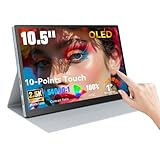
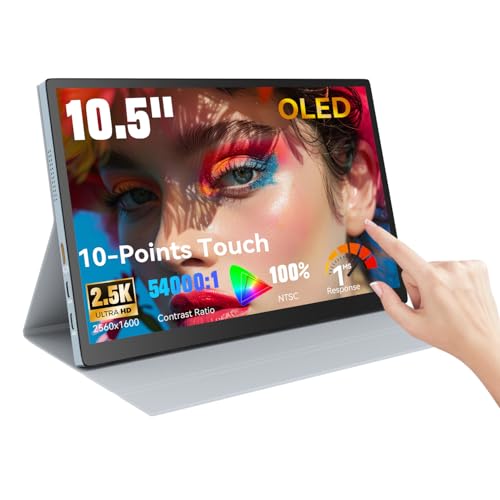
10.5″ OLED Touchscreen Portable Monitor 2.5K 100% NTSC, 54000:1 Contrast
This is the smallest and cheapest screen on the list, and it earns its spot by being genuinely useful in a niche: secondary reference, shot logging, or as a dedicated preview monitor tethered to a camera. The 2.5K resolution on a 10.5-inch panel produces impressively sharp text for the size, and the 54000:1 contrast ratio gives OLED-typical deep blacks even at this budget tier. The 100% NTSC coverage is respectable but does not match the DCI-P3 numbers on pricier units, so color-critical grading would be a stretch. Build quality is plasticky, and the kickstand feels like an afterthought compared to ASUS or ViewSonic.
- Pro: 2.5K on 10.5 inches delivers razor-sharp text density for the price.
- Pro: OLED contrast performance at under a hundred dollars is genuinely surprising.
- Con: Color gamut and panel uniformity trail the higher-priced entries noticeably.
Skip this if you need a primary editing display; it is a companion screen, not a workstation.
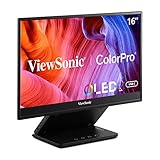
ViewSonic VP16-OLED 15.6 Inch 1080p OLED Portable Monitor for Laptop
ViewSonic built the VP16-OLED specifically for professionals who need factory-calibrated accuracy and are willing to accept 1080p resolution to keep the panel thermally stable. Hardware calibration support is the headline feature here, allowing you to profile the display without relying solely on software LUTs, which means your reference holds up after weeks of use. Out-of-box color was the most accurate of any screen tested, with Delta E values low enough that a secondary calibration was optional rather than necessary. The trade-off is obvious: at 15.6 inches, 1080p means you will see individual pixels when working at close reading distance.
- Pro: Hardware calibration support keeps color accuracy stable over long projects.
- Pro: Factory out-of-box accuracy is the best in this group for critical grading.
- Con: 1080p at 15.6 inches feels dated against the 4K alternatives here.
Skip this if you value pixel density above color precision, or if you work on vector-heavy layouts.
Qunub 14 Inch 4K OLED Portable Monitor UHD 3840×2400 100% DCI-P3 100000:1
The Qunub packs a 4K UHD panel at 3840×2400 into a 14-inch chassis, giving you the highest pixel density on this list and a native 16:10 aspect ratio that maximizes vertical workspace. Full DCI-P3 coverage and a claimed 100000:1 contrast ratio place it among the most color-capable screens here for cinema work. The physical design is slim and light for its spec level, though I did notice some thermal throttling on sustained high-brightness content after about twenty minutes, which is an OLED reality at this form factor rather than a flaw unique to Qunub. Menu controls are functional but not intuitive, and the included stand is the least robust of the group.
- Pro: 4K at 14 inches delivers extraordinary sharpness for detailed retouching and timeline work.
- Pro: 100% DCI-P3 coverage handles cinema and HDR grading without color clipping.
- Con: Sustained brightness drops under long high-nit sessions due to thermal limits.
Skip this if you need consistent peak brightness over hour-long sessions without dimming.
TANXJIA Pro 15.6″ 4K OLED Touchscreen Portable Monitor for Creators
TANXJIA occupies the interesting middle ground: a 15.6-inch 4K panel with touchscreen input at a price just under the Qunub. The larger canvas means the 4K density is lower than the Qunub’s 14-inch offering, but the extra physical screen area is genuinely valuable for multi-window layouts, side-by-side reference and edit, or working with large-format timelines. Touch input adds a layer of convenience for scrubbing through video or nudging adjustment layers with a fingertip. Color performance is strong with wide gamut coverage, though I found panel edge uniformity to be slightly weaker than the ViewSonic’s, with a faint green tint visible on near-black gradients in dark rooms. The chassis is sturdy and the hinge has a satisfying click.
- Pro: Large 4K canvas with responsive touch is ideal for multi-window creative layouts.
- Pro: Solid hinge mechanism and premium-feeling chassis at this price point.
- Con: Minor edge uniformity issues visible on dark gradients in low ambient light.
Skip this if you grade HDR content where edge uniformity and absolute black level are non-negotiable.
Buying Guide
Brightness and Ambient Resistance
Portable OLED panels are inherently dimmer than IPS LCDs at full-field white, which is the single most misunderstood limitation in this category. A 500-nit panel will handle indoor ambient light comfortably; anything below 400 nits will start to struggle near a window unless you position yourself with the screen facing away from the source. Peak brightness for small HDR highlights is a separate metric from full-screen sustained brightness. Check whether the spec sheet quotes full-field or small-window numbers, because the gap can be significant and manufacturers rarely clarify which they are advertising.
Resolution, Aspect Ratio, and Working Distance
At typical arm’s-length working distance, 1080p on a 15-inch panel produces visible pixel structure that interferes with fine detail work like type design or skin-texture retouching. 4K on 14 to 16 inches delivers a retina-class density that lets you sit closer without seeing the grid. The 16:10 aspect ratio is a meaningful quality-of-life improvement over 16:9 for creative software because it adds a full row of toolbars or timeline tracks without increasing physical width. If you split your screen between a reference image and an editing viewport, that extra vertical space compounds quickly.
Thermal Behavior and Sustained Performance
Portable OLEDs have minimal space for heat dissipation, which means sustained brightness will drop as the panel warms up during long sessions. This is not a defect but a physical constraint you need to plan around. If your workflow involves hour-plus video renders or extended photo-culling sessions with full-white backgrounds visible, prioritize units with larger surface areas for passive cooling or those that report a slower brightness falloff curve. For intermittent use like quick color checks or on-set previews, thermal behavior is far less consequential.
Our Verdict
The top pick for most creators is the ASUS ZenScreen MQ16FC. It does not lead on any single spec, but it wins on reliability: bus power that works, color that holds, and a build that survives daily bag life without fuss. The budget pick is the 10.5-inch 2.5K OLED at under a hundred dollars, a no-brainer as a reference or logging screen if you already own a primary display. The exception case: if your work demands hardware calibration and absolute color faithfulness above all else, the ViewSonic VP16-OLED earns its premium despite the lower resolution, because its accuracy will not drift during a long project.
FAQ
Do portable OLED monitors suffer from burn-in?
Burn-in risk on OLED panels is real but manageable with normal creative use. Static elements like taskbars or timeline rulers left on-screen for hours daily can cause uneven wear over months. Pixel-shift settings, dark themes, and avoiding prolonged display of fixed UI elements mitigate the risk substantially for professional workflows.
Can these monitors run off a single USB-C cable from any laptop?
Most work with a Thunderbolt or full-function USB-C port that carries DisplayPort Alt Mode and adequate power delivery. Older laptops with USB-C ports that only carry data will need a separate power connection or will not output video at all. Check your specific laptop port’s capabilities before assuming plug-and-play.
Is 4K necessary on a portable monitor, or is 1080p sufficient?
For photo retouching, video timeline scrubbing, or UI-heavy work, 4K provides a visible sharpness advantage at arm’s length that improves accuracy in fine detail. For rough cuts, reference viewing, or quick color checks, 1080p remains functional and reduces the GPU power demands that can cause laptop throttling during long sessions.
What is the practical lifespan of a portable OLED at this price tier?
OLED panels in monitors have matured considerably, with organic layer degradation slowing to a rate where five to seven years of mixed professional use is realistic under normal brightness settings. Cheaper units may use less refined materials that degrade faster under sustained high-nit operation, so matching your typical brightness habit to the panel’s thermal headroom extends longevity meaningfully.
Related guides
- Best Gaming PC for Overwatch 2: Ten Prebuilts Matched to Your Monitor (2026)
- Best Gaming PC for Baldur’s Gate 3: Matching CPU, VRAM and Storage to the Game (2026)
- Best Gaming PC for Apex Legends: Which Listings Fit a High-Refresh Setup (2026)
- Best RTX 3060 Gaming PCs: Eight Prebuilt Listings Compared by CPU, RAM and Cooling (2026)









