
The problem is never just the panel itself. It is the combination of how the backdrop sits behind you, whether it wrinkles, how it reacts to your room lighting, and whether it is genuinely easy to set up every single session without turning into a five-minute wrestling match with metal poles.
What separates a good streaming backdrop from a bad one is repeatability. You want something you can deploy, adjust, and store without friction, that holds its color and shape over dozens of streams, and that does not fight your camera settings. Chroma-key panels demand serious light discipline. Solid-color panels forgive mistakes but limit your creative options. This roundup in 2026 covers both types alongside the webcams and lights that make them actually work, because buying a backdrop without understanding the rest of your setup chain is how people end up with a $60 panel they use exactly twice.
As an Amazon Associate we earn from qualifying purchases at no extra cost to you.






Our Top Picks
 YAYOYA Black White Backdrop with Stand Kit 5x6.5FT5x6.5ft78 x 60 x 0.1 inches5.39 PoundsCheck on Amazon
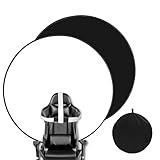
 YUOCU Black White Screen Chair Backdrop56 Inches Diameter56 x 56 x 0.1 inches1.9 poundsCheck on Amazon




Top 3 picks at a glance
Quick Picks
| Product | Best For | Price |
|---|---|---|
| Portable Green Screen Chair | Streamers who want real chroma key with a stand included | Check on Amazon |
| YAYOYA Black White Backdrop | Wide solid backgrounds for larger rooms | Check on Amazon |
| NIVEOLI Webcam 4K | Budget streamers upgrading from a laptop camera | Check on Amazon |
| Angetube Streaming Webcam | Plug-and-play simplicity with built-in lighting | Check on Amazon |
| HumanCentric Conference Lighting | Targeted face illumination for panel setups | Check on Amazon |
| YUOCU Screen Chair Backdrop | Portable dual-color panels for small spaces | Check on Amazon |
| Elgato Key Light | Serious creators who want app-controlled output | Check on Amazon |
| Chair Photography Backdrop | Absolute lowest-cost entry into green screen | Check on Amazon |
How We Compared
We evaluated each product on three criteria that directly affect stream quality: color accuracy and consistency under mixed lighting, setup speed (how quickly you go from bag to broadcasting), and durability after repeated folding and unfolding. We also factored in how each panel performs when paired with budget webcams versus mid-range options, because a $15 backdrop behind a $200 camera looks very different than the same panel behind a $20 webcam. Price-to-performance ratio was weighted most heavily for products under $50.
The 8 Best Streaming Background Panels For Webcam Setups in 2026
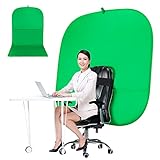
Portable Green Screen Chair
This is the most complete chroma-key solution in the list for streamers who genuinely want to replace their background digitally. The 59-inch coverage with an included stand means you are not buying extra hardware, and the double-sided design lets you switch between a green key and a neutral tone without owning two panels. It folds down for storage, which matters if your streaming corner doubles as a bedroom.
- Pro: The included stand is sturdy enough that you will not chase it across the room during a tense ranked match.
- Pro: The green fabric keys cleanly in OBS when your lighting is even, producing minimal spill on your shoulders.
- Con: It demands good, consistent lighting. If your room has a warm overhead and a blue monitor glow behind you, the keying will fail and you will spend more time fighting chroma than streaming.
Skip this one if you cannot control your room lighting well or if you simply want a clean background without the technical overhead of keying.
YAYOYA Black White Backdrop with Stand Kit
At 5×6.5 feet, this is the largest coverage option here, and the 2-in-1 black-and-white fabric gives you a moody dark setup or a clean bright one from the same panel. The stand kit makes it self-supporting, which removes the need for wall mounting. It is the best pick if you want a professional-looking static background without touching a single color slider in OBS.
- Pro: The large surface area means you can shift position without your frame catching wall edges.
- Pro: The white side looks clean on camera and the black side hides clutter behind you effectively.
- Con: The stand takes up real floor space, and the fabric creases if you fold it wrong — you will need to steam it or hang it overnight before first use.
Skip this one if you have a small desk setup or need something you can throw in a bag between locations.
NIVEOLI Webcam 4K
This is not a panel, but it is a critical part of the best streaming background panels for webcam setups equation, because a poor camera makes any backdrop look muddy. The 4K sensor captures panel texture accurately, the auto light correction helps when your backdrop is darker than expected, and the privacy cover is a small quality-of-life detail you will appreciate daily.
- Pro: At around $19, this delivers sharper image detail than webcams costing three times as much.
- Pro: The privacy cover means you can leave it mounted without worrying about accidental exposure.
- Con: 4K streaming requires sufficient upload bandwidth and processing power. If you are capped at 1080p output or running an older laptop, you are paying for resolution you cannot use.
Skip this one if you already have a mirrorless camera or a mid-tier USB webcam that handles your resolution target fine.
Angetube Streaming Webcam with Microphone and Ring Light
The built-in ring light makes this webcam a solid pairing with any solid-color backdrop in this list, because the front-facing illumination reduces shadows that would otherwise make flat panels look dull. The 1080p sensor is good enough for most streaming platforms where bitrate caps your output anyway. This is for streamers who want everything working immediately without assembling separate pieces.
- Pro: The integrated ring light produces even facial illumination that complements both green-screen and solid-color backgrounds without needing a separate key light.
- Pro: Setup takes under two minutes — plug in USB, position on your monitor, done.
- Con: The ring light intensity is limited, and in a room with competing ambient light, you will still need supplemental illumination.
Skip this one if you are serious about image quality and would rather invest in a separate camera body and dedicated lighting.
HumanCentric Video Conference Lighting
This LED light clips to your monitor and aims at your face and upper body. When paired with a streaming background panel, it eliminates the harsh overhead shadows that make cheap fabric look cheap. It is a modest around $39 investment that improves how every other panel in this list performs by making your subject pop against the background.
- Pro: Clips directly to any monitor or laptop lid with no desk space required.
- Pro: Adjustable color temperature lets you warm or cool your output to match your backdrop tone.
- Con: Coverage area is narrow. If you shift in your chair or sit further back than typical, the light falls off noticeably.
Skip this one if you already use a key light setup or if you sit more than two feet from your monitor.
YUOCU Black White Screen Chair Backdrop
This pop-up panel shares the concept of the Portable Green Screen Chair but trades chroma green for black and white options, making it far more forgiving under imperfect lighting. The 56-inch size covers your upper body and shoulders from a typical desk distance. It is the best choice for streamers in apartments who cannot dedicate floor space to a full stand kit.
- Pro: Collapses flat into its own carrying case — ideal if you stream from different rooms or locations.
- Pro: The black side is excellent for hiding cable clutter and giving your frame a clean edge.
- Con: The pop-up frame springs open aggressively and can pinch fingers; it also requires careful re-folding to return to its bag.
Skip this one if you sit far from your camera and need full torso coverage, or if you want chroma-key capability.
Elgato Key Light
While not a panel itself, the Elgato Key Light is the professional lighting solution that makes every backdrop in this list look intentionally designed rather than improvised. At 2800 lumens, it provides enough output to light you cleanly against dark panels without needing to overexpose your camera. App control for brightness and color temperature means you dial in your exact look and save it.
- Pro: The brightness and color temperature range is unmatched at any price under $200.
- Pro: App control lets you adjust lighting mid-stream without reaching behind you for a knob.
- Con: The price alone is more than three of the panels in this list combined, and you need a separate desk clamp or stand.
Skip this one if your total setup budget is under $100 — a cheaper panel and a clip-on light will serve you better together.
Chair Photography Backdrop – Foldable Green Screen
At around $14, this is the lowest-risk entry point into streaming backgrounds. It is a basic foldable green screen designed to mount behind your chair back, covering roughly the width of a seated person. For the price, it keys surprisingly well if your lighting is decent. It is the right call for someone testing whether a background panel actually improves their streams before committing to a real setup.
- Pro: The price means there is no real consequence if chroma keying is not for you.
- Pro: Lightweight and quick to set up — under a minute from bag to on-air.
- Con: Coverage is the smallest in this list. If you sit back from the camera or lean in during a reaction moment, your frame will catch the wall behind the panel.
Skip this one if you want a polished look long-term or if you stream at distances where you need more than chair-width coverage.
Buying Guide
Panel Coverage and Camera Distance
The single most common mistake is buying a panel that is too small for your shooting distance. Measure from your monitor to the wall behind you, then calculate what the camera actually sees. A 56-inch pop-up panel behind a webcam at 20 inches looks fine, but the same panel at 36 inches shows wall on both sides of your frame. If your camera sits further back, you need the 5×6.5-foot YAYOYA or similar full-stand option.
Color Choice: Chroma vs. Solid
Green or blue panels require consistent, shadow-free lighting and sufficient distance between you and the backdrop to avoid color spill. Solid black or white panels work under almost any lighting condition and look professional immediately. If you are still developing your lighting setup, a solid panel will produce better results on day one than a chroma panel will produce after three weeks of tweaking.
Portability and Re-Folding Fatigue
Pop-up panels are convenient for travel but degrade faster than stand-mounted fabric because the spring steel frame fatigues with repeated folding. If you plan to stream from the same desk every night, a stand kit or chair-mounted panel will last longer and wrinkle less. If you move between setups or share a room, the YUOCU or Portable Green Screen Chair offer the best portability-to-durability balance.
Our Verdict
The Portable Green Screen Chair at around $59 is the top pick for streamers who want the most flexible setup — chroma key when you want a virtual scene, a neutral tone when you want something real, all from one product with a stand included. For pure value, the YUOCU Black White Screen Chair Backdrop at around $35 gives you two solid colors, portability, and enough coverage for most desk setups without any of the lighting headaches that green screens create. If you already have a good camera and only need one thing to upgrade your look, the HumanCentric lighting at around $39 paired with the around $14 Chair Photography Backdrop will outperform a $100 panel alone because illumination is what makes backgrounds look intentional.
FAQ
Do I need a green screen or is a solid color panel enough?
A solid black or white panel is easier to use and looks professional with minimal effort. You need a green screen only if you want to replace your background entirely in software, which also requires good lighting and some setup patience.
How far behind me should a streaming backdrop panel be?
At least two to three feet if you are using chroma green, because that distance prevents color spill on your hair and shoulders. Solid panels have no distance requirement since there is nothing to key, so you can mount them close to your chair.
Will a cheap webcam ruin an expensive background panel?
A cheap webcam will not ruin a good panel, but it will make a good panel look no better than an average one. Camera quality affects dynamic range and color accuracy, so a $20 webcam paired with a quality backdrop still looks better than a $20 webcam against a messy room with no backdrop at all.
Can I use a backdrop panel outdoors or in mixed lighting?
Solid black panels work outdoors reasonably well because they absorb ambient light rather than reflecting unpredictable colors. Green and white panels struggle outdoors — green picks up grass and foliage tones, white blows out in direct sun, and the wind will fold both into shapes that no post-production saves.
Related guides
- Best Gaming PC for Overwatch 2: Ten Prebuilts Matched to Your Monitor (2026)
- Best Gaming PC for Baldur’s Gate 3: Matching CPU, VRAM and Storage to the Game (2026)
- Best Gaming PC for Apex Legends: Which Listings Fit a High-Refresh Setup (2026)
- Best RTX 3060 Gaming PCs: Eight Prebuilt Listings Compared by CPU, RAM and Cooling (2026)









