
Our Top Picks


The Short Answer
Yes — you should have an I/O shield installed before you mount the motherboard, and if yours is missing, a universal replacement like the IOmesh Black Universal I/O Shield Plate (around $15) is a cheap, sensible fix. The one exception: some modern motherboards (many mid-range and higher boards from roughly 2020 onward) have a pre-integrated shield built into the rear I/O assembly, in which case a separate plate is unnecessary. Check your board first — if the rear ports are already enclosed in a molded plastic housing, you’re covered. If your board arrived without a shield or you’ve lost the original backplate, though, you’ll need one before install. Trying to add it afterward means unplugging everything and pulling the board back out.
What You Actually Get
An I/O shield is a thin stamped-metal plate (usually 0.4–0.8 mm thick tin-plated steel or aluminum) that fits into the case’s rear opening and frames your motherboard’s port stack: USB, Ethernet, audio jacks, HDMI/DisplayPort, and Wi-Fi antenna connections. It serves a handful of purposes that matter more than the price tag suggests:
As an Amazon Associate we earn from qualifying purchases at no extra cost to you.
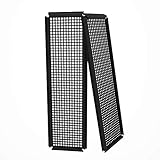

- Airflow control. The shield closes the gaps around the port stack so case fans pull air through intended channels rather than leaking through a one- to two-inch gap around the ports.
- Dust management. An open rear gap is a direct dust highway into your case, settling on components and eventually working into fan bearings.
- RFI/EMI reduction. Properly grounded shields reduce electromagnetic interference radiating from the port area — rarely a problem in practice, but part of why shields exist.
Universal plates like the IOmesh work by way of flexible spring fingers along the edges, so one plate fits most ATX, micro-ATX, and mini-ITX layouts. Board-specific replacements like the SAMXI plate for the GIGABYTE B450M DS3H (around $11) are die-cut to the exact port cutouts, giving a cleaner finish on supported boards.
Pros
- Inexpensive insurance. Between $10 and $20 for either the universal IOmesh or a board-specific fit like the SAMXI — trivial compared to a motherboard that costs $100 to $500.
- Better thermals in real cases. Sealing the rear gap helps directional airflow setups (front-to-back fan configurations running 80–120 CFM) actually move air where it should go.
- Less dust. Cuts down one of the two biggest dust entry points; expect noticeably less buildup between cleanings.
- Cleaner aesthetics. A bare port stack visible through the rear panel looks unfinished if your case has a window.
- No reinstall headaches if handled first. A universal plate takes under a minute to click into the case before the board goes in.
Cons
- Universal fit has gaps. The flexible fingers cover port cutouts approximately, so some openings on unusual port layouts may show small slivers of gap.
- Fit tolerances vary by case. A few cases have shield openings sized tightly enough that slightly oversized aftermarket plates need firm pressure to seat.
- Board-specific plates are model-locked. The SAMXI plate only fits the B450M DS3H — it’s useless if you upgrade to a different board.
- Forgettable step. If you install the board first and the shield second, you’re pulling the board back out — a 10–15 minute detour with all cables disconnected.
Who Should Buy It
- Anyone building on a budget or older board (many budget boards sold from 2018 through 2021 shipped without integrated shields) whose original plate is lost.
- Secondhand builders — used boards frequently arrive without the original shield.
- Builders with directional airflow who want the rear panel sealed properly.
- Anyone who lost the original plate during a move or case swap and needs a fast, under-$20 fix.
Who Should Skip It
- Owners of boards with pre-integrated shields — check your rear I/O before buying anything.
- Builders running open-bench test rigs, where a shield adds nothing functionally.
- Anyone whose original shield is intact in the case already — don’t replace what works.
Cheaper Alternatives
| Option | Cost | Trade-off |
|---|---|---|
| Universal plate (e.g., IOmesh) | Check on Amazon | Fits nearly any board now and after future upgrades, but cutout alignment is approximate |
| Board-specific plate (e.g., SAMXI for GIGABYTE B450M DS3H) | Check on Amazon | Perfect cutout alignment, but locked to one motherboard model |
| Contact the board manufacturer for a replacement | $5–$15 plus shipping | Exact fit guaranteed, but wait times can run 1–4 weeks |
| Run without a shield | $0 | Works, but expect more dust, minor airflow leakage, and an unfinished look |
FAQ
What happens if I build without an I/O shield?
The PC will run. You’ll give up dust control at the rear panel, leak some airflow around the port stack, and leave visible gaps. For most builds it’s not catastrophic — it’s just a worse result for the price of a pizza topping.
Can I install the I/O shield after the motherboard is in?
On almost all cases, no — the shield sits behind the motherboard’s port stack and can only be inserted from the rear of the case before the board is mounted. Adding it afterward means removing the GPU, disconnecting cables, and unbolting the board. Budget 10–15 minutes if you’ve already forgotten it.
How do I know if my motherboard has an integrated I/O shield?
Look at the rear port stack. If the ports are wrapped in a molded plastic or metal housing that’s part of the board itself, it’s integrated and no separate plate is needed. This is common on mid-range and premium boards released in the last several years, including most boards sold in 2026.
Will a universal I/O shield fit my case and motherboard?
Universal plates are designed for standard ATX (12 × 9.6 inches), micro-ATX (9.6 × 9.6 inches), and mini-ITX (6.7 × 6.7 inches) port layouts and fit cases with a standard shield opening (roughly 7 × 1.9 inches with rounded corners). Check that your case opening matches the plate’s listed dimensions before ordering.
Related guides
- Best Gaming PC for Overwatch 2: Ten Prebuilts Matched to Your Monitor (2026)
- Best Gaming PC for Baldur’s Gate 3: Matching CPU, VRAM and Storage to the Game (2026)
- Best Gaming PC for Apex Legends: Which Listings Fit a High-Refresh Setup (2026)
- Best RTX 3060 Gaming PCs: Eight Prebuilt Listings Compared by CPU, RAM and Cooling (2026)









