
Most gaming PC cable management kits look like a great deal until you actually try to use them. You get a bag of 150+ tiny clips, four short sleeves that barely cover your power and DisplayPort cables, and adhesive pads that peel off your desk after two weeks of GPU heat. The cables still sag, the under-desk mess still blocks airflow, and you are left buying a second kit to finish the job. A good buying guide does not count pieces. It matches sleeve length, clip size, and mounting strength to your actual setup: the number of cables, the heat behind your tower, and whether you need a five-minute tidy or a permanent, dust-free build.
In 2026, with glass-panel cases and standing desks everywhere, cable management is about performance as much as looks. Proper routing improves airflow around intake fans, keeps cables away from hot exhaust, and makes future upgrades faster. This guide explains what actually matters before you buy.
As an Amazon Associate we earn from qualifying purchases at no extra cost to you.



Our Top Picks
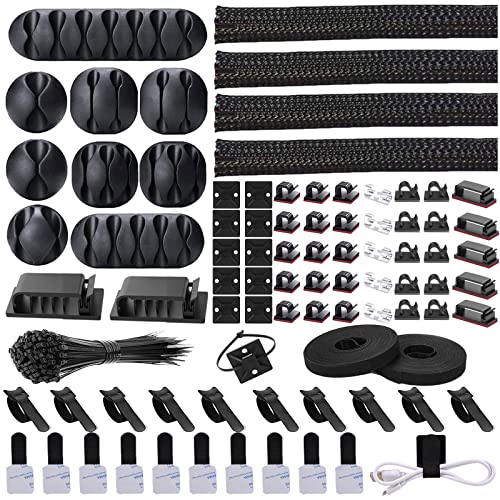 Cord Management Organizer Kit 4 Cable Sleeve split1-Pack (152 PCS)6 x 0.5 x 0.1 inchesCheck on Amazon
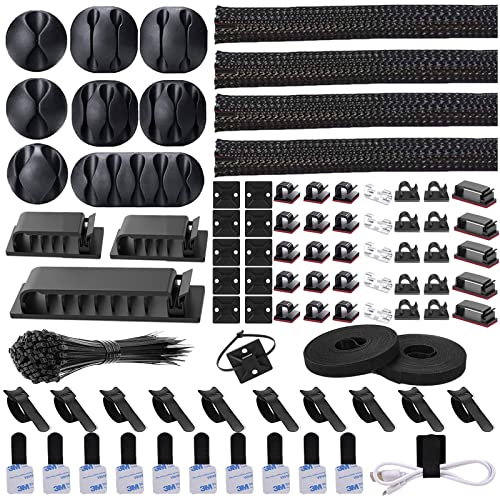


Top 3 picks at a glance
Decide These 3 Things First
Filtering kits before you compare specs will save you from overbuying or under-covering.
1. Your cable count and desk layout. Count everything that will be visible or under the desk: monitor power, monitor video (HDMI/DisplayPort), keyboard, mouse, headset, microphone, webcam, Ethernet, and PC power. Most single-PC gaming setups have 8 to 12 cables to manage. If you run dual monitors or a streaming setup, plan for 14 to 20 cables. Also measure your run length. From PC to wall or from desk leg to cable tray is typically 36 to 60 inches. A kit with four 20-inch sleeves will not cover a 60-inch run without gapping.
2. Adhesive-only or screw-in permanence. If you rent, use a glass desk, or want no damage, choose adhesive clips and sleeves. If you own a solid wood or metal frame desk and want cables to stay put when you raise a standing desk, choose a screw-in metal tray or raceway. Adhesive works, but it has weight and heat limits you need to respect.
3. Sleeve vs. tray strategy. Fabric sleeves bundle 3 to 6 cables into one clean tube for vertical runs behind the desk or PC. Under-desk trays and raceways hide power strips and excess slack horizontally. The best results usually combine both: sleeves for the bundled drop from desk to PC, and a tray for the power brick and slack. Kits that only offer one type rarely finish the job.
Size and Coverage: How Much Is Actually Enough
Piece count is marketing if you do not check dimensions. Here is what to measure:
Cable sleeves: Look for length and diameter. Standard polyethylene split sleeves are 20 to 24 inches long each. Four sleeves give you 80 to 96 inches of total coverage. For a full-height run from desktop to floor, you need at least 40 to 48 inches of continuous coverage per bundle, so plan to chain two sleeves together. Diameter matters too. A 0.75-inch diameter sleeve holds 2 to 3 thick cables (power, HDMI). A 1-inch to 1.25-inch diameter sleeve holds 4 to 6 mixed cables. If your kit lists sleeves without a diameter, assume they are narrow and will not fit braided or power cables comfortably.
Cable clips: Counts of 60 to 100 clips sound generous, but you will use 6 to 10 clips per major run. Clips come in sizes: small (0.25 inch) for mouse and fan wires, medium (0.4 inch) for HDMI and USB, and large (0.6 inch) for power cables. A useful kit includes at least 15 to 20 large clips. If all 65 clips are the smallest size, you will not be able to secure thick power cords.
Cable ties and wraps: Reusable hook-and-loop ties should be 6 to 8 inches long and 0.5 inch wide to wrap a bundle without pinching. Expect to use 8 to 12 ties for a complete gaming setup. Zip ties are single-use and can overtighten and damage shielding, so prefer hook-and-loop for anything you might re-route.
Under-desk tray or raceway: If included, check tray dimensions. A functional metal tray for a gaming desk is 15 to 17 inches long, 3.5 to 5.5 inches wide, and 2 to 4 inches deep. That fits a standard 12-outlet power strip (12 to 14 inches long) plus two power bricks. Anything smaller than 13 inches long will not hold a full strip.
Material and Heat Resistance: What Survives Behind a Gaming PC
Your PC exhaust can push 95 to 120 degrees Fahrenheit behind the case. Cheap plastics soften, adhesives fail, and fabric frays right where it matters most.
Split sleeves: The most common material is PET (polyethylene terephthalate) braided weave. Look for PET rated to at least 195 degrees Fahrenheit and that is flame-retardant. Neoprene sleeves look cleaner but trap more heat. PET braid allows airflow and is split down the side so you can add or remove a cable without rethreading. Thickness of 0.25 to 0.4 mm offers good split recovery without being too stiff to bend around desk legs.
Clips and holders: ABS plastic is standard for clips. It should feel rigid, not rubbery. Flexible TPE clips deform under the weight of a thick power cable. For under-desk trays, powder-coated steel at 1.2 to 1.5 mm thickness supports 10 to 15 pounds of power strip and adapters without sagging. Thin plastic trays warp under heat and load.
Adhesive: This is the failure point. Quality kits use 3M VHB or acrylic foam tape rated to hold 1 to 2.2 pounds per pad on clean, smooth surfaces. Standard foam tape holds 0.5 to 0.8 pounds and often fails on textured wood, painted drywall, or when exposed to sustained heat above 100 degrees Fahrenheit. If you have a textured or porous desk underside, plan to screw in or use an alcohol wipe plus 24-hour cure time for adhesive.
Construction and Mounting: How It Actually Stays Put
A kit is only as good as its mounting system during a months-long gaming season.
Adhesive clips: Best for rental-friendly installs and glass or laminate desks. To make them last, clean the surface with 70 percent isopropyl alcohol, press firmly for 30 seconds, and wait 12 to 24 hours before loading cables. Avoid placing adhesive directly above PC exhaust or on dusty melamine board. Expect adhesive to hold for 6 to 18 months before needing replacement pads.
Screw-in clips and trays: Best for wood and metal desks, and for standing desks that move up and down daily. Includes wood screws, typically #6 x 5/8 inch. You will need a drill or screwdriver and about 15 to 30 minutes to install a 16-inch tray with two to three screws. This method supports 11 to 22 pounds depending on the tray and eliminates heat-related peel-off.
Raceways and channels: J-channel or D-channel raceways (12 to 16 inches long, 0.6 to 1.2 inches wide) screw or stick along the back edge of the desk to guide cables horizontally. Look for channels with a hinged or snap-on cover and pre-drilled screw holes. Adhesive-only raceways longer than 12 inches tend to bow in the middle unless supported by at least three anchor points.
Build quality checks: Split sleeves should spring closed after you open the slit. Clips should have a smooth inner channel with no sharp mold lines that can cut cable jackets. Trays should have rolled edges, not sharp stamped metal, and include rubber or silicone pads where cables exit to prevent chafing.
Airflow, Access, and Daily Performance
Cable management should not cook your PC or make upgrades painful.
Airflow: Do not tightly wrap cables directly against rear exhaust fans or PSU vents. Leave 2 to 3 inches of clearance around exhaust grilles. Braided split sleeves are preferable to solid vinyl tubing because they vent heat. Under-desk trays should be open on the bottom or have ventilation slots, especially if you stash a 65W to 180W laptop brick or power strip inside.
Access: Split sleeves and hook-and-loop ties let you pull one cable without undoing the whole bundle. Avoid kits that rely only on zip ties for every bundle. You will cut and replace them every time you swap a monitor or add a USB hub. A good setup lets you add a new cable in under 60 seconds.
Aesthetics: For glass cases and RGB builds, match sleeve color to your case (black for most builds, white for white builds). PET braid in black hides dust better and blends with most desk frames. For the cleanest front view, bundle to no more than two visible trunks: one for power and one for data/video. Everything else should be routed behind the desk leg or inside a raceway.
Price Tiers: What $15 vs $55 Gets You
Price tells you the kit type, not just quality.
Budget: $12 to $20. This is the 150 to 330-piece sleeve and clip kits. You get four PET split sleeves (19 to 20 inches each), 30 to 65 clips in mixed sizes, 50 to 100 zip ties, and 10 to 20 hook-and-loop ties, plus adhesive pads. Perfect for a single PC and monitor where you just need to bundle vertical drops and tack cables along the desk edge. You will not get a metal tray at this price. Coverage is good, but mounting is adhesive-only.
Mid: $22 to $38. Adds larger-diameter sleeves (1 inch), more durable clips, sometimes a short J-channel raceway (10 to 16 inches) or a fabric under-desk pouch that holds 5 to 8 pounds with adhesive or screws. Good for dual-monitor setups that need a place to hide the power strip slack without investing in steel.
Premium: $45 to $65. This is where you get a powder-coated steel under-desk cable tray (15 to 17 inches, holds 10 to 15 pounds), plus sleeves and clips. Kits in this range include both adhesive and screw-in hardware, cable tie anchors, and often a cord cover for wall runs. If you have a standing desk, a heavy power strip, or want a one-and-done install that survives daily height changes, this tier is worth it. You are paying for metal construction and load capacity, not just more plastic clips.
Do not pay premium prices for a kit that only adds 100 more tiny zip ties. Compare sleeve dimensions and tray material, not total piece count.
Warranty, Delivery, and Assembly Reality
Warranty and support: Budget sleeve and clip kits typically have a 30-day return window and no formal warranty beyond Amazon return policy, because they are consumable plastics. Premium metal tray kits often include a 1-year to 2-year warranty against manufacturing defects and bending. Check whether the listing offers replacement adhesive pads. Without extras, you will need to buy 3M VHB double-sided pads separately ($6 to $9 for 20 pads) when adhesive ages out.
Delivery: Sleeve and clip kits ship in a poly bag or small box weighing 12 to 20 ounces, usually via standard ground in 3 to 5 days. Metal tray kits weigh 3 to 5 pounds and ship in a longer box; check dimensions to ensure your door or apartment locker can accept a 17-inch box.
Assembly time and tools: A sleeve-and-clip-only kit takes 20 to 40 minutes with no tools beyond scissors and an alcohol wipe. A metal tray install takes 25 to 45 minutes and requires a Phillips screwdriver or drill, a measuring tape, and optionally a stud finder if mounting to a desk with a hollow core. For hollow-core desks, use included toggle anchors or avoid screw-in and stay with adhesive to prevent pull-through.
What to do on arrival: Unpack and lay out all sizes. Test one adhesive clip on the underside of your desk for 2 hours with a loaded cable before committing to the full layout. Dry-fit sleeves around your thickest bundle to confirm diameter before peeling any adhesive.
Spec Checklist
| Spec | Budget | Mid | Premium |
|---|---|---|---|
| Total Sleeve Coverage | 76 – 96 inches (4 x 19-24 in) | 80 – 100 inches, includes 1 in diameter sleeves | 80 – 96 inches + steel tray or 16 in raceway |
| Sleeve Diameter | 0.6 – 0.85 inch | 0.85 – 1.1 inch | 1.0 – 1.25 inch |
| Clip Mix | 40 – 65 clips, mostly small/medium | 50 – 80 clips, 15+ large 0.6 in clips | 30 – 50 clips + tray with tie anchors |
| Ties Included | 50 – 100 zip ties + 10 – 20 hook-and-loop (6 in) | 20 – 40 hook-and-loop (6-8 in) + zip ties | 20+ hook-and-loop (8 in), fewer zip ties |
| Mounting Type | Adhesive only, 0.5 – 2.2 lb per pad | Adhesive + optional single screw channel | Adhesive and screw-in steel tray, 10 – 15 lb capacity |
| Tray Size If Included | None or fabric pouch | 10 – 13 in fabric or plastic tray | 15 – 17 in x 3.5 – 5.5 in steel tray |
| Material | PET braid, ABS clips | PET braid, ABS clips, powder-coated channel | PET braid, steel tray 1.2 – 1.5 mm, ABS clips |
| Best For | Single PC, rental desks | Dual monitors, hiding power strip slack | Standing desks, heavy bricks, permanent install |
Red Flags
Skip or scrutinize any kit that shows these issues:
- No sleeve dimensions listed, only total piece count. Without length and diameter you cannot verify coverage.
- All clips are one tiny size. You need large 0.6-inch clips for power and display cables; all-small kits are useless for thick cords.
- Adhesive with no brand or weight rating. Unrated foam tape often fails within weeks on textured or warm surfaces.
- Solid vinyl tubes instead of split braid. They trap heat, cannot be reopened, and make swaps difficult.
- Plastic under-desk tray with no steel option that claims to hold a power strip. Thin plastic sags and can drop a strip under load.
- Stock photos that show perfectly straight cables but the kit includes only 2 sleeves. The image is staged with additional parts not in the box.
- No extra adhesive pads or screw hardware included. You will need them within a year and should not have to hunt for compatible sizes.
FAQ
How many sleeves and clips do I actually need for a gaming PC?
For one tower and one monitor, plan for two sleeves for the main vertical bundle (40 to 48 inches total) and 12 to 18 clips to route around the desk edge and leg. For two monitors, add one more sleeve and 8 to 10 more clips. Buy based on coverage length and large-clip count, not total pieces. A 192-piece kit with four 20-inch sleeves and 25 large clips often covers a single setup completely, while a 300-piece kit full of small ties may not.
Will adhesive cable clips damage my desk or hold on a standing desk?
On smooth laminate, painted wood, glass, or metal, quality acrylic adhesive removes cleanly if you warm it with a hair dryer for 30 seconds and peel slowly, with no residue if removed within 12 months. On raw wood, textured melamine, or dusty surfaces, adhesive holds poorly and may pull finish when removed. For standing desks, adhesive works for light data cables but screw-in trays or clips are far more reliable for power strips, which can weigh 1.5 to 3.5 pounds plus bricks. If you must use adhesive on a standing desk, use at least three anchor points per 16-inch span and let adhesive cure 24 hours before loading.
Do cable sleeves affect temperatures or airflow?
Properly installed, no. Braided PET split sleeves are breathable and should not raise cable or component temperatures when you leave 2 to 3 inches of clearance around exhaust fans and PSU intakes. What hurts airflow is stuffing a tangled bundle directly behind the exhaust or blocking intake vents under the desk. Bundle loosely, do not cinch ties tight enough to deform cable jackets, and keep the tray away from floor heaters or direct exhaust blast.
Should I buy a big 300-piece kit or a metal tray kit?
If your main problem is visible cable clutter along the back of the desk, a $12 to $20 sleeve and clip kit is enough. If your main problem is a power strip, multiple bricks, and slack pooling on the floor, no amount of sleeves will fix it. Choose a premium kit with a 15 to 17-inch steel tray that can hold 10 to 15 pounds. Many gamers end up with both: a budget sleeve kit for bundling plus a separate steel tray. Check whether the tray kit already includes sleeves so you do not double-buy.
Related guides
- Best Gaming PC for Overwatch 2: Ten Prebuilts Matched to Your Monitor (2026)
- Best Gaming PC for Baldur’s Gate 3: Matching CPU, VRAM and Storage to the Game (2026)
- Best Gaming PC for Apex Legends: Which Listings Fit a High-Refresh Setup (2026)
- Best RTX 3060 Gaming PCs: Eight Prebuilt Listings Compared by CPU, RAM and Cooling (2026)









