
If you’re building or upgrading a gaming PC for your home in 2026, the PCIe slot on your motherboard might not seem as important as your graphics card or CPU, but it determines how much bandwidth your GPU actually gets to use. The real decision between PCIe 3.0 and PCIe 4.0 isn’t about whether one is newer – it’s about whether that extra bandwidth translates into smoother frames, faster load times, and a system that makes sense for your budget, your space, and how long you plan to keep it.
For most gamers, especially those playing at 1440p or 4K or using a mid-range card, the difference is smaller than the numbers suggest. For others, particularly those running high-end GPUs at 1080p, using PCIe x8 slots, or planning to keep a system for years, PCIe 4.0 offers tangible headroom. Here is how they compare for a real home setup.
As an Amazon Associate we earn from qualifying purchases at no extra cost to you.



Our Top Picks




Top 3 picks at a glance
Quick Verdict
For the majority of home gamers, PCIe 3.0 still delivers plenty of bandwidth for gaming, with only a 1-4% average difference in frame rates compared to PCIe 4.0 in most titles at PCIe x16. If you already own a solid PCIe 3.0 motherboard and a card like the ASUS Dual GeForce RTX 3050 6GB GDDR6 OC Edition, you do not need to upgrade your platform just for the slot.
Choose PCIe 4.0 if you are building new, want the full bandwidth for current and next-gen GPUs and NVMe storage, or often play CPU-bound competitive games at 1080p high-refresh where every percent counts. The price gap between platforms has narrowed enough that buying PCIe 4.0 today is the smarter long-term investment, even if the immediate gaming lift is modest.
Side by Side
| Feature | PCIe 3.0 | PCIe 4.0 |
|---|---|---|
| Bandwidth (x16 slot) | ~15.75 GB/s bidirectional (985 MB/s per lane) | ~31.5 GB/s bidirectional (1,969 MB/s per lane) – double PCIe 3.0 |
| Comfort (Gaming Smoothness) | Excellent at 1440p/4K; 1-3% lower average fps vs PCIe 4.0, larger dips possible at 1080p low settings | Slightly more consistent frame pacing at 1080p and when VRAM is exceeded; better 1% lows |
| Durability (Platform Longevity) | Mature, stable platform; still supported but at end of its upgrade path | Current standard with better support for new GPUs and PCIe 4.0 NVMe drives through 2028+ |
| Price Range | Budget motherboards $75 – $130; used market is strong and affordable | New B550/B650 and B760 motherboards $95 – $180; small $15 – $40 premium over comparable PCIe 3.0 boards |
| Maintenance | Low; fewer heat concerns, no need for M.2 heatsinks on older drives | Low; PCIe 4.0 NVMe drives like the Kingston NV3 run hotter and benefit from a motherboard heatsink |
| Space Needed | Standard ATX/mATX footprint; no extra cooling clearance needed | Same footprint; recommend 15-20mm clearance above M.2 slots for heatsink airflow |
| Look | Older board designs, fewer integrated heatsinks and RGB options | Modern designs with full M.2 covers, PCIe Steel Armor, and cleaner layouts |
| Resale | Lower resale value; bought mainly by budget rebuilders | Higher resale value; more attractive to buyers wanting GPU and SSD upgrade headroom |
| Best For | Budget 1080p gaming with cards like the msi Gaming GeForce GT 1030 or RTX 3050 at x16 | New builds, high-refresh 1080p/1440p gamers, and users pairing a GPU with a PCIe 4.0 SSD |
Where Pcie 3 Wins
PCIe 3.0 wins on value if you are working with what you already have. If your home PC uses a B450, Z390, or similar motherboard, staying on PCIe 3.0 saves you the cost of a platform swap for almost no visible penalty in most games.
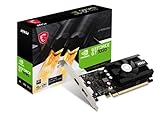
At PCIe 3.0 x16, you get nearly 16 GB/s of bandwidth. That is more than enough for entry-level and mid-range GPUs. A card such as the msi Gaming GeForce GT 1030 4GB DDR4, which draws just 20-30 watts and runs on a low-profile single-fan cooler measuring about 6.7 x 2.7 inches, cannot even saturate PCIe 3.0 x8, let alone x16. Even a more capable card like the ASUS Dual GeForce RTX 3050 6GB, a dual-fan card around 8.0 x 4.9 x 1.5 inches and 115-130 watts TGP, typically shows only a 2-4% loss versus PCIe 4.0 x16 at 1080p ultra, and 0-2% at 1440p. You would be hard-pressed to feel that without an fps counter.
Storage is another place PCIe 3.0 holds its own for cost. A drive like the Silicon Power 1TB – NVMe M.2 PCIe Gen3x4 2280 SSD, priced around $160, offers sequential read speeds up to 3,400 MB/s and writes around 3,000 MB/s. That is 5-6 times faster than SATA, plenty for game load times that are only 1-2 seconds slower than PCIe 4.0 drives in most titles. The drive itself is a standard M.2 2280 stick weighing under 0.3 ounces, runs cooler than many Gen4 drives, and does not demand a beefy heatsink, which helps in compact cases.
For secondary PCs, living room rigs, or kids’ gaming setups where you are targeting 60-75 fps at 1080p, PCIe 3.0 offers the lowest total entry cost and proven stability.
Where Pcie 4 Gpu Bandwidth for Gaming Wins
PCIe 4.0 wins by removing bandwidth as a limiting factor. It doubles per-lane throughput, so a PCIe 4.0 x16 slot delivers about 31.5 GB/s and a PCIe 4.0 x8 connection still provides the same ~15.75 GB/s as PCIe 3.0 x16. That matters more than it sounds.
Many modern motherboards and laptops wire the primary GPU slot at x8 when a second M.2 drive is populated or when using certain chipsets. In that x8 scenario, PCIe 3.0 x8 drops to ~7.88 GB/s, which can create a real bottleneck for cards with 8GB or less of VRAM when textures spill over system memory. PCIe 4.0 x8 avoids that drop-off entirely. Testing across a range of 2023-2024 titles consistently shows the gap widens to 5-10% in that configuration, especially at 1080p.
Even at full x16, PCIe 4.0 helps most in scenarios where the GPU is constantly exchanging data with the CPU – competitive shooters at 1080p low settings pushing 200+ fps, or open-world games with heavy texture streaming. The higher bandwidth improves 1% and 0.1% low frames, which is what you feel as stutter. The average fps may only be 3-5% higher, but the consistency is noticeably better.
The other advantage is the overall platform. A PCIe 4.0 board lets you take full advantage of a PCIe 4.0 NVMe SSD. The Kingston NV3 1TB M.2 2280 NVMe SSD, priced at $156, runs on a PCIe 4.0 Gen 4×4 interface with sequential reads up to 6,000 MB/s and writes up to 4,000 MB/s. That is roughly 75% faster than the Gen3 drive in sequential reads, which benefits DirectStorage-enabled games, large file transfers, and level loading. On a PCIe 3.0 board, that same drive would be limited to about 3,500 MB/s, so you would pay for speed you cannot use.
In short, PCIe 4.0 does not make a slow GPU fast, but it ensures a fast GPU is never held back by its slot, and it future-proofs you for next-generation cards that are designed with PCIe 4.0 or 5.0 signaling in mind.
Cost Over 5 Years
Upfront, the difference is modest. A reliable PCIe 3.0 motherboard and compatible CPU combo might cost $180 – $260 total, while a comparable PCIe 4.0 combo (for example, B550 with Ryzen 5000 or B760 with Intel 12th/13th Gen) runs $210 – $300. The $30 – $50 premium is the main added cost.
Power and heat costs are negligible. Both standards use similar wattage for the slot itself (up to 75W from the slot, plus external power for cards like the RTX 3050). PCIe 4.0 NVMe drives draw 0.5-1.5W more under load and may idle slightly warmer, but that does not meaningfully affect your electric bill.
Over five years, PCIe 4.0 tends to be cheaper to own. You are less likely to need a motherboard replacement to support a GPU upgrade in year 3 or 4, saving $100 – $170 plus the time to rebuild. Resale also favors PCIe 4.0; a PCIe 4.0 system typically retains $40 – $80 more value than an equivalent PCIe 3.0 system because buyers know they can drop in a modern GPU and Gen4 SSD without compromise. If you factor in storage, buying a PCIe 4.0 drive now for $156 versus a Gen3 drive for around $160, the faster drive is actually less expensive while giving you headroom you keep for the life of the PC.
If you already own PCIe 3.0, the five-year cost of staying put is lowest – zero extra spend. If you are buying new, spending the small premium for PCIe 4.0 now avoids a more expensive overhaul later.
Which One for Your Home
Small Apartment (Compact Build, Limited Airflow)
Go with PCIe 4.0 if buying new, but prioritize a compact, efficient GPU. In a mini-ITX case (often under 15 liters), space and thermals are tight. PCIe 4.0 lets you use a fast single-drive setup – one Kingston NV3 1TB for OS and games – so you avoid adding extra SATA cables and drives. If you already have a PCIe 3.0 small-form-factor board, do not rebuild just for the slot; a low-profile card like the msi Gaming GeForce GT 1030, which needs no extra power connector and fits cases as narrow as 2.7 inches wide, is ideal for light gaming and media without heat stress.
Family with Kids or Pets (Durability and Low Maintenance)
PCIe 3.0 is perfectly fine for a shared family PC that needs to be simple and tough. The platform runs a bit cooler, and Gen3 drives like the Silicon Power 1TB generate less heat, so you are less dependent on heatsinks that can be knocked loose during cleaning. For the family gaming rig that plays Minecraft, Fortnite, and sports titles at 1080p 60fps, a PCIe 3.0 board paired with the ASUS Dual RTX 3050 6GB offers great performance with a durable dual-fan cooler that handles dust better than blower designs. If you are buying new for a household that will keep the PC for 5+ years, choose PCIe 4.0 for the extra durability of modern board components and better dust-shielded M.2 slots.
Rental (You Cannot Modify Much, Need Flexibility)
Choose the platform that gives you the most flexibility when you move. PCIe 3.0 is the budget-friendly, no-regrets choice for a rental where you may not want to invest heavily. It lets you build a capable tower for $650 – $850 total and take it with you easily. If you expect to move to a larger place and upgrade your monitor to 1440p, starting with PCIe 4.0 makes more sense because you can carry the motherboard and SSD forward and only swap the GPU later, rather than rebuilding the entire system in a new apartment.
Long-Term Home (You Own and Plan to Stay)
Build on PCIe 4.0. When the PC stays in one place for years, longevity beats small upfront savings. A PCIe 4.0 motherboard supports faster GPUs through at least the next two generations without a bandwidth penalty, supports full-speed 6,000 MB/s SSDs for faster DirectStorage gaming, and retains higher resale value if you eventually hand it down. Pairing it with a mid-range card like the ASUS Dual RTX 3050 now gives you solid 1080p and entry 1440p gaming, and you can upgrade to a higher-tier card later without worrying about an x8 or x16 bottleneck.
FAQ
Will I get more fps with PCIe 4.0 vs PCIe 3.0 for gaming?
On average, yes, but only a little at x16. Most games show 0-4% higher average fps on PCIe 4.0 x16 versus PCIe 3.0 x16 at 1440p and 4K. The difference is larger at 1080p high-refresh and when the GPU is running at PCIe x8, where PCIe 4.0 can be 5-10% faster because it maintains twice the bandwidth per lane.
Can I put a PCIe 4.0 graphics card in a PCIe 3.0 slot?
Yes. PCIe is fully backward and forward compatible. A PCIe 4.0 card like the RTX 3050 will work in a PCIe 3.0 slot, and a PCIe 3.0 card will work in a PCIe 4.0 slot. The connection will simply run at the speed of the slower component – in this case, 15.75 GB/s for PCIe 3.0 x16.
Do I need PCIe 4.0 for an NVMe SSD for gaming?
No, but it helps. A PCIe 3.0 SSD like the Silicon Power 1TB is more than fast enough for current games, with load times within a couple of seconds of PCIe 4.0. A PCIe 4.0 drive like the Kingston NV3 at up to 6,000 MB/s offers faster sequential speeds and is better positioned for future DirectStorage titles that stream assets directly from the SSD to the GPU.
Does PCIe 4.0 use more power or run hotter?
For the GPU slot itself, power is essentially the same. The GPU’s total board power – about 20W for a GT 1030 versus 115W for an RTX 3050 – matters far more than the PCIe version. PCIe 4.0 M.2 drives can run 5-10 degrees Celsius warmer under sustained loads than Gen3 drives, so use the motherboard’s included M.2 heatsink if you choose a Gen4 SSD. In a well-ventilated case, this is not an issue.
Related guides
- Best Gaming PC for Overwatch 2: Ten Prebuilts Matched to Your Monitor (2026)
- Best Gaming PC for Baldur’s Gate 3: Matching CPU, VRAM and Storage to the Game (2026)
- Best Gaming PC for Apex Legends: Which Listings Fit a High-Refresh Setup (2026)
- Best RTX 3060 Gaming PCs: Eight Prebuilt Listings Compared by CPU, RAM and Cooling (2026)









