
If you’ve ever bought a gaming mouse based on DPI alone, you’ve probably experienced the disappointment: the spec sheet said 12,000 DPI, but the cursor jittered, skipped in fast flicks, or felt inconsistent on your pad. The sensor is the single most important component in a gaming mouse, yet it’s also the most misunderstood. Shoppers routinely overpay for inflated DPI numbers while ignoring the sensor qualities that actually determine whether clicks land where you intend.
The most common mistakes are predictable. First, chasing maximum DPI numbers that no human hand can use — competitive players overwhelmingly stay below 3,200 DPI, and many pros sit between 400 and 1,600. Second, treating “optical sensor” as a premium feature when it’s now standard on mice as cheap as $20. Third, ignoring weight and shape entirely, even though a well-shaped mouse with a mediocre sensor beats a badly shaped mouse with a great one. This guide walks you through what actually matters when evaluating a gaming mouse sensor, so you can spend your money on performance instead of marketing.
As an Amazon Associate we earn from qualifying purchases at no extra cost to you.
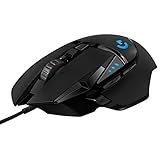

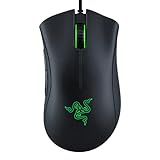

Our Top Picks
 Razer DeathAdder Essential Ergonomic Wired Gaming Mouse5.01 x 2.86 x 1.69 inches0.3 PoundsCheck on Amazon
 ATTACK SHARK X3 49g Ultra-Lightweight Wireless Gaming MouseMouse10 x 5 x 1 inches0.1 PoundsCheck on Amazon


Top 3 picks at a glance
Decide These 3 Things First
Before comparing a single spec, answer these questions. They’ll eliminate half the market immediately.
1. Wired or wireless? Modern wireless sensors (like Logitech’s HERO and Lightspeed combos) no longer carry a meaningful latency penalty — flagship wireless mice are used in professional esports. But budget wireless mice under $30 often use older Bluetooth, which polls far slower than a 2.4 GHz dongle. If you go wireless under $40, insist on a 2.4 GHz USB receiver. The Logitech G305 Lightspeed at around $29 is the classic example of dongle-based wireless done right at a budget price; Bluetooth-only mice introduce 8–16 ms of extra latency.
2. Claw, palm, or fingertip grip? Your grip dictates ideal mouse size and weight more than any spec sheet. Palm grippers need longer bodies (120 mm or more) to fill the hand; claw grippers want a pronounced rear hump; fingertip and hybrid grippers favor short, light mice under 60 grams like the ATTACK SHARK X3 at 49 g. A sensor can’t save a mouse that doesn’t match your grip.
3. What games and sensitivity? Low-sensitivity FPS players (moving the mouse 30–60 cm per 360-degree turn) need flawless tracking at high speeds — this is where cheap sensors fail hardest. MOBA and RTS players can get away with nearly any modern sensor but benefit more from extra buttons and comfort.
True DPI vs. Marketed DPI: What the Numbers Really Mean
DPI (dots per inch) measures how far the cursor moves per inch of physical motion. Here’s the uncomfortable truth: anything above 6,400 DPI is functionally useless on a 1080p–4K display. At 16,000 DPI on a 1080p monitor, a single pixel of cursor movement requires roughly 0.05 mm of mouse motion — less than the vibration of your desk fan. Manufacturers escalate DPI numbers because they’re free marketing, not because anyone uses them.
What matters more is DPI consistency. A quality sensor holds its rated DPI within a few percent across its usable range. Cheap sensors sometimes “count” 5–10% off their rating, which means your in-game sensitivity isn’t what you set it to. You don’t need lab equipment to spot this: if you swap between two mice at the same DPI setting and one feels faster, one of them is lying.
Practical buying guidance: ignore anything above 12,000 DPI entirely, and treat the sensor’s behavior at 400–3,200 DPI — the range nearly everyone actually uses — as the real test.
Polling Rate and Latency: The Numbers That Change Feel
Polling rate is how many times per second the mouse reports its position. The standard is 1,000 Hz (one report every 1 ms), and it’s non-negotiable for gaming. Some 2026-era premium mice push 4,000–8,000 Hz, which shaves 0.75–0.875 ms off report intervals — measurable, but far less impactful than a stable sensor.
What you’re avoiding is mice stuck at 125 Hz (8 ms intervals), which still appear on sub-$15 office-grade mice marketed as “gaming.” Check the spec sheet explicitly: if it doesn’t state 1,000 Hz, assume it doesn’t have it. Wired mice have a slight inherent edge in consistency; quality 2.4 GHz wireless like Logitech’s Lightspeed is effectively indistinguishable, while Bluetooth-only connections are not.
Tracking Speed, IPS, and Skipping: Why Cheap Sensors Fail on Fast Flicks
IPS (inches per second) is the maximum speed at which a sensor can track accurately. Exceed it and the cursor “skips” — it stops moving or teleports. Modern HERO-class sensors handle 400+ IPS, which is faster than any human flick. Budget sensors often cap out between 60 and 150 IPS, which sounds fine until you play low-sens FPS and whip the mouse 2+ meters per second during a 180.
You don’t need to memorize IPS ratings; you need to know the threshold. If a product page doesn’t list IPS at all, the sensor is almost certainly a budget part. As a rule of thumb: every mouse in this guide’s mid and premium tiers (the G502 Hero at around $37, the G305 at around $29) uses a sensor that won’t skip at realistic human speeds, while true bottom-tier sensors appear mostly in mice under $15.
Lift-Off Distance and Surface Compatibility
Lift-off distance (LOD) is how high you can lift the mouse before the cursor stops tracking. Low LOD (under 1.5 mm) is better — high-sens players reposition the mouse constantly, and a high LOD (3+ mm) makes the cursor drift during every lift. Cheap sensors often have LOD around 2.5–3.5 mm and inconsistent cutoff, meaning the cursor twitches as you lift.
Surface compatibility matters too. Optical sensors track using micro-texture imagery, so they behave differently on glossy, glass, and fabric surfaces. Most consumer sensors struggle on pure glass (under 4 mm thick glass is nearly untrackable without a special sensor). If you play on a hard pad or desk surface directly, prioritize sensors explicitly rated for hard or glossy surfaces. Fabric cloth pads — the large majority of the market — work with essentially every modern sensor.
Weight and Shape: The Specs That Outrank the Sensor
Here’s the counterintuitive part: the sensor is why fast flicks fail, but shape and weight determine whether you can execute them repeatably. Competitive FPS players have driven mouse weights down dramatically — the lightweight tier now starts around 49 g (like the ATTACK SHARK X3), while traditional ergonomics shells like the DeathAdder Essential weigh roughly 88–96 g and the feature-packed G502 Hero sits around 121 g with weights installed.
General weight guidance: under 65 g for competitive FPS and fingertip grips; 65–90 g for all-round use; above 100 g only if you prefer a planted, heavy feel or play slower-paced games. On shape, measure your hand from wrist crease to middle-fingertip: hands under 17 cm suit compact mice (115 mm and shorter bodies); 17–19 cm fits most mid-size shells; above 19 cm, look for full-size ergonomics like the DeathAdder’s 127 mm body. No sensor compensates for a mouse that cramps your hand in hour three.
Price Tiers: What Each Dollar Band Actually Buys
Budget ($15–$25): At the Razer DeathAdder Essential’s around $20, you get a proven ergonomic shape and a sensor that’s genuinely adequate for 1080p gaming — 6,400 DPI class tracking with no skipping at casual speeds. You give up software depth, onboard memory profiles, and light weight (roughly 90 g class).
Mid-range ($25–$45): This is the sweet spot, and the two Logitech options bracket it well. The G305 at around $29 brings HERO-sensor wireless performance with 12,000 DPI, 1 ms polling, and roughly 250 hours of battery on a single AA. The G502 Hero at around $37 adds 25,600 DPI on paper, 11 programmable buttons, adjustable weight tuning, and a 16,000-DPI-class HERO 25K-upgradable sensor. For most buyers, this tier delivers 95% of premium performance.
Premium ($45+): You’re paying for sub-60 g weights, 4,000+ Hz polling, 40+ gram lighter builds, and marginal-latency improvements. Worth it for dedicated competitive players; unnecessary for everyone else.
Spec Checklist
| Spec | Budget ($15–$25) | Mid ($25–$45) | Premium ($45+) |
|---|---|---|---|
| True usable DPI (rated) | 6,400 | 12,000–25,600 | 26,000–32,000 |
| Polling rate | 1,000 Hz wired only | 1,000 Hz wired + 2.4 GHz | 1,000–8,000 Hz |
| Tracking speed (IPS) | ~150–220 | 300–400 | 400–750 |
| Lift-off distance | 2–3 mm | 1–2 mm | Under 1 mm, adjustable |
| Weight | 85–100 g | 49–99 g | 45–60 g |
| Wireless latency | N/A or Bluetooth | ~1 ms via dongle | Under 1 ms |
| Battery life (wireless) | N/A | 150–250 hours | 70–150 hours |
Red Flags
- DPI advertised above 16,000 on a mouse under $20. The number is fabricated or software-interpolated; the underlying sensor is a budget part.
- No polling rate listed. Reputable brands state 1,000 Hz proudly. Silence usually means 125 Hz.
- “Wireless” with no mention of a USB receiver. Bluetooth-only means 8–16 ms added latency.
- Battery life quoted in hours of standby rather than active use — a common way to inflate a 30-hour mouse into “months” of battery.
- Adjustable DPI “up to 7,200” in seven unlabelled steps with no software — you can’t tune sensitivity to your actual preference.
- Weights under 45 g with hollow, creaky shells. Extreme lightweighting done badly produces flex and rattles; check reviews for build complaints.
- No stated warranty. Established brands back mice with 1–2 year warranties; mice with no stated coverage are usually disposable-grade inside.
FAQ
Is a higher DPI sensor always better?
No. Usable DPI tops out around 3,200 for almost all players on typical monitor sizes. What separates good sensors from bad is accuracy and consistency at the DPIs you actually use, plus tracking speed and lift-off distance — not the maximum number on the box.
Do wireless gaming mice have input lag compared to wired?
Not meaningfully, if they use a 2.4 GHz dongle. Modern wireless implementations like Logitech’s Lightspeed report at 1 ms, matching wired mice. Bluetooth-only connections are the exception: expect noticeably more latency, especially in fast games.
What sensor specs matter most for FPS games?
In order: consistent tracking at 400–1,600 DPI, a 1,000 Hz polling rate, high IPS so fast flicks don’t skip, low lift-off distance (under 2 mm), and then — honestly ahead of further sensor specs — weight and shape suited to your grip.
How much should I spend on a gaming mouse?
Between $25 and $45. That band (the G305 at around $29, the G502 Hero at around $37) gets you a genuinely excellent sensor, solid build, and either wireless or rich customization. Below $20 you make real compromises; above $60 the gains are marginal unless you compete seriously.
Related guides
- Best Gaming PC for Overwatch 2: Ten Prebuilts Matched to Your Monitor (2026)
- Best Gaming PC for Baldur’s Gate 3: Matching CPU, VRAM and Storage to the Game (2026)
- Best Gaming PC for Apex Legends: Which Listings Fit a High-Refresh Setup (2026)
- Best RTX 3060 Gaming PCs: Eight Prebuilt Listings Compared by CPU, RAM and Cooling (2026)









