
Designing a modern home office requires a careful balance between interior aesthetics and computing power. When building a custom desktop computer or upgrading your current setup, the physical footprint of your machine is dictated by one crucial question: what motherboard size fits my case? Choosing mismatched components can lead to frustrating returns, delayed builds, and wasted money.
Whether you are trying to tuck a discrete workstation into a minimalist study or showcasing a high-end gaming rig in your living room, understanding the relationship between your motherboard and your computer case is the foundation of a successful build. This guide breaks down standard dimensions, compatibility rules, and practical steps to ensure a perfect fit every time.
As an Amazon Associate we earn from qualifying purchases at no extra cost to you.


Our Top Picks
 Zalman CUBIX Compact Micro-ATX MATX Mini ITX PCSmall11.96 x 6.29 x 13.85 Inches5.73 poundsCheck on Amazon
 CORSAIR 4000D RS Frame Modular High Airflow Mid-Tower19.17 x 9.41 x 19.13 inches18.1 poundsCheck on Amazon

Top 3 picks at a glance
The Short Answer
To determine what motherboard size fits your case, the simplest rule of thumb is backward compatibility: a computer case can accommodate any motherboard that is its native size or smaller, but it cannot fit a board that is larger.
For example, if you own a standard ATX mid-tower case, it will comfortably fit a standard ATX, a Micro-ATX (mATX), or a Mini-ITX motherboard. However, if you purchase a compact Micro-ATX case, you cannot install a standard ATX motherboard inside it because the physical chassis lacks the necessary height and mounting points. Always check your case manufacturer’s specification sheet for the maximum supported motherboard form factor before purchasing hardware.
Standard Sizes
Motherboard and case dimensions are governed by industry-standard form factors. These standards ensure that mounting holes, expansion slots, and rear input/output (I/O) shields align perfectly across different brands. The table below outlines the four primary motherboard sizes found in modern home and office computers, along with their physical dimensions and typical design features.
| Form Factor | Dimensions (Inches) | Dimensions (Metric) | Typical Expansion Slots | Best Suited For |
|---|---|---|---|---|
| Mini-ITX | 6.7″ x 6.7″ | 17.0 x 17.0 cm | 1 PCIe Slot | Ultra-compact builds, minimalist desks, home theater PCs (HTPCs) |
| Micro-ATX (mATX) | 9.6″ x 9.6″ | 24.4 x 24.4 cm | 2 to 4 PCIe Slots | Budget builds, space-conscious home offices, general family use |
| Standard ATX | 12.0″ x 9.6″ | 30.5 x 24.4 cm | Up to 7 PCIe Slots | Gaming PCs, creative workstations, dual-GPU setups |
| Extended ATX (E-ATX) | 12.0″ x 13.0″ | 30.5 x 33.0 cm | Up to 7+ PCIe Slots | High-end desktop (HEDT) servers, rendering stations, extreme liquid cooling |
While the vertical height changes significantly as you move from Mini-ITX (6.7 inches) to Standard ATX (12.0 inches), the horizontal width remains relatively consistent at 9.6 inches for both ATX and Micro-ATX. E-ATX boards break this mold by expanding horizontally up to 13 inches, which often requires specialized full-tower cases with extended cable-routing grommets.
How to Measure Your Space
If you are working with an unbranded case, upgrading an older pre-built computer, or building an open-air system, you may need to manually measure your chassis to verify compatibility. Follow this step-by-step process to assess your space:
- Locate the Motherboard Tray: Open the side panel of your PC case. The flat metal sheet inside where the components mount is the motherboard tray.
- Count and Inspect the Standoff Holes: Look for the threaded brass or metal standoffs (the small pegs that prevent the motherboard from touching the bare metal of the case). Standard ATX boards require nine standoffs, Micro-ATX boards require six to eight, and Mini-ITX boards require four. Many cases have stamped letters next to the holes (such as “A” for ATX, “M” for Micro-ATX, and “I” for ITX) to guide your placement.
- Measure the Vertical Clearance: Use a standard measuring tape to measure from the top of the motherboard tray (near the top exhaust fans) to the bottom partition, which often houses the power supply shroud. You need at least 12.5 inches of vertical clearance to comfortably install a standard ATX board.
- Verify Horizontal Depth: Measure from the rear I/O cutout at the back of the case toward the front intake fans or storage drive cages. A standard board needs 9.6 inches of horizontal clearance, but you should aim for at least 11 to 12 inches of total space to allow for power cables, SATA drives, and front-mounted cooling radiators.
- Check the Rear Expansion Slots: Look at the back of your case where graphics cards and expansion cards screw into the chassis. A Mini-ITX case typically has 2 expansion slots; a Micro-ATX case has 4 to 5 slots; a mid-tower ATX case has 7 slots; and a full-tower case has 8 or more.
By Room or Use Case
Your choice of motherboard and case size directly influences the layout, acoustics, and visual appeal of your living space. Here is how to choose the right form factor based on your environment and daily needs.
The Minimalist Home Office (Mini-ITX)
If you work from a compact writing desk, a floating shelf, or a multi-purpose living room workspace, a Mini-ITX setup is ideal. These tiny systems take up minimal physical real estate and can easily be hidden behind a monitor or integrated into a bookshelf. However, because Mini-ITX motherboards only feature one PCIe slot, you are limited to a single graphics card and fewer storage expansion options. Building in these tight spaces also requires patience and specialized, compact power supplies (SFX form factor).
The Balanced Family Desktop (Micro-ATX)
For a shared family study, a Micro-ATX build offers the ultimate sweet spot between price, performance, and physical size. A compact chassis like the Zalman CUBIX M-ATX Compact Desktop PC Case (priced around $36) provides a space-saving footprint without the premium price tag of ultra-small Mini-ITX hardware. Micro-ATX motherboards typically offer four RAM slots and multiple M.2 storage slots, making them highly capable machines for homework, casual gaming, and budgeting software, all while sitting unobtrusively on or under a standard desk.
The High-Performance Gaming Den or Creative Studio (ATX)
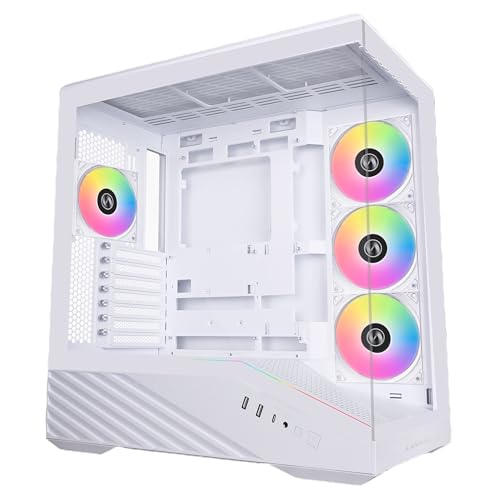
For dedicated gaming rooms or professional video-editing suites, a mid-tower or full-tower ATX system is the gold standard. High-performance tasks generate substantial heat, requiring robust cooling solutions. Cases like the CORSAIR 4000D RS Frame Modular High Airflow Mid-Tower PC Case (priced around $84) or the sleek Lian Li V100-ATX Mid-Tower PC Case (priced around $79) are designed to house standard ATX motherboards. These cases offer ample room for large triple-fan graphics cards, massive CPU air coolers, and multiple 360mm liquid cooling radiators, ensuring your system runs quietly even under heavy rendering loads.
The DIY Test Bench & Open-Air Setup
For tech enthusiasts, hardware testers, or those who prefer an industrial, workshop-inspired aesthetic, an open-frame chassis is an excellent alternative. The Open Air PC Case Test Bench (priced around $16) is a minimalist DIY rack designed to support ATX, Micro-ATX, and Mini-ITX motherboards. While open-frame designs offer unparalleled access for swapping parts and maximum natural airflow, they do not shield components from household dust or curious pets, making them best suited for dedicated hobbyist desks or climate-controlled workshops.
Common Sizing Mistakes
Even experienced builders can run into clearance issues if they only look at basic motherboard specs. Avoid these common pitfalls when planning your desktop integration:
- Ignoring Graphics Card (GPU) Length: While a Micro-ATX motherboard will easily fit inside a mid-tower case, a massive modern graphics card (some measuring over 13 inches or 330mm in length) might collide with front-mounted intake fans or liquid-cooling reservoirs. Always cross-reference your GPU length with your case clearance specifications.
- Assuming Proprietary Cases Use Standard Layouts: Many pre-built office computers from major brands use proprietary motherboard shapes and custom power connectors. If you attempt to transplant a motherboard from an old pre-built office machine into a standard aftermarket case, the mounting holes and front panel connectors rarely align.
- Neglecting CPU Cooler Height: Large, high-efficiency CPU tower coolers can stand up to 165mm to 170mm tall. If you choose a narrow case, the side panel may not close. Check the “maximum CPU cooler height” specification of your case before purchasing a bulky air cooler.
- E-ATX Cable Grommet Blockage: Many mid-tower cases claim to support E-ATX motherboards, but installing a wide 13-inch board can completely cover the rubber routing grommets used to pass the 24-pin power cable through the back of the tray. If you plan to build an E-ATX system for 2026 and beyond, invest in a true full-tower case to ensure clean cable management.
FAQ
Can I put a Mini-ITX motherboard in an ATX case?
Yes. Because the mounting hole standards are nested, standard ATX cases include the necessary standoff positions to mount a tiny Mini-ITX motherboard. However, this configuration can look visually sparse inside a large glass-paneled case, leaving a significant amount of empty space around the board.
How do I know what size motherboard I currently have?
You can identify your motherboard size by counting its expansion slots. Mini-ITX boards have exactly one PCIe slot at the very bottom. Micro-ATX boards typically have three to four slots, while standard ATX boards feature six to seven slots. Alternatively, you can search for your motherboard’s model number online to view its official specifications.
Do motherboard sizes affect gaming performance?
No, a smaller motherboard size does not inherently reduce in-game frame rates or processing speeds. A Mini-ITX board can run the exact same high-end CPU and graphics card as a massive ATX board. However, smaller boards have fewer expansion slots, fewer USB ports, and less space for heavy-duty voltage regulator (VRM) heatsinks, which can limit your ability to overclock your processor or add extra storage drives down the line.
Are standoff screws standardized across all case sizes?
Yes, the positioning of the standoff holes is strictly standardized by the Unified EFI Forum and hardware manufacturers. However, the screws themselves can vary. Most computer cases use standard 6-32 threaded screws for standoffs, while some compact or European designs use metric M3 screws. Always use the specific screws provided in your computer case’s accessory box to avoid stripping the threads on your motherboard tray.
Related guides
- Best Gaming PC for Overwatch 2: Ten Prebuilts Matched to Your Monitor (2026)
- Best Gaming PC for Baldur’s Gate 3: Matching CPU, VRAM and Storage to the Game (2026)
- Best Gaming PC for Apex Legends: Which Listings Fit a High-Refresh Setup (2026)
- Best RTX 3060 Gaming PCs: Eight Prebuilt Listings Compared by CPU, RAM and Cooling (2026)









