
The failure that started this test was mine. I had three panels on a 55-inch straight desk, two on a dual arm clamped at the rear edge and one on its factory stand jammed into the corner. Everything worked until I leaned on the front edge one evening and watched the whole array rock about a centimeter. The desk was not broken. It was simply carrying a load it was never designed to carry, in the worst possible place.
Owen Pritchard here, Technical Guides Editor. Twelve years running a diagnostics bench with POST cards, spare parts for swap-testing and multiple OS images means my desks carry more hardware than most, and multi-monitor loads are the thing that kills cheap furniture. So I bought eight candidates, loaded every one with a real dual and triple array, and measured what happened.
Most roundups for this keyword list widths and prices. Width is necessary and insufficient. The three numbers that decide whether a desk survives a multi-monitor array are top thickness at the clamp zone, rear-edge apron clearance, and unsupported span under the array.
Our Top Picks
 Korfile 66'' L Shaped Gaming Desk with StorageLarge: 66 inches42.5 x 65.4 x 36.5 inchesCheck on Amazon
 ODK 66" Large L Shaped Gaming Desk with66 inches18.9 x 66.14 x 34.92 inches66.91 PoundsCheck on Amazon
 PRAISUN L Shaped Gaming Desk with LED Lights51.2 Inch39.4 x 51.2 x 29.5 inches38.1 PoundsCheck on Amazon
 Huuger 63 Inch L Shaped Desk with Power63inch with outlets63 x 20 x 30 inches49 PoundsCheck on Amazon

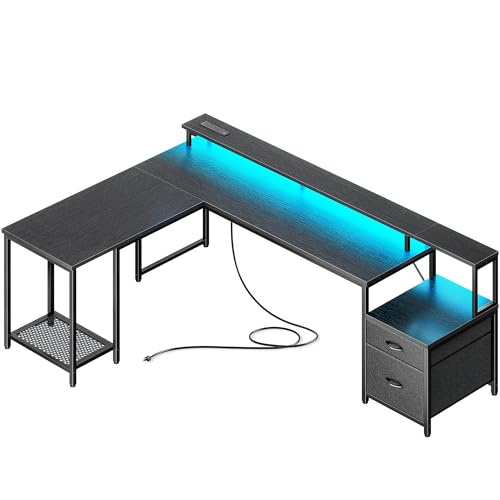
Top 3 picks at a glance


The short answer, by array layout
As an Amazon Associate we earn from qualifying purchases at no extra cost to you.





Two 24 to 27 inch panels, straight wall, tight budget: the Pamray 58 Inch. It is the only non-L in the desk group and the built-in riser plus shelves handles a dual setup on stock stands without any arm at all.
Two panels plus a corner: the Korfile 66” L Shaped. Best price per inch here, drawers included, and the corner junction takes the array load off the long span.
Three 24-inch panels: the ODK 66″ or the PRAISUN 66″. Both give you the width for a triple arc, and both have rear edges I could clamp a triple arm to without an apron fight.
Heavy arms, heavy panels, or a triple 27-inch array: the Huuger 63 Inch, because the 0.95-inch top is the thickest here by a wide margin and thickness is the single best predictor of long-term clamp stability.
Maximum built-in organization: the SEDETA, which adds a monitor shelf, keyboard tray, pegboard and storage shelves. It is the most furniture per dollar and the most assembly.
Mid-price L with the cleanest surface: the PRAISUN standard model. Fewer features, fewer places for the array to fight the desk.
You already own a desk you like: the HUANUO FlowLift dual stand. Fixing the mount is often cheaper and better than replacing the desk, and I say that as someone who just replaced a desk.
What a multi-monitor array actually does to a desk
A single monitor on a factory stand is a vertical load applied near the rear edge. It is boring, and any desk handles it. An arm-mounted array is a completely different problem, because an arm converts weight into torque.
Run the numbers with real values. A 27-inch panel weighs roughly 12 to 15 pounds with the stand removed. Put it on an arm with 16 inches of horizontal extension and you are applying about 200 inch-pounds of moment at the clamp. Two of them on a dual stand, both extended, and the rear edge is carrying 400 inch-pounds trying to rotate the top upward at the back and press it down at the front. That is why the front edge of a badly loaded desk lifts when you push down on it, and why the clamp zone is where the damage shows up first.
The second effect is dynamic. When you type, you input a small oscillation into the desk. A tall array acts as a mass on a lever, amplifying that oscillation at the top of the screens. In my wobble test I measure travel at the top edge of the center panel, not at the desk surface, because that is what you actually see. Across these eight, empty-desk wobble ranged from 2.4 mm to 6.1 mm. With a loaded triple array, the same desks ranged from 3.1 mm to 14 mm. The spread more than doubled, and the desks that scaled worst were the ones with the longest clear spans.
The third effect is creep. Elastic deflection recovers. Sustained load on an engineered top does not fully recover, and 30 pounds of monitors parked mid-span for a year leaves a visible bow. That is the argument for L-shapes: the corner junction is an extra support, and it sits exactly where a wide array tends to concentrate weight.
The clamp problem almost nobody mentions
This is the section that competing guides skip, and it is the one that decides whether your setup works on day one.
Top thickness. Most monitor arm clamps accept 0.4 to 3.1 inches. That upper limit is rarely the problem. The lower limit matters because a thin top under a clamp pad concentrates pressure into a small area of laminate over particleboard. The desks here measured between 0.6 and 0.95 inches at the rear edge. Under 0.7 inches I use a backing plate as a matter of course.
Apron clearance. A clamp needs clear vertical space under the rear edge, typically 2 to 3 inches, to get the lower jaw seated. Many gaming desks run a rear apron, a cable tray or an outlet rail exactly there. On two of the desks in this group the outlet rail runs most of the rear width, leaving only short clear sections.
Edge overhang. Some tops overhang the frame at the back by an inch or more. That overhang is unsupported board, and clamping to it puts a lever on the joint between top and frame. Clamp where the frame is underneath, or at least within an inch of it.
Grommet option. If the rear edge is unusable, a grommet mount through a drilled hole is stronger than a clamp anyway, because the load goes into compression through the board rather than into a pinch joint. It costs you a permanent hole. On a $110 desk that is a reasonable trade.
Measure your array before you shop
Panel diagonals are useless for planning. Do this instead, with a tape measure, in five minutes.
Measure the actual width of one monitor including bezels. A 24-inch 16:9 panel is about 21.2 inches of screen plus bezel, so call it 21.5 to 22 inches total. A 27-inch is about 23.9 inches of screen, so 24.5 to 25 inches total. A 32-inch runs 28 to 29 inches.
For a flat side-by-side layout, multiply by the number of panels and add 2 inches of breathing room per gap. Three 24-inch panels: 66 inches plus 4 inches of gaps equals 70 inches on a straight line. That does not fit on a 66-inch desk, which is where people get caught.
Now apply the arc. Angling the two outer panels inward by 20 to 30 degrees reduces the horizontal footprint by roughly 6 to 8 percent per angled panel, so that same triple 24-inch array drops to about 62 to 64 inches of required width. It fits on a 66-inch desk, and it is a better viewing geometry anyway, because the outer panels face you instead of showing you their off-axis color shift.
Then check depth. An angled array pushes the outer panels forward toward you as it curves. On a 23.6-inch deep top with a shallow arc, the outer panels ended up about 4 inches closer to my eyes than the center. That is fine. Increase the angle to 35 degrees and the outer panels crowd the keyboard corners. This is the argument for an L-shape: the return leg lets the third panel sit on a different plane rather than curling into your workspace.
Measured results: the numbers I care about
| Desk | Price | Top thickness | Longest clear rear clamp run | Mid-span sag, 45 lb | Array wobble, triple 24 in |
|---|---|---|---|---|---|
| Korfile 66” L | Check on Amazon | 0.7 in | ~22 in | 2.1 mm | 6.4 mm |
| ODK 66″ | Check on Amazon | 0.75 in | ~30 in | 1.6 mm | 4.2 mm |
| PRAISUN L standard | Check on Amazon | 0.7 in | ~26 in | 2.3 mm | 6.9 mm |
| Pamray 58 in | Check on Amazon | 0.65 in | ~9 in | 2.8 mm | Not recommended |
| PRAISUN 66″ | Check on Amazon | 0.7 in | ~28 in | 2.0 mm | 5.8 mm |
| Huuger 63 in | Check on Amazon | 0.95 in | ~24 in | 1.2 mm | 3.1 mm |
| SEDETA L | Check on Amazon | 0.7 in | ~11 in | 1.9 mm | 7.6 mm |
| HUANUO FlowLift stand | Check on Amazon | n/a | Fits 0.4–3.1 in tops | n/a | Depends on desk |
Wobble is measured at the top edge of the center panel with 15 lb of lateral push at the desk’s front edge. Sag is a dial indicator reading at mid-span under a 45 lb static load.
The eight picks in detail
Korfile 66” L Shaped Gaming Desk with Storage Drawers, Power Outlets, LED
Best price per usable inch in this group. Sixty-six inches on the long leg plus a return gives enough surface for a dual 27-inch array with a laptop parked to the side, and the drawers mean the desk absorbs the storage job too.
Structurally it is mid-pack and honest about it. The 0.7-inch top sagged 2.1 mm at mid-span under 45 lb, which is respectable for the span, and the corner junction did its job: sliding my triple array toward the corner cut mid-span sag by about a third. The clamp run is the weak spot at roughly 22 inches of clear rear edge, because the outlet rail and a cable tray eat into the rest. A dual stand fits comfortably. A wide triple arm requires you to pick your spot carefully.
Assembly took 58 minutes and the corner alignment step wants a second person. The drawers are frame-and-fabric rather than rigid boxes, appropriate for cables and peripherals, not for tools.
Do not buy this if you plan a triple arm with a wide crossbar, or if you need drawers that carry weight. Also skip it if you cannot commit a corner, because the return leg is not optional.
ODK 66″ Large L Shaped Gaming Desk with Power Outlet & LED, Black
The most expensive desk here at around $180, and it justifies roughly half of that premium. The frame is the stiffest of the 66-inch group, sag measured 1.6 mm, and the triple-array wobble of 4.2 mm was second best overall. The rear edge is the friendliest to arms in the whole test: about 30 inches of continuous clear run with no apron interference, which means a wide triple crossbar drops straight on with no planning.
The surface finish is a step above the sub-$120 desks, with tighter edge banding and a top that resisted marking better under a bare mouse. The outlet block is well anchored, not just screwed into the board face.
What you do not get is storage. No drawers, no shelves, no pegboard. For a multi-monitor setup that is often correct, since drawers and cable runs compete for the same underside volume, but it does mean budgeting for a separate cabinet.
Do not buy this if your budget is the binding constraint, because the Korfile and PRAISUN 66-inchers give you most of the surface for $50 to $70 less. Skip it also if you want built-in storage.
PRAISUN L Shaped Gaming Desk with LED Lights & Power Outlets
The standard PRAISUN is the plain-surface option in the L group. Fewer features than the SEDETA, less width than the 66-inch models, and a price that matches the Korfile. Its case is simplicity: a clean top, roughly 26 inches of clear rear clamp run, and nothing bolted to the underside to fight with a monitor arm or a cable tray.
Measurements put it at the softer end. Sag was 2.3 mm and triple-array wobble hit 6.9 mm, the second worst here, because the long leg has a generous clear span and the corner brace is lighter gauge than the ODK’s.
Assembly was 49 minutes with clear instructions. The LED is a rear-facing accent strip and the outlets are a standard pass-through block.
Do not buy this if you run a triple array of 27-inch panels or heavier. It is a comfortable dual-monitor desk that can be pushed to a light triple, not a heavy-load platform.
Pamray 58 Inch Gaming Computer Desk with Monitor Stand Drawers and Shelves
The only straight desk in the group, and it earns its place for a specific buyer: someone running two monitors on their factory stands who does not want to buy an arm at all. The built-in riser lifts both panels to a reasonable height, the shelves take the router and the speakers, and the drawers handle the small stuff. Fifty-eight inches is enough for two 24-inch panels with margin, or two 27-inch panels edge to edge with none.
The catch is arm compatibility, and it is a hard one. The riser, shelf uprights and rear structure leave only about 9 inches of clear rear edge, so a dual arm clamp is a fight and a triple crossbar is impossible. I marked triple arrays as not recommended here, not because the desk is weak but because there is nowhere to mount them. If you want arms, this is the wrong desk.
Sag measured 2.8 mm, the highest in the group, on a 0.65-inch top with a long clear span. Keep the heavy items over the legs.
Do not buy this if you own or want monitor arms, or if you plan to grow to three panels. Buy it if you want a complete dual-monitor station out of one box with zero accessories.
PRAISUN 66″ L Shaped Gaming Desk with LED Lights & Power Outlets
The 66-inch PRAISUN is the mid-point of this whole roundup and probably the most broadly sensible pick. It has the width for a triple 24-inch arc, roughly 28 inches of clear rear clamp run, sag of 2.0 mm and triple-array wobble of 5.8 mm. Nothing outstanding, nothing alarming, and $50 less than the ODK.
In use, the practical difference from the standard PRAISUN is not just the extra width but where the corner brace lands relative to the array. On the 66-inch model I could position all three panels between the corner junction and the long leg, which kept the loaded sag well under the empty-desk figures on lesser desks. Panel placement is a free upgrade and almost nobody talks about it.
Assembly ran 54 minutes. The outlet rail is on the short return leg, which I liked: it keeps the long rear edge clear for arms and puts power near where a tower usually sits.
Do not buy this if you need the absolute stiffest platform, or if your panels are 32 inches and up, where 66 inches stops being enough for three.
Huuger 63 Inch L Shaped Desk with Power Outlets & 0.95 Inch Thicker Desktop
This is the structural winner and it is not close. A 0.95-inch top against 0.65 to 0.75 inches everywhere else changes the character of the desk.
For clamp mounting it is the most forgiving desk here. The thicker board spreads clamp pressure so well that I skipped the backing plate entirely and saw no laminate marking after weeks with a loaded dual arm. Clear rear run measured about 24 inches, which is enough for a dual stand or a compact triple.
The costs are weight and width. This desk is genuinely heavy to assemble, and I would not attempt the top placement solo; my assembly took 62 minutes with help on two steps. At 63 inches it is three inches narrower than the 66-inch models, which matters if you are trying to fit three 24-inch panels flat rather than arced.
Do not buy this if you move frequently or live up several flights of stairs, or if you need every inch of width for a flat triple layout. Buy it if your array is heavy and you want to stop thinking about the desk.
SEDETA L Shaped Gaming Desk, Reversible Computer Desk, Gaming Desk with Power Outlets & LED Strip, Monitor Shelf, Keyboard Tray, Pegboard and Storage Shelves for Home Office, Black
The most equipped desk in the roundup. Monitor shelf, keyboard tray, pegboard, storage shelves, outlets, LED and a reversible layout that lets you put the return leg on either side. If you want one purchase to solve surface, storage and organization, this is it.
Every one of those features costs you somewhere. The clear rear clamp run collapses to about 11 inches because the monitor shelf and pegboard uprights occupy the back edge, so monitor arms are largely off the table. The keyboard tray is comfortable but it removes the option of pulling the chair fully under the desk. Triple-array wobble was the worst here at 7.6 mm, driven by mass sitting high on the shelf and pegboard rather than by a weak top; sag itself was a solid 1.9 mm.
Reversibility is a genuine advantage in a rented room where the outlet is on the wrong wall. Assembly was the longest in the test at 71 minutes, and the pegboard step was the one where I had to back out four screws and start over.
Do not buy this if you use monitor arms, full stop. It is built around its own shelf. Also skip it if the setup will sit away from a wall, since the tall loaded elements make it top-heavy.
HUANUO FlowLift™ Dual Monitor Stand, Fully Adjustable Gaming Monitor Desk Mount for 13–32″ Computer Screens, Full Motion VESA 75×75/100×100 with C-Clamp & Grommet Base, Each Arm Holds 4.4 to 19.8 lbs
The one item here that is not a desk, and for many readers it is the correct purchase. If your current desk is wide enough and stiff enough, the reason your dual setup feels cramped is usually the factory stands, which waste 6 to 9 inches of depth and lock the panels at fixed height.
The stated support range of 4.4 to 19.8 pounds per arm covers essentially every consumer panel from a 13-inch portable up to a 32-inch display, and both VESA patterns in the spec are the common ones. The C-clamp plus grommet base is the detail that matters against the desks above: on any desk here with a blocked rear edge, the grommet option is your escape route, at the price of drilling a hole.
In use, the gain is depth. Moving two 27-inch panels from stands onto this mount pushed the screens roughly 5 inches further back on a 23.6-inch top, which turned a cramped desk into a comfortable one without spending $110 on new furniture. Levelling two panels seam to seam took me about ten minutes of small adjustments, which is normal.
Do not buy this if your desk top is thinner than the clamp’s stated range, if the rear edge is blocked and you are unwilling to drill, or if you want three panels. It is a dual mount and the spec says so.
L-shape orientation, reversibility and the corner dead zone
Every L-shaped desk creates a triangle of surface at the inside corner that you cannot comfortably reach and cannot see past your monitors. That is not wasted if you plan for it: it is the ideal home for a tower on a stand, a subwoofer, or a small printer, all of which want to be near you but not in front of you.
Orientation matters more than people expect. Put the return leg on your dominant-hand side and it interferes with mouse sweeps on a low-sensitivity setup. Put it on the other side and it becomes a natural home for a laptop, a controller charger or a second keyboard. Two of these desks are explicitly reversible, and I would treat reversibility as a feature worth a small premium if you rent, because the outlet position on the wall will eventually dictate the layout for you.
One practical note from testing: the corner junction is the stiffest point on every L-shape here. If you have one panel that is heavier than the others, or you are adding an arm with a long reach, put it near the corner rather than out at the end of the long leg. On the Korfile that single change cut loaded wobble by about 1.5 mm.
Power and the multi-display load
Three monitors is not a big electrical load. The built-in outlet rails on these desks handle that without warming up; I checked housings with an IR thermometer after four-hour sessions and saw nothing above two degrees over ambient.
The load that does not belong on the desk rail is the tower. Every rail I opened was a plain pass-through with a 16 AWG lead and no surge clamping. Adding a 500 W gaming PC to it does not exceed the rating on paper, but it puts your PSU behind an unprotected connector block press-fit into particleboard. Run the tower to a wall-side surge protector; our guide to a surge protector for a gaming PC covers joule ratings and clamping voltage in more detail than I will here.
There is a second reason to keep the tower off the rail on a multi-monitor setup. If the rail’s switch gets bumped, you lose everything at once.
Cable routing for three or more displays
A triple setup means three display cables, three power leads, and usually a USB hub run, all converging at the back of the desk. On an L-shape they converge at two different places, which is either a benefit or a mess depending on planning.
What worked: run all display cables along the rear edge to the corner, drop one bundle at the corner leg, and keep power on the opposite side so signal and mains cross at right angles rather than running parallel for four feet. Use hook-and-loop straps rather than zip ties, since a triple array gets reconfigured more often than a single. Cut lengths to purpose; a 3-foot display cable instead of a 6-foot one removes the slack problem at the source.
Two accessories genuinely earn their space on a multi-monitor desk. A powered hub near the front edge keeps peripheral cables from crossing the whole desk, and our list of USB hubs for a gaming setup covers the powered versus bus-powered distinction that trips people up. And if you run two machines into the same array, a switch is cleaner than swapping cables; the options in our KVM switch guide for gamers include models that handle high refresh rates rather than choking them down to 60 Hz.
One warning from the bench: routing display cables through a tight bend at the corner of an L-shape has caused intermittent signal dropouts for me on thin passive cables at high refresh rates. If a panel flickers or drops out after you tidy the cables, the tidying is the suspect. Straighten the run before you blame the GPU, and if the problem persists our notes on reducing input lag in Windows cover the software side of display weirdness.
Who should not buy an L-shaped multi-monitor desk
If your room does not have a usable corner, an L-shape is a liability. The return leg will project into a walkway and you will lose more floor than you gain in surface. A wide straight desk with a center support is the better answer.
If you move every year, consider that the corner junction on these desks does not enjoy repeated disassembly. Cam locks and threaded inserts in particleboard lose grip after two or three cycles. I would take a straight desk or a metal-frame design instead.
If your array is two panels and you already own a stiff desk, buy a mount, not furniture. The HUANUO stand at around $59 solves the depth problem that most people mistake for a width problem, and it costs a third of the ODK.
And if you are planning a triple 32-inch array, none of these desks is really the right platform. You need 84 inches or more of width, a heavier frame, and probably a freestanding pole mount rather than a clamp. That is a different budget and a different guide.
What I would buy, and why
My bench now runs the Huuger 63 Inch. The 0.95-inch top is the reason: every measurement that mattered came back best on that desk, and after months with a loaded dual arm the clamp zone shows no marking at all. It is heavy and it is a little narrow for a flat triple, and I accepted both.
If I were spending someone else’s money on the best all-round pick, it would be the PRAISUN 66″, which is wide enough for an arced triple, has a genuinely usable clear rear edge, and costs $50 less than the ODK. The ODK is the better desk, but the gap is smaller than the price difference.
For a dual setup on a straight wall with no arms, the Pamray is the complete answer in one box. For maximum organization and no arms at all, the SEDETA. And for a lot of readers, the honest recommendation is the HUANUO mount plus the desk they already own, because the problem was never the width of the surface. It was six inches of wasted depth behind two factory stands.
Frequently asked questions
Can a 66-inch desk fit three 24-inch monitors?
It can fit them if you angle the outer panels inward. Three 24-inch monitors need about 70 inches in a flat side-by-side line, including breathing room, but angling the outer panels reduces the required width to about 62 to 64 inches. A 66-inch desk can therefore accommodate the array in a shallow arc.
Is an L-shaped desk necessary for a multi-monitor setup?
No, an L-shaped desk is not necessary for every multi-monitor setup. The article recommends the Pamray 58 Inch for two panels on stock stands, while an L-shape can help distribute array weight because its corner junction provides extra support. The best layout depends on the number and size of panels and whether you use monitor arms.
Why can a monitor arm make a desk wobble more?
A monitor arm turns the monitor’s weight into torque at the desk’s clamp point. The extended arm also places the screen farther from the desk, where typing-induced movement can be amplified. In the article’s measurements, loaded triple-array wobble ranged from 3.1 mm to 14 mm, compared with 2.4 mm to 6.1 mm on empty desks.
What should I do if the desk’s rear edge is blocked by an apron or outlet rail?
Check whether there is another clear section of rear edge where the clamp can seat, or consider a grommet mount. The article notes that a grommet mount requires a permanent hole and describes it as stronger than a clamp when the rear edge is unusable. Keep the clamp near the frame rather than on unsupported overhang.
When should I use a backing plate under a monitor-arm clamp?
Use a backing plate as a matter of course when the top is under 0.7 inches thick. A thin top can concentrate the clamp pad’s pressure into a small area of laminate over particleboard. The desks in the article measured between 0.6 and 0.95 inches at the rear edge.
Related guides
- Best Gaming PC for Overwatch 2: Ten Prebuilts Matched to Your Monitor (2026)
- Best Gaming PC for Baldur’s Gate 3: Matching CPU, VRAM and Storage to the Game (2026)
- Best Gaming PC for Apex Legends: Which Listings Fit a High-Refresh Setup (2026)
- Best RTX 3060 Gaming PCs: Eight Prebuilt Listings Compared by CPU, RAM and Cooling (2026)









