
The short version, before the detail: in a genuinely small room the desk that works is the one whose depth matches your monitor and whose footprint stops at the walkway, and almost every other feature on the box is secondary to those two measurements. A 33-inch desk that leaves you room to push your chair back beats a 48-inch desk you have to shuffle around sideways, every day of the year.
I am Owen Pritchard, technical guides editor here, and twelve years of diagnostic work has given me an unusual relationship with desks. My bench is a working surface with POST cards, a parts drawer for swap testing, and machines coming on and off it constantly, so I have opinions about depth, cable paths and how much weight a particleboard shelf actually tolerates that most desk reviews do not cover. This piece applies that to small rooms specifically – bedrooms, box rooms, student halls, shared spaces where the desk has to coexist with a bed and a wardrobe.
One ground rule for what follows: I am working from what each manufacturer states about its own product. Where a specification is not published – load ratings, whether an outlet block includes surge protection, exact usable depth under a monitor shelf – I say so rather than guess, and I tell you where to look it up. Desk listings are unusually prone to numbers that describe the widest point rather than the useful area.
Our Top Picks
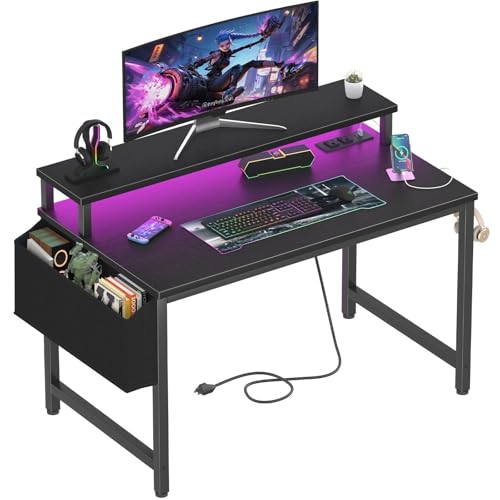 Lufeiya Small Desk with Power Outlets and LED31.5"19.7 x 31.5 x 33.4 Inches19.8 poundsCheck on Amazon
 X-cosrack 33.5" Small Gaming Desk with LED Lights33.5"15.75 x 33.5 x 35 Inches18.2 poundsCheck on Amazon
 33.7 Inch Small Gaming Desk Table with LED33.66 x 15.75 x 43.35 inches15.75 x 33.66 x 43.35 Inches10 PoundsCheck on Amazon


Top 3 picks at a glance
Recommendations by room shape
As an Amazon Associate we earn from qualifying purchases at no extra cost to you.





Narrow room, desk against a long wall: a straight desk of 39 to 48 inches wide. You have width to spend and no corner to exploit, so buy the widest straight surface the wall allows and keep depth modest.
Room with a free corner: a compact L-shape. The corner is dead space in almost every bedroom, and an L converts it into surface without pushing further into the room.
Room where the desk must fit beside a bed: 32 to 34 inches wide, straight. Anything wider makes the gap between bed and desk uncomfortable to pass through, and a walkway under about 24 inches becomes a daily irritation.
Setup with a tower PC and no floor space: a desk that includes a CPU stand or a lower shelf, so the tower is off the carpet and off the work surface.
Setup with two monitors: width of at least 40 inches, and plan on a dual monitor arm rather than two stands, because two stands eat the depth you need for a keyboard.
Room shared with someone who sleeps while you play: skip the LED lighting as a purchase reason and prioritise a solid, non-resonant surface. Desk wobble transmits every keystroke.
Take these five measurements before you shop
This is the part people skip and then regret, and it takes about ten minutes with a tape measure.
1. Wall run. Measure the clear wall length where the desk will sit, then subtract at least two inches at each end for skirting boards, radiator pipes and plug sockets that stick out. That is your real maximum width, and it is usually four to five inches less than the raw wall measurement.
2. Usable depth. Measure from the wall to where your chair back sits when you are seated normally. Then check what that leaves as a walkway behind you. In a small bedroom the walkway is what gets squeezed, and once it drops under about 24 inches you will be turning sideways to pass, which gets old.
3. Monitor viewing distance. Sit at your current setup and measure eye to panel. Most people land between 20 and 30 inches, scaling with panel size. If your chosen desk is shallower than that number, plan on a monitor arm from the outset rather than discovering the problem after assembly.
4. Door and drawer swings. Sketch the arc of the room door, the wardrobe doors and any desk drawers. Corner desks fail this test more often than any other type, because the short return lands exactly where a door wants to open.
5. The socket position. Where does mains power actually enter the room? A desk with built-in outlets still needs one cable to the wall, and if that run crosses a walkway you have created a trip hazard. Our guide to cable management accessories covers the trunking and clips that make that run safe.
Depth is the specification that decides everything
Width is what listings advertise, because a big number sounds generous. Depth is what determines whether the desk is usable.
The arithmetic is unforgiving. A 24-inch monitor on its factory stand typically consumes 7 to 9 inches of depth at the base. A full-size keyboard is about 5.5 inches deep, and you want a couple of inches of wrist space in front of it. Add those together and you have used roughly 15 to 17 inches before anything else exists on the desk. On a shallow desk that leaves you with the monitor closer to your face than is comfortable, or the keyboard hanging off the front edge.
Two fixes actually work. The first is a monitor arm clamped to the back edge, which removes the stand footprint entirely and typically recovers 6 to 8 inches of depth while letting you push the panel further back. On a small desk this is the single highest-value accessory you can add, and it costs less than upgrading to a larger desk. The second is a monitor shelf or riser, which does not recover depth but does return the space underneath for a keyboard when you are not using it. Several desks in this group include a riser as standard.
Check the maker’s specification table for the depth figure and read what it refers to. Some listings quote overall depth including a rear cable channel or a monitor shelf overhang; the number you care about is clear usable surface in front of the monitor.
What an L-shape does and does not buy you in a small room
The instinct is that an L-shaped desk is a large-room product. In small rooms it is often the opposite, because a corner is space you already own and cannot otherwise use.
The gain is real: an L gives you a primary zone for keyboard and monitor and a secondary zone for a laptop, a drawing tablet, a drink or a console, without the desk extending further into the walkway. If your room has a corner that currently holds nothing but a bag, an L converts it.
The failures are equally consistent. The short return frequently blocks a door swing, sits over a radiator – which then heats the underside of the desk and everything on it – or collides with a wardrobe. Two of the desks in this group are L-shaped at 48 and 33.7 inches respectively, and the smaller one exists precisely because the standard L is too big for a box room.
One more consideration specific to gaming: the corner of an L is the natural home for a tower, and it is a poor one if the tower’s intake ends up facing a wall. Leave three to four inches of clearance behind and beside any tower for airflow, whatever the desk shape.
Built-in outlets, LED strips and the features that matter less than they look
Every desk in this comparison advertises LED lighting and most advertise power outlets. Worth being precise about both.
Power modules. A built-in outlet block genuinely improves a small setup, because it shortens every cable run and removes the reach-behind-the-desk problem. What it does not automatically provide is surge protection. Those are separate functions, and unless the manufacturer’s specification states a surge rating, treat the desk module as an extension lead. In a gaming setup with a tower, a monitor and peripherals plugged into one block, I would still have a proper protector between the desk and the wall – see our notes on choosing a power strip for a gaming setup for what the ratings mean.
USB charging ports. Useful for phones and controllers. Check what the maker states about output, because a port that trickles at low current will charge a controller overnight and not much faster.
LED strips. Ambient light behind a desk genuinely reduces eye strain in a dark room, which is a real benefit and not just decoration. It is not, however, a reason to choose one desk over another, since a separate light strip costs very little. Judge these desks on surface, structure and storage, and treat lighting as a bonus.
Hooks and small storage. In a small room, a headphone hook on the side of the desk is worth more than it sounds, because a headset on the surface occupies a surprising amount of the space you were trying to preserve. Same logic applies to getting a laptop up off the surface if a laptop shares the desk.
The eight desks compared
Sorted by width, since that is the constraint doing the most work in a small room. Prices shift, so read the ordering rather than the exact figures.
| Desk | Width | Shape | Price | Notable extras | Best for |
|---|---|---|---|---|---|
| Lufeiya 32 Inch | 32 in | Straight | Check on Amazon | Monitor stand, outlets, LED | Tightest spaces, beside a bed |
| X-cosrack 33.5″ | 33.5 in | Straight | Check on Amazon | Drawer, CPU stand, hooks | Tower owners with no floor space |
| Jakyitvi 33.7 Inch | 33.7 in | L-shaped | Check on Amazon | CPU stand, drawer, storage | Small rooms with a free corner |
| DurayLoly 39.3″ | 39.3 in | Straight | Check on Amazon | Outlets, LED | Plain, wide, no clutter |
| Lufeiya 40 Inch | 40 in | Straight | Check on Amazon | Monitor stand, USB port, outlets | Dual monitor on a budget |
| Korfile 47 Inch | 47 in | Straight | Check on Amazon | Five drawers, outlets, LED | Rooms with no other storage |
| ODK 48 Inch L Shaped | 48 in | L-shaped | Check on Amazon | Outlets, LED | Corner setups with room to spare |
| ODK 48 Inch | 48 in | Straight | Check on Amazon | Storage shelves, LED | Widest straight surface per pound |
The pattern in that table is worth naming: the price range across all eight is only about $50, which means desk selection in this category is not really a budget decision. It is a fit decision. Buy the one that matches your measurements, not the one that saves you nine dollars.
Lufeiya Small Desk with Power Outlets and LED Lights, 32 Inch Teen Writing Study Table Home Office Computer Desks with Monitor Stand, Gaming Desk with Charging Station, Black
The narrowest desk here at 32 inches, and the right answer for the tightest rooms – a desk beside a bed, a corner of a shared room, a hall of residence where the wall run is genuinely short.
The included monitor stand matters more at this width than at any other, because it returns the space underneath for a keyboard when you push it back. With a single 24-inch panel on the riser and a keyboard beneath, this desk works. With a 27-inch monitor on its factory stand, it will feel cramped, and a clamp-on monitor arm becomes close to mandatory.
Power outlets and a charging station on a desk this small are a genuine practical gain rather than a novelty, since there is no spare surface for a separate block.
Who should not buy it: anyone running two monitors, anyone with a large keyboard and a mouse pad they actually use, and anyone who needs to place a tower on the desk. At 32 inches there is no spare width for any of those.
X-cosrack 33.5″ Small Gaming Desk with LED Lights & Power Outlets, Compact Computer Desk with Monitor Stand & CPU Stand, Gamer Table with Storage Drawer, Side Hooks for Home Office, Bedroom, Black
The most thoughtfully equipped narrow desk in the group, and my pick for someone with a tower PC and no floor space to spare. The specification list solves several small-room problems at once: a CPU stand keeps the tower off the carpet, side hooks take the headset off the surface, a drawer absorbs the loose items that otherwise colonise a small desk, and a monitor stand recovers keyboard space.
Two things I would verify against the manufacturer’s specification page before ordering. First, the stated load capacity of the CPU stand, since a full tower with a large air cooler is heavier than people assume. Second, the clear width of the CPU stand, because wide cases with side-mounted radiators do not always fit a stand sized for a standard mid-tower.
Getting the tower off carpet is worth doing regardless of desk choice. Carpet blocks bottom-mounted power supply intakes and pulls dust straight into the machine, which is the slow route to the thermal problems described in our overheating guide.
Who should not buy it: anyone with an oversized case, and anyone who wants maximum clear surface, since the drawer and stands each claim a share of the space.
33.7 Inch Small Gaming Desk Table with LED Lights & Power Outlets, Compact L Shaped Gaming Computer Desk with CPU Stand, Drawer & Storage, Corner PC Desk for Kids, Home Office , Bedroom, Black
An L-shape at 33.7 inches, which is unusual and useful. Most L-shaped desks assume you have a metre and a half of corner to fill. This one is sized for a bedroom corner, and it brings a CPU stand, a drawer and storage with it.
The reason to choose this over a straight desk of similar width is the second surface. In a small room the ability to slide a laptop, a tablet or a controller onto the return – instead of stacking it in front of your monitor – changes how usable the primary zone stays over a long session.
Before ordering, do the door-swing sketch I described earlier. Check the orientation too: L-shaped desks are frequently reversible, but not always, and a fixed-orientation desk that faces the wrong way in your corner is a returns process rather than a solution. The manufacturer’s assembly documentation will state whether the return can be mounted on either side.
Who should not buy it: anyone without a genuinely free corner, and anyone whose corner contains a radiator. Heat rising under a desk return is unpleasant and is not good for a tower parked nearby.
Lufeiya Black Gaming Desk with LED Lights and Power Outlets, 40 Inch Teen Writing Study Table Home Office Desks with Monitor Stand, Computer Desk with Charging Station USB Port, Black
The 40-inch version of the first desk, and for most small rooms this is the better buy of the two. The extra eight inches of width is the difference between one monitor with nowhere to put a drink and a workable setup with a mouse pad, a headset and space to actually write something on paper.
Forty inches is also roughly the minimum I would consider for two monitors, and only with a dual arm rather than two factory stands. Two 24-inch panels side by side occupy close to that entire width, so budget for the arm at the same time.
The included USB charging port on the power module is a small convenience that earns its place in a bedroom setup, where the desk is often also the phone’s overnight home.
Who should not buy it: anyone whose measured wall run is under 40 inches after subtracting for skirting and sockets. Take that measurement seriously rather than optimistically.
DurayLoly 39.3″ Gaming Desk with Power Outlet and LED Lights,Bedroom,Black
The plainest listing in the group, and that is not a criticism. What you are buying is a 39.3-inch straight surface with a power outlet and lighting, without a monitor riser, drawers or stands claiming any of it.
There is a real argument for this. Integrated risers and shelves are only useful if their dimensions happen to suit your equipment; when they do not, they are permanent obstructions on a surface you needed. A clear desk plus a monitor arm plus a separate under-desk tray is a more flexible configuration than a desk with fixed furniture built in, and it usually costs about the same.
Because the listing is sparse, this is one where reading the manufacturer’s full specification page matters most. Confirm the depth, the height and the stated weight capacity before ordering rather than inferring them from the photographs.
Who should not buy it: anyone who wants storage included, and anyone who would rather not buy accessories separately.
Korfile 47 Inch Gaming Computer Desk with Power Outlets,LED,5 Drawers,Black
Five drawers is the headline, and in a small room that can be the deciding feature – not because gaming needs drawers, but because a bedroom that has no other storage will otherwise use the desk surface as storage, and then the desk is no longer usable.
At 47 inches wide this is a full-size desk, so it belongs in a small room only if you have a clear wall run for it. The trade-off with drawer units is legroom: drawers on one side reduce the space your chair and knees can occupy, which matters if you sit centred on the desk. Check the manufacturer’s diagram for the clear knee space between the drawer column and the opposite leg, and compare it against your chair’s armrest width.
Structurally, desks with drawer columns tend to be steadier than open-frame desks of the same width, because the column acts as a brace. That is a genuine benefit if you type hard or use a low-DPI mouse across a large pad.
Who should not buy it: anyone tight on width, and anyone who needs full unobstructed legroom across the whole desk.
ODK 48 Inch Gaming Desk with LED Lights & Storage Shelves, Black
The most surface area per pound in this group: 48 inches straight, with storage shelves, at around $80. If your wall run allows it, this is the value pick, and the extra width over the 40-inch options is genuinely useful – room for two monitors on arms, a full mouse pad, and space to set a laptop beside the keyboard.
Storage shelves rather than drawers means open shelving, which suits a gaming setup better than it sounds: consoles, a router, external drives and a headset stand all live comfortably on open shelves and stay ventilated, whereas a closed drawer is a poor home for anything that generates heat. Keep the router off the floor and out of a metal-adjacent corner, and your wireless performance improves for free.
The caution for small rooms is simply the footprint. Forty-eight inches against a short wall leaves very little either side, and if the shelving is at one end, that end cannot be pushed into a corner as tightly as a plain leg could.
Who should not buy it: anyone whose measured wall run is under about 52 inches once skirting and sockets are accounted for.
ODK 48 Inch L Shaped Gaming Desk with LED Lights, Power Outlets, Black
The largest desk here and the most expensive at around $110, which makes it the least small-room-specific product in the comparison. It earns its place because plenty of rooms described as small have one usable corner, and in that case an L at this size gives you a genuine two-zone setup: monitors and keyboard on the long run, everything else on the return.
What I would think hardest about is the walkway. An L-shape occupies two walls, so it constrains movement in a way a straight desk does not, and in a bedroom that also contains a bed the remaining circulation space can become tight quickly. Sketch the floor plan before ordering. Fifteen minutes with a tape measure and a sheet of paper is cheaper than a return.
On the plus side, the corner of an L is the best place in a small room for a tower – off the floor if the desk supports it, away from foot traffic, with two walls of clearance rather than one. Just leave airflow space behind it.
Who should not buy it: anyone in a genuinely tight room. If your measurements put a 48-inch L against the bed, take the 33.7-inch L instead and keep the walkway.
Assembly and stability: what actually goes wrong
Desks in this price bracket are engineered wood panels on steel frames, and they behave predictably once you know the failure modes.
Wobble is usually assembly, not design. The near-universal cause is tightening all fasteners fully in sequence rather than leaving them loose until the frame is square. Assemble everything finger-tight, stand the desk up, check it sits flat on all four feet, then tighten in a cross pattern. A desk that rocks after assembly can usually be fixed by loosening everything and repeating this properly.
Levelling feet exist for a reason. Bedroom floors are rarely flat, and older houses are notably not. Adjust the feet rather than shimming with cardboard.
Do not overload a shelf that has no stated rating. If the manufacturer publishes a weight capacity for the monitor riser, the CPU stand or the shelving, respect it. If they do not publish one, be conservative – a heavy tower on an unrated shelf is asking a lot of a particleboard panel and four cam locks.
Route cables during assembly, not after. The moment the desk is loaded is the moment cable routing becomes a two-person job. Run and clip everything while the surface is still bare, leave slack at the monitor end for future arm adjustment, and keep the power run to the wall out of the walkway.
Protect the surface where the mouse lives. Melamine finishes wear at the mouse and wrist contact points before they wear anywhere else. A large mat is a two-pound insurance policy on an eighty-pound desk.
Who should not buy a small gaming desk at all
Three situations where the answer is something other than a desk from this list.
You need height adjustment for comfort reasons. None of these are sit-stand desks. If your setup causes wrist or shoulder pain at a fixed 29 to 30-inch height, a keyboard tray or an adjustable desk addresses the cause; a different fixed-height desk does not.
You are running three monitors or a large ultrawide. The width requirement outgrows this category. Buy the widest surface your room allows and mount everything on arms.
Your room’s real problem is storage, not surface. If the desk you own is unusable because it is covered in objects, another desk will be covered in objects too. Shelving and a proper home for peripherals fixes more small-room setups than new furniture does, and it costs less.
The bottom line
The strongest all-round choice for most small rooms here is the 40-inch Lufeiya: enough width to be genuinely usable, a monitor riser that returns keyboard space, and integrated power so no cable block sits on the surface. If you own a tower and no floor space, the X-cosrack at 33.5 inches with its CPU stand and hooks solves more problems per inch than anything else here. If you have a free corner, take the 33.7-inch L-shape rather than a 48-inch one, unless your floor plan genuinely has room. And if your wall run allows 48 inches, the straight ODK gives you the most surface for the money.
Whichever you choose, do the measuring first. Every desk in this group is within about $50 of every other, so the money is not the variable that decides whether you are happy with this purchase in six months. The tape measure is.
This guide covers one angle on the topic. For the full comparison, see our main guide: Best Gaming Desks for Small Spaces: Tested Picks Under 48 Inches.
Frequently asked questions
How much space should I leave behind my chair?
Aim to keep the walkway behind your chair at least about 24 inches wide. Measure where your chair back sits when you are seated normally, then check how much space remains behind it. If the walkway falls below about 24 inches, passing through may mean turning sideways, which can become a daily irritation.
Can I use a shallow desk with a full-size keyboard and monitor?
Yes, but you may need a monitor arm to keep the screen at a comfortable distance. A monitor on its factory stand can use 7 to 9 inches of depth, while a full-size keyboard is about 5.5 inches deep, plus a couple of inches for wrist space. An arm can recover 6 to 8 inches by removing the stand footprint.
Will a desk with built-in outlets protect my gaming equipment from surges?
Not unless the manufacturer specifically states that the outlet module has a surge rating. The article advises treating an unspecified desk outlet block as an extension lead, not a surge protector. For a setup with a tower, monitor and peripherals, it recommends putting a proper protector between the desk and the wall.
What should I check before choosing an L-shaped desk?
Check that the short return will not block a door swing, sit over a radiator or collide with a wardrobe. Also make sure a tower placed in the corner has 3 to 4 inches of clearance behind and beside it for airflow. An L-shape can use an otherwise empty corner, but it still needs to fit the room.
How much desk width do I need for two monitors?
Plan on at least 40 inches of width and consider a dual monitor arm rather than two stands. The article notes that two monitor stands eat into the desk depth needed for a keyboard. Measure the available wall run and account for skirting boards, radiator pipes and protruding sockets before choosing a desk.
Related guides
- Best Gaming PC for Overwatch 2: Ten Prebuilts Matched to Your Monitor (2026)
- Best Gaming PC for Baldur’s Gate 3: Matching CPU, VRAM and Storage to the Game (2026)
- Best Gaming PC for Apex Legends: Which Listings Fit a High-Refresh Setup (2026)
- Best RTX 3060 Gaming PCs: Eight Prebuilt Listings Compared by CPU, RAM and Cooling (2026)









